
Amazon Inventory Reconciliation: The FBA Seller’s Guide

Run the Inventory Ledger Detailed View for the affected SKU and open a “View discrepancies and request research” case for any closed inbound shipment with missing units. That is the fastest path to recovering what Amazon owes you. Amazon inventory reconciliation, at its core, is the process of matching your internal records with Amazon’s FBA database to surface lost units, receiving errors, and damage events before the claim window closes.
Here is the immediate checklist to run right now:
- Export the Inventory Ledger Detailed View for the affected SKU and date range; compare starting vs. ending balances to isolate the gap.
- Confirm the inbound shipment shows “Closed” status in Seller Central. Amazon will not accept a research request on an open shipment.
- Prioritize by value: high-COGS and high-velocity SKUs first, since reimbursement windows are time-sensitive.
- Save your supplier invoice, packing list, and carrier tracking confirmation before opening the case.
- Screenshot the shipment Contents tab inside Manage Shipments > Track Shipment.
- Open “View discrepancies and request research” in Seller Central and attach your evidence.
- Log the Case ID in an external tracker. Seller Central alone is not a reliable audit trail.
Beanhawk automates every step above continuously, flagging discrepancies before you even open a report.
Table of Contents
- Which Seller Central reports do you actually need for reconciliation?
- How to reconcile an inbound shipment step by step
- Why do your counts differ from Amazon’s records?
- What documents does Amazon actually accept for reimbursement cases?
- What timelines and outcomes should you expect?
- How do you reconcile Amazon adjustments to your accounting?
- Key Takeaways
- Why disciplined reconciliation protects your cash flow
- Beanhawk handles the reconciliation work you should not be doing manually
Which Seller Central reports do you actually need for reconciliation?
Not every FBA report answers the same question. Pulling the wrong one wastes time and leaves gaps in your evidence file.
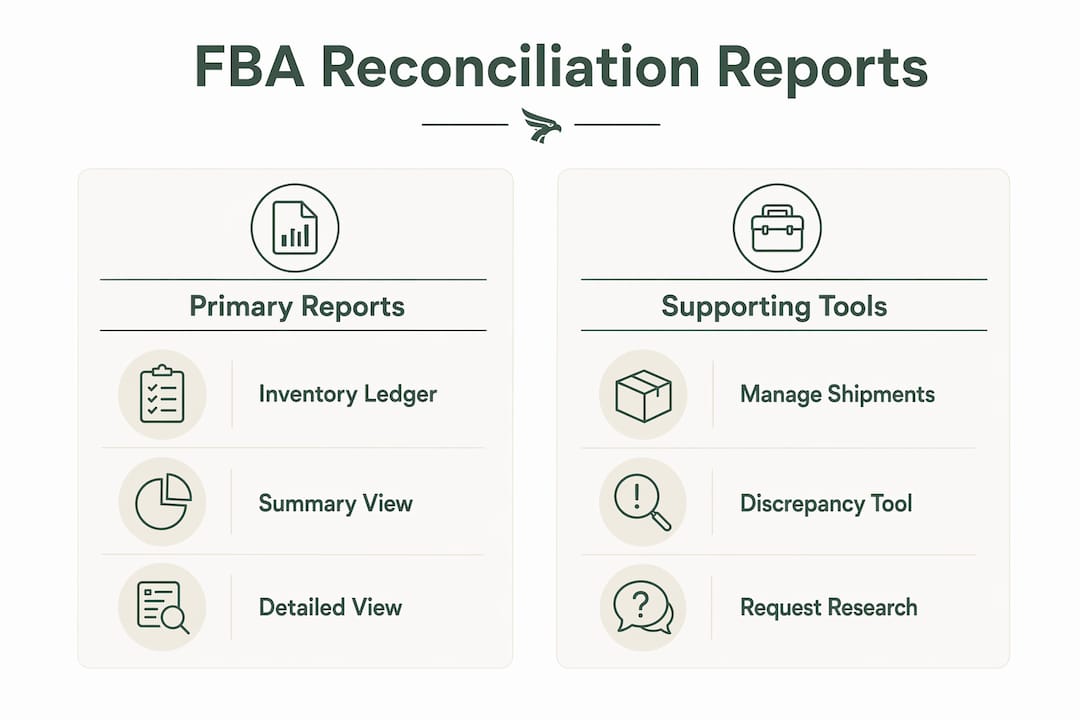
The Inventory Ledger is the primary reconciliation source. Its Summary View shows period-level unit movements; its Detailed View logs every event with timestamps, fulfillment center codes, and adjustment reason codes. Amazon retains ledger history up to 18 months in the UI, so export and save the Detailed View monthly before older records disappear. The Detailed View is also your forensic evidence file when you open a research case.
The table below maps each report to its purpose and the view you should export.
| Report | What it answers | View to export |
|---|---|---|
| Inventory Ledger | Period unit movements, event-level forensics | Detailed View (CSV) |
| Manage FBA Inventory | Live on-hand count right now | Summary (screenshot or export) |
| FBA Customer Returns | Returns received back into FBA | Full export |
| Inventory Age | Storage fees and slow-moving SKUs | Summary |
| Settlement Report | Reimbursements posted, fees deducted | Full export per settlement period |
| Manage Shipments > Track Shipment > Contents | Shipped vs. received unit counts per shipment | Screenshot + export |
The “View discrepancies and request research” tool lives inside Manage Shipments. Navigate to the relevant shipment, click Track Shipment, then the Contents tab. If the shipment is closed and counts differ, the research option appears there. For tracking FBA inventory day-to-day, Manage FBA Inventory gives you the live number, but it cannot reconstruct what happened over a date range. That is the Ledger’s job.
How to reconcile an inbound shipment step by step
This workflow is repeatable. Run it monthly for high-value SKUs and after every large inbound shipment.
- Identify candidate shipments. Filter Manage Shipments by “Closed” status. Pull the Inventory Ledger Summary for the same date range. Any SKU where shipped quantity does not match received quantity is a candidate.
- Export your evidence. Download the Inventory Ledger Detailed View as a CSV. Export the shipment packing list and carrier tracking scan events. Gather the supplier invoice and PO receipt. These four documents form your claim packet.
- Open the research request. Inside the closed shipment, go to Track Shipment > Contents. Click “View discrepancies and request research.” Enter precise event dates, SKU-level unit counts, and upload your supporting files. Vague descriptions slow the process; specific dates and FC codes from the Ledger Detailed View speed it up.
- Track the case. Note the Case ID and log it in a spreadsheet outside Seller Central. Check status every few days. Amazon’s research processing commonly runs 2,30 days; some cases extend to around 60 days.
- Prioritize your queue. Work high-COGS and high-velocity SKUs first. Batch lower-value SKUs into a single periodic claim session rather than filing one unit at a time.
Pro Tip: Name every file you upload using the format SKU_YYYYMMDD_doctype_CaseID (e.g., B07XYZ_20250315_invoice_12345678). Amazon’s review team processes hundreds of cases daily. A clearly named, well-organized packet gets reviewed faster than a folder of unnamed PDFs.
Why do your counts differ from Amazon’s records?
Discrepancies rarely have a single cause. Knowing the likely source tells you which evidence to pull and which claim path to use.

Receiving miscounts are the most common inbound issue. Amazon’s fulfillment centers process enormous volume, and unit counts occasionally differ from what you shipped. The Inventory Ledger Detailed View will show a “receipt” event with a lower quantity than your packing list.
Warehouse damage and FC transfers account for a large share of ledger adjustments. Look for adjustment codes indicating damage or inter-FC transfers before filing a loss claim. A unit that transferred between fulfillment centers is not lost; it will appear as a negative event at one FC and a positive event at another. Filing a loss claim on a transfer wastes your time and Amazon’s.
Mislabeling and ASIN mix-ups happen when units arrive without proper FNSKU labels or with incorrect barcodes. These often appear as “found” inventory under a different ASIN, which you will only catch by cross-referencing the Detailed View against your full SKU list.
Returns and customer refunds can create phantom inventory. A return that is logged as “received” but not actually restocked to sellable status shows up as a unit in your count that cannot be sold. Check the FBA Customer Returns report alongside the Ledger.
Commingling has been a persistent source of errors for sellers who opted into Amazon’s stickerless inventory program. Amazon ended commingling for U.S. fulfillment centers effective March 31, 2026. After that date, every unit requires unit-level tracking, which removes one major source of ASIN mix-up discrepancies going forward.
Pro Tip: Before filing any loss claim, search the Inventory Ledger Detailed View for transfer events in the same date window. A unit that moved between FCs will show a negative adjustment followed by a positive one. If you see both, the unit is not lost.
What documents does Amazon actually accept for reimbursement cases?
Amazon requires two categories of documentation for most inbound shipment reconciliation cases: proof of ownership and proof of delivery.
Proof of ownership:
- Supplier invoice showing product name, ASIN or FNSKU, quantity, and purchase price
- Packing list from your supplier
- ASN or PO receipt
Proof of delivery:
- Carrier tracking with scan events confirming pickup and delivery
- For LTL or FTL shipments: documentation showing box count and total weight, from the carrier
Supporting evidence that strengthens high-value or older cases:
- Photos of packaging at time of shipment
- Supplier communications confirming the order
- Customs paperwork for cross-border shipments
- Inventory Ledger Detailed View export showing the discrepancy event
Organize files by SKU and date before uploading. Use the naming convention SKU_date_doctype_CaseID. A disorganized packet is the single most common reason cases stall at initial review.
What timelines and outcomes should you expect?
Reconciliation of shipped inventory commonly takes 2,30 days. In some cases, investigations extend to around 60 days depending on complexity or the age of the shipment.
Amazon’s own guidance states: reconciliation of shipped inventory usually takes 2 to 30 days; in some cases, it will take up to 60 days.
Three outcomes are possible: Amazon reimburses you in cash, Amazon locates the inventory and restocks it, or Amazon denies the claim. A cash reimbursement posts to your next settlement report as a separate line item. Watch for it in the “Other” or “Adjustments” section of the settlement, not in the sales section.
If a case passes the expected window without resolution, reopen it. Reference the original Case ID, attach the same evidence packet, and note the date the case was opened. Escalating through Seller Central’s case management system with a clear timeline and documented evidence is more effective than opening a new case from scratch.
The 18-month retention limit on the Inventory Ledger UI matters here. If you did not export the Detailed View at the time of the discrepancy, older records may no longer be available. Export monthly; do not rely on Amazon’s UI as your archive.
How do you reconcile Amazon adjustments to your accounting?
Unit reconciliation is only half the job. The financial side, matching Amazon’s ledger events to your COGS and inventory valuation, is where most sellers leave errors in their books.

The principle is straightforward: treat Amazon’s Inventory Ledger as the source of truth for FBA-held stock, then reconcile financial value in your accounting system using landed costs, not Amazon’s reimbursement amount. Amazon reimburses at its own assessed value, which often differs from your actual landed cost.
| Ledger event type | Accounting action | Example journal entry |
|---|---|---|
| Inbound receipt | Increase inventory asset | Dr Inventory / Cr Accounts Payable |
| FC damage or loss | Write down inventory, record loss | Dr Loss on Inventory / Cr Inventory |
| Reimbursement received | Credit inventory write-down or other income | Dr Cash / Cr Inventory Loss (or Other Income) |
| Customer return restocked | Restore inventory at cost | Dr Inventory / Cr COGS |
| Customer return unsellable | Expense the loss | Dr COGS / Cr Inventory |
When a reimbursement posts to settlement, match it to the original write-down entry. If the reimbursement exceeds the written-down value, record the difference as other income. If it falls short, the gap is an unrecovered loss.
Automating this process with QuickBooks or Xero integration eliminates the manual journal entry step and prevents the mismatch between your inventory ledger and accounting records that builds up over time. For a deeper look at the bookkeeping side, FBA bookkeeping guidance covers COGS and reimbursement posting in detail.
Pro Tip: Export the Inventory Ledger Detailed View on the last day of every month and save it to a dated folder. Amazon’s UI history is limited to 18 months, and older exports are your only evidence for late-discovered discrepancies. Treat this export like a bank statement.
Key Takeaways
Accurate FBA inventory reconciliation requires the Inventory Ledger Detailed View, closed-shipment status, organized evidence, and accounting entries that match reimbursements to landed-cost COGS.
| Point | Details |
|---|---|
| Inventory Ledger is the primary tool | Export the Detailed View monthly; Amazon retains UI history up to 18 months. |
| Closed status is required | Amazon will not process a research request until the shipment shows “Closed” status. |
| Research timelines vary | Investigations commonly take 2,30 days; some cases extend to around 60 days. |
| Reconcile value, not just counts | Match reimbursements to landed-cost COGS, not Amazon’s assessed value, to keep books accurate. |
| Beanhawk automates the cycle | Beanhawk monitors inbound shipments and ledger events continuously and posts settlements to QuickBooks or Xero. |
Why disciplined reconciliation protects your cash flow
Most sellers treat reconciliation as a cleanup task, something to do when a number looks wrong. That framing costs real money. Small unit losses, a few here, a few there, compound into recurring cash-flow leakage that never shows up as a single alarming line item. By the time a quarterly audit catches it, several claim windows have already closed.
Monthly cycles beat quarterly audits for one practical reason: Amazon’s reimbursement windows are short, and automated systems can miss recoverable events. A monthly review catches discrepancies while the evidence is still fresh and the claim is still eligible. A quarterly review often finds the same discrepancies after the window has passed.
The sellers who recover the most are not the ones who file the most claims. They are the ones who maintain clean evidence files, export their Ledger data on schedule, and match every reimbursement back to their books. Reconciliation done right is not admin overhead. It is margin protection.
Beanhawk handles the reconciliation work you should not be doing manually
Every hour you spend cross-referencing Seller Central reports is an hour not spent on sourcing, pricing, or growth. Beanhawk was built specifically for this: continuous monitoring of inbound shipments and FBA ledger events, automated reimbursement tracking, and direct settlement posting to QuickBooks and Xero, without commissions or hidden fees.

Where manual processes miss claim windows and leave mismatched journal entries in your books, Beanhawk flags discrepancies as they happen, enforces evidence collection, and centralizes every case in one place. The accounting loop closes automatically: reimbursements post to the right lines in QuickBooks or Xero the moment they appear in settlement.
The starting point is a free limited audit. Beanhawk scans your FBA account, identifies recoverable discrepancies, and shows you exactly what Amazon owes you before you commit to anything. Run the free audit now and see what your current reconciliation process has missed.
Useful sources and Seller Central references
- Amazon Inventory Ledger Report: What It Is and How to Use It , Detailed View export guidance and 18-month retention explained
- Guide to FBA Inventory Reconciliation: What to Do When Units Go Missing , Seller Central forum guide covering documentation requirements and timelines
- Reconciling Amazon FBA Shipments: Step-by-Step Guide , Evidence requirements and closed-shipment workflow
- Amazon Commingled Inventory Ending March 2026 , What the March 31, 2026 commingling change means for unit-level tracking
- Beanhawk: FBA Reimbursement Recovery and Accounting Automation , Continuous monitoring, settlement posting to QuickBooks and Xero, and free audit