
Amazon Lost Inventory: What FBA Sellers Must Do Now

Amazon will reimburse FBA sellers for lost or damaged inventory it accepted into a fulfillment center, but eligibility depends on event type, timing, and whether you supply the right documentation. The single most important first step: pull your Inventory Ledger report (Reports > Fulfillment > Inventory Ledger) and filter for “Warehouse Lost” or “Misplaced” event codes before you open any case. According to Amazon’s FBA inventory reimbursement policy, the clock starts when Amazon accepts your inventory, and missing that window costs you the claim entirely.
Based on your situation, here is where to start:
- Inbound shipment shortfall: Check the Shipping Queue for “Closed” status, then compare units shipped vs. units received in the Inventory Ledger.
- Warehouse lost or misplaced: Filter the Inventory Ledger for “M” (Misplaced) or “E” (Damaged) codes with no paired “F” (Found) entry.
- Damaged at the fulfillment center: Look for “Warehouse Damaged” events in the Inventory Ledger and confirm no auto-reimbursement already posted.
- Disposed inventory: Check for “D” (Disposed) codes and verify whether a reimbursement was issued or a disposal order was authorized by you.
Key Takeaways
Amazon reimburses FBA sellers for lost or damaged inventory it accepted, but you must act within the 60-day window, file with the correct Inventory Ledger evidence, and dispute low auto-reimbursements with cost-basis documentation to recover the full amount.
| Point | Details |
|---|---|
| Start with the Inventory Ledger | Filter for M, E, and D codes with no paired reimbursement or Found entry before opening any case. |
| 60-day window is the hard deadline | File within 60 days of the inventory event; missing it typically forfeits the claim. |
| Dispute auto-reimbursements | Amazon’s retail-based default is often 10,30% below cost; supplier invoices can close that gap. |
| Use the case template | Include Transaction IDs, SKU/FNSKU, shipment ID, and a specific dollar request to minimize back-and-forth. |
| Beanhawk automates the process | Continuous ledger monitoring, automated claim assembly, and QuickBooks/Xero integration replace manual weekly checks. |
Table of Contents
- How does Amazon FBA reimbursement actually work?
- How to confirm and diagnose missing inventory in Seller Central
- What documentation does Amazon require to win a reimbursement?
- How to open a Seller Support reimbursement case (with a copyable template)
- What are the timelines and how does Amazon calculate reimbursements?
- What should you do if Amazon denies or underpays your claim?
- Practical steps to reduce the risk of losing FBA inventory
- How Beanhawk speeds up recovery and automates monitoring
- The mistakes that cost sellers the most money
- A free Beanhawk audit finds what you are owed
- What the most overlooked part of FBA reimbursements actually is
- Sources
How does Amazon FBA reimbursement actually work?
Amazon reimburses certain losses automatically since late 2024, but many events still require a manual claim. The FBA inventory reimbursement policy covers inventory Amazon accepted into FBA that is subsequently lost, damaged, or disposed of through no fault of the seller.
Reimbursable event types
Inbound lost: Units that shipped to a fulfillment center but were never received. These require shipment reconciliation and carrier documentation.
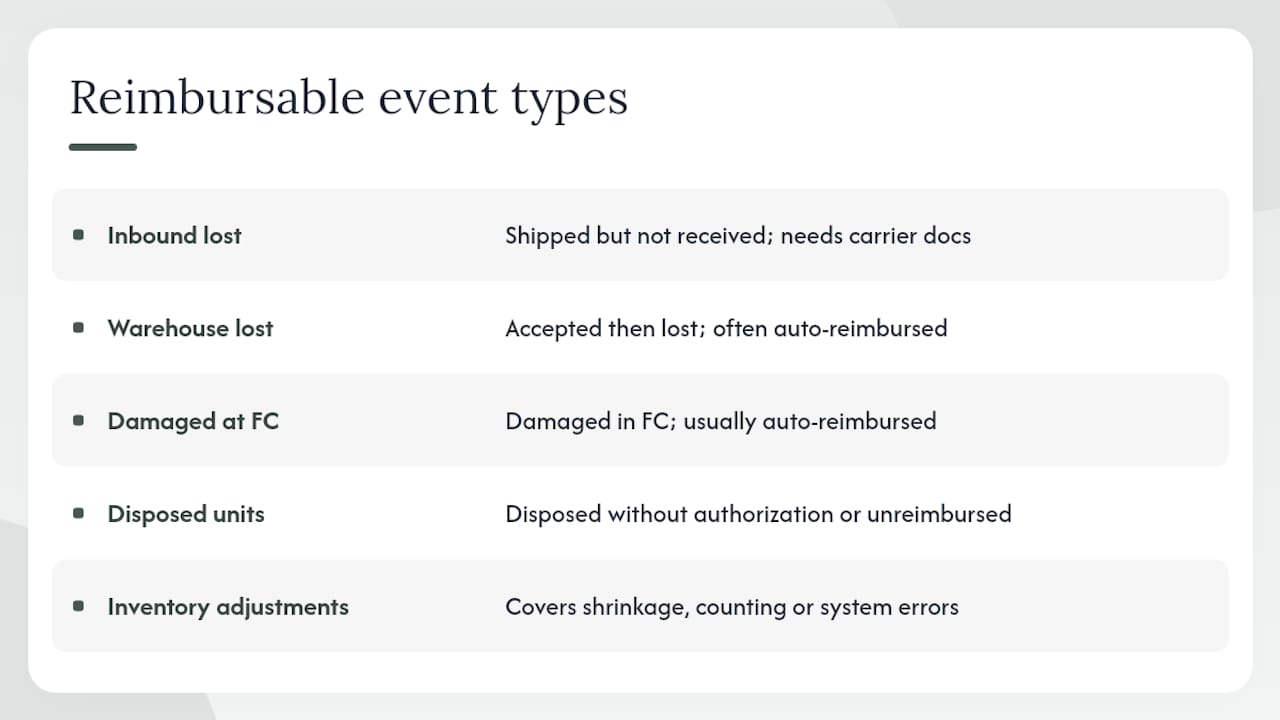
Warehouse lost or misplaced: Units Amazon accepted but can no longer locate inside the FC. These often trigger auto-reimbursements, but the valuation is frequently low.
Damaged at the FC: Units damaged by Amazon during storage or handling. Amazon typically reimburses these automatically, though the amount may not reflect your actual cost.
Disposed: Units Amazon disposed of without authorization, or units you authorized for disposal but were not reimbursed correctly.
Inventory adjustments: Catch-all adjustments that can reflect shrinkage, counting errors, or system corrections. These appear in the Inventory Ledger and Inventory Adjustments report.
Where these events live in Seller Central
Every reimbursable event generates a transaction record in the Inventory Ledger and, once paid, a corresponding entry in the Reimbursement Transactions report. Matching the Transaction ID across both reports is how you confirm a loss was actually paid. Since late 2024, Amazon auto-reimburses certain FC losses, so always check the Reimbursement Transactions report before filing manually. Filing a duplicate claim wastes time and can flag your account.
How Amazon calculates what it owes you
Amazon’s default valuation uses a retail-based estimate, not your actual cost. That gap matters. Disputing with cost-basis documentation, such as supplier invoices or purchase orders, typically yields a meaningful uplift on the initial reimbursement amount. The FBA Reimbursement Audit Guide notes that successful cost-basis disputes commonly produce a 10,30% increase over Amazon’s auto-calculated figure.
How to confirm and diagnose missing inventory in Seller Central
The Inventory Ledger is your authoritative source. Do not open a support case until you have confirmed the loss there. Here is the exact sequence to follow.
- Export the Inventory Ledger. Go to Reports > Fulfillment > Inventory Ledger. Set the date range to cover the relevant shipment or event period, plus a 30-day buffer on each end.
- Filter by SKU or FNSKU. Isolate the affected product so you are not scanning thousands of rows.
- Filter by event type. Look for: M (Misplaced), E (Damaged), D (Disposed), Q (disposition change). Any M entry with no paired F (Found) within the same window is a candidate claim.
- Cross-check the Shipping Queue. Go to Inventory > Shipments. Confirm the relevant shipment shows “Closed” status. Per FBA inventory reconciliation guidance, a shipment must be in Closed status before it is eligible for reconciliation. Statuses to understand: In Transit, Delivered, Checked-in, Receiving, and Closed. Only Closed shipments are reconcilable.
- Record the key fields. For each candidate event, capture: Transaction ID, Transaction Item ID, event date, event type code, quantity affected, and whether a reimbursement flag appears.
- Check Reimbursement Transactions. Filter for the same SKU and date range. If a reimbursement already posted, compare the amount against your cost basis before deciding whether to dispute.
Pro Tip: When exporting the Inventory Ledger as a CSV, add a filter column for “Reimbursement ID” immediately. Any row with a blank Reimbursement ID and an M, E, or D event code is your shortlist. Sort by event date descending so the most recent losses surface first.
Timing matters here. Reconciliation typically takes 2,30 days, and in some cases up to 60 days. If a shipment closed recently, give it at least two weeks before filing. If it has been more than 30 days with no reimbursement and no paired Found entry, file now. The 60-day filing window is not generous, and missing it typically means losing the claim.
What documentation does Amazon require to win a reimbursement?
For most cases, Amazon needs two things: evidence of the loss event from the Inventory Ledger, and proof that you actually owned and shipped the inventory. The exact documents depend on the scenario.
By scenario
- Inbound shipment shortfall: Packing list showing units per carton, carrier proof of delivery (POD), and for LTL or FTL shipments, carrier documentation showing total box count and total weight. A signed pickup manifest is particularly valuable.
- Fulfillment-center loss or damage: The Inventory Ledger event record (Transaction ID, event type, quantity), and photos of the inventory condition at shipment if you have them.
- Disputing an underpaid auto-reimbursement: Supplier invoices or purchase orders showing your actual unit cost. This is your cost-basis proof.
- LTL/FTL special requirements: Per FBA reconciliation guidance, carrier documentation must show box count and total shipment weight, plus signed pickup records. A best practice is to photograph pallet counts at pickup and retain the signed bill of lading.
File naming and packaging
Name files clearly: “ShipmentID_POD.pdf,” “FNSKU_Invoice.pdf.” If you are attaching multiple documents, combine them into a single PDF or ZIP archive. Amazon’s case system handles fewer, clearly labeled attachments better than a pile of individual files.
What not to send
Avoid attaching screenshots of your own spreadsheets, unrelated invoices, or lengthy email chains. These slow review without adding evidentiary value. A clean Inventory Ledger export filtered to the specific event, plus the carrier POD, is almost always sufficient for a first submission.
How to open a Seller Support reimbursement case (with a copyable template)
File via Seller Central: Get Support > Selling on Amazon > Fulfillment by Amazon > Inventory > Lost or Damaged Inventory. Here is the complete workflow.
- Gather your Inventory Ledger export filtered to the affected SKU, event type, and date range.
- Collect carrier documents (POD, packing list, bill of lading for LTL/FTL).
- Pull your cost-basis proof (supplier invoice or PO) if you are disputing a valuation.
- Open the case using the path above and paste the template below.
- Attach evidence as a single labeled PDF or ZIP.
- State the specific outcome you want: reimbursement at cost basis, or reconciliation of missing units.
Copyable case template
Subject: FBA Inventory Reconciliation Request , [Shipment ID] / [SKU/FNSKU]
Hello,
I am writing to request reconciliation for units that appear lost in my FBA inventory.
Shipment ID: [FBAXXXXXXXXX] SKU / FNSKU: [Your SKU] / [FNSKU] Event date(s): [MM/DD/YYYY , MM/DD/YYYY] Event type code(s): [M / E / D] Transaction ID(s): [List each Transaction ID] Units affected: [Quantity]
The Inventory Ledger shows [X] units with a [Misplaced/Damaged/Disposed] event and no corresponding reimbursement or Found entry as of [today’s date].
I have attached: (1) Inventory Ledger export for the relevant date range, (2) carrier proof of delivery / bill of lading, (3) supplier invoice for cost-basis reference.
Requested outcome: Please reimburse [X] units at my documented cost of $[amount] per unit, or reconcile the missing units to my inventory.
Thank you.
Attachment checklist
- Inventory Ledger CSV or PDF (filtered to the event)
- Carrier POD or signed bill of lading
- Packing list or commercial invoice
- Supplier invoice (if disputing valuation)
- Prior reimbursement case ID (if disputing an existing auto-reimbursement)
When referencing a prior auto-reimbursement you want to dispute, include the original Reimbursement ID from the Reimbursement Transactions report. That ID ties the new case directly to the existing payment record and speeds review.
What are the timelines and how does Amazon calculate reimbursements?
Automatic reimbursements for FC losses often post within a few days of the event. Manual reconciliation cases take longer.
| Scenario | Typical Timeline | Where to Track |
|---|---|---|
| Auto-reimbursement (FC loss/damage) | A few days to ~2 weeks | Reimbursement Transactions report |
| Inbound shipment reconciliation | 2,30 days after Closed status | Shipping Queue + Inventory Ledger |
| Manual case (first submission) | 5,15 business days | Seller Central case log |
| Disputed valuation or escalation | Up to 60 days | Case log + Reimbursement Transactions |
The 60-day reconciliation window is the critical deadline. Notify Amazon within that window and the documentation burden is lighter. After it expires, Amazon typically requires cost-basis invoices before processing anything.
How Amazon calculates the reimbursement amount
Amazon’s default is a retail-based estimate derived from your listing price and recent sales data. It is almost always lower than your actual cost on high-margin or private-label products. Here is a simple example:
- Your unit cost: $12.00
- Amazon’s auto-calculated reimbursement: $9.50 (retail estimate)
- Dispute with supplier invoice showing $12.00 cost
- Likely outcome after successful dispute: $12.00,$14.00 (cost plus a margin allowance)
That gap is why disputing with cost-basis documentation is worth the effort. The FBA Reimbursement Audit Guide documents a 10,30% uplift on successful disputes.
Where reimbursements appear in your financials
Reimbursements post to your Payments settlement as a separate line item under “Other.” To reconcile correctly, they need to flow into your accounting software as income offset against COGS, not as revenue. Beanhawk’s QuickBooks reconciliation workflow handles this automatically, so reimbursements post to the right account without manual journal entries.
What should you do if Amazon denies or underpays your claim?
A denial is not final. Most denials fall into a handful of fixable categories.
- Timing window missed: If the 60-day window has passed, you have limited options. For future claims, this is the single strongest argument for weekly ledger checks.
- Paired “Found” entry exists: Amazon located the unit after the loss event. Check the Inventory Ledger for an F (Found) code paired with your M (Misplaced) entry. If the unit was found and returned to sellable inventory, no reimbursement is owed.
- Mismatched Transaction IDs: The case references a different event than the one Amazon is reviewing. Resubmit with the exact Transaction ID from the Inventory Ledger.
- Insufficient carrier proof: For inbound shortfalls, Amazon needs the carrier POD and box-count documentation. Resubmit with the complete carrier package.
- Shipment not in Closed status at time of filing: Wait for Closed status, then refile.
Escalation steps
- Reopen the original case with the denial reason addressed directly. Reference the original Case ID in your new submission.
- Attach any missing documentation identified in the denial.
- If the second submission is also denied, request a manager review explicitly in the case notes.
- For valuation disputes specifically, attach your supplier invoice and state the cost-basis figure clearly in the case body.
- If you have exhausted internal escalation, a recovery partner like Beanhawk can audit the denial, identify the gap, and prepare a stronger submission.
Keep all original documentation for at least 12 months after the inventory event. Amazon account reviews can surface old discrepancies, and having the originals on hand protects you.
Practical steps to reduce the risk of losing FBA inventory
Routine reconciliation and consistent packing procedures prevent most avoidable losses. The sellers who rarely deal with unresolved discrepancies are the ones who built a short weekly habit around their Inventory Ledger.
Prevention checklist
- Create a standardized packing list template for every shipment and keep a copy on file.
- Photograph carton counts and pallet configurations at pickup, every time.
- Place FNSKU labels consistently on the same face of each unit; inconsistent placement is a leading cause of receiving errors.
- Double-check carton quantities against the packing list before the carrier picks up.
- Use carriers that provide signed proof of delivery and electronic tracking.
- For LTL/FTL shipments, retain the signed bill of lading and pickup manifest.
Monitoring cadence
Daily: Check the Shipping Queue for status changes on any shipment in transit. A shipment that moves to “Delivered” but stalls at “Receiving” for more than a week is worth watching.
Weekly: Export the Inventory Ledger for the past 7 days and filter for M, E, and D codes. Flag any M entry with no paired F within the same window. This is the audit checklist approach that experienced sellers use to catch losses before the 60-day window closes.
Monthly: Run a full Inventory Adjustments report and reconcile against your purchase records. Cross-reference with the Reimbursement Transactions report to confirm every adjustment either has a reimbursement or a legitimate explanation.
Pro Tip: Set up a simple spreadsheet with columns for Shipment ID, Closed Date, Ledger Check Date, and Claim Status. Updating it takes five minutes a week and gives you a complete audit trail if Amazon ever questions a claim.
If you sell across multiple channels, inventory discrepancies from multi-channel fulfillment (MCF) orders can look like FC losses in the Ledger. Always tag MCF orders separately so you are not filing claims on units that were legitimately fulfilled to another platform. For sellers managing inventory across marketplaces, cross-channel inventory sync prevents the kind of oversell and miscount that generates false discrepancy signals.
How Beanhawk speeds up recovery and automates monitoring
Beanhawk automates the ledger monitoring, evidence assembly, and case preparation that most sellers do manually, or skip entirely. The practical result: fewer missed claims, faster submissions, and reimbursements that post to the right account in your accounting software without manual work.
What Beanhawk monitors and does
- Continuous Inventory Ledger monitoring: Beanhawk scans your ledger for M, E, and D codes in real time and flags events with no paired reimbursement or Found entry.
- Automated claim assembly: For each flagged event, Beanhawk pulls the Transaction IDs, event dates, quantities, and relevant shipment data and assembles the case documentation.
- Cost-basis reconciliation: Beanhawk matches your supplier invoices and purchase orders against Amazon’s auto-reimbursement values and identifies where a dispute would yield a higher payout.
- Accounting integrations: Reimbursements post directly to QuickBooks or Xero in the correct account category, so your COGS and income figures stay accurate without manual journal entries.
Use cases where Beanhawk adds the most value
Inbound shortfall recovery is where manual processes break down most often. Sellers either miss the 60-day window or submit incomplete carrier documentation. Beanhawk flags the shortfall at shipment closure and prompts the seller to attach the carrier POD before the window expires.
For high-volume sellers, the ongoing ledger alerts matter more than any single claim. When you are processing hundreds of shipments a month, a weekly manual ledger check is not realistic. Beanhawk’s continuous monitoring catches the M and E codes that would otherwise age past the filing deadline unnoticed.
A free Beanhawk audit scans your Inventory Ledger history and identifies unreimbursed or underpaid FBA events, with an estimate of recoverable dollars. Most active sellers find recoverable amounts they were unaware of. You can learn more about what Amazon reimburses and what a Beanhawk audit covers before committing to anything.
The mistakes that cost sellers the most money
The most common pattern Beanhawk sees is not a complicated edge case. It is a seller who waited 90 days to check their Inventory Ledger, found a cluster of M codes from a shipment that closed in January, and then discovered the 60-day window had already passed. The claim was valid. The documentation existed. The window was gone.
The second most common mistake is filing without the Inventory Ledger at all. Sellers open a case based on a gut feeling that units are missing, without pulling the Transaction IDs first. Amazon’s support team cannot act on “I think I’m missing 12 units.” They need the event record. A case filed without Transaction IDs almost always comes back with a request for more information, which burns a week and sometimes pushes the claim past the deadline.
The third mistake is accepting the first auto-reimbursement without checking the math. Amazon’s retail-based estimate is a starting point, not a final offer. If your cost is $18 and Amazon paid $11, that gap is recoverable with a supplier invoice. Most sellers never look.
A practical weekly workflow
Monday morning (10 minutes): Export the Inventory Ledger for the past 7 days. Filter for M, E, D codes. Flag any with no paired reimbursement. Add them to your claim tracker spreadsheet.
Wednesday (5 minutes): Check the Shipping Queue for any shipment that moved to Delivered or Received in the past week. Confirm it is progressing toward Closed.
First Monday of the month (20 minutes): Run the full Inventory Adjustments report for the prior month. Cross-reference with Reimbursement Transactions. Any adjustment without a corresponding reimbursement or a legitimate explanation goes on the claim list.
One non-obvious thing Beanhawk does when assembling cases: it cross-references the Reimbursement Transactions report against the Inventory Ledger at the Transaction Item ID level, not just the SKU level. Amazon occasionally reimburses one unit of a multi-unit event and marks the whole event as resolved. Catching that requires matching at the line-item level, which is tedious manually but straightforward with automated ledger monitoring.
Keep every original document, including carrier PODs, supplier invoices, and packing lists, for at least 12 months after the inventory event. Amazon account reviews can surface old discrepancies, and having the originals on hand is the difference between a quick resolution and a prolonged dispute.
A free Beanhawk audit finds what you are owed
Most active FBA sellers have unreimbursed or underpaid inventory events sitting in their Inventory Ledger right now. A free Beanhawk audit scans your ledger history, identifies candidate claims, and gives you a clear picture of recoverable dollars before you commit to anything.

Here is what the audit covers:
- A full Inventory Ledger scan for M, E, and D events with no paired reimbursement
- Identification of auto-reimbursements that were paid below your documented cost basis
- A prioritized list of candidate claims with Transaction IDs and recommended next steps
- An assessment of your current monitoring setup and where automation would close gaps
- Integration options for QuickBooks or Xero so future reimbursements post correctly
The audit is free, there are no commissions, and Beanhawk’s subscription pricing is based on order volume rather than a percentage of what it recovers. To get started and see what your Inventory Ledger is hiding, check what Amazon owes you and run your free audit today.
What the most overlooked part of FBA reimbursements actually is
Most guides focus on the mechanics: pull the Ledger, file the case, attach the POD. That is all correct. But the part that rarely gets discussed is the compounding cost of not having a system.
A single missed claim on a $15 unit is trivial. But sellers who run 200 shipments a year and check their Inventory Ledger quarterly are not missing one claim. They are missing dozens, and many of them are past the 60-day window by the time anyone looks. The real cost is not the individual reimbursement. It is the cumulative drift between what Amazon owes and what actually posts to your settlement.
The sellers who recover the most are not the ones who file the most aggressive cases. They are the ones who check their Inventory Ledger every week, file within the window, and dispute low valuations with clean cost-basis documentation. That is a process, not a one-time action. And it is exactly the kind of process that benefits from automation, because the moment it depends on someone remembering to do it, it stops happening consistently.
This article is general information, not a substitute for advice from a qualified financial advisor. Consult a qualified financial professional about your own circumstances before acting on anything here.
Sources
The sources below are the primary references for policy, procedure, and timing details in this article.
- April FBA Series 🤿 Reimbursement Deep Dive: Recovering Money for Lost/Damaged Units 🔍
- Reconciling Amazon FBA shipments: step-by-step guide