
When Does Amazon Pay Sellers? The 2026 Payout Schedule

Amazon pays sellers on a 14-day disbursement cycle, but the money you see hit your bank account today reflects sales made 3 to 4 weeks earlier, not last week. The reason is DD+7, a delivery-date-based reserve policy that holds funds until seven days after the customer actually receives the order, then routes them through the standard settlement cycle and a 3 to 5 day ACH transfer. If you’re trying to figure out why your Amazon payout schedule feels slower than it used to, DD+7 is almost always the answer.
Three things to know right now:
- Standard cadence stays the same: Amazon still settles seller accounts roughly every two weeks, but what feeds into that cycle now starts later.
- DD+7 starts the clock at delivery, not shipment. A package delivered on Monday doesn’t become eligible for disbursement until the following Monday.
- ACH adds another 3 to 5 business days after Amazon releases the funds, so the deposit date is never the same as the “available” date in your dashboard.
To check your own numbers, go to Seller Central → Payments → Payments Dashboard → Statement View, where Amazon shows your next scheduled payout date and estimated amount before it processes.
Key Takeaways
Amazon’s payout schedule follows a fixed 14-day disbursement cycle, but DD+7 now holds every dollar until seven days after delivery, pushing total order-to-deposit timing to roughly 14 to 28 days depending on fulfillment method.
| Point | Details |
|---|---|
| DD+7 starts at delivery | The 7-day reserve clock begins when the customer receives the order, not when it ships. |
| Check Statement View first | Seller Central’s Payments Dashboard shows your next scheduled payout date and amount before it processes. |
| Reserves are performance-driven | Lowering your return rate and order defect rate can shrink Account Level Reserve over time. |
| Faster options don’t skip DD+7 | Express Payout and Disburse on Demand speed up ACH transfer, not the delivery-based hold itself. |
| Automate reconciliation | Beanhawk matches settlement data against your ledger automatically, flagging missing funds faster than manual review. |
Where to Verify Payout Details Directly
- Seller Central Payments help: official explanation of deferred transactions and the 7-day hold.
- DD+7 rollout forum thread: real seller reports on transition timing and ALR behavior.
- Amazon seller payments overview: baseline explanation of the 14-day disbursement cadence.
This article is general information, not a substitute for advice from a qualified financial advisor. Consult a qualified financial professional about your own circumstances before acting on anything here.
Table of Contents
- How the Amazon Payout Schedule Actually Works
- Where to Check Your Next Amazon Payment Timeline
- Why Your Amazon Payout Is Delayed or Smaller Than Expected
- Faster Payout Options: Express Payout, DoD, and Seller Wallet Compared
- DD+7’s Real Impact on Cash Flow and How to Prepare
- What to Do If a Scheduled Amazon Payout Doesn’t Arrive
- How Beanhawk Closes the Gap Between Your Payout and Your Books
- Sources
- FAQ
How the Amazon Payout Schedule Actually Works
Money doesn’t move the moment a customer clicks “buy.” It moves through a sequence of holds and releases, and DD+7 added a new link to that chain in 2026.
Here’s the order of events for a typical sale:
- Order placed and shipped. Amazon records the sale, but no funds are yet eligible for disbursement.
- Order delivered. This date, not the ship date, now starts the reserve clock under DD+7.
- Seven-day hold (DD+7). Funds sit in reserve so customers have a window to request refunds or file claims before Amazon releases the cash.
- Disbursement cycle. Once released, the funds join Amazon’s standard 14-day settlement cadence.
- ACH transfer. The bank transfer itself takes another 3 to 5 business days to land in your account.
The math behind each payout is straightforward on paper: beginning balance + sales − fees including fulfillment charges − refunds and adjustments = payout amount. In practice, that number moves around because Amazon applies adjustments retroactively. A return processed after the fact, a fee correction, or a chargeback can shrink a disbursement that looked locked in a week earlier.
Put the stages together and you get a real-world timeline. One detailed breakdown puts the minimum order-to-deposit window at roughly 24 to 26 days: 7 days for DD+7, up to 14 days for the disbursement cycle, and 3 to 5 days for ACH. Depending on fulfillment speed, FBA sellers typically wait 14 to 21 days from sale to bank deposit, while FBM sellers, who control their own shipping, often see 17 to 28 days.
| Fulfillment type | Order to delivery | DD+7 hold | Disbursement cycle | ACH transfer | Total (order to deposit) |
|---|---|---|---|---|---|
| FBA (Prime, 2-day) | 2 days | 7 days | Up to 14 days | 3,5 days | ~14,21 days |
| FBM (standard shipping) | 5,7 days | 7 days | Up to 14 days | 3,5 days | 21 to 28 days |
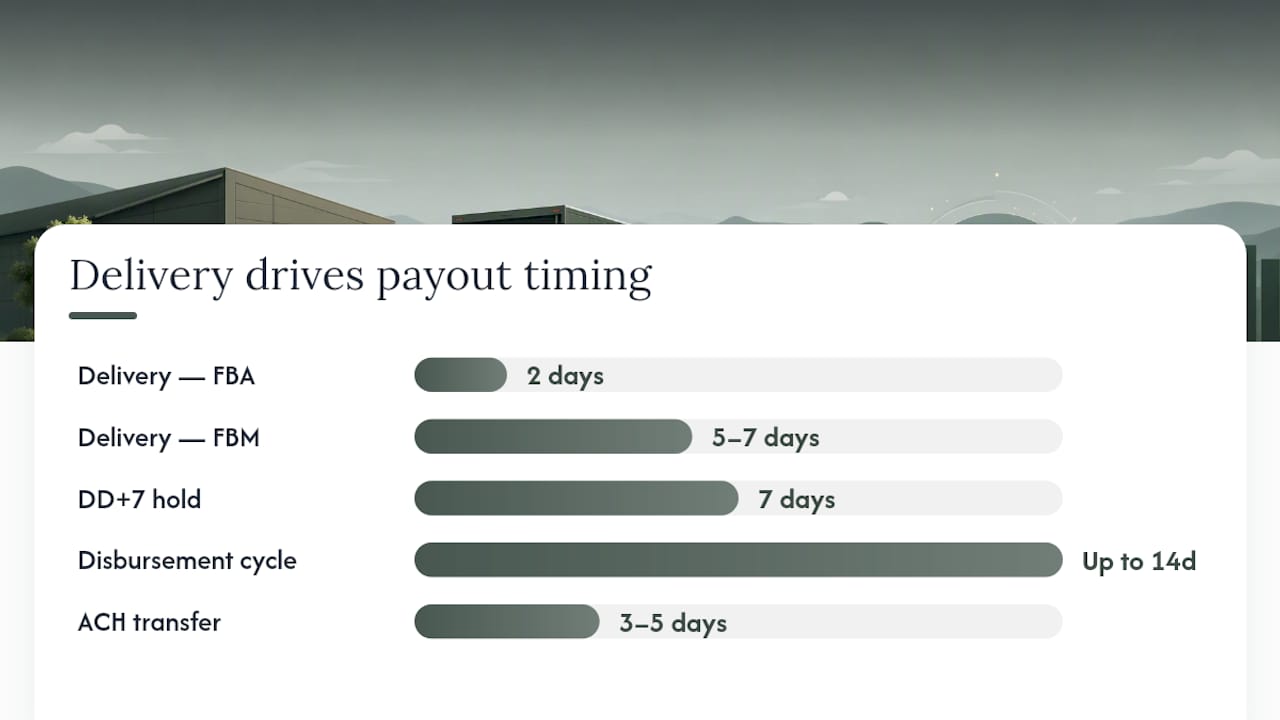
Faster delivery is the one lever you actually control in that chain, which is why FBA sellers, and FBM sellers who use Amazon FBA fulfillment or otherwise tighten shipping times, tend to see cash land sooner than sellers shipping standard ground.
Where to Check Your Next Amazon Payment Timeline
You don’t need to guess when money is coming. Amazon shows the estimate directly in Seller Central, and knowing exactly where to look saves you from opening a support case over a payout that’s simply still in transit.
Start here:
- Payments Dashboard: Seller Central → Payments → Payments Dashboard shows your current balance and next scheduled disbursement date.
- Statement View: Click into the current period to see a running total of sales, fees, refunds, and the settlement balance building toward your next payout.
- Disbursements tab: Lists past and upcoming disbursements with exact dates and amounts once they’re finalized.
- Transaction/Settlement reports: Export these under Reports → Payments for a line-by-line view tied to individual order IDs.
When you’re trying to match a specific order to a specific disbursement, export the Settlement Report and cross-reference the order ID, transaction ID, and settlement ID columns. Deferred transactions (orders still inside their DD+7 window) show up in these reports before they’re eligible for payout, which is useful for forecasting but easy to misread as a missing payment if you don’t know what you’re looking at.
Pro Tip: Export your Settlement Report as a CSV every payout cycle and keep a running log. When a disbursement looks short, you can match line items against the previous export in minutes instead of scrolling through Seller Central manually.
Why Your Amazon Payout Is Delayed or Smaller Than Expected
Most payout surprises trace back to one of a handful of causes, and each one has a specific fix rather than a generic “wait it out.”
- Account Level Reserve (ALR): Amazon holds a percentage of your balance against future claims. The single best lever here is improving your reserve profile by lowering your return rate and order defect rate (ODR), since reserves are tied directly to account health signals.
- DD+7 deferred transactions: Recent orders simply haven’t cleared their 7-day window yet. No action needed; this resolves automatically as orders age past delivery plus 7 days.
- A-to-Z claims and chargebacks: These freeze the specific transaction amount until resolved. Respond to the claim with tracking and delivery confirmation as fast as possible; delayed responses extend the hold.
- Verification or identity holds: Amazon occasionally requires document re-verification. Check the Account Health page for a specific request and submit it immediately, since these holds don’t expire on their own.
- Bank account changes: Updating your bank details triggers an automatic security freeze, typically 3 days, before the new account is usable.
- Holidays and weekends: ACH doesn’t process on bank holidays or weekends, so a payout scheduled for a Friday before a long weekend can land the following Tuesday or Wednesday.
The distinction that matters: ALR, DD+7 deferrals, and holiday delays are automatic system behavior. Claims, chargebacks, and verification holds require you to act. If you’re calling Seller Support, bring the Settlement Report row and transaction ID for the specific hold; a screenshot of your Payments Dashboard balance alone rarely gets you past the first tier of support.
Faster Payout Options: Express Payout, DoD, and Seller Wallet Compared
None of these options skip DD+7 or account reserves. What they change is the speed of the final ACH leg, or how much control you have over the timing of a release once funds are eligible.
| Option | Payout speed | Eligibility | Fees | Visibility |
|---|---|---|---|---|
| Standard disbursement | 14-day cycle + 3,5 day ACH | All sellers | None | Full, via Statement View |
| Express Payout | Same-day to next-day ACH once released | Accounts in good standing, US bank required | Varies by program terms | Transaction-level |
| Disburse on Demand (DoD) | On-request, outside the fixed cycle | Sellers with eligible account health status | May carry a per-transfer fee | Account-level summary |
| Seller Wallet | Near-instant internal balance access | Rolling out by region/eligibility | None to hold funds | Wallet balance view |
| Manual Request Transfer | Same as standard unless manually triggered | All sellers with available balance | None | Full |
Express Payout and Disburse on Demand both operate under Seller Central’s Payments menu, typically under a “Get Paid Faster” or similar option once your account qualifies. New sellers, accounts with recent policy violations, or accounts flagged for account health review are usually excluded until those issues clear.
The catch worth repeating: these tools shorten the ACH leg, not the DD+7 hold itself. If your funds are still inside the 7-day delivery window, Express Payout has nothing to release yet. Sellers who see the biggest benefit from faster-payout tools are the ones also working on delivery speed and in-network banking, since both shrink the total timeline instead of just the last few days of it.
DD+7’s Real Impact on Cash Flow and How to Prepare
DD+7 didn’t just add a delay. It changed how much working capital you need to keep on hand at any given moment.

Here’s what happened during rollout: Amazon reportedly shifted North American sellers to DD+7 around March 12, 2026, largely without a dedicated announcement, so many sellers noticed the change only when disbursements came in smaller or later than expected. During the shift, sellers commonly reported a 10 to 14 day transition period where transactions temporarily appeared inside Account Level Reserve while Amazon finished building out transaction-level visibility for deferred orders. One seller’s ALR balance can look artificially inflated for two weeks before it normalizes as the reporting catches up, which is unsettling if you don’t know it’s a rollout artifact rather than a permanent reserve increase.
The financial reality: DD+7 effectively locks up about 14 days of revenue that used to be available sooner. Here’s a 30/60/90-day approach to handle it:
- First 30 days: Build a 13-week rolling cash forecast that treats disbursements as arriving 14 to 21 days after the sale, not the old shipment-based timing.
- Next 30 days: Renegotiate supplier payment terms where possible, and price the DD+7 delay into your margin calculations rather than treating it as a temporary shock.
- Final 30 days: Diversify sales channels, since a comparison of Amazon versus eBay payout timing shows not every marketplace holds funds the same way, and speed up delivery where you control fulfillment.
Pro Tip: Model your disbursement forecast off the delivery date, not the order date. It’s the single easiest way to stop being surprised by a payout that “should have arrived” three days ago.
What to Do If a Scheduled Amazon Payout Doesn’t Arrive
Run through this before opening a support case; most missing payouts turn out to be a timing misunderstanding, not an actual error.
- Check the Disbursements tab for the exact scheduled date and status (pending, released, or failed).
- Check for a bank account change freeze. Any recent update to your bank details triggers an automatic hold.
- Check Statement View for the estimated payout amount and confirm it matches what you expected based on your own sales tracking.
- Pull the Settlement Report and locate the specific settlement ID tied to the missing funds.
If the payout genuinely didn’t process, escalate to Seller Support with a minimal, specific payload:
- Settlement ID and disbursement row from the report
- Transaction ID for the specific orders in question
- CSV export of the relevant Settlement Report period
- Screenshot of the Payments Dashboard showing the discrepancy
If Seller Support doesn’t resolve it within a few business days, request escalation to the Payments team specifically. Vague tickets (“my payment is late”) get generic responses; tickets with a settlement ID and transaction ID attached move faster.
A Seller’s Take on Payout Habits After DD+7
Three things stood out once DD+7 became the norm: forecast weekly disbursements instead of checking your balance reactively, never touch your bank account details in the days before a scheduled payout, and keep your order defect rate low, since it’s the fastest way to shrink an inflated reserve. If you adopt one habit today, make it a 13-week rolling cash forecast built around delivery dates instead of order dates. It’s also worth automating the boring part: matching every disbursement against your ledger by hand is exactly the kind of task that hides a missing reimbursement for months.
How Beanhawk Closes the Gap Between Your Payout and Your Books
Beanhawk is built for the exact problem DD+7 makes worse: the longer the gap between a sale and a deposit, the easier it is for a missing reimbursement or a shorted disbursement to slip past unnoticed. Beanhawk continuously monitors your inbound shipments and FBA ledger events, flags discrepancies before they get buried in a 14-day settlement cycle, and automatically posts reconciled settlements to QuickBooks and Xero with no manual matching required.

That matters most in a world where your cash arrives 3 to 4 weeks after the sale: you need to know immediately if Amazon shorted a reimbursement for lost or damaged inventory, not discover it during a quarterly review. Instead of manually cross-referencing settlement reports every payout cycle, Beanhawk does the matching for you and surfaces exactly what Amazon still owes. Start with a free audit to see what’s currently sitting unreconciled in your account.
Sources
- How Amazon seller payments work
- Seller forum discussion on DD+7 transition and Account Level Reserve visibility
- Amazon Seller Payouts: Bank Transfers & DD+7 Policy 2026
FAQ
How often does Amazon pay sellers?
Amazon disburses funds on a standard 14-day cycle, but under DD+7, individual transactions only become eligible for that cycle seven days after delivery.
When should I expect my Amazon settlement payout?
Check Seller Central → Payments → Statement View for the exact scheduled date; most FBA sellers see deposits 14 to 21 days after the sale, while FBM sellers often wait 17 to 28 days depending on shipping speed.
Does Amazon pay $1,000 a week?
There’s no fixed weekly payout amount. Your disbursement reflects your actual sales minus fees and refunds for that settlement period, so it varies seller to seller and week to week.
How much will I get from the Amazon Prime settlement?
That question refers to a separate legal class-action settlement unrelated to routine seller disbursements, and specific payout amounts depend on the individual claim and eligibility terms set by that settlement, not on Amazon’s standard payout schedule.