
Amazon Reimbursement Claims for FBA Sellers: 2026 Guide

Yes, you should file an amazon reimbursement claim for any eligible FBA inventory loss, damage, or mishandling , and you should do it now, because the claim windows tightened significantly in late 2025. Many payouts are automatic, but Amazon’s own policy acknowledges that automation doesn’t catch everything. The cases it misses are yours to find and file manually before the window closes.
Here’s what to expect at a glance:
- Eligible event types: inventory lost or damaged at a fulfillment center (FC), customer returns that never arrive or arrive damaged, removal order shortfalls, and unaccounted inventory adjustments
- Valuation rule (since March 10, 2025): most pre-order loss events are now reimbursed at manufacturing cost, not selling price , a meaningful reduction per unit
- Key windows (effective October 15, 2025): 60 days for lost/damaged items; 45,105 days for customer return claims, depending on the event type
- Where to file: Amazon Seller Central via the Contact Us path under FBA issues
- Automation gap: Amazon auto-reimburses most FC losses, but customer-return discrepancies and removal order problems frequently require manual claims
- Recommended tool: Beanhawk monitors your FBA ledger continuously and flags missed reimbursements before they expire
The rest of this guide walks through every step: what’s claimable, how Amazon values it, the exact Seller Central workflow, and the reports you need.
Key Takeaways
Filing claims promptly with the right reports is the single most reliable way to recover FBA reimbursements before the 60-day window closes.
| Point | Details |
|---|---|
| File within 60 days | Lost/damaged claims expire after 60 days (effective October 15, 2025); monthly audits are the only reliable safeguard. |
| Manufacturing cost is now the baseline | Since March 10, 2025, most pre-order FC losses are valued at manufacturing cost , enter accurate cost data in Seller Central to avoid low estimates. |
| Three reports cover most claims | Cross-reference the Inventory Ledger, Customer Returns report, and Reimbursements report by FNSKU and date to find unpaid events. |
| Re-evaluation window is 90 days | Underpaid or denied claims can be re-evaluated within 90 days , attach your supplier invoice as new evidence for valuation disputes. |
| Beanhawk automates the audit | Beanhawk monitors your FBA ledger continuously and posts reimbursements to QuickBooks or Xero automatically, so missed claims surface before they expire. |
Table of Contents
- What types of FBA inventory losses are actually claimable?
- What changed in 2025 that every FBA seller needs to know
- How Amazon calculates your reimbursement value
- How to file an amazon reimbursement claim in Seller Central, step by step
- Prevention and bookkeeping: how to stop missing claims before they expire
- Why automation still needs a human check behind it
- Beanhawk catches what manual audits miss
- Useful sources and policy pages to bookmark
What types of FBA inventory losses are actually claimable?
The FBA inventory reimbursement policy covers five core event categories. Knowing which one applies to your loss determines which report to pull and which Seller Central path to use.
Lost in fulfillment center. Inventory that enters Amazon’s network but disappears before it’s sold or returned to you. Amazon tracks this through the Inventory Ledger; if units are missing and no corresponding reimbursement appears, this is a claimable event.
Damaged at the fulfillment center. Units that Amazon’s own warehouse staff or equipment damage before a customer order. Disposition codes like DAMAGED or CARRIER_DAMAGED in your Inventory Event Detail report flag these.
Customer-return shortages or damage. A customer returns an item, Amazon logs the return, but the unit never makes it back to sellable or unsellable inventory , or it arrives in worse condition than the return reason justifies. This category generates the most missed claims because the matching logic is easy to get wrong.
Removal order loss or damage. You request a removal and the shipment arrives short or with damaged units. Amazon should reimburse the difference between what was requested and what was received.
Unaccounted inventory adjustments. Inventory disposed of without authorization, or adjustments coded as “Inventory misplaced” that never resolve into a reimbursement.
When does Amazon reimburse automatically vs. when must you file?
Amazon auto-reimburses most straightforward FC loss events, typically within a few weeks of the loss being logged. The catch: “most” is doing a lot of work in that sentence. Customer-return discrepancies, removal shortfalls, and any event where the disposition code is ambiguous almost always require a manual claim. If you see an inventory adjustment in your ledger with no matching entry in the Reimbursements report, that’s your signal to file.
What changed in 2025 that every FBA seller needs to know
Two policy updates in 2025 materially changed how much you get paid and how long you have to ask for it. Both tighten the economics of missed claims.
Tightened claim windows (effective October 15, 2026)
The updated claim submission windows shortened the time sellers have to file manual claims. Lost or damaged inventory claims now carry a 60-day window. Customer return claims range from 45 to 105 days depending on the specific event type. Miss the window and the claim is gone , Amazon won’t accept late filings regardless of the evidence quality.
This is why quarterly audits are no longer sufficient. A loss event from 61 days ago is already expired under the new rules.
How Amazon calculates your reimbursement value
Amazon uses two different valuation models depending on when and how the loss occurred. Understanding which applies to your claim lets you estimate the payout before you file , and spot underpayments after.
| Loss event type | Valuation model | Key inputs |
|---|---|---|
| FC loss before customer order | Manufacturing cost | Your cost data in Seller Central or Amazon’s estimate |
| FC damage before customer order | Manufacturing cost | Same as above |
| Post-order damage / customer return | Sales-price-based estimate | Comparable sales price, condition, category |
| Removal order shortfall | Manufacturing cost or comparable | Depends on event classification |
How to file an amazon reimbursement claim in Seller Central, step by step
This workflow covers the most common manual claim path. The whole process takes 15,30 minutes per claim once you have the right reports pulled.
- Download your three core reports , In Seller Central, go to Reports > Fulfillment. Download the Inventory Ledger (Inventory Event Detail), the Customer Returns report, and the Reimbursements report. Set the date range to the last 60 days for lost/damaged claims, or the appropriate window for return claims.
Processing typically takes 3,7 business days for straightforward cases. Complex cases or those requiring manual review can run 2,4 weeks. Once resolved, reimbursements post to your next settlement.
Pro Tip: Set the case subject line to the FNSKU and event date (e.g., “Reimbursement request , X00ABC123 , 2025-11-14”). It makes follow-up faster and gives the support agent an immediate reference point.
Re-evaluation workflow
You have a 90-day window to request re-evaluation of a closed or underpaid case. Reply to the existing case thread , don’t open a new case , and include the phrase “re-evaluation request” in your message. Attach any new evidence: the original CSV row, the settlement detail showing the payout amount, and the supplier invoice if the dispute is about valuation.
If the re-evaluation comes back denied and you believe the evidence is solid, escalate by opening a new case and referencing the original case ID. Note the specific policy section that supports your position , the FBA reimbursement policy page is the document to cite. Keep all original CSVs, settlement PDFs, and invoices in a dedicated folder organized by FNSKU. You’ll need them if the case goes to a second review.
Common escalation timeline: initial case (3,7 days) → re-evaluation reply (5,10 days) → new escalation case (7,14 days). Most legitimate claims resolve at the re-evaluation stage when the evidence is complete.
Prevention and bookkeeping: how to stop missing claims before they expire
The most common reason reimbursements go uncollected isn’t a complicated policy question , it’s that sellers don’t run the audit until the window has already closed. A monthly cadence fixes that.
Run the three-report cross-check (Inventory Ledger, Customer Returns, Reimbursements) on the first business day of each month, covering the prior 30 days. This keeps you well inside the 60-day window for lost/damaged claims and gives you time to gather evidence before filing.
For accounting reconciliation, the gap between what Amazon reimburses and what your books show is a real problem. Reimbursements post as line items in your settlement, but if you’re manually entering settlements into QuickBooks or Xero, it’s easy to lump them into a generic income category and lose visibility. Automating settlement posting , so each reimbursement posts to its own account code , makes underpayments visible immediately. Beanhawk’s integration with QuickBooks and Xero reconciliation handles this automatically, so reimbursements never get buried in a catch-all revenue line.
Operationally, tag your highest-margin SKUs for weekly ledger checks rather than monthly. A $60 product with a $20 manufacturing cost generates a much larger dollar loss per missed claim than a $12 accessory, and the tighter the margin, the more each missed reimbursement hurts. Keep supplier invoices organized by FNSKU, not just by shipment date , when you need to prove manufacturing cost for a re-evaluation, finding the right invoice quickly matters.
Pro Tip: Prioritize your audit queue by multiplying each SKU’s manufacturing cost by its average monthly units sold. The SKUs at the top of that list are where missed reimbursements cost you the most.
Why automation still needs a human check behind it
Amazon’s move toward automatic reimbursements is genuinely useful. For straightforward FC loss events, most sellers will see a credit appear without filing anything. But “most” is the word that should keep you running monthly audits anyway.
The edge cases automation misses tend to cluster in exactly the places that hurt most: customer-return discrepancies where the return reason doesn’t match the unit’s actual condition, removal order shortfalls where the count difference is small enough to look like rounding, and inventory adjustments coded ambiguously enough that the system doesn’t trigger a payout. These aren’t rare exceptions , they’re routine for any seller moving meaningful volume.
The manufacturing-cost shift also changes the math on how much effort a manual audit is worth. When reimbursements were calculated at selling price, a missed claim on a $40 product might have recovered $28. Under the current model, that same claim recovers $12,$15. That sounds like less reason to bother , but the opposite is true. Because each unit pays out less, you need to catch more of them to recover the same total. One missed claim used to be a minor annoyance. At scale, a pattern of missed claims under manufacturing-cost valuation quietly erodes margin in a way that doesn’t show up clearly until you reconcile.
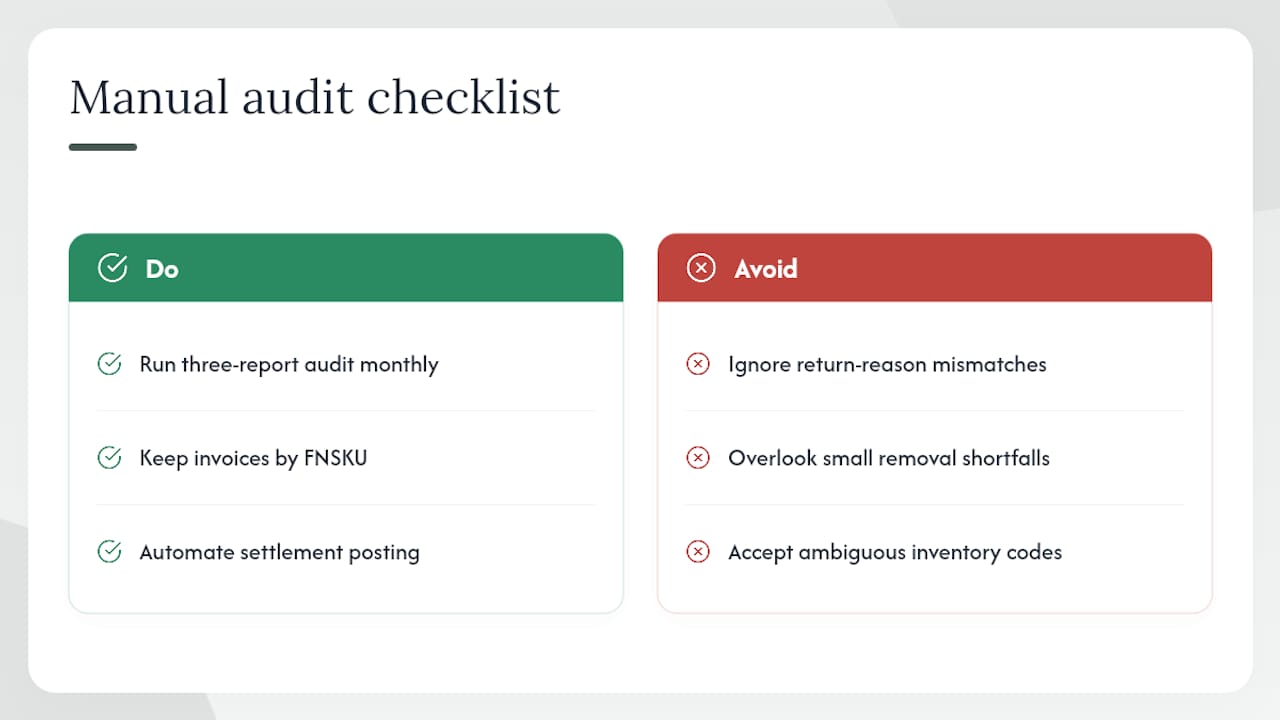
The sellers who handle this best treat reimbursement recovery as a bookkeeping function, not a one-off task. They run the three-report audit monthly, keep invoices organized by FNSKU, and automate settlement posting so reimbursements appear as distinct line items in their accounts. That combination , regular audits plus clean books , is what separates sellers who recover most of what they’re owed from those who leave money on the table every quarter.
Beanhawk catches what manual audits miss
Most FBA sellers lose reimbursements not because the claims are hard to win, but because the audit didn’t happen before the window closed. Beanhawk solves that by monitoring your inbound shipments and FBA ledger events continuously, flagging every unpaid loss or discrepancy as it appears rather than waiting for a monthly review.

Where Beanhawk goes further than a manual workflow: it automatically posts reimbursements to QuickBooks or Xero as distinct line items, so your books reflect what Amazon actually paid and underpayments are visible at a glance. No commission fees, no hidden charges , just a subscription that pays for itself when the first missed claim is recovered. A free limited audit is available if you want to see what your account is owed before committing to anything.
Useful sources and policy pages to bookmark
| Resource | What it covers |
|---|---|
| FBA inventory reimbursement policy | Canonical eligibility rules, automatic reimbursement behavior, and where to file in Seller Central |
| Reimbursement value calculation | How Amazon calculates payouts and what inputs it uses |
| March 10, 2025 policy update | Manufacturing-cost valuation change and definition |
| October 15, 2025 claim window update | Updated submission windows (60 days lost/damaged; 45,105 days returns) |
| Three-report audit guide | Practical walkthrough of the Inventory Ledger, Returns, and Reimbursements cross-check |
| Missed reimbursements: prevention guide | Common denial reasons and how to avoid expired claims |
| Beanhawk: does Amazon reimburse lost inventory? | Reimbursement scenarios, continuous monitoring, and free audit |
| Beanhawk: FBA reimbursement glossary | Definitions and integration with QuickBooks/Xero reconciliation workflows |