
Amazon Reimbursement Time Limits: Compute Deadlines and Recover Funds

Most seller-side FBA reimbursement claims must be filed within 60 days of the relevant event. Removal claims carry a stricter rule: you cannot submit before 15 days from the shipment-creation date, and you lose eligibility entirely after 75 days. That 60-day window replaced the former 18-month limit in a 2024 policy change, and monthly audits no longer cut it.
Two things to do right now:
- Identify the event date that applies to your case (shipment-creation date for removals; the “reported lost/damaged” ledger date for fulfillment-center claims).
- Open your Reimbursements report and Settlement report in Seller Central to confirm whether Amazon already issued a credit before you file a duplicate claim.
Quick orientation for finance teams and operators:
- Who owns the check: Operations should flag inbound discrepancies; accounting should reconcile the Reimbursements report against each settlement deposit.
- Which reports to open first: Reimbursements report, Inventory Adjustments report, and the relevant Removal Order report.
- What to flag immediately: Any ledger event older than 45 days with no matching reimbursement credit , those are inside the window but running out of time.
Key Takeaways
Amazon’s 60-day filing window means a missed weekly audit can permanently forfeit a valid reimbursement claim, making continuous monitoring the single most important process change sellers can make.
| Point | Details |
|---|---|
| Core filing window | Most manual claims must be filed within 60 days of the triggering ledger event. |
| Removal claim rule | Submit removal claims between 15 and 75 days from the shipment-creation date , not before day 15. |
| Automation gap | Amazon auto-reimburses some events within ~20 days, but manual validation is still required to catch every eligible case. |
| Reconciliation step | Match each approved reimbursement to its settlement deposit by transaction ID before posting to income. |
| Beanhawk audit | Beanhawk’s free FBA reimbursement audit identifies missed and recoverable claims and posts approved credits directly to QuickBooks or Xero. |
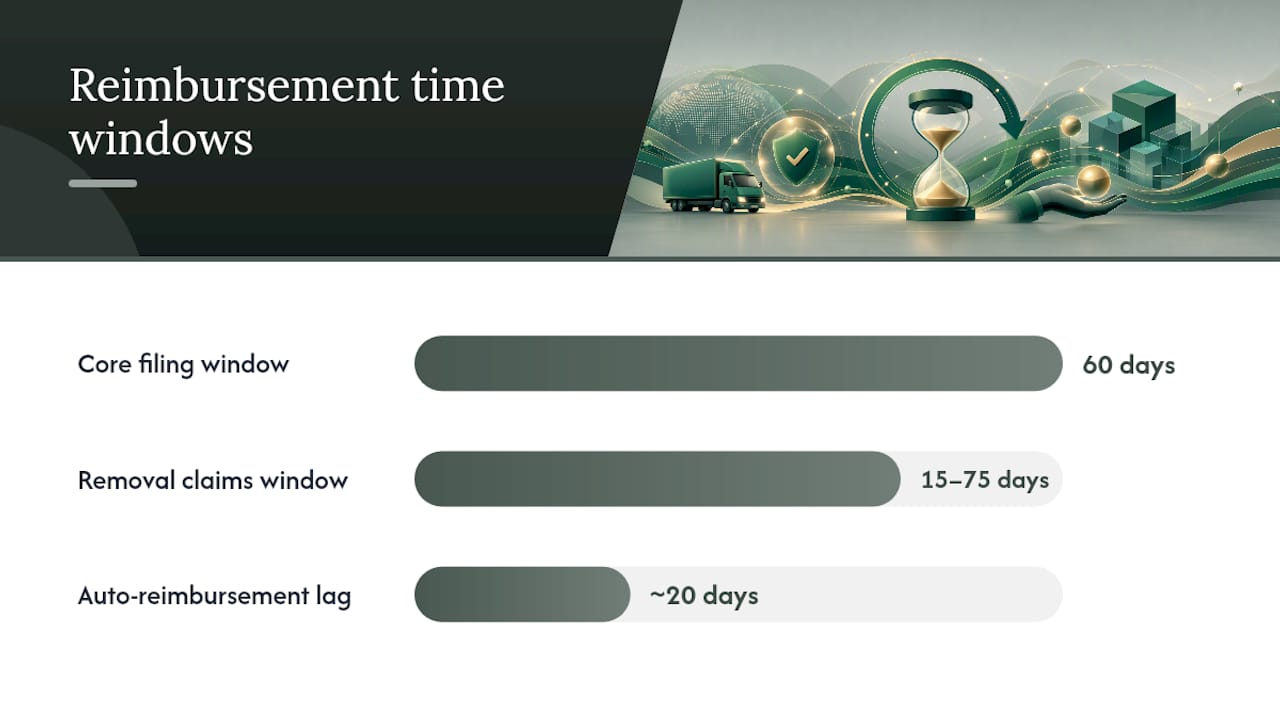
Table of Contents
- Which reimbursement claim types these amazon reimbursement time limits cover
- Concrete Amazon filing windows and where to confirm them
- How to compute the exact deadline for your claim
- A practical filing checklist for claims and evidence
- Why Amazon denies claims and how to respond
- How to record and reconcile approved reimbursements
- When automation is worth it and how Beanhawk addresses the risk
- One habit that changes outcomes
- Beanhawk: continuous monitoring for sellers who cannot afford to miss a window
- Sources
- FAQ
Which reimbursement claim types these amazon reimbursement time limits cover
These filing windows apply to seller-side FBA reimbursement claims , situations where Amazon owes the seller money because of something that happened to inventory after it entered the fulfillment network.
In-scope claim types:
- Fulfillment center lost or damaged inventory (items lost or damaged while in Amazon’s custody)
- Inbound shipment discrepancies (units Amazon received but did not credit)
- Removal claims for items lost in transit back to the seller
- Inventory adjustments that reduce your sellable count without a corresponding sale or return
- Customer-return disputes where Amazon issued a refund to the buyer but the unit was never returned to your inventory or reimbursed
Explicitly out of scope:
- Shopper refund and return processing timelines (how long a customer waits for a refund)
- Customer-facing return policies and buyer-side dispute resolution
Which event date triggers the window:
- Removal claims: shipment-creation date
- Fulfillment-center lost/damaged: the date the event appears in your ledger or is reported
- Inbound discrepancies: the date the shipment is reconciled in Seller Central
- Customer-return disputes: the date Amazon issued the buyer refund or replacement
Concrete Amazon filing windows and where to confirm them
Amazon updated its eligibility windows so most manual claims must now be submitted within 60 days of the triggering event, and began automating some reimbursement types in late 2024. Before that change, sellers had up to 18 months , a window wide enough that quarterly audits were fine. At 60 days, they are not.
The canonical windows:
- Most manual claims: 60 days from the reported event date
- Removal claims (lost in transit): Submit between 15 and 75 days from the shipment-creation date; submissions before day 15 are rejected
- FBA customer return disputes: Typically 60 days from the date Amazon issued the buyer refund (confirm in Seller Central for your marketplace)
Some reimbursements are now issued automatically, often within roughly 20 days of the event. Check your Reimbursements report before filing , a duplicate claim wastes time and can trigger a review. But automation does not catch every eligible case, so manual validation remains necessary.
To confirm the current rule in Seller Central, navigate to Help → FBA → Lost and Damaged Inventory Reimbursements or check the official reimbursement policy page. Screenshot the policy language you relied on before filing , Amazon’s own text is your strongest evidence if a denial references a different interpretation.
SPS Commerce’s policy summary also notes marketplace-specific reimbursement caps for Multichannel Fulfillment orders, so check those if you run MCF alongside standard FBA.
Pro Tip: When a policy gives a range (15,75 days for removals), document the shipment-creation timestamp and carrier tracking number the moment you create the removal order. If Amazon questions your eligibility window later, that timestamp is the only proof that holds up.
How to compute the exact deadline for your claim
The right start date depends on the claim type. Use the table below as a reference, then follow the numbered steps to calculate your specific deadline.
| Claim type | Start date | Earliest filing | Latest filing |
|---|---|---|---|
| Removal (lost in transit) | Shipment-creation date | Day 15 | Day 75 |
| Fulfillment-center lost/damaged | Ledger event date | Day 1 | Day 60 |
| Inbound discrepancy | Shipment reconciliation date | Day 1 | Day 60 |
| Customer-return dispute | Buyer refund/replacement date | Day 1 | Day 60 |
Step-by-step process:
- Locate the event timestamp. For removal claims, find the shipment-creation date in your Removal Order report. For fulfillment-center events, pull the date from the Inventory Adjustments report or your ledger.
- Compute earliest and latest filing dates. Add 15 days (removal) or 0 days (other claims) for the earliest date; add 75 days (removal) or 60 days (other claims) for the hard deadline.
- Subtract a 5-day internal buffer. Some forum threads reference a practical 61-day limit for fulfillment-center claims, suggesting Amazon’s system can be strict on the boundary. Build in a buffer for evidence gathering and internal review.
- Set a calendar reminder for the buffer deadline, not the hard cutoff. Waiting until day 59 leaves no room for a denied first submission and a refile.
Understanding FBA receive time also matters here: the clock on inbound discrepancy claims does not start until Amazon reconciles the shipment, which can lag the physical delivery by several days.
A practical filing checklist for claims and evidence
Evidence to gather before submitting:
- Reimbursements report (confirm no automatic credit already issued)
- Inventory Adjustments report (export the relevant date range; note the adjustment reason code)
- Shipment manifest (the packing list you sent with the inbound shipment)
- Carrier tracking confirmation and proof of delivery or loss (critical for removal claims)
- Photos of damaged goods, if available at the time of damage
- Settlement or ledger extract showing the missing credit line
Seller Central report columns to export:
- Inventory Adjustments: Date, FNSKU, ASIN, Quantity, Reason
- Reimbursements: Date, Case ID, ASIN, Quantity, Amount Per Unit, Total Amount
- Removal Orders: Request Date, Order ID, ASIN, Requested Quantity, Shipped Quantity, Carrier, Tracking
Filing steps:
- Confirm no automatic reimbursement exists in the Reimbursements report.
- Open a case in Seller Central under Help → Contact Us → FBA Issue → Reimbursement Request.
- Attach the shipment manifest, carrier tracking, and the relevant Inventory Adjustments export.
- Include the specific ledger event date and the ASIN/FNSKU in the case description.
- If denied, respond within the same case thread with additional evidence (see the denial section below).
Pro Tip: Schedule automated report exports weekly , set a recurring task in your ops calendar to pull the Inventory Adjustments and Reimbursements reports every Monday. Filing within a narrow window is nearly impossible if you are hunting for reports manually when the deadline is already close. Reducing FBA receiving delays also shortens the lag before your clock starts.
Why Amazon denies claims and how to respond
Common denial reasons:
- Claim filed outside the eligibility window (most common after the 60-day rule took effect)
- Insufficient documentation (missing manifest, no carrier tracking)
- Duplicate claim (Amazon already issued an automatic reimbursement)
- Seller-caused error (mislabeled ASINs, incorrect quantities on the shipment manifest)
- Damage occurred before Amazon received the unit (carrier damage, not fulfillment-center damage)
Troubleshooting flow:
- Confirm the event date and recalculate whether the claim was filed within the window.
- Check the Reimbursements report for an automatic credit that may have closed the case.
- Identify the specific denial reason code in the case response.
- Collect the missing evidence (carrier proof of in-transit loss, signed delivery exception, or your internal receiving log showing the discrepancy).
- Refile or appeal in the same case thread with a clear chronology: event date → filing date → evidence attached.
When to escalate: If Amazon denies a removal claim citing “damage occurred before receipt” but your carrier tracking shows the unit left your facility in sellable condition, escalate with the carrier’s signed delivery exception document. For systematic under-reimbursement across multiple ASINs, a pattern of ledger extracts showing repeated adjustments without matching credits is the strongest escalation evidence.
How to record and reconcile approved reimbursements
Approved reimbursements appear in your Reimbursements report and eventually settle into your Amazon disbursement. The lag between approval and settlement posting can run several days to a few weeks, which creates month-end timing problems if you are not tracking pending credits.
Reconciliation steps:
- Identify each reimbursement in the Reimbursements report by Case ID and approval date.
- Match it to the corresponding settlement deposit using the settlement date and transaction reference.
- Post a journal entry: debit the clearing account, credit Other Income (or reduce COGS if the reimbursement covers inventory cost) , your accountant should confirm the appropriate treatment based on how you record inventory write-downs.
- Clear the entry once the deposit appears in your bank feed.
For QuickBooks and Xero users, reconciling Amazon payouts requires mapping settlement lines to individual reimbursement events by transaction ID. Amazon’s settlement report groups multiple events into a single deposit, so a line-by-line match is the only way to confirm every approved claim actually landed.
Pro Tip: Maintain a dedicated reimbursement clearing account in your chart of accounts. Every approved claim posts there first; it clears to income only when the settlement deposit confirms. At month-end, an open balance in that account tells you exactly how much is approved but not yet disbursed , no guessing, no missed accruals.

When automation is worth it and how Beanhawk addresses the risk
Amazon’s automated reimbursements handle a growing share of fulfillment-center lost/damaged events, but automation is not fully reliable , sellers who rely on it exclusively leave recoverable funds unclaimed. The gap is widest for inbound discrepancies, removal claims, and customer-return disputes, where manual filing is still required.
Sellers who gain the most from automation tools:
- High-volume FBA sellers with hundreds of shipments per month (too many events to track manually)
- Multi-channel merchants reconciling Amazon alongside other platforms
- Accounting teams managing month-end closes who cannot afford to chase individual case IDs
Beanhawk monitors inbound shipments and ledger events continuously, flags approaching deadlines before the window closes, and posts approved reimbursements directly to QuickBooks or Xero as journal entries. The free FBA reimbursement audit shows exactly what you have missed and what is still recoverable , no commitment required to see the number.
Learn more about how Amazon handles lost or damaged inventory reimbursements and where the gaps in automation typically appear.
One habit that changes outcomes
The sellers who recover the most are not the ones with the best spreadsheets. They are the ones who assigned a specific person to own claims, gave that person a 7-day SLA from event detection to case submission, and switched from monthly to weekly audit runs after the 60-day rule took effect.
Weekly is the right cadence now. A monthly audit on a 60-day window leaves you with roughly 30 days to gather evidence, file, and respond to a denial before the window closes permanently. That is not enough margin for a busy ops team. Set the weekly audit as a recurring calendar block, not a task that gets bumped.
This week: pull your Inventory Adjustments report for the past 30 days, filter for adjustments with no matching reimbursement, and check whether any of those events are older than 45 days. Those are your most urgent cases.
Beanhawk: continuous monitoring for sellers who cannot afford to miss a window
Missing a reimbursement claim after the 60-day window closes means the money is gone permanently. For sellers managing dozens of shipments a month, tracking every ledger event manually is the part that breaks first.

Beanhawk monitors your inbound shipments and FBA ledger events continuously, surfaces claims before the deadline, and handles the reconciliation side by posting approved reimbursements directly as journal entries in QuickBooks or Xero. No commission on recoveries, no manual report hunting, and no month-end surprises from credits that settled but never got posted. The free FBA reimbursement audit shows you the exact dollar amount sitting in missed or under-reimbursed claims right now. Start there, see the number, and decide what to do with it.
This article is general information, not a substitute for advice from a qualified financial advisor. Consult a qualified financial professional about your own circumstances before acting on anything here.
Sources
These are the primary references cited in this guide. Bookmark them for appeals and policy verification.
- Seller Central forum , Update on Reimbursement Automation and Eligibility Window
- Amazon Reimbursement Rules 2026: What Changed and How to Claim , Nventory
- Key Amazon reimbursement policy details, changes, and updates , SPS Commerce
FAQ
What is the filing deadline for most Amazon FBA reimbursement claims?
Most manual seller-side claims must be submitted within 60 days of the triggering event, such as the date an item is reported lost or damaged in the fulfillment center.
When can I file a removal claim for items lost in transit?
You can file between 15 and 75 days from the shipment-creation date. Claims submitted before day 15 are rejected, and the window closes permanently at day 75.
Does Amazon automatically reimburse lost or damaged FBA inventory?
Amazon began automating some reimbursements in late 2024, often processing credits within roughly 20 days. However, automation does not cover every eligible case, so manual validation of your Reimbursements report remains necessary.
How do I reconcile Amazon reimbursements in QuickBooks or Xero?
Match each reimbursement in the Reimbursements report to its settlement deposit by transaction ID, then post a journal entry to a dedicated clearing account before moving it to income once the deposit confirms. Beanhawk automates this posting directly into QuickBooks and Xero.
What happens if I miss the reimbursement filing window?
Once the window closes , 60 days for most claims, 75 days for removal claims , the claim is permanently ineligible. Amazon will not accept late submissions, which is why weekly audits are now the recommended cadence.