
Amazon SAFE-T Claim: 2026 Filing Guide for US Sellers

File your Amazon SAFE-T claim through Seller Central at Orders > Manage SAFE-T Claims > File a new SAFE-T claim. Two deadlines control everything: you have four calendar days from the return delivery scan to process the refund yourself (miss it, and Amazon’s automated system issues the refund, which typically kills your SAFE-T eligibility); then you have thirty days from the later of the return delivery scan or the refund date to submit the actual claim. Both windows went into effect in early 2026 and are unforgiving.
- Go to Orders > Manage SAFE-T Claims in Seller Central immediately after a return is delivered.
- Photograph the returned item, packaging, and return label the moment you open the box. Timestamps matter.
- Preserve all carrier tracking scans, the return label image, and any customer messages in a dedicated folder before you do anything else.
- Verify the refund has not already been issued by Amazon. If it has, check whether you still fall within the 30-day filing window.
- File before day 30. There is no grace period and no exception for late submissions after early 2026.
Pro Tip: Set a calendar alert the moment a return tracking number shows “delivered.” That scan starts both clocks simultaneously, and the 4-day window closes faster than most sellers expect.
Beanhawk automates this monitoring, timestamps return scans, and flags the 4-day inspection deadline so nothing slips through. If you are managing volume manually, the risk of missing a window is real.

Table of Contents
- What is an Amazon SAFE-T claim and when does it apply?
- Are you eligible? Deadlines and rules that determine your SAFE-T filing window
- How to file a SAFE-T claim in Seller Central: step by step
- What evidence does Amazon actually need to approve your claim?
- What happens after you submit: review timelines and possible outcomes
- Why Amazon denies SAFE-T claims and how to prevent each denial type
- What to do when Amazon denies your SAFE-T claim
- SAFE-T claim checklist and sample claim text you can adapt
- 2026 policy changes and the operational workflows you need now
- Key Takeaways
- The part of SAFE-T most sellers underestimate
- Beanhawk recovers what manual SAFE-T workflows miss
- Useful sources
What is an Amazon SAFE-T claim and when does it apply?
SAFE-T stands for Seller Assurance for E-Commerce Transactions. It is the recovery tool Amazon gives seller-fulfilled order sellers to dispute refunds that Amazon issued on their behalf, when the seller believes the refund was not their fault.
The program covers a specific set of scenarios, and knowing exactly which ones qualify saves you from wasting time on ineligible claims. SAFE-T applies to seller-fulfilled orders where Amazon issued a refund due to buyer abuse, in-transit damage, clearly different items returned, or returnless refunds processed using Amazon prepaid return labels.
What it covers:
- Buyer abuse: A buyer claims non-receipt or a defect that does not exist, and Amazon refunds them automatically.
- Returnless refunds: Amazon grants the buyer a refund without requiring the item to be returned, using an Amazon-issued prepaid label.
- Clearly different item returned: The buyer returns a different product entirely, not the one you shipped.
- Damaged or empty return: The item comes back broken, missing components, or in a condition materially worse than shipped.
- Lost in transit: The return shipment never arrives, with the last carrier scan showing the package in transit.
What SAFE-T does not cover:
- Seller error: wrong item shipped, poor packaging that caused damage, or incorrect listings.
- FBA inventory issues: those follow a separate FBA reimbursement path.
- Refunds the seller issued directly, except in limited lost-in-transit cases.
The distinction between SAFE-T and FBA reimbursement types trips up a lot of sellers. FBA reimbursements are for inventory Amazon loses or damages in its own warehouses. SAFE-T is strictly for seller-fulfilled orders where Amazon made the refund decision.

Are you eligible? Deadlines and rules that determine your SAFE-T filing window
Eligibility comes down to four conditions and two hard deadlines. Miss any one of them and the claim is gone.
Eligibility checklist:
- The order was seller-fulfilled (not FBA).
- Amazon issued the refund, not you.
- You are filing within thirty days of the triggering event.
- You processed the return decision within four calendar days of the return delivery scan (or Amazon auto-refunded and you are filing under a limited exception).
The 4-calendar-day refund assessment window, effective early 2026, is the trap most sellers fall into. Once a return is marked delivered, you have 4 days to inspect it and decide whether to issue a refund, a partial refund, or dispute it. If you do nothing, Amazon’s automated system issues the refund and your SAFE-T eligibility is typically gone. No appeal fixes that.
The 30-calendar-day SAFE-T filing window, effective early 2026, replaced the previous 60-day window. The 30-day clock starts from whichever comes later: the return delivery scan or the refund date. For lost shipments where no return delivery scan exists, the clock starts from the last carrier scan.
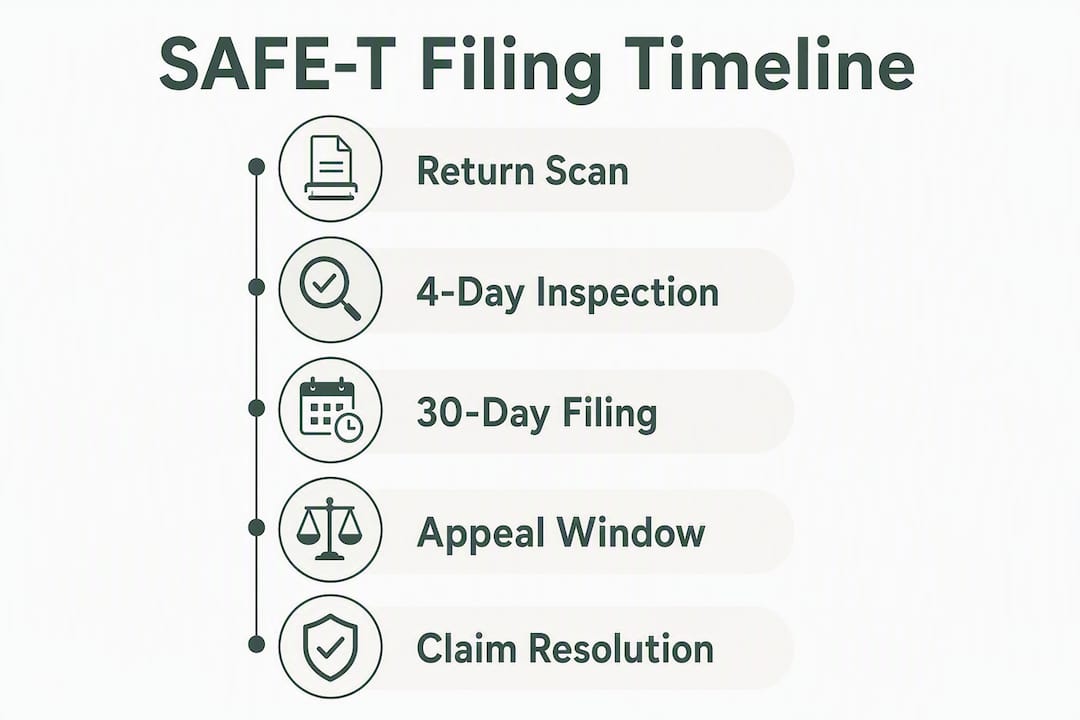
| Triggering Event | Clock That Starts | Deadline |
|---|---|---|
| Return delivery scan | 4-day refund assessment window | Process refund by day 4 or Amazon auto-refunds |
| Return delivery scan | 30-day SAFE-T filing window | File claim by day 30 |
| Refund date (if later than scan) | 30-day SAFE-T filing window | File claim by day 30 from refund date |
| Last carrier scan (lost shipment) | 30-day SAFE-T filing window | File claim by day 30 from last scan |
The 30-day window was aligned with Amazon’s A-to-Z Guarantee appeal window, which means Amazon treats it as a firm cutoff, not a soft guideline. Claims older than 30 days cannot be newly submitted after early 2026.
How to file a SAFE-T claim in Seller Central: step by step
Filing starts in Seller Central at Orders > Manage SAFE-T Claims. Before you click anything, have the Order ID, return tracking number, return delivery scan timestamp, refund notification, and your evidence folder open and ready.
- Navigate to Manage SAFE-T Claims. In Seller Central, go to Orders, then select “Manage SAFE-T Claims” from the dropdown.
- Click “File a new SAFE-T claim.” The button appears in the upper right of the Manage SAFE-T Claims dashboard.
- Enter the Order ID, RMA number, or tracking ID. The system checks eligibility automatically. If the order is ineligible (outside the window, FBA order, seller-issued refund), it will tell you here.
- Select the claim reason. This is critical. Match the reason exactly to your evidence: “Item returned in different condition,” “Returnless refund,” “Item not returned,” “In-transit damage,” etc. A mismatched reason is one of the top denial triggers.
- Complete all required fields. Enter the requested reimbursement amount, describe what happened concisely (2,4 sentences), and note any relevant order details.
- Attach your evidence files. Upload photos, tracking screenshots, return label images, and customer message exports. Follow the file-naming convention (covered in the next section). Amazon accepts JPEG, PNG, and PDF formats; keep individual files under 10 MB.
- Review and submit. Double-check that the claim reason matches your evidence before hitting submit. You will receive a confirmation email with a case number. Save it.
- Screenshot the submission confirmation page. This is your timestamp proof that you filed within the window.
Before you file, collect:
- Order ID and ASIN
- Return tracking number and delivery scan timestamp
- Refund notification from Amazon (date and amount)
- High-resolution photos of the returned item and packaging
- Return label image
- Outbound shipment proof (carrier receipt or tracking confirmation)
- Relevant customer messages exported from Seller Central
What evidence does Amazon actually need to approve your claim?
Documentation is the difference between approval and denial. Claims without specific, verifiable proof are frequently rejected, and Amazon’s investigators place the burden of proof squarely on the seller.
Primary evidence
- Timestamped photos of the returned item: Shoot from multiple angles. Show the damage, the missing component, or the clearly different item next to a ruler or reference object. If your phone or camera embeds EXIF metadata, leave it intact.
- Packaging photos: Show the box, the tape, the label, and any damage to the exterior. This establishes condition at receipt.
- Return label image: Confirms the return was processed under Amazon’s prepaid label program, which is required for returnless refund claims.
- Outbound shipment proof: Carrier receipt, tracking confirmation, or a screenshot showing the item left your facility in the correct condition.
- Carrier tracking scans: A full scan history showing delivery to the buyer and, for returns, delivery back to you (or the last scan for lost shipments).
- Order and invoice screenshots: Show the original order details, the item description, and the refund notification.
Secondary evidence
- Customer messages from the Buyer-Seller Messaging Center, exported as PDF.
- Prior condition records: serial numbers, batch identifiers, or lot numbers that prove the returned item is not what you shipped.
- Side-by-side comparison photos: the item you shipped versus what came back.
File naming and organization
Name every file using this format: OrderID_reason_date.jpg (for example, 112-3456789-0123456_differentitem_2026-03-15.jpg). Create one folder per claim and include a plain-text summary file (claim_summary.txt) that lists the order ID, claim reason, refund amount, and a two-sentence description of the issue. Practitioners consistently report that a single organized folder with standardized file names reduces reviewer friction and speeds resolution.
Pro Tip: Red-box or circle the key damage area in a copy of the photo (keep the unedited original as a separate file). Reviewers process dozens of claims; a visual callout cuts the time they spend hunting for the issue.
What happens after you submit: review timelines and possible outcomes
Amazon does not publish a fixed review timeline for SAFE-T claims, but sellers typically see an initial status update within 3,7 business days. Complex cases or those requiring additional evidence can run 2,4 weeks.
Claim statuses to watch:
- In Review: Amazon’s team is assessing the claim. No action needed unless they request more information.
- Additional Information Requested: You have a limited window (usually 48,72 hours) to respond with the requested documents. Missing this response window often results in denial.
- Decision Delivered: The claim is resolved. Check the outcome in Manage SAFE-T Claims.
Possible outcomes:
- Full reimbursement: Amazon credits the full product cost plus eligible return shipping fees to your seller account.
- Partial reimbursement: Amazon applies a restocking fee cap or reimburses only a portion of the claimed amount, typically when the item shows some use but is not completely unsellable.
- Denial: The claim is rejected. You have one appeal opportunity (covered in the next section).
- Request for more information: Treated as a pause, not a denial. Respond quickly with the specific documents requested.
Amazon calculates the reimbursement amount based on the product’s sale price, eligible return shipping costs, and any applicable restocking fee offsets. The reimbursement posts to your seller account balance, not as a separate line item in your bank account.
For accounting purposes, record a SAFE-T reimbursement as a revenue adjustment or a recovery of cost of goods, not as new revenue. It offsets the original refund charge. Beanhawk’s Amazon FBA bookkeeping guide covers the correct journal entry treatment and how to reconcile these recoveries in QuickBooks or Xero so your books stay clean.
Why Amazon denies SAFE-T claims and how to prevent each denial type
Amazon tends to side with buyers, and SAFE-T functions as a last resort where strong, irrefutable evidence is required to overturn an automated refund decision. Most denials trace back to a handful of avoidable mistakes.
Top denial reasons and how to avoid them:
- Missing or low-quality evidence. Blurry photos, screenshots without timestamps, or missing carrier scans give investigators nothing to work with. Shoot photos in good lighting, check that EXIF data is intact, and pull the full tracking history before filing.
- Mismatched claim reason. Selecting “Item not returned” when the item was returned but damaged is a fast path to denial. Read each reason option carefully and choose the one that matches your evidence, not the one that sounds most sympathetic.
- Seller issued the refund first. If you processed the refund before Amazon did, SAFE-T eligibility is gone in most cases. The program only covers Amazon-issued refunds.
- Filing outside the 30-day window. No exceptions. If day 30 has passed, the claim cannot be submitted.
- No proof of return delivery or tracking gaps. A tracking chain with unexplained gaps raises red flags. Use carrier APIs or download the full scan history directly from the carrier’s website to produce an unbroken record.
Red flags Amazon reviewers watch for:
- Ambiguous photos that could apply to any order (no order-specific identifiers visible).
- Reused images across multiple claims.
- Timestamps that do not align with the order timeline.
- Inconsistent tracking chain (scans that skip locations or show impossible transit times).
The fix for most of these is operational, not strategic: build a return intake process that captures timestamped photos automatically, pulls carrier scans at delivery, and stores everything in a per-claim folder before you even open the box.
What to do when Amazon denies your SAFE-T claim
A denial is not necessarily final. You have one appeal, and how you use it determines whether you recover anything.
Filing the appeal
Submit the appeal through the Communication Center in Seller Central, referencing the original case number. The appeal window is typically seven days from the denial decision, though Amazon’s policy does not always state this explicitly in the denial notice. File as soon as possible.
The single most important rule: include new, material evidence that directly addresses the stated denial reason. Resubmitting the same photos and description that already failed is the most common appeal mistake, and Amazon’s reviewers reject it routinely. If the denial cited “insufficient evidence of item condition,” your appeal needs a clearer photo, a serial number comparison, or a carrier damage report, not the same blurry image with a different caption.
What to include in a strong appeal
- A concise explanation (3,5 sentences) of why the original denial was incorrect, tied directly to the denial reason Amazon cited.
- New evidence that was not in the original submission: a carrier damage report, a manufacturer’s serial number verification, a police report for high-value items, or a more detailed customer message thread.
- A clear statement of the reimbursement amount requested and why it is justified.
Escalation options
If the appeal is also denied, internal Seller Central avenues are exhausted. At that point, contact Seller Support with the full documented case history, including timestamps of every submission and response. For high-value claims, a professional recovery service or a seller-side attorney can sometimes surface additional escalation paths, particularly when the denial appears to contradict Amazon’s own policy language.
For lower-value claims where the dollar amount does not justify extended effort, credit the loss and redirect that energy toward preventing the same scenario on future orders.
SAFE-T claim checklist and sample claim text you can adapt
Use this checklist before every submission to confirm you have everything in place.
- Order ID confirmed and entered correctly.
- Return delivery scan timestamp documented (or last carrier scan for lost shipments).
- Refund date from Amazon notification recorded.
- High-resolution photos attached (item, packaging, label).
- Carrier tracking history downloaded and attached.
- Claim reason selected and verified to match evidence.
- Requested reimbursement amount calculated and entered.
- Customer message thread exported and attached (if relevant).
- All files named using the
OrderID_reason_dateformat. - Claim submitted within 30 days of the triggering event.
Sample claim text 1: clearly different item returned
Sample claim text 2: returnless refund with no return delivered
File-naming example for a two-item evidence folder:
112-3456789-0123456_differentitem_2026-03-15.jpg
112-3456789-0123456_returnlabel_2026-03-15.jpg
112-3456789-0123456_trackinghistory_2026-03-15.pdf
112-3456789-0123456_claim_summary.txt
2026 policy changes and the operational workflows you need now
Two policy changes in early 2026 fundamentally changed how sellers need to operate their return workflows. The 4-calendar-day refund assessment window (effective early 2026) and the 30-day SAFE-T filing window (effective early 2026) together create an operational bottleneck: you get slightly more time to inspect a return, but far less time to file the claim. The previous 60-day window gave sellers room to batch-process claims weekly. The 30-day window does not.
The mandatory prepaid return label program compounds this. When Amazon issues a prepaid label, the return delivery scan triggers both clocks immediately, often before the seller even knows the return is coming.
What to automate now
- Return delivery scan ingestion: , Connect your carrier accounts (UPS, FedEx, USPS) to a monitoring tool or use Seller Central’s return notifications to get an alert the moment a return is marked delivered. Manual checking is too slow.
Staffing and SLA recommendations
Inspect every return within 48 hours of delivery, not 4 days. The 4-day window is the maximum, not the target. A 48-hour internal SLA gives you buffer for weekends, carrier delays in scan reporting, and the time needed to photograph and document properly.
Pro Tip: Build a dedicated SAFE-T evidence repository, one folder per return, created automatically when the return tracking number shows “delivered.” Sellers who pre-build the folder structure before the return arrives are consistently faster at filing and less likely to miss the 4-day window.
Key Takeaways
Filing an Amazon SAFE-T claim requires acting within four calendar days of the return delivery scan to avoid an automatic refund, then submitting the documented claim within thirty days to stay eligible for reimbursement.
| Point | Details |
|---|---|
| Two hard deadlines | Inspect the return within 4 days of delivery scan; file the SAFE-T claim within 30 days of the scan or refund date. |
| Evidence quality decides outcomes | Timestamped photos, carrier scans, and a matching claim reason are the three factors that most determine approval. |
| One appeal, new evidence only | A denied claim allows one appeal through the Communication Center; resubmitting the same files is routinely rejected. |
| 2026 policy changes are in effect | The 30-day filing window replaced the 60-day window on early 2026; the 4-day assessment window took effect early 2026. |
| Beanhawk automates the bottleneck | Beanhawk monitors return delivery scans, timestamps evidence, flags the 4-day deadline, and posts reimbursements to QuickBooks or Xero automatically. |
The part of SAFE-T most sellers underestimate
The 4-day window gets all the attention in seller forums, and rightly so. But the deeper problem is structural: SAFE-T is a program designed around Amazon’s customer-first philosophy, which means the default outcome is always the refund. You are not appealing a mistake. You are overturning a deliberate policy decision with evidence strong enough to make Amazon reverse course.
That framing matters because it changes how you prepare. Sellers who treat SAFE-T as a paperwork exercise, filing whatever photos they have and hoping for the best, consistently get denied. Sellers who treat every return as a potential claim from the moment the tracking number shows “out for delivery” build the evidence before they need it. The difference in approval rates between those two approaches is not marginal.
The 2026 policy changes actually made this clearer, not harder. The shorter filing window forces sellers to build real-time workflows instead of monthly batch reviews. The 4-day assessment window forces immediate inspection instead of letting returns pile up. Both changes push sellers toward the kind of operational discipline that produces better evidence and faster filings. The sellers who complain loudest about the new windows are often the ones who were already filing weak claims slowly.
One more thing worth saying plainly: the accounting side of SAFE-T recoveries is almost always an afterthought, and it should not be. A reimbursement that posts to your seller account but never gets reconciled in QuickBooks or Xero is money that disappears into your P&L as noise. Tracking SAFE-T recoveries as revenue adjustments, tied to the original refund charge, gives you a real picture of your return economics and surfaces patterns worth addressing operationally.
Beanhawk recovers what manual SAFE-T workflows miss
Sellers who manage SAFE-T claims manually face a specific problem: the 4-day and 30-day windows do not care about weekends, staffing gaps, or high-volume return seasons. One missed scan notification is one lost claim.

Beanhawk monitors your inbound shipments and ledger events continuously, capturing return delivery scans and timestamping evidence automatically. When a return is delivered, Beanhawk flags the 4-day inspection deadline and stores the associated documentation in a structured claim folder. Reimbursements that come through, whether from SAFE-T or other Amazon reimbursement programs, post directly to QuickBooks or Xero with the correct accounting treatment, so your books reflect actual recovery amounts without manual reconciliation.
For sellers running volume that makes manual monitoring impractical, Beanhawk’s free FBA reimbursement audit is the fastest way to see what Amazon currently owes you. The audit surfaces missed claims, open reimbursement windows, and ledger discrepancies across your account. Start there, then decide whether continuous monitoring fits your operation.
Useful sources
The following official Amazon resources and practitioner analyses informed this guide. Policy pages are the authoritative source for current rules; forum threads and legal commentary provide practical context.
Official Amazon Seller Central resources:
- Reimbursement for seller-fulfilled orders (SAFE-T claim guidelines) , the canonical Amazon policy page defining SAFE-T eligibility, filing steps, and reimbursement calculation.
- US SAFE-T claim filing window changes to 30 days on Feb 16 (Seller Forums) , the official announcement of the early 2026 filing window change from 60 to 30 days.
- Two Major Changes to Seller-Fulfilled Returns and SAFE-T Claims (Seller Forums) , documents both the 4-day assessment window (effective early 2026) and the 30-day filing window with operational context.
- How to file a SAFE-T claim: steps and best practices (Seller Forums) , practitioner-contributed filing walkthrough with evidence and documentation guidance.
- How to file a SAFE-T claim: evidence and denial guidance (Seller Forums) , covers documentation requirements, appeal mechanics, and common denial patterns.
- SAFE-T Claims in 2026: New Rules and How to Get Reimbursed (Seller Forums) , a 2026 practitioner summary of both policy changes and their filing implications.
Practitioner and legal commentary (US):
- Amazon SAFE-T Claim Guide 2026: File, Win, Escalate (Dam Law Firm) , legal practitioner analysis of SAFE-T scope, the 30-day alignment with A-to-Z Guarantee windows, and escalation options. Practitioner commentary, not official Amazon policy.
- Amazon Seller Appeals Are Changing: What Sellers Must Know (Amazon Sellers Lawyer) , covers the burden-of-proof dynamics in SAFE-T and A-to-Z appeals and why Amazon defaults to buyer-side decisions. Practitioner commentary.
- Amazon Narrows SAFE-T Claims Window for Sellers to 30 Days (EcommerceBytes) , news coverage of the January 2026 announcement with seller reaction context. Journalism, not official policy.