
Automating Ecommerce Accounting: A Practical Rollout Guide

Automating ecommerce accounting means parsing marketplace settlement data into accurate, balanced journal entries that post directly into your books, instead of a bookkeeper eyeballing a bank deposit once a month. The single workflow to automate first is payout reconciliation paired with order posting: connect the marketplace or gateway, decompose each settlement into sales, fees, taxes, and refunds, and post those line items to the right general ledger accounts automatically.
Get that one workflow right and two things happen fast. Reconciliation time drops because you’re no longer manually splitting a lump-sum deposit into its parts, and unmatched transactions shrink because the system is matching at the line-item level instead of the bank-deposit level. Most sellers see the difference inside 30 to 60 days.
Two checks matter after your first sync:
- Clearing account zeroing. Once a settlement posts and matches the bank deposit, your clearing account balance should return to zero. If it doesn’t, something in the fee or tax mapping is off.
- Sample settlement match. Pull three or four settlements at random and trace every dollar, sales, referral fees, FBA fulfillment, refunds, back to the journal entry. If the math holds on a small sample, it will hold at scale.
Skip these checks and you won’t find out your automation is broken until your accountant asks why gross margin looks impossible in Q4.
Key Takeaways
Automating ecommerce accounting works when settlements post through a clearing account that decomposes every fee and tax line, not when a bank deposit gets recorded as raw revenue.
| Point | Details |
|---|---|
| Automate payout reconciliation first | It carries the highest frequency, effort, and financial risk of any ecommerce accounting workflow. |
| Use a clearing account, not the bank | Route settlements through a clearing account that should return to zero once every line item matches. |
| Include landed cost in COGS | Freight, duties, and prep fees run about 18% above invoice price and belong in your cost basis. |
| Automate one channel at a time | A 90-day phased rollout, one channel first, prevents mapping errors from compounding across your whole stack. |
| Beanhawk handles Amazon-specific gaps | It monitors FBA ledger events for reimbursements and posts decomposed settlements straight into QuickBooks or Xero. |
Table of Contents
- What Does Automating Ecommerce Accounting Actually Save You?
- Which Accounting Workflows Should You Automate First?
- What Mistakes Break Ecommerce Accounting Automation?
- What Do You Need Before You Automate the Stack?
- How Long Does It Take to Automate Ecommerce Accounting?
- How Do You Measure ROI From Accounting Automation?
- How BeanHawk Handles the Hardest Automation Problems
- Why the Five-Minute Fix Beats the Six-Month Rebuild
- Get Your Books Right Without Building the Automation Yourself
- Sources
- FAQ
What Does Automating Ecommerce Accounting Actually Save You?
The honest answer: time first, accuracy second, and both compound. Manual settlement reconciliation on a multi-channel store commonly eats a full day or more per week once order volume climbs past a few hundred transactions a month. Automating payout matching and order posting typically cuts that to an hour or two of exception review, because the system handles the routine matches and only flags what doesn’t reconcile cleanly.
That time savings turns into a simple ROI case almost immediately. If a bookkeeper spends significant time monthly manually reconciling settlements at a competitive loaded rate, the labor cost can be substantial. An automation platform that cuts that to three hours a month frees up roughly $420 monthly, often more than covering the subscription cost outright.
Error reduction is the part owners underestimate. Missed referral fee changes, refunds posted as new expenses instead of revenue reversals, and fulfillment fee spikes buried inside a lump payout all slip past manual review constantly. Automated line-item posting catches these because it’s mapping every fee code to its own account every time, not sampling a few transactions and calling it close enough.
Three operational wins matter beyond the labor math:
- Faster month-end close. When settlements post daily instead of getting batched into a monthly catch-up session, closing the books takes days instead of weeks.
- Real channel-level profitability. Amazon, Shopify, and eBay carry different fee structures; automation that separates them by channel shows you which one actually makes money after fees, not just which one has the highest top-line revenue.
- Cleaner records for tax season and loans. Lenders and the growing scale of global ecommerce transactions both demand books that reconcile cleanly, not spreadsheets stitched together in April.
As a rule of thumb, once you’re processing more than a moderate monthly amount in marketplace payouts, manual reconciliation stops being a minor chore and starts consuming enough hours that automation can pay for itself relatively quickly.
Which Accounting Workflows Should You Automate First?
Not every part of ecommerce accounting deserves the same urgency. Some workflows touch every single transaction and carry real financial risk if they’re wrong. Others matter but can tolerate a human touch for longer. Here’s the order that actually protects your books.
-
Order-to-journal posting. Every sale needs to decompose into its real parts before it hits your ledger: gross sales, sales tax collected, discounts applied, shipping charged to the customer, and the fees the platform deducted. Posting the net deposit as one lump “sales” line hides all of that detail and makes your revenue and tax reporting wrong from day one.
-
Settlement reconciliation at the line-item level. This is where most DIY automation setups quietly fail. A marketplace settlement isn’t one number, it’s dozens of line items: product sales, refunds, referral fees, FBA fulfillment charges, storage fees, advertising deductions, and reserve holds. Automation needs to match every one of those lines to a GL account, then confirm the sum equals the actual bank deposit through a clearing account, a temporary holding account that should sit at zero once everything is mapped correctly.
-
Fee allocation. Referral fees, fulfillment fees, storage fees, advertising spend, and payment processing charges each need their own account, not a single “platform fees” bucket. Lumping them together destroys your ability to see whether rising costs are coming from storage, ads, or payment processing. Tools like Beanhawk’s fee calculators are worth running manually first so you know what “normal” fee ranges look like before you automate the posting.
-
Inventory movement and cost of goods sold. Every unit sold needs to debit COGS and credit inventory at its true landed cost, not just the invoice price from your supplier. Landed cost, once you add freight, duties, and prep fees, typically runs about 18% higher than the invoice price alone. Automation that only tracks invoice cost will overstate your margin on every single sale.
-
Tax calculation, with limits. Automation handles sales tax collection and remittance tracking well, since that’s rule-based and repetitive. Nexus determination, multi-state filing strategy, and income tax planning still belong with a CPA. Automating the mechanical part of tax tracking frees up your accountant’s time for the judgment calls that actually require a license.
Pro Tip: Before you automate fee allocation, pull one full month of settlement reports and manually tag every fee type by hand. That single exercise usually reveals two or three fee categories you didn’t know existed, and it gives you a clean baseline to check your automation against later.
Get these five right and the rest of your accounting stack, budgeting, forecasting, tax prep gets dramatically easier because it’s built on numbers that actually mean something.
What Mistakes Break Ecommerce Accounting Automation?
Most automation failures aren’t software bugs. They’re setup decisions that seemed reasonable at the time and quietly corrupted the books for months before anyone noticed.
-
Netting payouts as revenue. This is the single most common mistake in ecommerce bookkeeping. A seller sees a $14,000 deposit hit the bank and records $14,000 as sales. In reality that deposit already had referral fees, fulfillment charges, refunds, and reserve holds netted out of it. Recording the net deposit as gross revenue overstates nothing, it actually understates real sales and hides your true fee burden, which quietly wrecks both your margin calculations and your tax filings. The fix is always the same: post the full settlement gross, then decompose every deduction into its own account.
-
Reconciling to the bank instead of the settlement. Matching your books to what landed in your bank account, rather than to the settlement report that explains why that number is what it is, means you’re reconciling a symptom instead of a cause. The correct pattern routes every settlement through a clearing account first, decomposes it, and only then checks that the clearing balance zeroes out against the bank deposit.
-
Fragmented automation across channels. Automating Amazon settlements but leaving Shopify and eBay on manual entry doesn’t halve your workload, it often increases it. You now have one clean data pipeline and two messy ones, and reconciling across formats creates more reconciliation work than starting from scratch with a single unified approach. If you sell on more than one channel, multi-channel support isn’t optional.
-
Skipping landed cost in COGS. Posting COGS at invoice price alone, ignoring freight, customs, and prep fees, produces margin reports that look great and mean nothing. This mistake compounds over time as unit volume grows, because every sale carries the same understated cost.
-
No validation after go-live. APIs change. Marketplaces update fee structures without much warning. A mapping that worked perfectly at setup can drift silently over six months unless someone checks it.
Pro Tip: Run a monthly five-minute audit: pull one settlement, trace it line by line to your ledger, and confirm the clearing account hit zero. Catching mapping drift in month two costs you an hour. Catching it in month eight costs you a full re-audit of your books.
What Do You Need Before You Automate the Stack?
A reliable automated accounting setup depends on more than picking software with a good interface. It depends on whether every system in your stack actually talks to the others in a way your chart of accounts can absorb.
Confirm these connections exist before you commit to a platform:
- Marketplace and storefront APIs (Amazon, Shopify, eBay, Walmart) that expose settlement-level detail, not just order totals
- Payment gateway feeds (Stripe, PayPal) for direct-to-consumer sales outside marketplace settlements
- Third-party logistics (3PL) invoicing data, since fulfillment costs from an outside warehouse need to flow into COGS too
- An inventory management system that tracks unit cost, not just unit count
- An accounting platform, QuickBooks or Xero cover the overwhelming majority of ecommerce sellers, capable of receiving journal entries at the line-item level
- A sales tax engine if you’re collecting across multiple states or countries
Mapping is where most of the real work happens. Every settlement line needs a destination account, and getting your chart of accounts structured correctly up front, separate revenue accounts per channel, separate fee accounts by fee type, SKU-level COGS tracking, dedicated tax liability accounts, saves you from a messy restructuring project later.
Before you trust the system with live data, run these three validation tests:
- Confirm the clearing account returns to exactly zero after a settlement posts and matches the bank deposit.
- Pull five sample settlements and manually verify each line item lands in the correct GL account.
- Test how the system handles a delayed or duplicate API response, since marketplace APIs occasionally lag or double-fire during high-volume periods like Black Friday.
Scalability matters more than most sellers plan for early. A setup that handles 500 orders a month cleanly can choke at 5,000 if the platform wasn’t built for volume, and multi-entity or multi-warehouse sellers need to confirm the automation can segment data by entity, not just by channel, before they scale into it.
How Long Does It Take to Automate Ecommerce Accounting?
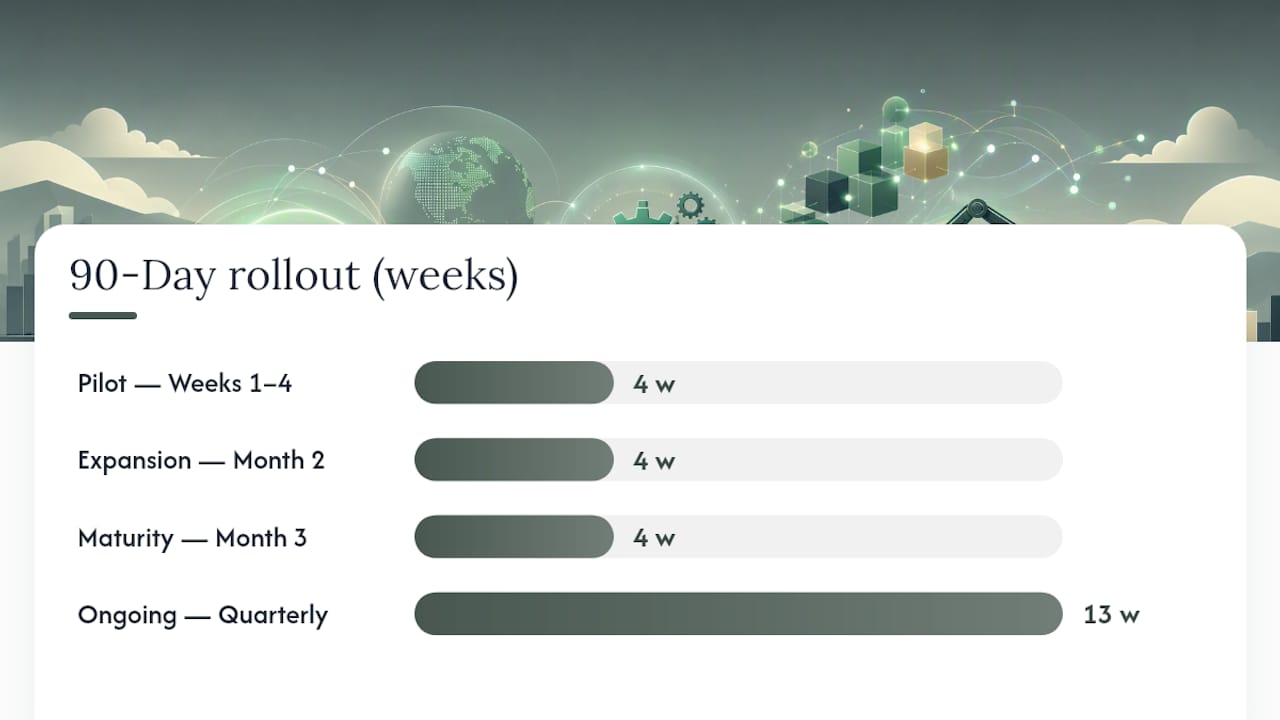
Rolling out automation in one weekend, connecting every channel, mapping every account, and trusting it immediately, is how sellers end up with silently broken books. A phased approach protects you from that, and it takes roughly 90 days done right.
Start by scoring every candidate workflow on four factors: how often it happens, how much manual effort it currently takes, how much error risk it carries, and how much it affects your financials if it’s wrong. Order posting and payout reconciliation score highest on nearly every axis for most sellers, which is exactly why they come first.
Week 1 you connect your highest-volume channel, usually Amazon, and map its chart of accounts: revenue, each fee type, tax liability, and a clearing account. Week 2 you run test syncs on historical data, not live transactions, and compare the output against settlements you’ve already reconciled by hand. Week 3 you fix whatever mapping errors the test syncs revealed, and they will reveal some. Week 4 you go live on that one channel and watch it daily for the first two weeks.
Month 2 you add your second and third channels using the same test-then-live pattern, and you layer in inventory and COGS automation now that settlement posting is stable. Month 3 you automate sales tax tracking and build exception workflows, rules for what happens when a settlement doesn’t match cleanly, so exceptions route to a review queue instead of getting silently mis-posted.
| Phase | Timeframe | Primary focus |
|---|---|---|
| Pilot | Weeks 1 to 4 | Connect, map, and validate one channel |
| Expansion | Month 2 | Add remaining channels, automate inventory and COGS |
| Maturity | Month 3 | Automate tax tracking, build exception handling |
| Ongoing | Quarterly | Audit mappings, retrain staff, check for API drift |
Change management is the part sellers skip and regret. Whoever touches the books, you, a bookkeeper, a fractional CPA, needs a short written reference for what each account means and what to do when something doesn’t match. Schedule a quarterly audit on the calendar now, not as an afterthought after something breaks.
How Do You Measure ROI From Accounting Automation?
You can’t prove automation worked if you never measured what “before” looked like. Capture your baseline in the week before you connect anything: hours spent per month on reconciliation, how many days it takes to close the books after month-end, the percentage of transactions that don’t match cleanly on the first pass, and any fees or reimbursements you suspect are going unrecorded.
After automation, track these against realistic improvement ranges:
- Time saved. Sellers moving from manual spreadsheets to an integrated automation stack commonly cut reconciliation time by more than half within the first two months.
- Error reduction. Fewer unmatched line items and fewer misposted refunds show up almost immediately once line-item mapping replaces lump-sum posting.
- Days to close. A close that used to take two or three weeks after month-end should shrink toward a few days once settlements post continuously instead of in a monthly batch.
A simple ROI calculation makes the case concrete: take your annual hours saved, multiply by your loaded hourly rate, and subtract the annual subscription cost. If automation saves 12 hours a month at $35 an hour, that’s $5,040 a year in recovered labor before you even count the value of catching a single missed reimbursement.
Measure on a 30, 60, and 90-day cadence, and report it the same way every time: hours saved, exception rate, and days to close. This cadence does double duty. It proves ROI to whoever approved the subscription, and it catches mapping drift early, before a broken fee mapping has quietly skewed three months of margin reports.
How BeanHawk Handles the Hardest Automation Problems
Amazon sellers face a version of this problem that’s harder than a typical Shopify store: FBA inventory gets lost, damaged, or miscounted in Amazon’s warehouses regularly, and Amazon doesn’t proactively tell you when it owes you money for it. Beanhawk was built specifically for that gap.

Beanhawk runs continuous monitoring of inbound shipments and FBA ledger events, catching discrepancies as they happen instead of during an annual audit nobody has time to run. When Amazon owes a reimbursement for lost or damaged inventory, the system flags it and helps you claim it, rather than letting it disappear into settlement noise.
The part that connects directly to everything covered above: Beanhawk automates settlement posting into QuickBooks and Xero, decomposing each settlement the correct way, sales, fees, refunds, and reimbursements landing in their own accounts, so the clearing-account pattern this guide describes isn’t something you build by hand.
Three specific problems this prevents:
- Missing reimbursements that never make it into revenue. Without continuous monitoring, a $40 reimbursement for a damaged unit just vanishes into a settlement line nobody reviewed closely.
- Misposted fees that quietly erode margin visibility. Automated line-item mapping means fulfillment, storage, and referral fees land in their own accounts instead of one blended bucket.
- COGS drift from unreconciled inventory movement. When reimbursement and inventory data connect to the same posting engine, your cost basis stays accurate instead of slowly diverging from reality.
If you want to see where the leaks are before committing to anything, start with a free audit. It’s the fastest way to find out whether your current settlement posting is quietly costing you money, and it pairs well with reading through how to reconcile Amazon payouts in QuickBooks to understand exactly what the automated version replaces.
Why the Five-Minute Fix Beats the Six-Month Rebuild
The conventional advice on ecommerce accounting automation treats it like a software purchase: pick a tool, connect it, move on. That framing undersells how much of the real work is accounting judgment, not integration plumbing. The sellers who get burned aren’t the ones who chose the wrong platform. They’re the ones who let a connected platform post net deposits as revenue for eight months before a tax preparer asked why gross margin didn’t match reality.
What gets underweighted almost everywhere is validation cadence. Everyone talks about the initial setup and nobody talks about the monthly five-minute check that catches drift before it compounds. A mapping error caught in week three costs you an afternoon. The same error caught at year-end costs you a restatement.
If you take one thing from this guide, prioritize the clearing account pattern over anything else. It’s the single mechanism that separates books you can trust from books that happen to look plausible. Everything else, phased rollout, ROI dashboards, tax automation, only matters once that foundation holds.
Get Your Books Right Without Building the Automation Yourself
Beanhawk gives Amazon and multi-channel sellers something a generic accounting automation tool doesn’t: continuous monitoring built specifically for FBA’s messiest problem, inventory that goes missing or gets damaged inside Amazon’s own warehouses, paired with settlement posting that already follows the clearing-account pattern this guide walks through.

Instead of piecing together API connections, chart-of-accounts mapping, and reimbursement tracking on your own, you get a system that watches inbound shipments and FBA ledger events continuously, flags what Amazon owes you, and posts the decomposed settlement straight into QuickBooks or Xero with no hidden fees or commissions on what it recovers. That combination, reimbursement recovery plus accurate settlement posting, is exactly what closes the gap between a books-look-fine spreadsheet and books that actually hold up under scrutiny.
If you’re not sure whether your current setup is leaving money on the table, start with a free audit and see what Amazon might owe you for lost or damaged inventory before you build anything else.
Sources
A few references are worth bookmarking as you build out your own automation stack:
- How to Automate Your E-Commerce Accounting Stack in 2026 , Ecommerce Times
- QuickBooks Workflow Automation: Prioritize for Maximum ROI
- E-commerce Accounting Automation: Top Tools & Best Practices
- Statista , Worldwide retail e-commerce sales
FAQ
What Is the First Workflow to Automate in Ecommerce Accounting?
Payout reconciliation paired with order posting, since it touches every transaction and carries the highest financial risk if it’s done wrong.
What Happens When You Post a Payout as Revenue Instead of Decomposing It?
You understate your real sales, hide your true fee burden, and produce margin and tax figures that don’t reflect what actually happened in the transaction.
How Much Higher Is Landed Cost Than Invoice Price?
Landed cost typically runs about 18% higher than the invoice price once freight, duties, and prep fees are included.
How Long Does a Full Automation Rollout Take?
A phased rollout, one channel first, then expansion, then tax and exception handling, typically takes about 90 days from pilot to full maturity.
Can Beanhawk Post Directly Into QuickBooks or Xero?
Yes. Beanhawk automates settlement posting into both platforms, decomposing sales, fees, and reimbursements while continuously monitoring FBA ledger events for money Amazon owes you.
Which Accounting Platforms Work Best for Ecommerce Automation?
QuickBooks and Xero cover the large majority of ecommerce sellers and both support line-item journal posting, which is essential for accurate settlement decomposition.