
Best Connex for QuickBooks Alternatives for E-Commerce Sellers

For most small- to medium- e-commerce sellers, the strongest Connex alternatives are Webgility (QuickBooks Desktop with order-level inventory), MyWorks Sync (Shopify-first merchants on QBO), and Beanhawk (Amazon sellers who need settlement posting plus reimbursement recovery). Connex runs at a premium price monthly, which pencils out only for high-complexity wholesale or B2B accounts. Most SMB sellers are paying for capabilities they do not use.
Here is the quick shortlist:
- Beanhawk , Automated FBA settlement posting, continuous ledger monitoring, and reimbursement recovery; best for Amazon-first sellers who want reconciliation and lost-inventory claims in one tool.
- Webgility , Deep SKU and COGS automation; best for QuickBooks Desktop or Enterprise users who need order-level inventory updates.
- MyWorks Sync , Shopify-native connector with configurable field mapping; best for Shopify merchants on QuickBooks Online.
- Link My Books , Price-competitive Amazon settlement decomposition with clear journal posting; best for Amazon sellers who want a focused, lower-cost option.
- Zapier / Make , No-code automation for simple, event-based workflows; best for teams with light integration needs and no audit-grade requirements.
QuickBooks compatibility note: Webgility supports both QBO and QuickBooks Desktop. MyWorks Sync, Link My Books, and Beanhawk target QBO primarily. ZappySys SSIS PowerPack works across environments but requires technical setup.
If you are an Amazon-first seller with FBA settlement reconciliation needs, start with Beanhawk. If you run Shopify on QBO, trial MyWorks Sync first.
Key Takeaways
Connex alternatives exist across every price point and use case, but the right choice depends on your QuickBooks version, primary channel, and whether you need order-level or settlement-level posting.
| Point | Details |
|---|---|
| Connex pricing drives most switches | At approximately $399/month, Connex is cost-effective only for high-complexity wholesale or B2B accounts. |
| Posting model is the first decision | Order-level posting suits QuickBooks Desktop inventory; summary settlement posting suits high-volume marketplace reconciliation. |
| Native QBO connector has real limits | The free Intuit Amazon connector posts settlements as a single line with no decomposition and no multi-currency support. |
| Match tool to volume and channel | Under $500K GMV, a focused paid connector is sufficient; above that, audit-grade decomposition becomes necessary. |
| Beanhawk adds reimbursement recovery | For Amazon sellers, Beanhawk combines automated settlement posting with continuous FBA ledger monitoring and lost-inventory claims. |
Table of Contents
- How do the top Connex alternatives compare?
- What does each alternative actually do?
- How do you choose the right Connex alternative?
- How do you migrate away from Connex?
- What merchants typically miss when swapping connectors
- Why Beanhawk is worth considering alongside these connectors
- Sources
- FAQ
How do the top Connex alternatives compare?
Market directories consistently surface Zapier, Make, Albato, ZappySys SSIS PowerPack, Webgility, and MyWorks Sync as the most commonly evaluated alternatives. The table below maps each against the dimensions that actually drive the buying decision.
| Tool | Best for | QBO / Desktop | Two-way sync | Key channels | Setup complexity | Pricing / trial | Multi-currency |
|---|---|---|---|---|---|---|---|
| Beanhawk | Amazon sellers needing settlement posting + reimbursement recovery | QBO, Xero | Yes (settlements, inventory, COGS) | Amazon, multi-channel | Low (managed onboarding) | Subscription; free audit | Yes |
| Webgility | QuickBooks Desktop / Enterprise, order-level inventory | QBO + Desktop | Yes (orders, inventory, returns) | Shopify, Amazon, BigCommerce, eBay | Medium | Paid tiers; trial available | Yes |
| MyWorks Sync | Shopify merchants on QBO | QBO | Yes (orders, customers, products) | Shopify | Low | Paid; free trial | Yes |
| Link My Books | Amazon settlement decomposition | QBO, Xero | Summary posting | Amazon, Shopify, eBay | Low | Paid; free trial | Yes |
| Zapier | Simple event-based automations | QBO | Limited (trigger-action) | many apps | Very low | Free tier; paid plans | Limited |
| Make | Complex multi-step visual workflows | QBO | Conditional | many apps | Low,medium | Free tier; paid plans | Limited |
| Albato | Mid-market multi-channel merchants | QBO | Yes | Shopify, Amazon, others | Medium | Paid; trial available | Moderate |
| Amaka | Marketplace and POS connectors | QBO, Xero | Yes (packaged mappings) | Square, Shopify, marketplaces | Low | Paid; free trial | Yes |
| ZappySys SSIS PowerPack | Technical / ETL custom integrations | QBO + Desktop | Configurable | Custom via SSIS | High | Paid; trial available | Configurable |
| eZintegrations | Standard prebuilt connector needs | QBO | Yes | Shopify, Amazon, others | Medium | Paid | Moderate |
| NetSuite | Enterprise / high-growth sellers | Native ERP | Yes (native) | All major channels | High | Enterprise pricing | Yes |
| QuickBooks Online | SMB cloud accounting (native connector) | QBO | Limited | Amazon (native) | Very low | Included in QBO plan | Limited |
| Xero | Cloud accounting alternative to QBO | Xero | Via connectors | Via third-party apps | Low | Paid; trial available | Yes |
| TP: True Profit Analytics | Profit and analytics reporting | QBO, Xero | Analytics only | Amazon, Shopify | Low | Paid | Moderate |
| Shine Ecommerce | E-commerce bookkeeping automation | QBO, Xero | Yes | Shopify, Amazon | Low | Paid | Yes |
| Mipler Reports & Analytics | Advanced Shopify reporting | Shopify-native | Reporting only | Shopify | Very low | Paid; free plan | Yes |
| Xero Bridge by Parex | Shopify-to-Xero posting | Xero | Yes | Shopify | Low | Paid; free trial | Yes |
Pro Tip: Choose summary posting (Beanhawk, Link My Books, Amaka) when your priority is clean settlement reconciliation and P&L accuracy. Choose order-level posting (Webgility, MyWorks Sync) when QuickBooks is your operational inventory system and you need per-SKU COGS tracking inside the ledger.
What does each alternative actually do?
Beanhawk
Beanhawk goes beyond connector territory. It continuously monitors your FBA ledger events and inbound shipments, files reimbursement claims for lost or damaged inventory, and posts settlements to QuickBooks or Xero automatically. No hidden commissions on recovered funds. For Amazon sellers whose biggest accounting headache is settlement decomposition plus unreimbursed inventory, this combination is hard to replicate with a standalone connector.
Best for: Amazon and multi-channel sellers who need reimbursement recovery alongside automated reconciliation. QBO/Desktop: QBO and Xero. Channels: Amazon, multi-channel. Two-way sync: Yes. Trial: Free audit available.
Webgility
Webgility is the go-to for QuickBooks Desktop users. It pulls order-level data, updates SKU inventory inside QuickBooks, and handles COGS automation in a way that QBO-only connectors cannot match. Roundups consistently recommend it for Desktop and inventory-heavy scenarios. The tradeoff is a steeper setup and a higher price point than Shopify-focused tools.
Best for: QuickBooks Desktop / Enterprise with operational inventory. Channels: Shopify, Amazon, BigCommerce, eBay, ShipStation.
MyWorks Sync
MyWorks Sync is built Shopify-first. The field mapping is granular, the sync is bidirectional, and the setup is straightforward enough that most merchants configure it without a developer. It does not try to be everything; it does Shopify-to-QBO exceptionally well.
Best for: Shopify merchants on QBO who want configurable, direct mapping.
Link My Books
Paid connectors that rebuild Amazon settlement reports into decomposed journal entries are preferable for audit-grade reconciliation. Link My Books does exactly that at a price point below Connex. It separates fees, refunds, and reserves into distinct lines and posts on a settlement cadence. Supports QBO and Xero.
Best for: Amazon sellers who want settlement decomposition without a large monthly fee.
Zapier and Make
Neither Zapier nor Make is a true accounting connector. Zapier automates trigger-action events across its massive app ecosystem; Make adds visual scenario design and conditional logic for more complex flows. Both work for lightweight QuickBooks automations. Neither reconstructs settlement reports or handles audit-grade reconciliation. Use them when your integration need is genuinely simple.
Albato
Albato sits between general automation platforms and purpose-built connectors. It offers prebuilt connectors for common e-commerce channels with moderate customization. A reasonable option for mid-market merchants who need multi-channel coverage without building custom flows.
Amaka
Amaka packages marketplace and POS-to-accounting mappings out of the box. Square, Shopify, and several marketplaces are supported. The bookkeeping-focused outputs and standard mappings make it accessible for merchants who want a vendor to handle the mapping logic.
ZappySys SSIS PowerPack
This is a developer tool, not a merchant tool. If your team runs SQL Server Integration Services and needs a programmable ETL approach to sync complex or custom data flows into QuickBooks, ZappySys delivers. Everyone else should look elsewhere.
eZintegrations, Shine Ecommerce, TP: True Profit Analytics, Mipler, Xero Bridge by Parex
These tools serve narrower or complementary roles. eZintegrations offers standard prebuilt connector features for Shopify and Amazon. Shine Ecommerce automates bookkeeping for Shopify and Amazon sellers on QBO or Xero. TP: True Profit Analytics focuses on profit reporting rather than ledger posting. Mipler is a Shopify-native reporting tool, not an accounting connector. Xero Bridge by Parex handles Shopify-to-Xero posting specifically.
NetSuite and QuickBooks Online (native)
NetSuite is an ERP, not a connector. It makes sense when a seller outgrows QuickBooks entirely. The native Intuit Amazon connector is free on paid QBO plans but posts settlements as a single adjustment line with no decomposition and no multi-currency handling. That limitation is exactly where paid connectors earn their cost.
Pro Tip: The QuickBooks support docs note that the initial Amazon import can take anywhere from 10 minutes to several hours depending on transaction volume. Plan your migration window accordingly.
How do you choose the right Connex alternative?
Start with these criteria in priority order:
- QuickBooks version , Desktop or Online? Webgility is the clearest Desktop choice. Most other connectors target QBO.
- Posting model , Do you need order-level SKU tracking inside QuickBooks, or settlement-level summary posting? Order-level posting suits Desktop inventory management; summary posting suits high-volume marketplace reconciliation.
- Primary channel , Shopify-first sellers have different needs than Amazon-first sellers. MyWorks Sync is built for the former; Beanhawk and Link My Books for the latter.
- Transaction volume , The Eightx volume matrix suggests native/free connectors for under $500K GMV, mid-band paid tools for $500K,$3M, and higher-priced multi-channel connectors above that.
- Multi-currency and VAT , If you sell internationally, confirm the connector handles currency conversion and tax line decomposition before committing.
- Custom field mapping , Bundles, kits, and non-standard SKUs break basic connectors. Ask specifically about bundle support.
- Rollback capability , Can you undo a bad sync period without manual journal corrections?
- Support model , Self-serve docs, live chat, or dedicated onboarding? Match this to your team’s technical capacity.
Questions to ask every vendor during trial
- Does your tool support QuickBooks Desktop, QBO, or both?
- How does it handle Amazon FBA settlement decomposition (fees, refunds, reserves as separate lines)?
- What happens when a sync fails mid-period? Is there a rollback?
- How are bundles and kit SKUs mapped?
- Does multi-currency conversion happen inside the connector or inside QuickBooks?
- What is the sync frequency (real-time, hourly, daily, per settlement)?
- Is pricing per store, per channel, or per order volume?
- What does onboarding look like, and how long does initial historical import take?
- Do you support multi-entity or multi-account setups?
- Where is data stored, and what are your SOC 2 or equivalent compliance certifications?
Red flags to watch for
- No rollback or undo for failed sync periods
- Settlement posted as a single lump sum with no line-item breakdown
- No support for bundle or kit SKUs
- Pricing that scales by order volume with no cap
- No documented multi-currency handling
- Vague onboarding timeline (“it depends”)
- No published integration documentation or changelog
Scenario example: An FBA seller with 1,200 monthly orders across Amazon and Shopify needs settlement decomposition (fees, refunds, reserves posted separately), multi-currency support, and a rollback option. A general automation tool like Zapier fails on all three. A summary connector like Link My Books or Beanhawk handles the first two; Beanhawk adds reimbursement recovery on top.
How do you migrate away from Connex?
Migration is straightforward if you plan it in stages. Rushing the cutover is where most teams lose data integrity.
- Audit your current Connex mappings , Export every account mapping, custom field rule, and channel configuration. Document which QuickBooks accounts receive which settlement lines.
- Export a sample of historical settlement periods , Capture at least two full Amazon pay cycles (14-day periods) to use as your validation baseline.
- Set up a test QuickBooks account or sandbox , Never run a new connector against your live books first.
- Install the new connector and configure mappings , Mirror your existing Connex rules as closely as possible before adding any changes.
- Run a parallel sync , Let both Connex and the new tool post the same period simultaneously. Compare line by line.
- Validate settlement reporting , Confirm fees, refunds, reserves, and COGS land in the correct accounts. Check that the new tool’s totals match your Connex baseline.
- Test edge cases , Returns, refunds, FBA reimbursements, and marketplace fee adjustments are where connectors diverge. Test each explicitly.
- Document your rollback plan , Know exactly how to revert if the new connector posts incorrectly after cutover.
- Final cutover , Disable Connex, activate the new connector, and monitor the first two live settlement periods closely.
- Post-cutover checks , Reconcile COGS, P&L, and inventory balances against your pre-migration baseline. Confirm QuickBooks is good for your Amazon workflow with the new setup.
Timeline estimates:
- Small store (1 channel, under 500 orders/month): 1,2 days
- Medium store (2,3 channels, 500,3,000 orders/month): 3,5 days
- Complex store (4+ channels, bundles, multi-currency, Desktop): 2,4 weeks
Common pitfalls: Bundle SKUs that map differently across channels, return transactions that post to the wrong period, and marketplace fee line items that collapse into a single expense account when they should be split.
What merchants typically miss when swapping connectors
The technical migration usually goes fine. What breaks things is the operational layer nobody documents before switching.
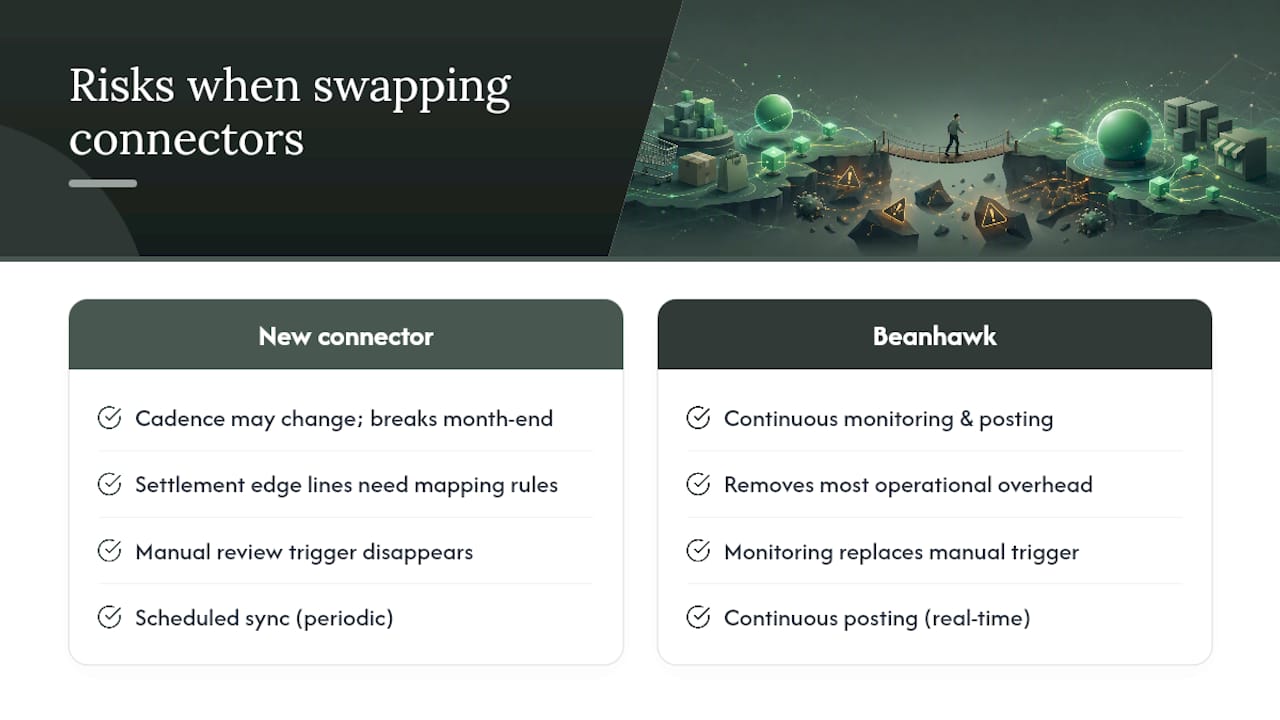
Most teams focus on whether the new connector maps to the right QuickBooks accounts. They forget to ask whether the reconciliation cadence changes. Amazon pays on a 14-day cycle; if your new connector posts on a different schedule than Connex did, your month-end close process breaks even if every individual line is correct. Settlement nuances compound this: FBA reserve amounts, loan repayments, and advertising adjustments all appear inside settlement reports and need explicit mapping rules. A connector that handles standard settlements cleanly can still mangle these edge lines.
The other thing teams miss is internal process change. Connex may have been the trigger for a manual review step your bookkeeper runs every two weeks. When you swap connectors, that trigger disappears unless someone rebuilds it deliberately. For sellers with complex FBA inventory situations, a managed service like Beanhawk removes most of this operational overhead because the monitoring and posting happen continuously rather than on a scheduled sync.
Why Beanhawk is worth considering alongside these connectors
Most connectors move data. Beanhawk also recovers money.
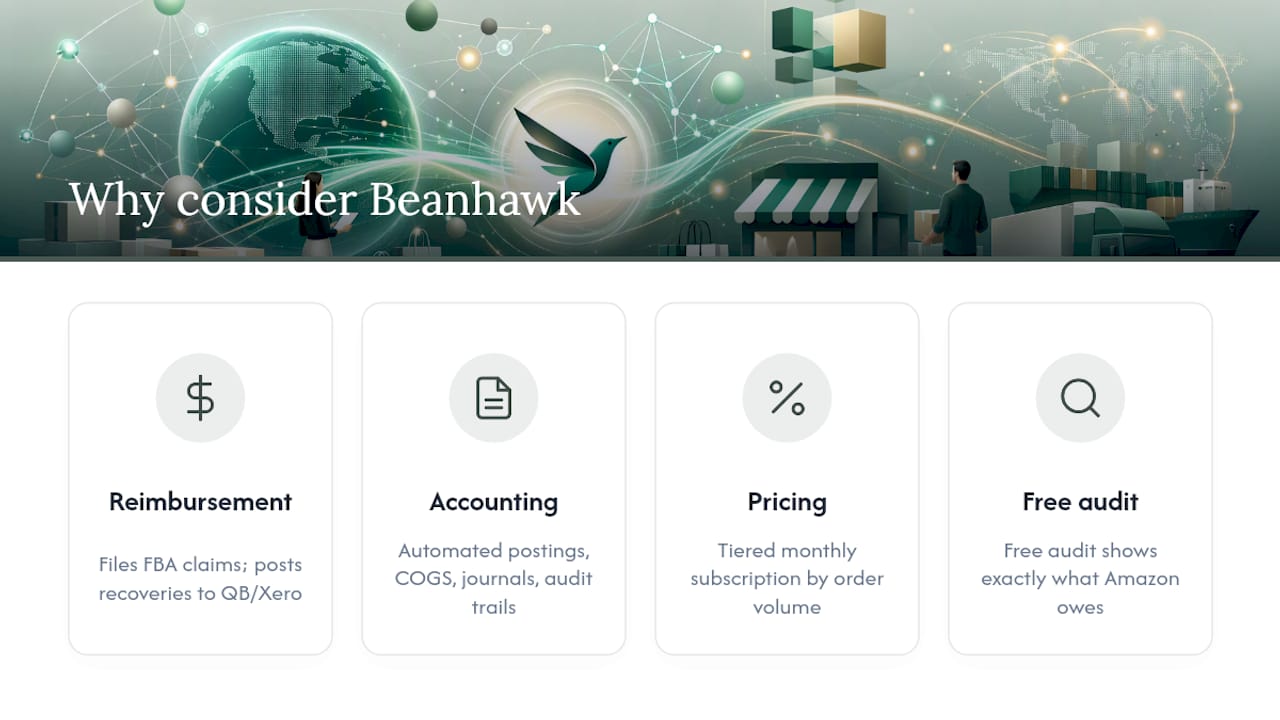
For Amazon sellers, FBA reimbursements for lost or damaged inventory are a real, recurring revenue line that most connector tools ignore entirely. Beanhawk monitors every inbound shipment and ledger event continuously, files claims on your behalf, and posts the recovered amounts directly to QuickBooks or Xero. No hidden commissions on what it recovers.

The accounting side covers automated settlement posting, COGS management, centralized journal entries across channels, and PO and landed cost tracking. Audit trails are built in. The pricing model is a tiered monthly subscription based on order volume, and a free audit is available so you can see exactly what Amazon owes you before committing to a plan. If you manage multiple Amazon accounts or want reimbursement recovery running alongside your reconciliation, start with the free Beanhawk audit to see the gap before you pick any connector.
Sources
- Best QuickBooks POS Integration Tools Compared (2026) | Growthy
- Connect Amazon Seller Central to QuickBooks Online: what the free Intuit connector actually posts in 2026 (and when settlement reconciliation forces the upgrade) | Eightx
- Amazon settlement reconciliation in QuickBooks Online: 4 integration approaches (TechBullion)
- Best Connex For QuickBooks Alternatives 2026
- Connect Amazon Seller Central to QuickBooks (QuickBooks support)
FAQ
What are the best free alternatives to Connex for QuickBooks?
The native Intuit Amazon Marketplace Connector is free on paid QuickBooks Online plans, but it posts settlements as a single line with no decomposition. Zapier and Make both offer free tiers for lightweight automations, though neither handles audit-grade settlement reconciliation.
What is the main difference between Connex and Webgility?
Connex targets high-complexity wholesale and B2B workflows at approximately $399/month. Webgility focuses on order-level SKU and COGS automation and is the stronger choice for QuickBooks Desktop or Enterprise users who need per-SKU inventory updates inside their ledger.
What are people replacing QuickBooks with at the enterprise level?
Sellers who outgrow QuickBooks typically move to NetSuite, which provides a full ERP with native multi-entity support and financials. For most SMB sellers, the issue is not QuickBooks itself but the connector sitting between it and their sales channels.
When does a paid connector pay for itself over the free native option?
For Amazon sellers, the break point is typically around $500K annual GMV, where FBA settlement complexity creates repeated manual adjustments that cost more in bookkeeper time than a paid connector’s monthly fee. The free native connector’s single-line posting becomes a liability at that scale.
Can Beanhawk replace a QuickBooks connector entirely?
For Amazon sellers, Beanhawk handles automated settlement posting, COGS management, and reimbursement recovery in one tool, which covers the core reconciliation need without a separate connector. Multi-channel sellers who also run Shopify or other platforms may still want a dedicated Shopify connector alongside it.