
Building an Ecommerce Chart of Accounts That Actually Reconciles

An ecommerce chart of accounts must separate channel revenue and COGS, track marketplace fees and clearing accounts, record sales tax as a liability, and allocate landed cost to COGS so you can see true margins. Any structure missing those elements will hide the gap between what a marketplace pays out and what actually happened financially, and that gap grows every month you leave it unfixed.
TL;DR:
- Separate gross sales, COGS, and fees for each sales channel to maintain clear profit analysis and prevent fee spikes from going unnoticed.
- Use clearing accounts to hold settlement reports temporarily, ensuring payouts reconcile to zero before deposits clear in the bank.
- Track sales tax payable as a liability with state sub-accounts and record refunds as contra-revenue, not expenses.
- Automate settlement postings and inventory adjustments to avoid reconciliation gaps, especially when managing multiple platforms and currency conversions.
- Regularly reconcile accounts weekly or monthly to catch errors early, and avoid mixing currency gains or losses into core revenue lines for clarity.
Table of Contents
- Key Account Categories Every Ecommerce Chart of Accounts Needs
- How Do You Build or Fix an Ecommerce Chart of Accounts?
- Sample Starter Chart of Accounts for Ecommerce Sellers
- Practical QuickBooks and Xero Mapping Tips
- Best Practices and Common Mistakes to Avoid
- How Automation Prevents Reconciliation Gaps
- Why an Ecommerce-Specific Chart of Accounts Matters
- Handling Deferred Revenue and Subscription Models in Ecommerce
- Integration Considerations Beyond Account Mapping
- Segmenting Marketing Expenses by Channel
- Managing Multi-Currency Transactions Across Channels
- How Often Should You Reconcile Ecommerce Accounts?
- Publisher Perspective: Why We Recommend This Structure
- Let Beanhawk Keep Your Chart of Accounts Accurate
- Resources to Build and Maintain Your Chart of Accounts
- Sources
- FAQ
Key Account Categories Every Ecommerce Chart of Accounts Needs
A generic chart of accounts treats “sales” as one number. An ecommerce chart of accounts treats it as several, because Amazon, Shopify, and Walmart Marketplace each generate revenue, fees, and payouts differently, and blending them destroys your ability to see which channel actually makes money.
Start with per-channel revenue accounts. Gross sales for Amazon, Shopify, and any other channel need their own line, recorded at the gross sale amount, not the net deposit that lands in your bank account. The difference between those two numbers is fees, and if you only book the net deposit, you’ve buried your fee structure inside your revenue line where you can never analyze it again.
Per-channel COGS follows the same logic, with landed cost, meaning product cost plus freight, duty, and inbound handling, allocated into it rather than expensed separately. A marketplace fee parent account should break into sub-accounts for referral fees, FBA fulfillment fees, storage fees, advertising spend, and payment processor fees. Lump them together and you lose the ability to spot a storage-fee spike before it eats your margin.
Every channel also needs its own clearing account, a temporary holding account that captures the full settlement report before it’s split apart and matched to the bank deposit. Sales tax payable belongs on the balance sheet as a liability, not revenue, with state sub-accounts once you have nexus in multiple states. Refunds and discounts post as contra-revenue, deducted from gross sales, never as an expense. Round it out with inventory accounts for on-hand stock, in-transit stock, and inventory adjustments.
- Per-channel revenue and COGS accounts
- Marketplace fee sub-accounts (referral, fulfillment, storage, ads, processing)
- Per-channel clearing accounts
- Sales tax payable with state-level sub-accounts
- Contra-revenue for refunds and discounts
- Inventory on-hand, in-transit, and adjustment accounts
How Do You Build or Fix an Ecommerce Chart of Accounts?
Setting this up isn’t a weekend project if you’re migrating from a generic small-business template, but it’s a finite one. Here’s the sequence that avoids rework.
- Decide your channel mapping approach. Choose between fully separate accounts per channel or class tracking with a single set of ledgers. Separate accounts give cleaner audit trails; class tracking gives faster setup and one unified P&L with channel filters.
- Build accounts in this order: revenue, then COGS, then clearing, then fee sub-accounts, then inventory and landed cost, then sales tax payable. Building clearing accounts before fees exist gives you nothing to map them to.
- Map each marketplace’s settlement report to its clearing account first, then split fees into their sub-accounts and gross sales into the revenue account. A typical journal entry debits the clearing account for the full settlement, credits gross revenue, and debits each fee sub-account for its share.
- Set a monthly closing checklist: zero out clearing accounts to $0 after each settlement clears, verify sales tax payable matches your filed returns, and confirm inventory adjustments tie to a physical count or FBA ledger event.
- Test with one settlement report before automating the whole feed. Reconcile it by hand, check that the clearing account nets to zero, and confirm gross sales minus all fee sub-accounts equals your actual bank deposit.
Pro Tip: Run your first month in parallel, old method and new chart of accounts side by side, and only retire the old method once three consecutive clearing accounts hit zero without a manual adjustment.
Sample Starter Chart of Accounts for Ecommerce Sellers
A lean but complete starter template covers a moderate number of accounts for a multi-channel seller, once you account for fee splits and tax nexus. Here’s a base structure you can copy into QuickBooks or Xero and adjust.
| Account Number | Account Name | Type |
|---|---|---|
| , | Inventory Asset | Asset |
| , | Inventory In Transit | Asset |
| , | Amazon Clearing Account | Asset |
| , | Shopify Clearing Account | Asset |
| , | Sales Tax Payable, California | Liability |
| 4000 | Amazon Gross Sales | Revenue |
| , | Shopify Gross Sales | Revenue |
| , | Refunds and Allowances | Contra-Revenue |
| 5000 | Amazon COGS | COGS |
| , | Shopify COGS | COGS |
| , | Landed Cost Allocation | COGS |
| 6000 | Amazon Referral Fees | Expense |
| , | FBA Fulfillment Fees | Expense |
Use the 1000s for assets, 2000s for liabilities, 4000s for revenue, 5000s for COGS, and 6000s for expenses, then let the third digit denote channel. Only add a sales tax sub-account for states where you’ve crossed nexus thresholds; adding all fifty in advance clutters a chart you’ll rarely touch. Keep granularity to whatever level actually changes a decision. If you never act differently based on ad spend versus referral fees, don’t split them.
Practical QuickBooks and Xero Mapping Tips
Class tracking versus separate accounts is the first real decision, and it’s not universal. Class tracking works well when you want one clean P&L with channel filters and your connector tags transactions reliably. Separate accounts work better when you need an audit trail that survives a bookkeeper turnover or a tax review, since nothing depends on a tag being applied correctly at import.
Connectors that post automated settlement data, the kind used by tools like A2X or similar settlement processors, should always route through a clearing account first, never straight to revenue. If a connector posts fees directly to a generic “expenses” bucket instead of your fee sub-accounts, you’ll lose the ability to see referral fees creeping up relative to fulfillment fees.
- Confirm every sale maps to the correct channel revenue account, not a generic “sales” catch-all
- Verify fees split into their sub-accounts, not one lumped “marketplace fees” line
- Check that payouts clear to zero in the clearing account before hitting the bank feed
- Re-run a test import after any connector update, since mapping rules silently reset more often than vendors admit
Pro Tip: After any QuickBooks or Xero integration update, pull one settlement report and manually trace it through the clearing account to the bank deposit. A five-minute check catches a broken mapping before it corrupts a full month.
Best Practices and Common Mistakes to Avoid
Most chart of accounts problems aren’t structural, they’re maintenance failures. A clearing account with a growing, unexplained balance is the clearest warning sign in ecommerce books, and it usually means settlements are posting but never fully reconciling against the bank deposit.
- Reconcile clearing accounts weekly at scale, monthly at minimum, and never let a balance carry more than one period unexplained
- Book refunds as contra-revenue against gross sales, never as a standalone expense line
- Allocate landed cost, freight, duty, inbound handling, into COGS rather than leaving it in a general overhead account
- Resist the urge to create a new account for every fee type Amazon invents; only split out fees you’ll actually use to make a decision
- Keep fee detail granular enough to separate referral fees, fulfillment fees, and advertising spend, since those three move independently and blending them hides which one is actually squeezing margin
- Document every change to your chart of accounts with a date and reason, so a future bookkeeper or accountant isn’t reverse-engineering your logic a year later
Sales tax sitting inside a revenue account is the single most common error reviewers catch, and it’s an easy one to avoid. The IRS treats sales tax collected at checkout as money held on behalf of a government, not income, and it needs to live in a liability account until remitted.
How Automation Prevents Reconciliation Gaps
Beanhawk’s approach ties directly to this structure. It ingests marketplace ledger events continuously, posts gross sales to channel revenue and fees to their sub-accounts, then clears payouts through per-channel clearing accounts automatically. When Amazon owes a reimbursement for lost or damaged inventory, continuous inbound-shipment monitoring catches it and posts the credit to inventory and COGS instead of letting it disappear into miscellaneous income.
Why an Ecommerce-Specific Chart of Accounts Matters
A chart of accounts built for a generic small business assumes one revenue stream, one set of customers, and simple cost tracking. Ecommerce breaks every one of those assumptions the moment you sell on more than one channel.
Multi-channel clarity means being able to answer “which channel is actually profitable” without a spreadsheet reconstruction project. Blend Amazon and Shopify into one revenue line, and you can’t tell if Amazon’s higher fee structure is quietly eating a margin advantage that Shopify holds elsewhere. Split them from day one, and the answer sits directly on your P&L.
Inventory and COGS accuracy matters just as much. Ecommerce sellers carry inventory across multiple locations, sometimes their own warehouse, sometimes FBA, sometimes a 3PL, and each has different cost behavior. Landed cost, the true cost of a unit once freight and duty are included, needs to flow into COGS rather than sitting in a general expense account, or your gross margin will read higher than reality. That gap compounds fast: a seller who miscounts landed cost by even a few percentage points on every unit will misprice products for months before the error surfaces in a bank reconciliation.
The generic chart of accounts also fails at fee visibility. Referral fees, fulfillment fees, storage fees, and advertising spend all move independently, sometimes in opposite directions in the same month. A structure that lumps them together can’t tell you why net margin dropped even when gross sales climbed. An ecommerce-specific structure isolates each of those moving parts, so a fee spike becomes visible the same month it happens rather than three months later during tax prep.
Handling Deferred Revenue and Subscription Models in Ecommerce
Subscription boxes, replenishment programs, and prepaid bundles are common enough in ecommerce that most sellers eventually run into deferred revenue, even if they started as a pure transactional retailer.
When a customer pays upfront for a three-month supply or a recurring subscription, that cash isn’t fully earned revenue the moment it hits your bank account. It needs to sit in a deferred revenue liability account and get recognized into actual revenue as each shipment or service period is delivered. Booking the entire prepayment as revenue on day one overstates that month’s performance and understates every month after, which distorts trend analysis exactly when you need it most, during a subscription program’s early growth phase.
Set up a deferred revenue account under liabilities, separate from sales tax payable, and recognize a portion into the appropriate channel revenue account each billing cycle. If you run subscriptions through Shopify or a dedicated subscription app, check whether that platform’s reporting already separates deferred amounts from recognized amounts before it hits your books, since some connectors post the full charge as revenue by default. That’s a mapping error worth catching early, because it compounds with every renewal cycle.
For sellers running a mix of one-time sales and subscriptions, keep the two revenue types on separate accounts even within the same channel. A subscription box sold through Amazon still needs its own revenue line distinct from one-time Amazon product sales, because the deferred recognition schedule only applies to one of them.
Integration Considerations Beyond Account Mapping
Getting the chart of accounts right is only half the job. The integration layer connecting Shopify, Amazon, and your accounting platform introduces its own failure points that no amount of account structure fixes on its own.
Timing mismatches are the most common issue. Shopify orders post the moment a sale happens, but the corresponding payout might land in your bank account days later, and Amazon settlements batch on a biweekly cycle that rarely lines up with your monthly close. If your integration posts revenue on the order date but your bank feed shows the deposit two weeks later, you’ll see a gap that looks like an error but is actually just timing.
Currency handling is another layer integrations need to manage correctly, which the next section covers in more detail. Beyond that, watch for how your connector handles order edits, cancellations, and partial refunds that happen after a settlement has already posted. A refund processed after the clearing account has zeroed out needs to flow through as a new transaction, not a retroactive edit to a closed period.
Inventory sync between platforms matters too. If Shopify shows inventory as available while Amazon’s FBA ledger shows it as reserved or in-transit, your on-hand inventory account will be wrong until both feeds reconcile. Choose an integration that posts inventory adjustments as they happen rather than in a single batch at month-end, or you’ll spend every close chasing discrepancies that a same-day sync would have caught automatically.
Segmenting Marketing Expenses by Channel
Marketing spend is where a lot of ecommerce sellers lose the plot on true channel profitability, because ad spend often sits in one general “marketing expense” account regardless of which channel it supports.

Amazon PPC, Shopify-linked Meta and Google ads, and any influencer or affiliate spend tied to a specific channel all need their own sub-accounts under a marketing expense parent account. Without that split, a channel that looks profitable on paper might actually be losing money once you account for the ad spend required to drive its sales. A seller running Amazon PPC aggressively could show strong Amazon gross margin while genuinely losing money once acquisition cost is factored in, and a lumped marketing account hides that completely.
Tag each marketing expense to the channel it supports, and where a campaign spans multiple channels, either split it proportionally based on attributed sales or create a separate “cross-channel marketing” account rather than forcing an arbitrary allocation. Pair this with your per-channel revenue and COGS accounts, and you get a genuine channel-level profitability picture: revenue, minus COGS, minus fees, minus channel-specific marketing spend, equals real contribution margin per channel.
This segmentation also makes budget decisions easier.
Managing Multi-Currency Transactions Across Channels
Selling internationally through Amazon’s European or Canadian marketplaces, or through Shopify stores priced in local currency, introduces a layer most domestic-only charts of accounts never have to handle.
Each foreign-currency channel should still post to its own revenue and clearing accounts, but those accounts need a currency designation, and your accounting platform needs multi-currency support turned on before you start posting international sales. QuickBooks Online and Xero both support this, but it has to be enabled at the account level, not applied retroactively without some cleanup.
The real complexity comes from currency conversion timing. A sale recorded in euros on the day of purchase gets converted at that day’s exchange rate, but the actual payout might convert at a different rate days or weeks later when the marketplace settles. That difference creates a foreign exchange gain or loss, which needs its own account, typically a non-operating income or expense line, separate from your channel revenue and COGS accounts. Skip this step and your clearing account for that channel will never zero out cleanly, because you’re trying to match a converted deposit against an unconverted sale amount.
Keep exchange rate gains and losses out of your core revenue and COGS lines. Mixing currency fluctuation into your channel margin numbers makes it impossible to tell whether a currency’s profitability changed because of actual sales performance or just because the exchange rate moved.
How Often Should You Reconcile Ecommerce Accounts?
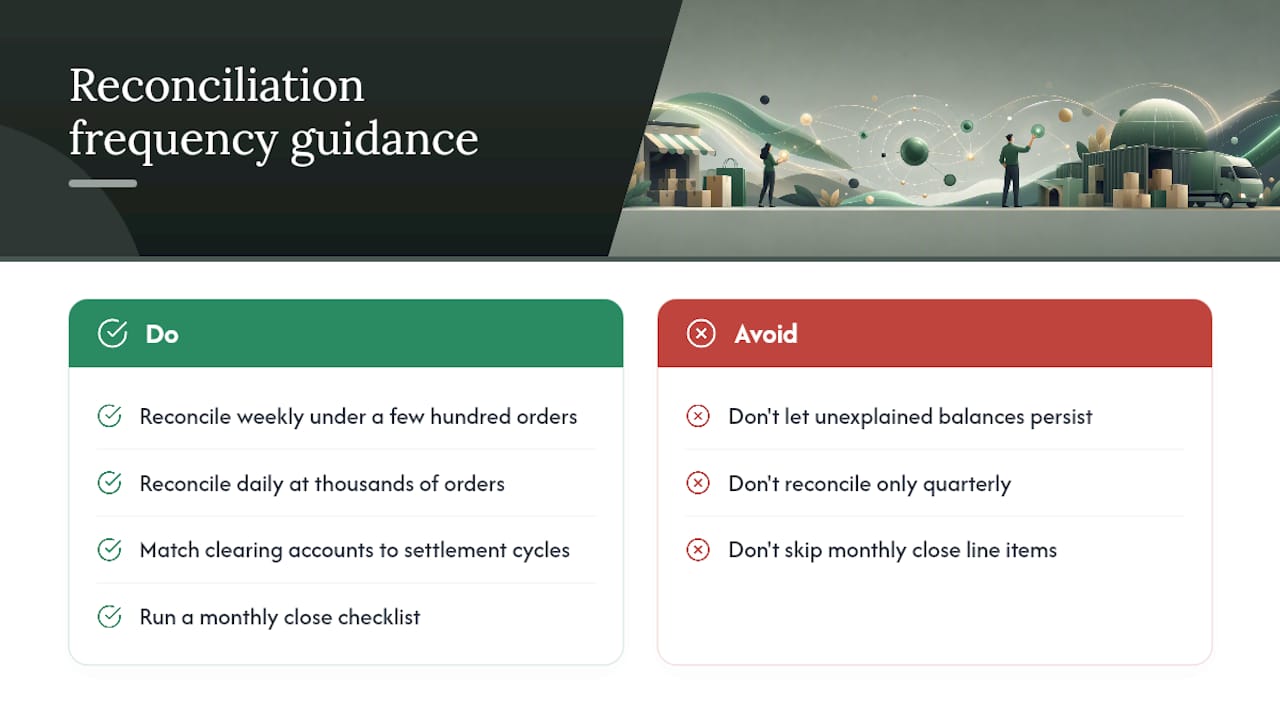
Reconciliation frequency depends on transaction volume, but the underlying principle doesn’t change: clearing accounts should never carry an unexplained balance for more than one settlement cycle.
Sellers doing under a few hundred orders a month can often reconcile weekly without much strain. Once volume climbs into the thousands, daily or near-daily reconciliation becomes necessary, simply because errors compound faster and get harder to trace the longer they sit. Amazon settles roughly every two weeks, so at minimum, each clearing account tied to Amazon needs a full reconciliation cycle matching that settlement schedule, checking that gross sales, fees, and net deposit all tie together before the next settlement lands on top of it.
The monthly close is where everything gets validated together: clearing accounts at zero, sales tax payable matching filed returns, inventory adjustments tied to physical counts or FBA ledger events, and deferred revenue balances reflecting only unearned amounts. Treat this as a checklist, not a review, since skipping one line item is exactly how a small discrepancy in March becomes an unexplainable variance by year-end.
Data integrity between platforms and books breaks down fastest when reconciliation gets treated as an occasional cleanup task instead of a routine. A seller who reconciles quarterly will always be chasing three months of accumulated small errors, while one who reconciles weekly catches a mapping mistake within days of it happening, before it touches more than one or two transactions.
Publisher Perspective: Why We Recommend This Structure
Reconciling marketplace payouts and recovering FBA reimbursements exposes every weakness in a generic chart of accounts fast. The channel-split structure, backed by automation, isn’t optional at any real volume.
, Tim
Let Beanhawk Keep Your Chart of Accounts Accurate
Building the right chart of accounts gets you halfway there. The other half is keeping it accurate every month, catching the reimbursements Amazon owes you before they get buried in a settlement report nobody reads closely. Beanhawk monitors your inbound shipments and FBA ledger events continuously, then posts settlements directly into QuickBooks or Xero using the same channel-level structure this article just walked through, revenue, fees, and clearing accounts all mapped correctly, without you touching a spreadsheet.

Where a generic bookkeeper reconciles once a month and misses reimbursement windows that close on a deadline, Beanhawk’s continuous monitoring catches lost or damaged inventory credits the moment Amazon’s ledger reflects them, then reconciles the recovery straight into your inventory and COGS accounts. If you’re unsure whether reimbursements you’re owed are slipping through the cracks right now, start with a free audit and see what your current books are missing.
Resources to Build and Maintain Your Chart of Accounts
- Chart of accounts glossary for a quick structural refresher
- Shopify fee calculator to model gross-to-net impact by channel
- Reconcile Amazon payouts in QuickBooks for a hands-on walkthrough
- Amazon seller accounting hub for FBA-specific account guidance
Sources
- Ecommerce Chart of Accounts: A Starter Template | Growthy
- QuickBooks for eCommerce: Setup, Optimization & Common Mistakes | Eightx
- The Best Chart of Accounts Setup for Ecommerce Businesses Using Shopify & Xero - Day One Advisory
- Amazon Seller Accounting 2026: Complete Guide to FBA Finances | Acuity
FAQ
What Are the 5 Basic Types of Accounts in a Chart of Accounts?
Every chart of accounts, ecommerce or otherwise, organizes around five categories: assets, liabilities, equity, revenue, and expenses. Ecommerce sellers expand each category with channel-specific detail, like per-channel revenue accounts or clearing accounts under assets.
How Do I Set Up Accounting for an Ecommerce Business?
Start by separating revenue and COGS per sales channel, add clearing accounts for each marketplace’s settlement report, record sales tax as a liability rather than income, and allocate landed cost into COGS. From there, map your platform’s settlement data into those accounts through QuickBooks or Xero, using class tracking if you prefer one set of books over separate account trees.
What Are the 7 Books of Accounts, and Do Ecommerce Sellers Need All of Them?
The traditional seven books of accounts, general journal, general ledger, cash receipts journal, cash disbursements journal, sales journal, purchases journal, and payroll journal, are largely automated within modern accounting software today. Ecommerce sellers still rely on their functions, just consolidated inside platforms like QuickBooks or Xero rather than kept as physical ledgers.
Can You Give an Example of a Small Business Chart of Accounts for Ecommerce?
A lean starter version includes inventory asset and in-transit accounts, a clearing account per sales channel, sales tax payable with state sub-accounts where you have nexus, gross revenue and COGS accounts split by channel, a contra-revenue account for refunds, and fee sub-accounts for referral, fulfillment, and advertising costs. Most multi-channel sellers land somewhere between 25 and 35 accounts total once those splits are in place.
Should FBA Reimbursements Get Their Own Account?
Yes. A dedicated reimbursement or reconciliation account keeps Amazon’s credits for lost or damaged inventory visible and tied to inventory and COGS, rather than buried inside miscellaneous income where they’re easy to overlook. Automation tools like Beanhawk post these reimbursements directly into that account as Amazon’s ledger reflects them.