
Yes, Amazon Reimburses FBA Damaged Inventory. Here’s How

Amazon does reimburse many cases of lost or damaged FBA inventory, but the reimbursement is not automatic for every event, and the clock on filing a claim starts ticking the moment the damage happens. If a unit is warehouse damaged, lost in a fulfillment center, or never received after inbound shipping, Amazon’s reimbursement policy typically applies. Customer damage that happens after delivery generally does not qualify.
Do these three things today:
- Pull the Inventory Reconciliation report and the FBA Inventory Ledger to spot negative adjustments without a matching reimbursement.
- Check your Payments reports for reimbursement transaction IDs tied to those adjustments.
- Open a case in Seller Central for any gap you find before the filing window closes.
Sellers who run this audit regularly recover 1 to 3 percent of annual revenue in unclaimed reimbursements, according to practical bookkeeping guides. Most cases resolve within a few weeks, though contested claims can take longer.
Key Takeaways
Amazon reimburses many lost and damaged FBA units, but recovering the full amount depends on catching Ledger discrepancies fast and filing before the window closes.
| Point | Details |
|---|---|
| Check three reports monthly | Run Inventory Reconciliation, FBA Inventory Ledger, and Payments to catch unreimbursed losses early. |
| Reimbursement basis changed | Amazon now bases reimbursements on manufacturing cost following its March 2025 policy update. |
| File within 18 months | Most claims must be filed inside an 18-month window, and some subtypes have shorter deadlines. |
| Reverse write-offs, don’t book revenue | Credit COGS when a reimbursement lands instead of recording it as new revenue. |
| BeanHawk automates detection and posting | Continuous Ledger monitoring plus automated QuickBooks and Xero posting shortens the gap between loss and recovery. |
Table of Contents
- What Amazon’s FBA Damaged Inventory Policy Actually Covers
- How Do I Find Lost or Damaged FBA Units?
- How to File a Claim for Damaged or Lost FBA Inventory
- Getting the Accounting Right When Reimbursements Land
- Why Do FBA Damage Claims Get Denied?
- How BeanHawk Closes the Gap Manual Audits Miss
- Authoritative Policy and How-To Resources
- What Most Sellers Get Wrong About Damage Claims
- Get Continuous Recovery Instead of Quarterly Guesswork
- Sources
- FAQ
What Amazon’s FBA Damaged Inventory Policy Actually Covers
Amazon’s official reimbursement policy applies to units lost or damaged inside a fulfillment center, inbound shipments that never get received, and warehouse-caused damage discovered during storage or processing. It does not cover damage a customer causes after delivery, and it does not cover losses traced to a seller’s own packaging or listing errors.
The mechanics changed in a way sellers should understand. Effective March 10, 2025, Amazon shifted its reimbursement basis to product manufacturing cost rather than a broader fulfillment center valuation, and it expanded automatic reimbursements for items lost inside its own facilities. That is good news for detection speed but bad news if your manufacturing cost is lower than what you used to get paid.
A few things determine whether a claim gets approved:
- The event must carry a valid Amazon reason code (damaged_warehouse, lost_warehouse, and similar labels).
- The claim must fall inside the applicable filing window.
- You need documentation tying the loss to a specific FNSKU and quantity.
Reason codes matter more than most sellers realize. File the wrong category, and even a legitimate loss can get bounced back to you.
How Do I Find Lost or Damaged FBA Units?
Finding the discrepancy is half the battle. Start with these reports, in this order:
- Inventory Reconciliation report , shows starting and ending inventory quantities alongside every adjustment, giving you the widest net for catching anomalies.
- FBA Inventory Ledger , filter by event type (damaged, lost, disposed) and reason code to isolate exactly which units triggered a write-off.
- Shipment Reconciliation report , flags inbound shipments where the received quantity does not match what you shipped.
- Returns report , separates customer-damaged returns from warehouse-caused damage, which matters because reimbursement rules differ between the two.
- Payments transaction view , search for reimbursement line items and match each one back to its Ledger event using the transaction ID.
Once you’ve matched a negative Ledger adjustment to a Payments entry, close the loop and move on. The units you cannot match, the “orphan losses,” are your claim list. For each one, record the FNSKU, quantity, reason code, date, and estimated unit cost.
Pro Tip: Keep a running spreadsheet with one row per orphan loss and update it weekly instead of scrambling through six months of Ledger data right before a filing deadline closes.
How to File a Claim for Damaged or Lost FBA Inventory
Amazon automatically reimburses a growing share of warehouse-loss events under its updated policy, but plenty of damage still requires you to file manually. If a unit shows a damaged or lost reason code in the Ledger with no corresponding Payments entry after a couple of weeks, it’s time to open a case.
Filing windows matter more than most sellers plan for. Most lost and damaged inventory claims fall under an 18-month filing window, but certain claim subtypes carry shorter deadlines, so don’t sit on a discrepancy hoping it resolves itself.
- Open a case under Fulfillment by Amazon > Report a Problem With FBA Inventory or the equivalent case log path.
- Reference the specific FNSKU, quantity, and date range pulled from your Ledger extract.
- Attach your evidence package and state the reason code you believe applies.
- Request confirmation of the reimbursement amount and transaction ID once approved.
Your evidence package should include:
- A Ledger extract showing the exact adjustment entry
- Shipment manifest or inbound shipping labels for inbound losses
- Supplier invoice or manufacturing cost documentation
- A screenshot of the Payments report showing no matching credit
Keep your case message short and factual: state the FNSKU, the event date, the reason code, and the outcome you’re requesting. Vague messages (“please check my inventory”) get generic responses. Specific messages with transaction IDs get resolutions.
Getting the Accounting Right When Reimbursements Land
Write off the loss when the Ledger posts the negative adjustment, not when the reimbursement arrives. Waiting distorts your inventory balance for weeks or months and makes your interim financials wrong in the meantime.
When the reimbursement does land, it reverses the original write-off rather than counting as new revenue. Best practice debits your Amazon asset account and credits COGS for the reimbursed amount, keeping gross revenue accurate and avoiding the common mistake of inflating sales figures with reimbursement cash. Booking a reimbursement as revenue is one of the fastest ways to make your margins look better than they actually are, and it will confuse anyone reading your P&L later.
Build a monthly reconciliation habit around three checks:
- Match every FBA Ledger reason code to a corresponding journal entry, whether that’s a write-off or a reversal.
- Flag any reimbursement transaction ID in Payments that doesn’t tie back to a known write-off, since orphan credits usually mean a missed loss you never logged.
- Confirm in-transit inventory gets recorded when shipped, not when received, so your balance sheet reflects reality during transit gaps.
Pro Tip: Tag every write-off journal entry with the Ledger’s transaction ID at the time you post it. Six months later, matching a reimbursement to its original loss takes seconds instead of an afternoon.
Why Do FBA Damage Claims Get Denied?
Three outcomes are possible once you file: automatic full reimbursement, partial reimbursement (common when quantity or cost documentation is incomplete), and denial. Each has a different accounting consequence, since a denial means the original write-off stands permanently rather than getting reversed.
Denials usually trace back to one of these:
- Insufficient proof , the case lacked a Ledger extract or shipment manifest tying the loss to a specific unit.
- Filed outside the window , the claim missed the 18-month deadline or a shorter subtype-specific cutoff.
- Seller-responsible determination , Amazon attributed the damage to packaging, labeling, or a listing error rather than warehouse handling.
If a denial looks wrong, request a specialist review and resubmit with additional evidence rather than just re-filing the same case. Reference the specific policy section and reason code in your appeal message, and keep it short. Cases that drag on with vague back-and-forth rarely end well.
How BeanHawk Closes the Gap Manual Audits Miss
Manual audits catch a lot, but they run on a schedule, usually monthly or quarterly, and every day between audits is a day a discrepancy sits unclaimed and edges closer to its filing deadline. BeanHawk runs continuous monitoring across your inbound shipments and FBA Ledger events instead, so a lost or damaged unit gets flagged the day it shows up rather than weeks later.
The gap between a loss occurring and a seller noticing it is where most unclaimed reimbursements disappear for good. Continuous monitoring closes that gap; a monthly spreadsheet audit cannot.
BeanHawk also automates settlement posting to QuickBooks and Xero, so approved reimbursements reverse the correct write-off in your books without manual journal entries. That matters for anyone managing multiple sales channels alongside FBA, where reconciliation gaps multiply fast.
- No commissions taken from recovered funds
- Centralized view across channels instead of report-by-report digging
- Journal entries posted automatically, tied to the original Ledger transaction ID
Pro Tip: If you’ve never run a full-year reimbursement audit, do it before your next tax filing. Unclaimed reimbursements you write off permanently cost you twice: once in lost inventory, once in an inflated COGS figure that understates your real margin.
Authoritative Policy and How-To Resources
- FBA lost and damaged inventory reimbursement policy , official qualifying conditions and timelines
- Update to the FBA inventory reimbursement policy , March 2025 reimbursement basis change
- FBA Damaged Inventory Ownership , ownership options for damaged units
- Amazon Reimbursement Tracking guide , report-mapping approach for audits
What Most Sellers Get Wrong About Damage Claims
The conventional advice treats reimbursement claims as a paperwork problem: find the loss, attach proof, wait for a check. That framing misses the bigger issue, which is detection speed. A loss that sits unnoticed for four months isn’t just a missed reimbursement, it’s four months of a distorted inventory balance and an understated COGS figure feeding every financial decision you make in between.
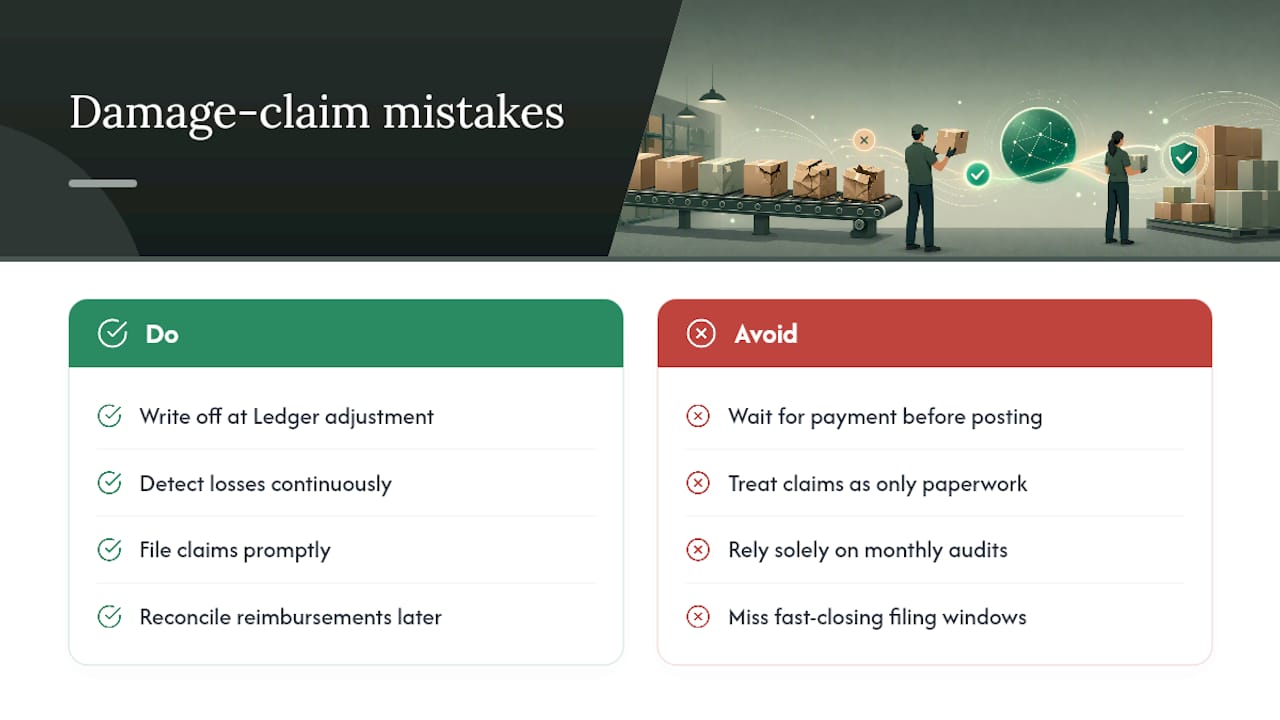
Most sellers also get the accounting backward. They wait for the reimbursement to arrive before touching their books, when the write-off should happen the moment the Ledger posts the adjustment. That single habit change, write off first, reconcile the reimbursement later, fixes more margin confusion than any claims template ever will.
Where I’d push back hardest on standard guidance: monthly audits are treated as sufficient. They’re not wrong, but they’re slow relative to how fast filing windows on certain claim subtypes close. Continuous monitoring isn’t a luxury for high-volume sellers anymore. It’s the difference between catching a loss in week one versus week twelve, and that gap is exactly where recoverable money quietly turns into a permanent write-off.
, Tim
Get Continuous Recovery Instead of Quarterly Guesswork
Running the reports above manually every month works, but it takes hours you probably don’t have, and every week between audits is a week a claim’s filing window gets shorter. Beanhawk replaces that manual cycle with continuous monitoring of your inbound shipments and FBA Ledger events, catching discrepancies the day they post instead of the day you finally sit down with a spreadsheet.

Beyond detection, Beanhawk automates the accounting side too: approved reimbursements post directly to QuickBooks or Xero, reversing the correct write-off without you touching a journal entry. No commissions taken from what you recover, and no hidden fees layered on top. If you’re managing FBA alongside other sales channels, that centralized view alone saves the report-by-report digging this article just walked you through.
Curious how much you might be leaving on the table? Learn more about how Beanhawk recovers lost and damaged inventory reimbursements and start with a free audit of your account.
Sources
- FBA lost and damaged inventory reimbursement policy
- Sellerbookkeeping
- How to Reconcile Amazon FBA Inventory to Your Books
FAQ
How Do You Account for Damaged Inventory?
Write off the loss as soon as the FBA Ledger posts the negative adjustment, then reverse that write-off and credit COGS when the reimbursement arrives, rather than recording the reimbursement as revenue.
What Are the Biggest FBA Mistakes Sellers Make With Damaged Inventory?
The two most common mistakes are waiting for reimbursement before writing off the loss, and never reconciling Ledger reason codes against Payments, which lets unclaimed losses age past their filing window unnoticed.
What Happens if I Receive a Damaged Item From Amazon?
If a fulfillment center damages your inventory, Amazon typically issues an automatic reimbursement or lets you file a case with your Ledger extract and shipment documentation as proof, depending on the reason code assigned.
What Does FBA Inventory Mean?
FBA inventory refers to units you’ve shipped to Amazon’s fulfillment network for storage, packing, and shipping under the Fulfillment by Amazon program, distinct from inventory you ship yourself.
Does Amazon Reimburse Customer-Damaged Returns?
Rarely. Customer damage that occurs after delivery generally falls outside Amazon’s reimbursement policy, unlike warehouse-caused damage or units lost inside a fulfillment center, which typically qualify.