
FBA Reconciliation Report: How to Find Missing Units

An FBA reconciliation report compares what Amazon says it received against what your own shipping records show, and any gap between those two numbers is money you’re owed. The fastest way to check your exposure right now: go to Manage FBA Shipments → Shipping Queue, filter to Closed shipments, and scan the Discrepancy column. Any non-zero number there is a case waiting to happen.
That single column is the most reliable signal in Seller Central for catching lost or miscounted inventory before the claim window closes. Industry estimates suggest roughly 1 in 5 shipments show some kind of shortfall, and Amazon won’t flag most of them for you. You have to go looking.
Here’s the immediate checklist:
- Open the Shipping Queue and filter to Closed shipments only.
- Note the shipment ID, ASIN, and FNSKU for every row with a non-zero Discrepancy value.
- Download the full reconciliation export for your records.
- If the shipment shows a valid eligibility date, open a Research case for the affected units.
Pro Tip: Run this check monthly, not just when something feels off. Save the reconciliation export and any related email correspondence before you open a case. Amazon investigators move faster when the paper trail is already organized.
Key Takeaways
Reconciling FBA shipments successfully depends on checking the Discrepancy column only after a shipment is Closed, documenting ownership and delivery proof immediately, and tracking every case to resolution.
| Point | Details |
|---|---|
| Check Closed shipments first | Filter Shipping Queue to Closed status and scan the Discrepancy column monthly. |
| Wait for eligibility | Filing before the shipment is Closed and eligible causes automatic declines. |
| Documentation wins cases | Supplier invoices and carrier POD/BOL are required for most research requests. |
| Track every case | Log shipment ID, discrepancy, eligibility date, and case ID in one spreadsheet. |
| Automate at scale | Beanhawk continuously monitors shipments and posts recovered reimbursements to QuickBooks or Xero automatically. |
Table of Contents
- Which Seller Central Reports Do You Need for FBA Reconciliation?
- How Do You Run and Interpret an FBA Reconciliation?
- When Should You File a Claim, and What Documents Does Amazon Require?
- What Causes FBA Discrepancies, and What’s the Right Fix for Each?
- How Do You Manage Evidence So Investigations Actually Get Approved?
- Should You Automate FBA Reconciliation?
- A Publisher’s Perspective on Reconciliation Discipline
- How BeanHawk Handles FBA Reconciliation for You
- Sources
- FAQ
Which Seller Central Reports Do You Need for FBA Reconciliation?
Six reports do most of the work, and each one answers a different question. Knowing which report to pull saves you from digging through the wrong data mid-investigation.
The Inventory Reconciliation report (sometimes called the Inventory Ledger export) is your master document. It tracks every unit from receipt to disposition and shows where quantities diverge from what you shipped. The Inventory Adjustments report lists every quantity change Amazon made to your inventory, including automatic write-offs you might not have noticed. FBA Inventory Ledger / Inventory Details breaks down current stock by location, reserved status, and inbound quantity. The Manage FBA Shipments tool, specifically its Shipping Queue and Reconcile tab, is where you actually file claims. The Reimbursements report shows what Amazon has already paid you, which matters because it’s easy to double-claim units Amazon already reimbursed automatically. Finally, Settlement reports tie everything back to your bank deposits, confirming reimbursements actually landed.
| Report | Best Use Case | Key Columns to Check |
|---|---|---|
| Inventory Reconciliation | Spot unit-level gaps across a shipment’s lifecycle | Discrepancy, Located, Expected |
| Inventory Adjustments | Catch automatic write-offs or corrections | Adjustment type, Quantity, Reason |
| FBA Inventory Ledger | Verify current stock and reserved units | Reserved, Inbound, Sellable |
| Shipping Queue / Reconcile | File Research or Missing item cases | Discrepancy, Eligibility date |
| Reimbursements | Confirm what’s already been paid | Reimbursement ID, Amount, Reason |
| Settlement | Verify reimbursements hit your account | Deposit date, Transaction type |
Export everything as CSV when you can. Excel formatting sometimes strips column headers that Seller Central’s own upload tool expects, and CSV gives you a cleaner audit trail if a case gets escalated. According to BeanHawk’s guidance on inventory reconciliation, cross-referencing the Inventory Reconciliation export against Adjustments and Reimbursements is the fastest way to find units that were already credited quietly, so you don’t waste a case on something Amazon already fixed.
- Pull Inventory Reconciliation first, always.
- Cross-check against Reimbursements before filing anything new.
- Keep Settlement reports as your final proof that money actually arrived.
How Do You Run and Interpret an FBA Reconciliation?
Start in Manage FBA Shipments. Select the shipment you’re investigating, open the Contents tab, then click Reconcile. From there, Seller Central shows you a side-by-side of what you sent versus what Amazon logged as received.
- Confirm the shipment status reads Closed. Amazon won’t process a research request on anything still marked In Transit or Delivered.
- Check for an eligibility date. If one is showing, that’s Amazon’s own signal that the discrepancy is old enough to investigate.
- Review the discrepancy at the SKU level, not just the shipment total.
- Select the correct Action Required option, either “Missing , Please Research” or “Unexpected , Please Research,” depending on the direction of the gap.
- Submit and record the case ID immediately.
The columns themselves tell a specific story. Units expected is what your packing list says you shipped. Units located is what Amazon’s warehouse actually scanned in. Discrepancy is simply the difference between the two, and it’s the number that decides whether you have a case at all. Located units by SKU breaks that number down when a shipment contains multiple products, which matters because a shipment can show zero net discrepancy overall while still hiding a real loss on one SKU and a phantom gain on another.
Three scenarios come up constantly. If units expected exceeds units located, you have a missing-inventory case. If located exceeds expected, Amazon is reporting more units than you sent, which usually means a labeling or commingling error somewhere upstream. If the two numbers match exactly, there’s nothing to file. Don’t create a case just because a shipment took longer than expected to close.
The Shipping Queue Discrepancy column is the operational source of truth for inbound claims. Treat any non-zero value as a case-level trigger, but only after the shipment shows Closed and the eligibility date has passed. Filing before that point is one of the most common reasons research requests get declined outright.
Pro Tip: Screenshot the Reconcile tab the moment you spot a discrepancy, including the eligibility date field. Amazon’s interface changes what it displays over time, and a saved screenshot is evidence you can point to later if a case gets contested.
When Should You File a Claim, and What Documents Does Amazon Require?
Timing determines whether your case gets accepted at all. File too early and Amazon declines it automatically; wait too long and you miss the window entirely.
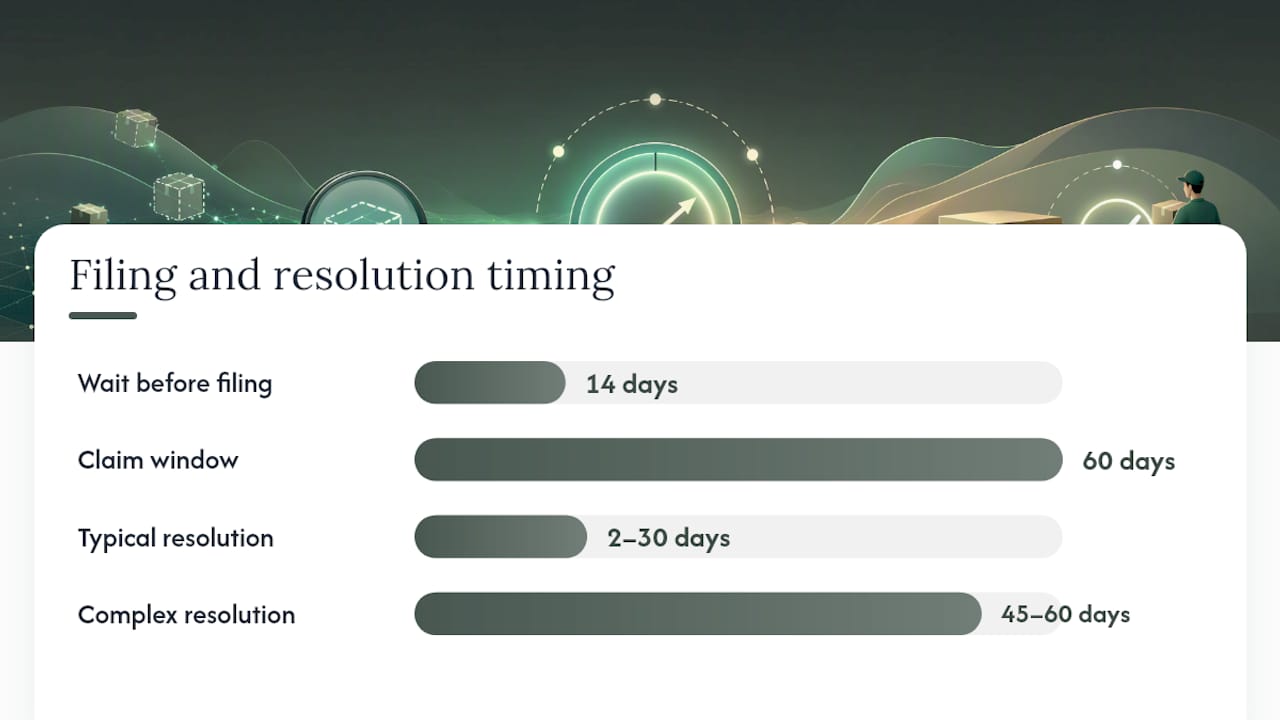
Amazon commonly requires roughly a 14-day wait after delivery before it will accept a research request, giving its own systems time to finish reconciling the shipment internally. Most claim windows referenced by sellers run around 60 days from the point the discrepancy becomes visible, though you should always confirm the exact window shown in your own Seller Central account since these can shift by category. Once filed, resolution typically takes 2 to 30 days, though complex cases involving multiple SKUs or FC transfers can stretch to 45 to 60 days.
Documentation makes or breaks these cases. Amazon generally wants:
- Proof of ownership: a supplier invoice showing itemized quantities and purchase dates.
- Proof of delivery: a bill of lading or carrier POD showing box counts and weight.
- Packing slips matching the shipment you’re disputing.
- Signed manufacturer packing lists, if you’re the manufacturer of record.
- Photos, when the discrepancy involves damage rather than a pure count mismatch.
Stick to non-editable file formats. JPG, PNG, TIFF, and PDF attachments tend to process cleanly, while Word or Excel files sometimes get flagged or ignored depending on the case type.
Since March 31, 2025, Amazon has leaned more heavily on documented sourcing cost rather than sale price when calculating reimbursement amounts. That single change makes your supplier invoices more valuable than they used to be.
Pro Tip: You can redact unit pricing on an invoice if you’re worried about competitive exposure, but never withhold sourcing-cost data entirely. Amazon needs that figure to calculate what it owes you, and vague or missing cost documentation is a common reason reimbursements come back lower than expected.
What Causes FBA Discrepancies, and What’s the Right Fix for Each?
Most discrepancies fall into a handful of predictable buckets, and each one has a specific correct response in Seller Central. Picking the wrong action wastes the case.
FC transfer losses deserve their own mention because sellers frequently misfile them as standard inbound research requests. Amazon runs transfer losses through a different internal workflow than inbound receiving losses, and using the wrong claim path typically results in an automatic denial or a redirect that costs you weeks.
- Match the cause to the action before you file, not after.
- When in doubt about whether it’s inbound or transfer, check the shipment history for a fulfillment-center-to-fulfillment-center movement first.
How Do You Manage Evidence So Investigations Actually Get Approved?
A disorganized case folder is the single biggest reason investigations drag past 30 days or get denied outright. For every shipment you dispute, save the reconciliation export, the inventory adjustments record, the carrier POD or BOL, the supplier invoice, any relevant photos, and the case ID with its full correspondence thread.

A simple spreadsheet keeps this manageable. Track shipment ID, ASIN/FNSKU, units expected, units located, discrepancy, eligibility date, case ID, current status, reimbursement ID once issued, and documented sourcing cost for each affected SKU. That last column matters more now than it used to, given the shift toward sourcing-cost-based reimbursement.
Follow-up cadence matters as much as the initial filing. Check status at 14 days. If there’s no update, escalate at 30 days. For anything still open at 45 to 60 days, request a supervisor review or reopen the case with your saved documentation attached. A well-organized case folder with consistent naming genuinely shortens resolution time and reduces the odds of an automatic denial.
Pro Tip: Name files the same way every time, something like “ShipmentID_ASIN_DocType_Date.” When you’re managing a dozen open cases at once, that convention is the difference between a five-minute status check and a lost afternoon.
| Field | What to Track |
|---|---|
| Shipment ID / ASIN | Identifies the exact unit in dispute |
| Discrepancy amount | The gap between expected and located |
| Eligibility date | When Amazon allows a case to be filed |
| Case ID + status | For follow-up and escalation |
Should You Automate FBA Reconciliation?
Automation earns its cost once your shipment volume, SKU count, or claim frequency make manual checking unreliable. A seller running two shipments a month can handle this by hand. A seller running twenty, across a few hundred SKUs, usually can’t catch every discrepancy before the claim window closes.
Weigh these factors before deciding:
- Monthly shipment volume and how many SKUs are involved.
- Your historical claim success rate, meaning how many filed cases actually resulted in a reimbursement.
- Whether anyone on your team has time for a monthly (or weekly) manual audit.
- How often discrepancies show up in the first place.
If you do look at automated tools, prioritize continuous inbound monitoring over scheduled monthly pulls, automated claim filing with attachments already formatted correctly, and direct posting of recovered reimbursements into your accounting system. A tool that finds the discrepancy but still requires you to manually assemble documentation and file the case only solves half the problem.
Pro Tip: If your time spent chasing discrepancies each month exceeds what you’d pay for a monitoring tool, that’s usually the signal it’s time to automate rather than a hard revenue threshold.
| Signal | What It Means |
|---|---|
| High shipment volume | Manual monthly checks likely miss cases |
| Low internal bookkeeping capacity | Automation reduces time cost per case |
| Frequent unresolved discrepancies | A monitoring gap exists somewhere upstream |
A Publisher’s Perspective on Reconciliation Discipline
Most sellers treat reconciliation as damage control, something you do after noticing a shortfall. It works better as a scheduled habit, closer to reviewing your bank statement than filing an insurance claim. The sellers who recover the most aren’t the ones who argue hardest with Amazon. They’re the ones who kept the invoice, the POD, and the case ID before they needed them.
How BeanHawk Handles FBA Reconciliation for You
Beanhawk is the alternative to chasing this manually every month: it watches your inbound shipments and ledger events continuously, so a discrepancy gets flagged the moment it appears instead of during your next audit cycle, if you ever run one.

Beanhawk automates the parts of this process that eat the most time. It monitors shipments for discrepancies in real time, assembles the supporting documentation a case needs, and files research requests with attachments already formatted the way Amazon expects. Once a reimbursement lands, Beanhawk posts it directly into QuickBooks or Xero, so your reconciled Amazon payouts reflect actual recovered cash without a manual journal entry.
That combination, continuous monitoring plus automated evidence assembly plus direct accounting posting, is what shortens the gap between “we noticed a shortfall” and “the money is back in the account.” Beanhawk offers a free limited audit to show you what it finds in your own account before you commit to anything. If you’re wondering whether Amazon owes you money on lost or damaged inventory, that audit is the fastest way to find out.
Sources
- Amazon Seller Central , Shipping queue discrepancy guidance
- Reconciling Amazon FBA shipments: A step-by-step guide , TaxJar
FAQ
What is the purpose of a reconciliation report?
It compares what you shipped against what Amazon’s warehouses actually recorded receiving, isolating the exact units where a discrepancy exists so you can file an accurate claim.
How do I get an Amazon inventory report?
Go to Reports → Fulfillment in Seller Central, then select Inventory Ledger or Inventory Reconciliation depending on which columns you need, and export as CSV.
What are the biggest FBA mistakes to avoid?
Filing a research case before a shipment shows Closed, missing the roughly 60 day claim window, and submitting documentation without proof of both ownership and delivery are the three most common reasons cases get declined.
Is FBA still profitable in 2026?
FBA remains viable for most sellers, but margins depend heavily on catching reimbursable losses. Industry estimates suggest about 1 in 5 shipments carries some shortfall, so sellers who skip reconciliation are quietly giving up recoverable revenue.
How does Beanhawk help with FBA reconciliation?
Beanhawk continuously monitors inbound shipments for discrepancies, automates evidence collection and claim filing, and posts recovered reimbursements straight into QuickBooks or Xero.