
Inventory Reconciliation Process: A Step-by-Step Workflow

The inventory reconciliation process is a repeatable workflow that ties physical stock counts to system records, investigates variances, and posts audit-ready adjustments to keep your GL and subledger in sync. Here is the shortest workable version:
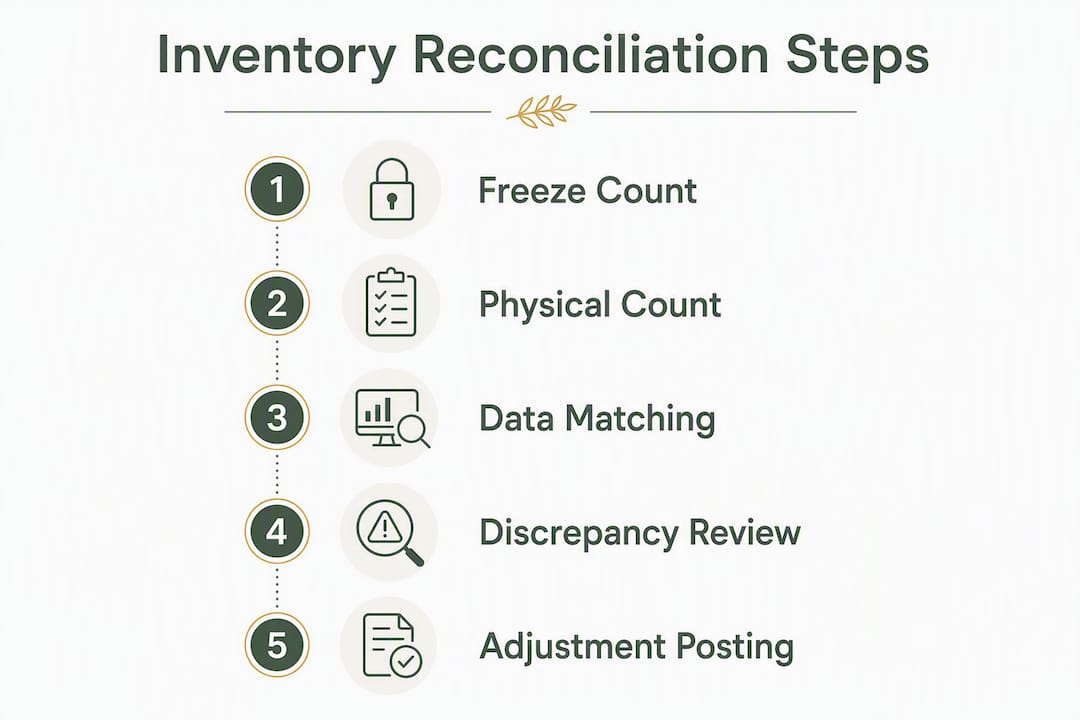
- Freeze a snapshot. Lock a timestamp across every source (ERP, WMS, marketplace, POS) before counting begins.
- Match sources. Compare physical counts to system records by SKU, location, and unit of measure. Flag anything outside tolerance.
- Resolve exceptions and post adjustments. Investigate flagged items, assign reason codes, get approvals, and post correcting journal entries.
As a starting point for U.S. operations, many teams set variance escalation thresholds reflecting their audit risk and materiality levels, requiring manager sign-off before posting for moderate variances and higher-level approvals for larger cases. Those numbers are illustrative; your thresholds should reflect your audit risk and materiality levels.
Table of Contents
- What the inventory reconciliation process actually covers
- Step-by-step inventory reconciliation workflow you can repeat every cycle
- Which counting method fits your reconciliation schedule?
- What actually causes inventory discrepancies
- Tools and integrations that cut manual reconciliation work
- How to post adjustments and keep your GL audit-ready
- KPIs and best practices that show reconciliation is working
- How Beanhawk helps Amazon and multi-channel sellers reconcile faster
- Handling consignment, damaged goods, and in-transit inventory
- How inventory reconciliation affects financial reporting and compliance
- Key Takeaways
- The mistake most teams make with reconciliation
- Beanhawk turns FBA reconciliation into a continuous, automated control
- Useful sources and references
What the inventory reconciliation process actually covers
Inventory reconciliation is a structured process of matching recorded balances across systems with physical stock, investigating variances, and posting corrective adjustments to ensure GL and subledger accuracy. That definition is clean, but it papers over a real tension between what operations cares about and what finance needs.
Operations teams focus on item-level accuracy: is the right SKU in the right bin, in the right quantity, ready to pick? Finance teams focus on the GL tie-out: does the inventory asset account match the subledger, are COGS entries correct, and is there documented evidence for the auditors? Both are right, and a reconciliation that satisfies only one of them will create problems for the other.
The snapshot concept is where these two perspectives converge. Before any count begins, you freeze a point-in-time record of what every system says you have. In a perpetual inventory system, that snapshot is pulled from live records and compared to a physical count. In a periodic system, the snapshot is the last recorded balance, and the count replaces it entirely. Perpetual systems give you more frequent reconciliation opportunities and smaller variance pools to investigate; periodic systems require more work at each close but are common in smaller operations.
Audit-readiness is not a year-end project. The AICPA’s guidance on inventory as a material balance sheet item expects documented count procedures, approved adjustments, and evidence of investigation for significant variances , not just a number that ties out.
For U.S. companies where inventory is a material balance, annual physical verification is a baseline expectation. But the teams that close fastest and with the fewest audit findings run reconciliations continuously, not just at year-end.
Step-by-step inventory reconciliation workflow you can repeat every cycle
The steps below follow the proven approach used across operations and finance teams. Run them in order; skipping the freeze step is the single most common cause of reconciliation failures.
- Gather and align sources , Pull records from your ERP, WMS, marketplace settlement reports (Amazon, Shopify, eBay), POS, and any spreadsheets still in use. Confirm that each source uses the same SKU identifiers and units of measure before you try to match them.
Matching rules and tolerance table
| Match type | Rule | Date tolerance | Value tolerance |
|---|---|---|---|
| One-to-one (PO to receipt) | Exact SKU, quantity, UoM | ±1 business day | , |
| Many-to-one (invoice to receipts) | Sum of receipts = invoice total | ±3 business days | ±2% or $50 |
| Marketplace settlement to orders | Net payout = sum of order lines minus fees | Settlement period | , |
| Physical count to system record | Count quantity = system quantity | Same snapshot | ±1 unit or 1% |
Reason codes and approval thresholds
| Reason code | Description | Approval tier |
|---|---|---|
| MIS-PICK | Item picked incorrectly, wrong SKU shipped | Supervisor |
| DAMAGED | Item damaged in warehouse or transit | Supervisor |
| SUPPLIER-SHORT | Vendor shipped fewer units than invoiced | Purchasing manager |
| UNRECORDED-RECEIPT | Receipt not logged in WMS/ERP | Warehouse manager |
| DATA-ENTRY | Quantity or SKU entered incorrectly | Supervisor |
| SHRINKAGE | Unexplained loss (theft, spoilage) | Finance director |
Approval thresholds depend on your organization’s policy and materiality standards. Typically, smaller variances can be approved by a supervisor, moderate variances require manager approval, and significant variances need finance director approval before posting.
Pro Tip: Configure your WMS or reconciliation software to auto-post adjustments that fall below your low-risk threshold (e.g., single-unit data-entry corrections with a DATA-ENTRY code). Reserve human review for exceptions above $500 or flagged as SHRINKAGE. This alone can cut manual reconciliation time by a third in high-volume operations.
Exception investigation checklist
When an exception clears your tolerance filter, work through these steps before posting:
- Recount the physical location independently (blind recount, different counter).
- Sweep adjacent bins for misplaced stock.
- Trace the transaction history: pull the PO, ASN, and invoice for the SKU and verify each step.
- Contact the vendor if a supplier-short code is likely.
- Document every step taken, including negative findings (e.g., “bin 4B swept, no stock found”).
Which counting method fits your reconciliation schedule?
Perpetual reconciliation runs continuously: every transaction updates the system record, and variances surface in real time. Periodic reconciliation resets the record at a fixed interval (monthly, quarterly, annually) based on a physical count. Most modern operations run perpetual systems with cycle counts layered on top, using full physical counts only as an annual verification or after a significant event like a warehouse move.
Counting methods compared
| Method | Best for | Operational impact | Audit value |
|---|---|---|---|
| Cycle count (ABC) | Ongoing accuracy, high-velocity SKUs | Low (counts spread across year) | High (continuous evidence) |
| Full physical count | Annual verification, periodic systems | High (operations pause) | High (point-in-time snapshot) |
| Opportunistic count | Returns spikes, negative stock events | Minimal (triggered by event) | Medium |
| RFID/sample-based | Large SKU catalogs, high-value items | Low to medium | Medium to high |
ABC cadence matrix
- A items (top 20% of SKUs by value or velocity): count monthly, or more frequently if negative stock incidents occur.
- B items (middle 30%): count quarterly.
- C items (bottom 50%): count semi-annually or annually.
Trigger an opportunistic count outside the normal cadence when you see: a negative stock flag, a spike in returns for a specific SKU, or a newly received high-value shipment that has not yet been confirmed in the WMS.
What actually causes inventory discrepancies
Inventory discrepancies surface during physical counts and daily operations alike. A warehouse worker finds the bin empty when the system shows 40 units; an accountant spots a GL balance that does not match the subledger. The causes fall into predictable categories, and knowing the category tells you where to look first.
Common root causes:
- Manual data entry errors (wrong quantity, wrong SKU, transposed digits)
- Unrecorded receipts or shipments (goods received but not logged, or shipped without a pick confirmation)
- SKU or location mismatches (same item under two part numbers, or stock in an unmapped bin)
- Return processing delays (customer return received but not yet restocked or credited in the system)
- Shrinkage (damage, theft, or spoilage not recorded as a write-off)
- Timing differences at cut-off (a receipt posted after the snapshot freeze)
- Unit-of-measure mismatches (cases vs. eaches, pounds vs. kilograms)
- Consignment and intercompany gaps (stock you hold but do not own, or stock transferred between entities without a matching transaction)
Investigation priority matrix
Prioritize exceptions in this order before routing to investigators:
- High dollar value + A-item SKU. Investigate immediately; do not post an adjustment without a full trace.
- High unit variance + B-item SKU. Recount and trace within 24 hours.
- SHRINKAGE code, any value. Escalate to finance director regardless of dollar amount.
- Timing difference, low value. Confirm the transaction posted correctly and close without a count adjustment.
- Data-entry error, low value. Correct and auto-post if below the auto-post threshold.
Triage rules: Recount when the variance is more than 5 units or 5% of system quantity. Trace transactions when the recount confirms the variance. Post an immediate adjustment only when the cause is confirmed and documented. Escalate to finance or procurement when the cause cannot be confirmed within two business days.
Tools and integrations that cut manual reconciliation work
The integration chain that matters is: WMS → ERP → accounting system (QuickBooks or Xero) → marketplaces (Amazon, Shopify, eBay). Every link in that chain needs to use the same canonical identifiers and aligned timestamps, or you will spend more time normalizing data than investigating real exceptions.

Amazon adds a specific layer of complexity: multi-region settlements, reserve holds, fee lumping, and FBA-specific reimbursement windows that close if you miss them. Parsing Amazon settlement reports means mapping fee lines to individual orders and reconciling payouts against inventory adjustments simultaneously. Manual processes cannot keep up with that volume reliably.
Must-have automation features for any reconciliation tool:
- Configurable matching rules and tolerances (so you define what “match” means for your business)
- Many-to-one matching (one invoice matched to multiple receipts, or one settlement to multiple orders)
- Automated reason-code assignment for common patterns
- Scheduled reconciliation runs (daily, weekly, or at settlement period close)
- Automated adjustment creation for low-risk exceptions below your threshold
- Full audit-trail capture (who matched what, when, and why)
Scheduled auto-reconciliation with automatic stock adjustment creation, as seen in Amazon FBA integration patterns, reduces manual work and maintains a continuous audit trail without requiring a human to trigger each run.
For Amazon sellers specifically, tracking FBA inventory accurately requires continuous monitoring of inbound shipments and ledger events, not just periodic settlement downloads. The reimbursement window for lost or damaged FBA inventory is finite; automation that surfaces exceptions in real time recovers money that manual monthly reviews miss.
Accurate inventory is also foundational to reliable reorder alerts, COGS management, and landed cost calculations. Reconciliation failures cascade into poor planning and inflated working capital, not just accounting errors.
How to post adjustments and keep your GL audit-ready
Posting an adjustment without documentation is the fastest way to create an audit finding. Every journal entry that touches the inventory asset account needs a paper trail: what changed, why, who approved it, and what evidence supports the decision.
Approval tiers for posting
- Under $500 or 2% of SKU value (whichever is lower): Supervisor approval, reason code required, auto-post eligible.
- $500 to $2,000: Warehouse or operations manager approval, investigation notes required.
- Above $2,000: Finance director approval, full investigation documentation required before posting.
- SHRINKAGE code, any amount: Finance director approval regardless of dollar value; consider whether a write-off or insurance claim is appropriate.
GL tie-out checklist
- Verify the inventory clearing account balance is zero after all receipts and shipments post.
- Confirm the inventory asset account on the GL matches the subledger total to the penny.
- Review COGS entries for the period: adjustments that write down inventory increase COGS; write-ups decrease it. Reconciliation adjustments that affect COGS calculations flow directly to gross margin.
- Post journal entries for any remaining GL/subledger difference with full documentation.
- Run a final subledger-to-GL comparison after posting to confirm the tie-out holds.
Evidence retention
For U.S. operations, retain the following for each reconciliation cycle:
- Count sheets or scanner logs (with counter ID and timestamp)
- Invoices, POs, and ASNs supporting each adjustment
- Photos of damaged goods for SHRINKAGE adjustments
- Investigation notes, including negative findings
- Approval records (approver name, role, date, and dollar amount approved)
The IRS generally expects business records to be kept for at least three years, and auditors sampling inventory balances will ask for count evidence and adjustment approvals. Storing these in a centralized, searchable system is far more practical than hunting through email threads at year-end.
Audit evidence is not just about having the documents. It is about being able to produce them quickly, in a format that shows a clear chain of custody from count to adjustment to posted journal entry.
KPIs and best practices that show reconciliation is working
Reconciliation health is measurable. If you are not tracking these metrics, you are managing by feel.
Reconciliation KPI targets
| KPI | Description | Illustrative target |
|---|---|---|
| Variance value as % of inventory | Total adjustment value / total inventory value | <1% per cycle |
| Recount rate | % of counts requiring a second count | <5% |
| Exception aging | % of exceptions resolved within 48 hours | >90% |
| Cycle count coverage | % of A items counted in the period | monthly or more frequent |
| Negative stock incidents | Count of SKUs with negative system quantity | minimal target |
| Month-end adjustment stability | Variance in total adjustment value cycle-over-cycle | Declining trend |
Continuous improvement checklist:
- Review reason-code distribution monthly. If DATA-ENTRY codes dominate, the fix is training or barcode scanning, not more reconciliations.
- Track exception aging. Exceptions that sit open for more than 72 hours usually indicate a process gap, not a data problem.
- Run root-cause trending quarterly. A centralized adjustments log with consistent reason codes and approver IDs lets you distinguish between tactical fixes and systemic issues.
- Feed reconciliation findings back into procurement and forecasting. A supplier that consistently ships short should show up in your vendor scorecard, not just your reason-code log.
How Beanhawk helps Amazon and multi-channel sellers reconcile faster
For Amazon and multi-channel sellers, the reconciliation challenge is not just operational accuracy. It is also recovering money that Amazon owes you before the reimbursement window closes. Amazon’s reimbursement rules are specific, time-bound, and easy to miss without continuous monitoring.

Beanhawk monitors inbound shipments and FBA ledger events continuously, surfacing lost, damaged, or under-reimbursed inventory in real time rather than waiting for a monthly settlement review. When a discrepancy is found, Beanhawk files the claim and posts the reconciled settlement entry directly to QuickBooks or Xero, keeping your GL aligned without manual journal entries.
The integration covers the full chain: FBA inventory events, multi-channel settlement reports, and accounting system posting. Every adjustment carries an audit trail, and approval controls are configurable so your finance team sets the thresholds, not the software.
Continuous FBA ledger monitoring is not optional for high-volume sellers. The reimbursement window closes, and manual monthly reviews consistently miss claims that automated monitoring catches within days.
For sellers running Amazon FBA bookkeeping across multiple channels, Beanhawk centralizes settlement data and posts it in a format that ties directly to the GL, cutting the time your accountant spends on month-end close.
Handling consignment, damaged goods, and in-transit inventory
These three inventory types cause more reconciliation headaches than their volume justifies, because standard matching logic does not handle them well without configuration.
Consignment inventory sits in your warehouse but belongs to a vendor until you sell it. It should not appear on your balance sheet as an owned asset. The reconciliation risk is that WMS systems often track consignment stock alongside owned stock, and a count that lumps them together will overstate your inventory asset. Maintain a separate consignment register, reconcile it against vendor statements monthly, and confirm your WMS tags consignment items with a distinct ownership flag.
Damaged goods need a write-down at the time damage is confirmed, not at year-end. When a damaged item is identified during a count, assign a SHRINKAGE or DAMAGED reason code immediately, photograph the item, and route the adjustment for finance director approval before the item is disposed of or returned to the vendor. Waiting to batch these at month-end creates a spike in adjustments that looks worse to auditors than a steady trickle of small, well-documented write-downs.
In-transit inventory is stock that has left the vendor but has not yet been received into your WMS. It is an asset you own (assuming FOB shipping point terms) but cannot physically count. Reconcile in-transit items against open POs and ASNs at each close. If a shipment is more than five business days past its expected arrival, flag it for investigation: it may be lost, held at customs, or simply unconfirmed in the system.
For FBA sellers, in-transit inventory between your prep center and Amazon’s fulfillment network is a particularly common source of discrepancies. Beanhawk’s inbound shipment monitoring tracks these items through the FBA receiving process and flags units that Amazon received but did not credit to your inventory.
How inventory reconciliation affects financial reporting and compliance
Inventory is often the largest asset on a product company’s balance sheet. How you reconcile it directly affects your income statement, your tax position, and your audit exposure.
Under U.S. GAAP, inventory must be reported at the lower of cost or net realizable value. That means write-downs from reconciliation adjustments (damaged goods, obsolescence, shrinkage) are not optional accounting entries; they are required when the evidence exists. Delaying a write-down to protect a quarterly gross margin number is a GAAP violation, not a judgment call.
COGS accuracy depends entirely on reconciled inventory. If your ending inventory balance is overstated because shrinkage was not recorded, your COGS is understated and your gross profit is inflated. That error flows through to income tax calculations, which is why the IRS takes inventory accuracy seriously in audits of product businesses.
For public companies and those preparing for acquisition, auditors will sample inventory transactions and ask for count evidence, adjustment approvals, and GL tie-out documentation. A reconciliation process that produces clean, searchable evidence for every adjustment is the difference between a clean audit opinion and a material weakness finding.
E-commerce sellers face an additional layer: marketplace settlement reconciliation must tie out to both the inventory subledger and the revenue accounts. Multi-region settlements, reserve holds, and fee complexity mean that a single Amazon settlement period can contain dozens of line items that need to be mapped before the GL entry is correct.
Sales tax compliance is also affected. In states with economic nexus thresholds, accurate inventory and sales records are the foundation of a defensible sales tax position. Reconciliation gaps that distort revenue or inventory balances can create exposure in a state tax audit.
This article provides general information on inventory reconciliation practices and is not a substitute for advice from a qualified accountant, auditor, or tax professional. Confirm current GAAP requirements, IRS record-keeping rules, and state tax obligations with a licensed professional.
Key Takeaways
A reliable inventory reconciliation process requires a frozen snapshot, consistent matching rules, documented reason codes, and GL tie-out evidence at every cycle, not just at year-end.
| Point | Details |
|---|---|
| Freeze before you count | Lock a snapshot timestamp across all systems before any count begins to prevent timing variances. |
| Match by type, not just quantity | Reconcile SKU, location, UoM, and lot details; unit-only matching misses the most common error categories. |
| Reason codes drive improvement | A centralized log with consistent codes lets you trend root causes and fix processes, not just symptoms. |
| GL tie-out is non-optional | Every adjustment must reconcile the subledger to the GL with documented approvals before the period closes. |
| Beanhawk automates FBA reconciliation | Beanhawk monitors FBA ledger events continuously and posts reconciled settlements to QuickBooks or Xero with a full audit trail. |
The mistake most teams make with reconciliation
Most reconciliation problems are not counting problems; they are identifier problems and freeze problems.
Teams spend hours investigating variances that exist only because the WMS uses UPCs and the ERP uses internal part numbers, with no maintained crosswalk. Or they start counting before locking the snapshot, so receipts post during the count and create phantom variances that take twice as long to clear as real ones. These are process failures, not data failures, and no amount of better counting fixes them.
The other persistent mistake is treating reason codes as a compliance checkbox rather than a diagnostic tool. When every unexplained variance gets coded as SHRINKAGE, you lose the signal. A month of DATA-ENTRY codes concentrated on one receiving dock tells you exactly where to put a barcode scanner. A month of SUPPLIER-SHORT codes on one vendor tells you to renegotiate your receiving terms. That signal disappears the moment codes become arbitrary.
Three fixes that work immediately: standardize your SKU identifiers and units of measure across every system before the next reconciliation cycle (a one-time crosswalk table is enough to start). Tighten your freeze protocol so no transactions post during the count window, even if that means a two-hour system lock. And configure auto-posting for low-risk adjustments below your threshold so your team spends time on the exceptions that actually matter, not on approving single-unit data-entry corrections one by one.
Teams that implement all three typically see their exception aging drop and their month-end close shorten within two or three cycles. The KPI improvement is real, but the bigger gain is that reconciliation stops feeling like a fire drill and starts functioning as a control.
Beanhawk turns FBA reconciliation into a continuous, automated control
If you sell on Amazon, your reconciliation exposure is not just operational. Every lost or damaged FBA unit that goes unreclaimed is money Amazon owes you, and the window to file that claim is finite. Manual monthly reviews miss claims that close before anyone notices.

Beanhawk monitors your FBA inbound shipments and ledger events around the clock, identifies every lost, damaged, or under-reimbursed unit, and files claims on your behalf. When a settlement posts, Beanhawk maps every fee line and payout to the correct order and posts the reconciled journal entry directly to QuickBooks or Xero, with configurable approval controls your finance team sets. No hidden fees, no commissions, no manual journal entries.
The free audit shows you exactly what Amazon owes you right now, across your full shipment history, before you commit to anything. See what Amazon owes you in 60 seconds or start your free FBA reimbursement audit to get a full picture of your recovery opportunities.
Useful sources and references
These sources are worth bookmarking for policy guidance, practical how-to steps, and marketplace-specific reconciliation details.
- How to reconcile inventory , AccountingTools: Best for step-by-step procedural guidance and accounting treatment of adjustments. Practical and concise.
- Inventory reconciliations: Methods, Examples, and Best Practices , Cleverence: Covers the dimensions a reconciliation must verify (item, quantity, UoM, location, lot, serial) and snapshot timing. Good for building count procedures.
- Amazon Business Inventory Reconciliation , Webgility: Covers marketplace-specific complexity: multi-region settlements, reserve holds, fee lumping, and FBA reimbursement windows. Best for e-commerce and Amazon sellers.
- What Is an Inventory Discrepancy? , Shopify: Practical overview of how discrepancies surface in daily operations and during physical counts, with causes and prevention guidance.