
Sellerboard Alternatives for FBA Reimbursements & Accounting

The best alternatives to Sellerboard for FBA reimbursement recovery and automated accounting are Beanhawk, GETIDA, Refund Retriever, and Reimbursify. If you want one recommendation to start with: Beanhawk, because it is the only option that combines continuous ledger monitoring with automated settlement posting directly to QuickBooks and Xero, no manual exports required.
Quick shortlist:
- Beanhawk , Best for sellers who need automated reimbursement recovery and clean accounting: automated journal posting to QuickBooks/Xero, multi-channel settlement reconciliation, COGS tracking, and reorder alerts in one subscription.
- GETIDA , Best for high-volume sellers who prefer a contingency-fee model with a dedicated case management team.
- Refund Retriever , Best for smaller sellers who want a straightforward contingency-fee reimbursement service with no monthly commitment.
- Reimbursify , Best for sellers who want a self-service, per-claim submission tool with transparent per-case pricing.
Table of Contents
- How do these alternatives compare side by side?
- How do you pick the right tool for your business?
- What each alternative actually does: quick vendor profiles
- How Amazon FBA reimbursements work and what changed in March 2026
- Key Takeaways
- Why the “free” contingency model costs more than sellers expect
- Beanhawk recovers what Amazon owes you and posts it to your books automatically
- Useful sources for further reading
How do these alternatives compare side by side?
| Dimension | Beanhawk | GETIDA | Refund Retriever | Reimbursify |
|---|---|---|---|---|
| Primary function | Recovery automation + accounting | Recovery (contingency) | Recovery (contingency) | Self-service claim submission |
| QuickBooks / Xero posting | Yes, automated | No | No | No |
| Pricing model | Subscription (tiered by volume) | Contingency fee | Contingency fee | Per-claim fee |
| Automatic settlement posting | Yes | No | No | No |
| Multi-channel support | Yes | Amazon only | Amazon only | Amazon only |
| Turnaround / investigation | Continuous monitoring | Case-by-case | Case-by-case | Seller-initiated |
| Minimums / eligibility | Free audit available | Free audit available | No minimum stated | No minimum stated |
| Support quality | Dedicated + documentation | Dedicated case managers | Email/ticket | Self-service |
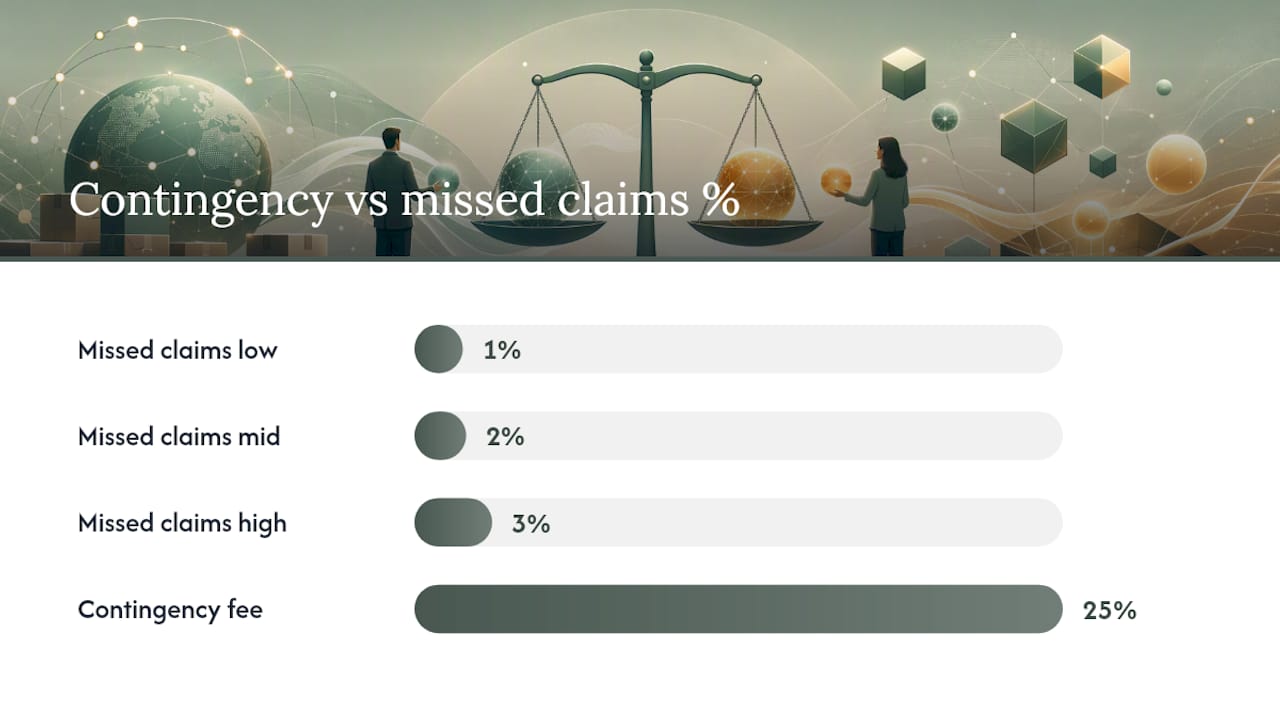
The sharpest trade-off here is between contingency and subscription pricing. Contingency sounds free until you do the math: at 25% of recovered funds, a seller recovering $20,000 per year pays $5,000 in fees. A subscription model with a fixed monthly cost often costs less at scale, and it includes the accounting automation that contingency services do not offer.
Beanhawk strengths: automated GL posting, multi-channel, COGS management, no per-claim commission. GETIDA strengths: experienced case team, strong at complex dispute escalation. Refund Retriever strengths: zero upfront cost, simple onboarding for smaller sellers. Reimbursify strengths: transparent per-case pricing, seller stays in control of submissions.
Beanhawk gaps: requires a subscription commitment; best value emerges at mid-to-high order volumes. GETIDA / Refund Retriever gaps: no accounting integration; reimbursements land in your bank account but do not post to your books automatically. Reimbursify gaps: manual submission means missed claims if you are not actively monitoring.
Pro Tip: Before comparing prices, pull your last 12 months of settlement reports and estimate your unrecovered reimbursements. Systematic auditing typically uncovers 1,3% of annual Amazon revenue in missed claims , that number tells you whether a contingency fee or a flat subscription saves you more money.
How do you pick the right tool for your business?
The three selection drivers that matter most: QuickBooks/Xero integration, reimbursement methodology and coverage, and total cost of ownership at your revenue level.
- Under $500K annual revenue: contingency-fee tools carry less financial risk. Prioritize ease of onboarding and claim coverage breadth. Automated posting is a bonus, not a requirement yet.
- $500K,$3M annual revenue: the accounting burden grows fast. Automated settlement posting to QuickBooks or Xero saves 5,10 hours per month in manual reconciliation. A subscription tool with integrated Amazon accounting software pays for itself quickly at this tier.
- Over $3M annual revenue: manual anything is a liability. You need continuous ledger monitoring, automated posting, multi-channel support, and a vendor who can document every claim for audit purposes.
Vendor due-diligence questions to ask before signing up:
- Can you show a sample journal entry from a reimbursement posting to QuickBooks or Xero?
- What is your published SLA for case resolution, and what happens if Amazon exceeds it?
- How do you handle the March 10, 2025 manufacturing-cost policy? Do you help upload sourcing costs to the Inventory Defect and Reimbursement portal?
- What documentation do you collect per claim type (lost inbound, damaged FBA, customer return discrepancy)?
- Where is our data stored, and are you SOC 2 compliant?
Red flags: no direct QuickBooks/Xero posting (means manual exports forever), no documentation requirements on submissions (increases Amazon rejection risk), opaque contingency terms with no cap, and no published case outcomes or recovery examples.
Pro Tip: Ask every vendor for a sample reconciliation report that ties a reimbursement entry to a specific settlement ID and bank deposit. If they cannot produce one, their “automated posting” may be a CSV export dressed up as integration. The Settlement Report is the authoritative source document for reconciliation , your tool must trace back to it.
What each alternative actually does: quick vendor profiles
Beanhawk monitors inbound shipments and FBA ledger events continuously, flags discrepancies, submits claims, and posts the resulting reimbursements as journal entries directly in QuickBooks or Xero. It also handles multi-channel settlement reconciliation, COGS management, PO and landed cost tracking, and reorder alerts. Best for sellers and accountants who want FBA reimbursement recovery and clean books in one place. Pricing is a tiered monthly subscription based on order volume; a free limited audit is available. Workflow: ledger event detected → documentation collected automatically → claim submitted → reimbursement received → journal entry posted to QuickBooks/Xero with correct GL mapping.
GETIDA focuses on FBA reimbursement recovery through a dedicated case management team. The service audits up to 18 months of transaction history on signup. Pricing is contingency-based (a percentage of recovered funds). No accounting integration. Best for high-volume sellers with complex dispute histories who want human escalation on stubborn cases.
Refund Retriever is a contingency-fee reimbursement service with straightforward onboarding. It covers lost and damaged inventory, overcharged FBA fees, and customer return discrepancies. No monthly fee; you pay only when Amazon pays you. No QuickBooks or Xero integration. Best for sellers under $500K who want zero upfront cost.
Reimbursify is a self-service platform where sellers submit individual claims. Pricing is per claim. The seller controls what gets submitted and when, which suits operators who want visibility into every case. No automated monitoring, no accounting integration.
Systematic reimbursement auditing typically finds 1,3% of annual Amazon revenue in missed claims, and the 2025 policy change increases the need for sourcing documentation to support those claims.
Reimbursements must be posted to a dedicated “FBA Inventory Reimbursements” other-income account in your chart of accounts, not recorded as product sales. Misclassifying them inflates revenue and distorts unit economics. This is where automated GL mapping in Beanhawk eliminates a recurring bookkeeping error that manual tools leave on the table.
How Amazon FBA reimbursements work and what changed in March 2026
The short answer: Since March 10, 2025, Amazon calculates reimbursements based on your product’s manufacturing (sourcing) cost, not its selling price. That means the amount you recover per lost or damaged unit is generally lower unless you upload accurate sourcing costs to the Inventory Defect and Reimbursement portal.
Timelines you need to know:
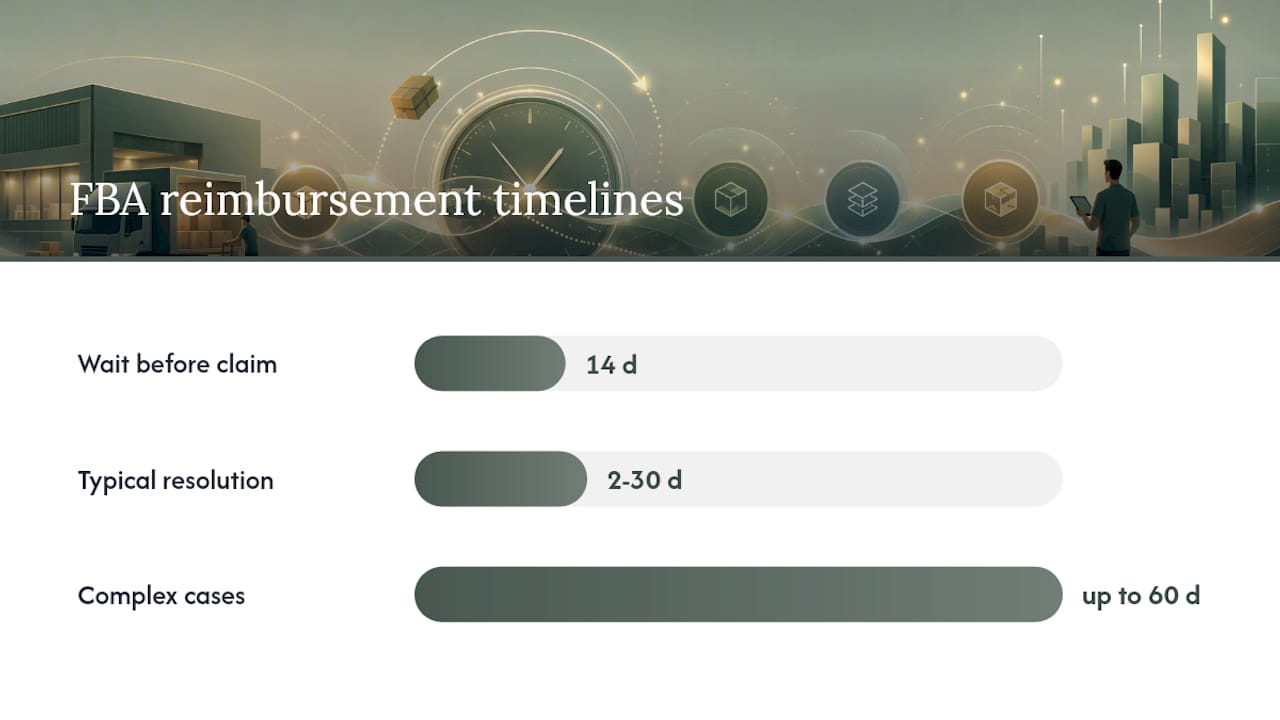
- Wait at least 14 days after confirmed delivery before requesting an investigation.
- Most cases resolve within 2,30 days; complex cases can take up to 60 days.
- Check Inventory > Manage FBA Inventory and the Shipping Queue Contents tab to track unit status before submitting.
Documents required by claim type:
- Lost inbound shipment: bill of lading (LTL/FTL), shipment manifest, proof of ownership/supplier invoice.
- Damaged FBA unit: settlement ID, item-level transaction record, sourcing invoice.
- Customer return discrepancy: return report, original order ID, condition notes.
- Overcharged fees: fee preview report, ASIN dimensions/weight documentation.
The March 10, 2025 policy change shifted reimbursements from selling-price-based to manufacturing-cost-based. Sellers who proactively upload sourcing costs in the Inventory Defect and Reimbursement portal see faster approvals and more accurate payouts. For accounting, this means reimbursement amounts are now smaller and must be reconciled against your actual COGS, not your retail price. Tools that track landed costs and sourcing data , like Beanhawk , have a structural advantage here.
Settlement-first close and detailed GL mapping are the recommended best practices: every settlement period should tie directly to a bank deposit, with fees, reimbursements, and reserves mapped to separate GL accounts. A structured reimbursement workflow covering monitoring, documentation, submission, and appeals is what separates sellers who recover consistently from those who leave money in Amazon’s pocket.
Key Takeaways
Automated reimbursement recovery combined with direct QuickBooks/Xero posting delivers the highest ROI for Amazon sellers, especially after the March 2025 manufacturing-cost policy change.
| Point | Details |
|---|---|
| Start with a free audit | Run a free audit first to estimate your unrecovered claims before committing to any tool. |
| Prioritize accounting integration | Only tools with direct QuickBooks/Xero posting eliminate the manual reconciliation burden at scale. |
| Store sourcing documentation | The March 2025 policy requires manufacturing-cost proof; upload invoices to the Inventory Defect and Reimbursement portal. |
| Watch total cost of ownership | Contingency fees at 25% can exceed a flat subscription cost once annual recoveries pass $10,000,$15,000. |
| Beanhawk as the recommended pick | Beanhawk combines continuous ledger monitoring, automated GL posting, and multi-channel reconciliation in one subscription. |
Mid-size sellers ($500K,$3M revenue) typically see recovered claims within the first 2,30 days of onboarding a continuous monitoring tool, with accounting time savings compounding each settlement period.
Why the “free” contingency model costs more than sellers expect
The contingency-fee model is the default in this category, and it deserves more scrutiny than it usually gets. A 25% fee on recovered funds sounds reasonable when you assume you would have recovered nothing otherwise. But that assumption is wrong for sellers who are already monitoring their ledger, even imperfectly. You are paying a commission on money you partially would have found yourself.
The deeper issue is what contingency tools do not do: they recover the cash, but they do not post it to your books. That means your accountant or bookkeeper still has to match every reimbursement to a settlement ID, assign it to the correct GL account, and verify it did not get miscategorized as product revenue. At $500K+ in annual sales, that is a material time cost every single month.
The 2025 manufacturing-cost policy change makes this worse. Reimbursement amounts are now smaller and tied to sourcing data that most contingency services do not track. A tool that also manages your COGS and landed costs is no longer a nice addition , it is the only way to validate that Amazon’s reimbursement calculation is actually correct.
Beanhawk recovers what Amazon owes you and posts it to your books automatically
Most reimbursement tools stop at the cash. Beanhawk goes further: it monitors your inbound shipments and FBA ledger continuously, submits claims with the documentation Amazon now requires under the March 2025 policy, and posts every reimbursement as a journal entry directly in QuickBooks or Xero , mapped to the correct other-income account, tied to the settlement ID, and reconciled against your COGS.

No contingency fees. No manual exports. No misclassified income. Pricing is a flat monthly subscription tiered by order volume, so your cost is predictable whether you recover $5,000 or $50,000 in a given quarter. A free limited audit shows you exactly what Amazon owes you before you commit to anything.
Start your free FBA reimbursement audit and see your unrecovered claims in black and white. Accountants and bookkeepers managing multiple seller accounts can also explore the partner program for volume pricing and white-label reporting.
Useful sources for further reading
- FBA Reconciliation guide (Seller Forums)
- Step-by-step guide to fixing inventory discrepancies (Seller Forums)
- Policy update: manufacturing-cost based reimbursements (Seller Forums)
- Amazon FBA Accounting: Settlements, Fees & FBA Inventory (Ledgify)
- Amazon FBA Accounting & Bookkeeping 2026: Fees, Settlements, Channel P&L (Eightx)
- Amazon Payout Reconciliation: The Process Most 7-Figure Sellers Skip (MuseMinded)
- Amazon FBA Accounting: Stop Getting Settlement Reports Wrong (Zolify)
- Amazon FBA Reimbursements Explained: How to Recover Every Dollar You’re Owed in 2026 (Bluesteak)