
Xero Amazon Integration for Pro Multi-Channel Sellers

Use a settlement-focused, API-based connector that posts gross sales, itemized fees, reimbursements, reserves, and COGS into a dedicated Amazon clearing account in Xero. Before enabling auto-posting, run a free audit or process one historical settlement in review mode to validate your account mapping. Beanhawk offers a free limited audit that surfaces reimbursement gaps and settlement mismatches before you commit to any configuration.
Table of Contents
- Which Xero Amazon integration approach fits your operation?
- When does manual reconciliation cost more than a paid connector?
- How do you map Amazon settlement lines into Xero?
- How do you reconcile Amazon settlements and catch missing reimbursements?
- What does implementation look like, and what should you budget?
- How Beanhawk connects Xero to Amazon and recovers reimbursements automatically
- Key Takeaways
- The mistake most sellers make before the errors compound
- See what Amazon owes you before you configure anything
- Useful sources
Which Xero Amazon integration approach fits your operation?
Four practical paths exist, and the right one depends on your order volume, marketplace count, and how much reconciliation pain you can absorb.
Manual CSV import works for sellers with fewer than 200 orders per month who are comfortable downloading Amazon settlement reports and importing them into Xero manually. The upside is zero cost. The downside is that every fee type lands in one lump unless you split it by hand, which hides true margin.
Native bookkeeping connectors from the Xero App Store handle basic settlement imports and suit growing sellers who need automation without a large budget. Multi-currency and reimbursement visibility are limited, and native connectors often fail to decompose the full 14-day settlement into all required GL lines, creating reconciliation drift over time.
Paid settlement-first connectors decompose each Amazon settlement into gross sales, referral fees, FBA fulfillment and storage fees, advertising, refunds, and reimbursements, then post dated journal entries to Xero so your P&L reflects activity in the correct period regardless of cash timing. This is the right choice for sellers above roughly $500K annual GMV or anyone running multiple marketplaces, which is where practitioners report these tools become cost-effective.
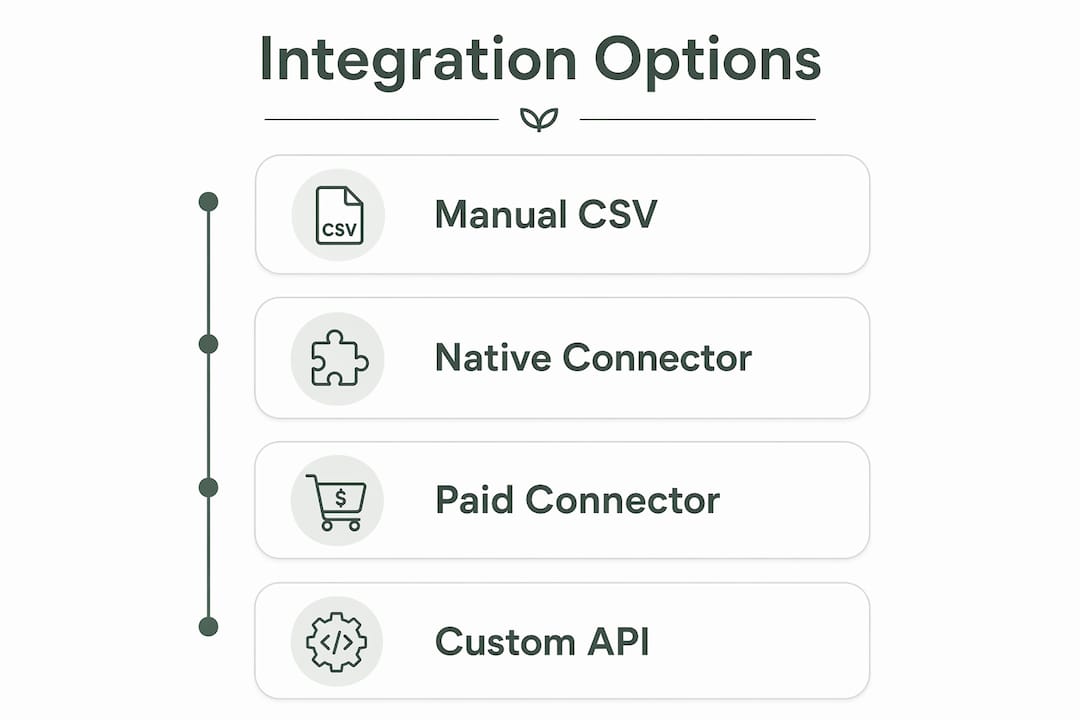
Custom API or middleware suits enterprise sellers with bespoke ERP requirements. Implementation takes months and requires developer resources; most professional sellers never need it.
| Dimension | Manual CSV | Native connector | Paid settlement connector | Custom API |
|---|---|---|---|---|
| Reconciliation accuracy | Low | Medium | High | High |
| Multi-currency support | Manual | Limited | Yes | Yes |
| Reimbursement visibility | None | Minimal | Itemized | Configurable |
| Cost | Free | Low | $59,$299/month | High |
| Setup time | Immediate | Hours | 1,4 weeks | Months |
When does manual reconciliation cost more than a paid connector?
The trigger is operational complexity, not just revenue alone. Accounting practitioners consistently find that a paid connector becomes cost-effective when manual mapping and reconciliation become more expensive than the automation,commonly around $500K annual GMV for FBA-heavy sellers, according to practitioner benchmarks.
Concrete signals to watch for:
- Recurring unmapped adjustment lines after every settlement
- FBA storage and referral fees growing faster than your ability to categorize them
- Reserve movements that distort your cash position week to week
- Active sales in more than one currency or marketplace region
- Reimbursements appearing as lump adjustments rather than distinct GL entries
- More than two hours of bookkeeper time per settlement cycle
At a typical bookkeeper rate of $50,$75/hour, two hours per settlement equals $200,$300 per month in labor. A paid connector in the $59,$299/month range pays for itself the moment it eliminates that cleanup work. Before committing, process one or two historical settlements in review mode to confirm the mapping is correct before enabling auto-posting.
How do you map Amazon settlement lines into Xero?
Always post gross sales and itemize every fee type into dedicated GL accounts. Never record the net bank deposit as revenue. That single mistake hides true gross margin and makes contribution margin by channel impossible to calculate.
Core mapping rules:
- Gross product sales → Revenue: Amazon Product Sales
- Shipping income → Revenue: Amazon Shipping Income
- Refunds → Revenue contra: Amazon Refunds
- Referral fees → Expense: Amazon Referral Fees
- FBA fulfillment fees → Expense: FBA Fulfillment Fees
- FBA storage fees → Expense: FBA Storage Fees
- Advertising → Expense: Amazon Advertising
- Reimbursements → Other Income: Amazon Reimbursements (separate GL line)
- Reserve withheld/released → Liability: Amazon Reserve Account
- FX/bank fees → Expense: FX and Bank Charges
Use an Amazon clearing account as the intermediary. Post all settlement breakdowns to the clearing account, then match the actual bank payout to it. The clearing account should return to zero after every match.
Sample journal entries:
| Entry | Debit | Credit |
|---|---|---|
| A: Settlement posting | Amazon Clearing Account | Gross Sales, Shipping Income |
| A: Fee breakouts | Referral Fees, FBA Fees, Advertising | Amazon Clearing Account |
| B: Reimbursement | Amazon Clearing Account | Amazon Reimbursements (Income) |
| C: Bank deposit arrives | Bank Account | Amazon Clearing Account |

Post COGS at the point of sale when your connector supports it, or at month-end using Amazon inventory valuation reports. Keep your inventory asset account reconciled to Amazon’s inventory reports monthly, not quarterly. For FBA inventory tracking, a dedicated inventory asset account per product category makes reconciliation faster.
Security note: Grant connectors the minimum OAuth scopes needed for settlement and inventory data. Keep bookkeeping Xero users separate from operational Seller Central users, and confirm data export rights in your contract before signing.
Pro Tip: Limit connector OAuth access to read-only settlement and inventory scopes. Never grant full Seller Central admin access to a third-party bookkeeping tool.
How do you reconcile Amazon settlements and catch missing reimbursements?
Reconcile each settlement within five business days of the bank deposit posting. Waiting until quarter-end makes reserve movements, timing differences, and missing reimbursements far harder to untangle.
Settlement reconciliation checklist:
- Clearing account returns to zero after bank deposit match
- Gross sales in Xero match the Amazon settlement report total
- Each fee category (referral, FBA, storage, advertising) matches the settlement breakdown
- Reserve movements are posted to the liability account, not expensed
- All reimbursement lines appear as distinct income entries, not buried in adjustments
- FX differences are posted to the FX expense account, not left as clearing residuals
Red flags for missing reimbursements:
- Unexplained negative adjustment lines with no corresponding reimbursement
- Inbound shipment discrepancies with no FBA reimbursement posted within 60 days
- Clearing account residual balance after bank match
- Recurring inventory adjustment lines that never resolve
Trace workflow: Amazon settlement line → connector preview in Xero → confirm journal entry → match bank deposit → if clearing account residual remains, investigate reimbursement claim status in Seller Central. Connectors that post reimbursements as distinct journal lines make this trace immediate rather than a manual dig through adjustment rows.
Pro Tip: Run a full monthly review of all reimbursement GL entries against your FBA inbound shipment reports. Discrepancies older than 90 days are harder to claim.
What does implementation look like, and what should you budget?
Plan for one to four weeks of configuration and mapping, longer if you are adding inventory or COGS automation. A proper integration can reduce month-end close from weeks to days once it is running cleanly.
Implementation steps:
- Run a free audit to surface existing settlement mismatches and reimbursement gaps.
- Connect your Amazon Seller Central account to Xero in review mode (no auto-posting yet).
- Map your chart of accounts: gross sales, each fee type, reimbursements, reserves, FX.
- Configure tax rates to match your US sales tax or marketplace facilitator settings.
- Process two historical settlements and validate every GL line against the Amazon report.
- Enable auto-posting once mapping is confirmed.
- Set a monthly monitoring cadence: full review of clearing account, reimbursements, and reserve movements.
Pricing factors to evaluate: order volume per month, number of marketplaces and regions, multi-currency requirements, whether COGS and inventory automation are included, and whether reimbursement recovery is part of the subscription or billed separately.
Contract checklist before signing: trial period length, data export rights on termination, onboarding support included, SLAs for reimbursement claim handling, and whether historical data imports are covered.
How Beanhawk connects Xero to Amazon and recovers reimbursements automatically
Beanhawk pairs continuous FBA ledger and inbound-shipment monitoring with automated settlement posting into Xero, so sellers recover reimbursements and maintain a clean clearing account without manual work.
Core features:
- Continuous inbound shipment and FBA ledger event monitoring
- Automated settlement breakdowns posted to Xero with gross sales, itemized fees, reimbursements, and reserves
- Reimbursement claim automation with no hidden commissions
- Multi-channel settlement consolidation across Amazon marketplaces and other sales channels
- PO and landed-cost tracking for accurate COGS and inventory economics
- Reorder alerts tied to inventory reconciliation
Onboarding path with Xero:
- Start with the free limited audit to see what Amazon currently owes you.
- Connect Seller Central and Xero in review mode.
- Map your chart of accounts with Beanhawk-assisted configuration.
- Run test settlements and validate every line.
- Enable auto-posting and continuous reimbursement monitoring.
Beanhawk operates as a subscription SaaS with tiered monthly pricing based on order volume. There are no commissions on recovered reimbursements. The free audit gives you a settlement health check before you spend anything.
Pro Tip: Use the free audit results as your baseline. Any reimbursement gap the audit surfaces is money Amazon already owes you, independent of any integration decision.
Key Takeaways
A paid, settlement-first Xero integration with a dedicated Amazon clearing account is the most reliable path to penny-perfect reconciliation and traceable reimbursement recovery for professional sellers.
| Point | Details |
|---|---|
| Use a clearing account | Post all settlement lines to an Amazon clearing account; match the bank deposit to zero it out every cycle. |
| Gross up your sales | Never record the net deposit as revenue; itemize gross sales and every fee type in separate GL accounts. |
| Reconcile per settlement | Match each settlement within five business days; do not defer to quarter-end or reserve movements compound. |
| Upgrade trigger | Switch to a paid connector when settlement cleanup exceeds the subscription cost in bookkeeper hours, typically when operational complexity passes $500K annual GMV for FBA-heavy sellers. |
| Beanhawk next step | Run the free audit at Beanhawk to surface reimbursement gaps and validate your settlement mapping before enabling auto-posting. |
The mistake most sellers make before the errors compound
The pattern is consistent: sellers invest in the integration tool but under-invest in the mapping. They connect Amazon to Xero, see transactions flowing, and assume the work is done. Six months later, the clearing account has a residual balance nobody can explain, reimbursements are buried in adjustment rows, and the P&L shows margin that does not match the bank.
The fix is not a better tool. It is staging the rollout. Process two historical settlements manually in review mode before enabling auto-posting. Trace every line. Confirm the reimbursement GL entry appears as a distinct income line, not folded into a catch-all adjustment. Confirm the clearing account zeros after the bank match. Only then flip the switch.
Reconciling every settlement as it posts, rather than deferring to month-end or quarter-end, is the single habit that separates sellers who catch reimbursement gaps early from those who discover them during a year-end audit when the claim window has closed.
See what Amazon owes you before you configure anything
Most sellers who run Beanhawk’s free audit find reimbursement gaps they did not know existed. That is the right starting point for any Xero integration: know your baseline before you map a single account.

Beanhawk’s onboarding follows the same staged approach this guide recommends: free audit, connect in review mode, assisted chart-of-accounts mapping, test settlements, then auto-posting. Pricing is a monthly subscription tiered by order volume, with no commissions on recovered funds. You get continuous FBA ledger monitoring, automated settlement posting to Xero, and reimbursement claim automation in one place.
Check your FBA reimbursement exposure with the free audit at Beanhawk, then follow the onboarding steps to connect your Amazon account to Xero in under a week.
Useful sources
- Xero for Amazon Sellers: Complete Setup and Best Practices , covers clearing account setup, reconciliation cadence, and OAuth security for Xero connectors.
- Xero Bookkeeping for Amazon FBA: Settlement Reconciliation Guide , detailed mapping rules, upgrade triggers, and the gross-up approach for accurate margin reporting.
- Amazon FBA Seller Accounting on Xero , Xero’s own overview of its app ecosystem and multi-currency support for marketplace sellers.
- Beanhawk Free Audit , run a settlement health check to surface reimbursement gaps before configuring your integration.
- Amazon FBA Bookkeeping Guide , practical reconciliation steps and mapping recommendations for FBA sellers using Xero or QuickBooks.