
Settlement First: Reconcile Amazon Settlements in QuickBooks & Xero

The Amazon settlement report is the authoritative source for what Amazon actually paid you. Use it, not the bank deposit, as your starting point: post either a summarized settlement journal entry or route activity through an Amazon clearing account, then match by settlement ID. Track reserves separately, and never book the net deposit straight to revenue.
TL;DR:
- Using the settlement report as the definitive source ensures accurate reconciliation and prevents mistakes caused by delays or blending of disbursements.
- Post settlements to a dedicated Amazon clearing account to better track timing delays, reserves, reimbursements, and cross-border FX impacts, especially across multiple marketplaces.
- Variations between settlement report totals and bank deposits often result from reserves, FX differences, sales tax, refunds, or fee adjustments, not reporting errors.
- Automating data ingestion and mapping reduces manual effort, but manual review remains essential for large, unusual, or aged reserves, reimbursements, or fee adjustments.
- Setting up a comprehensive chart of accounts and reconciling monthly helps maintain accuracy and catch discrepancies early without extensive manual investigations.
Table of Contents
- How Do You Reconcile Amazon Settlements Step by Step?
- Which Posting Model Should You Use for Amazon Settlements?
- Why Doesn’t My Amazon Deposit Match the Settlement Report?
- How Should Reserves, Reimbursements, and Fee Adjustments Be Booked?
- How Do You Set Up QuickBooks or Xero for Amazon Settlements?
- What Should Be Automated vs. Reviewed Manually?
- What Does BeanHawk Actually Automate in This Process?
- Why a Settlement-First Close Changes How You Work
- Get a Free FBA Reimbursement Audit From BeanHawk
- Where These Reconciliation Steps Come From
- Sources
- FAQ
How Do You Reconcile Amazon Settlements Step by Step?
Reconciling Amazon settlements starts with pulling the right reports, not opening your bank feed. Amazon disburses cash on a schedule that has nothing to do with when a sale happened, a refund posted, or a fee got charged, so the deposit hitting your bank account is a lagging, blended number. You need the underlying detail before that number means anything.
Four reports do the heavy lifting. The Settlement Report (Flat File V2) is your primary source, and it comes with settlement-id, settlement-start-date, settlement-end-date, deposit-date, transaction-type, order-id, adjustment-id, and the amount fields you’ll use to reconstruct every line of activity. Amazon condenses everything into three columns: amount-type, amount-description, and amount, a design choice that keeps the report format stable even as Amazon adds new fee types. That matters more than it sounds like it should, because it means your parsing logic doesn’t break every time Amazon rolls out a new charge category.
The other three reports fill in gaps the settlement file leaves open:
- Date Range Transaction Report , gives you transaction-level detail when you need to trace a specific order or adjustment that the settlement summary doesn’t fully explain.
- Inventory Ledger , ties FBA inventory movements to the reimbursements and adjustments that show up later in a settlement.
- Marketplace Tax Collection Report , isolates the sales tax and VAT Amazon collects and remits on your behalf, so you don’t accidentally book it as revenue.
- Fee Preview Report , not strictly a reconciliation tool, but useful for anticipating charges before they hit a settlement.
Pulling these five reports is the baseline stack most accountants recommend for proper Amazon bookkeeping. Export in CSV or Flat File V2 rather than the PDF summary. The flat file gives you line-level rows you can actually join and pivot. The PDF gives you a picture you can’t do anything with.
One practical snag: Amazon formats numbers according to the marketplace locale. A European settlement might use a comma as the decimal separator where a US one uses a period. If you’re importing multiple marketplaces into one spreadsheet or database, normalize number formats before you sum anything, or you’ll get totals that are off by a factor of a thousand and won’t understand why until you’ve lost an hour.
Which Posting Model Should You Use for Amazon Settlements?
There are two defensible ways to post Amazon settlements to your books, and the right one depends mostly on how many marketplaces you run and how much timing precision your close needs.
Option A: The summarized settlement journal entry. For each settlement period, you total the amount-type categories (product sales, referral fees, FBA fulfillment fees, storage fees, refunds, reimbursements) and post one journal entry that nets to the bank deposit. This is the simpler model, and for a single-marketplace seller with a fairly clean settlement cycle, it works fine.
Option B: The Amazon clearing account model. Instead of posting straight to the bank, you post all settlement activity to an “Amazon Clearing” account, a holding account on your balance sheet that represents funds Amazon owes you but hasn’t disbursed yet. When the actual bank deposit lands, you post it as a transfer out of clearing, not as new revenue. This model handles timing mismatches and multi-marketplace complexity far better, because reserves, delayed reimbursements, and cross-border FX timing all show up as a clearing balance you can see and age, rather than getting buried inside a lump-sum journal entry.
Here’s the sequence for Option B, which is the version most settlement-based close models build around:
- Pull the settlement report for the period and break it into amount-type categories.
- Post each category to its GL account (revenue, referral fee expense, FBA fee expense, refunds, reimbursements) with the offsetting entry to Amazon Clearing.
- When Amazon disburses funds, post the bank deposit as a debit to cash and a credit to Amazon Clearing, matched by settlement-id.
- At month-end, whatever remains in Amazon Clearing represents funds earned but not yet disbursed, plus reserves and withholds.
If your close date falls in the middle of an open settlement period and the amount is material, you may need to accrue estimated revenue and fees for the partial period under GAAP, rather than waiting for the settlement to close. Most smaller sellers skip this unless the timing gap consistently distorts monthly numbers.
Pro Tip: Never book the raw bank deposit as revenue, no matter which model you use. The deposit is a net figure that already has fees, refunds, and reimbursements baked in , treating it as top-line revenue will overstate your sales and understate your expenses in a way that quietly wrecks your margin analysis.
Why Doesn’t My Amazon Deposit Match the Settlement Report?
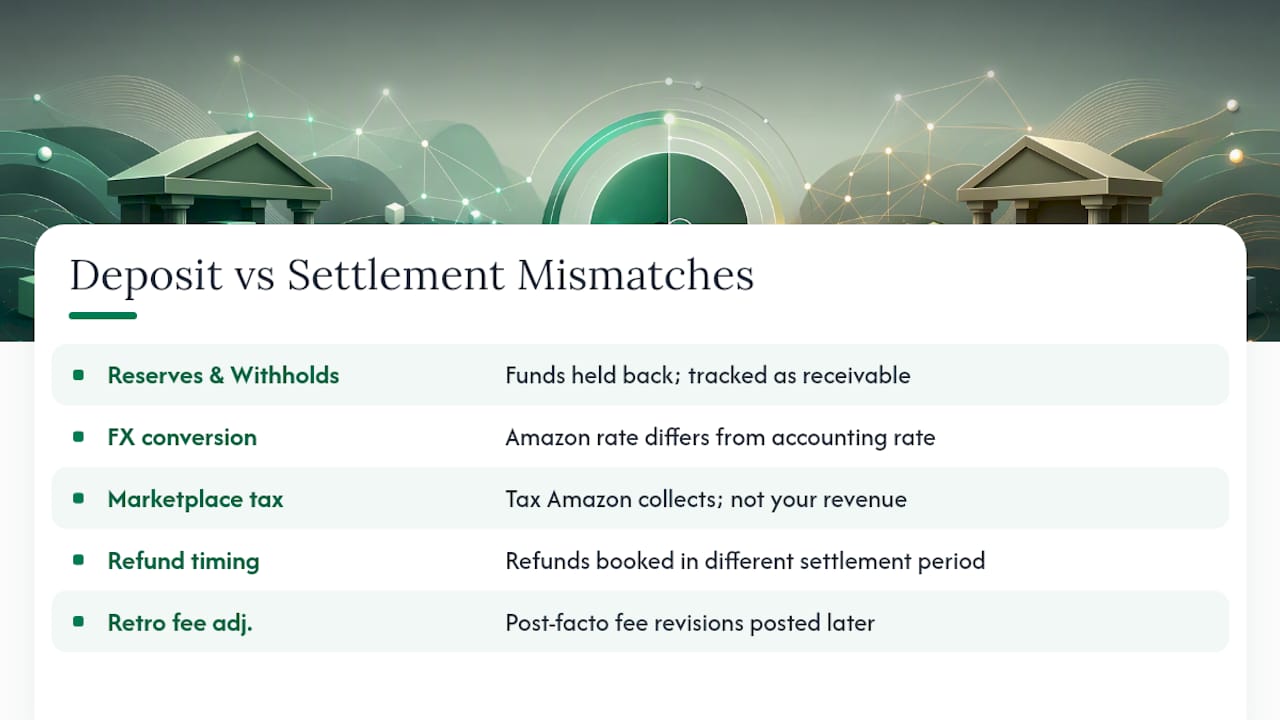
Matching is mechanically simple: the deposit amount and deposit date in your bank feed should tie to a specific settlement-id in your settlement report. When they don’t, the mismatch almost always comes from one of five sources.
Reserves and withholds. Amazon can hold back a portion of your funds for new accounts, category risk, or performance issues. That amount sits outside the disbursement and needs to be tracked as a receivable, not written off as a loss.
FX conversion differences. If you sell in a marketplace with a different settlement currency, Amazon applies its own conversion rate at disbursement time. That rate rarely matches whatever rate your accounting software defaults to, and the gap shows up as a small, persistent variance that has nothing to do with an error.
Marketplace-facilitator tax. In jurisdictions where Amazon collects and remits sales tax directly, that tax flows through the settlement but isn’t yours to keep or report as revenue. Missing this is one of the most common reasons settlement totals look “off” by exactly the sales tax amount.
Refund timing. A refund issued in one settlement period can relate to an order booked in an earlier one. If you’re reconciling period by period without joining back to the original order, the refund looks like an unexplained deduction.
Retroactive fee adjustments. Amazon periodically revises fees after the fact, sometimes months later, and drops the adjustment into whatever settlement is currently open rather than the one where the original charge happened.
When something doesn’t tie, don’t chase every dollar. Set a variance threshold, commonly $500 or 1% of the settlement total, and only escalate variances above that line for manual investigation. Anything smaller gets logged and monitored, not chased line by line. This single rule saves more bookkeeping hours than any other habit in this process, because Amazon settlements are noisy by nature and perfect matches are rare even when everything is correct.
Also document splits and combinations explicitly. Amazon sometimes disburses one settlement across two bank deposits, or combines two settlement periods into a single deposit if a prior one was delayed. Note these as named exceptions in your workpapers rather than leaving a mystery gap for next month’s you to rediscover.
How Should Reserves, Reimbursements, and Fee Adjustments Be Booked?
These three categories cause more misclassification than anything else in Amazon accounting, mostly because they don’t behave like normal revenue or expense transactions.
- Reserves and withholds go on the balance sheet, not the income statement. They’re a receivable, funds Amazon is holding that belong to you and will eventually release. Age them the same way you’d age any other receivable, and flag anything sitting for more than a full settlement cycle for follow-up. A running clearing balance per marketplace makes it obvious whether a reserve is genuinely outstanding or already cleared in a prior period you forgot to reconcile.
- Reimbursements need a policy decision, not a default. Amazon reimbursements for lost or damaged FBA inventory can post as other income or as a recovery against COGS/inventory, depending on how your business tracks landed cost. Whichever you choose, apply it consistently, and keep the underlying case or claim ID attached to the journal entry as evidence.
- Retroactive fee adjustments post when Amazon issues them, tied back to the original settlement where possible. Don’t restate a prior period’s closed books for a small fee correction. Book it in the current period, but reference the original settlement-id in the memo field so an auditor (or future you) can trace the full history in one search.
Reserve accounts aren’t unique to Amazon. Traditional invoice factoring arrangements also lock up 10% to 20% of invoice value in a reserve until conditions are met, which is a useful mental model if you’re explaining to a business partner why a chunk of Amazon’s money isn’t sitting in your bank yet even though it’s technically yours.
How Do You Set Up QuickBooks or Xero for Amazon Settlements?
The chart-of-accounts setup determines whether this whole process takes you twenty minutes a month or two hours of detective work.
In QuickBooks, start by creating an “Amazon Clearing” account, typically as an Other Current Asset or a bank-type account depending on your preference. Map each amount-type from the settlement report to its own GL account: product sales to revenue, referral fees and FBA fees to separate expense accounts, refunds as a contra-revenue line, and reimbursements to whichever account your policy dictates. If you’re using a connector to automate the import, verify the mapping manually on your first several settlements before trusting it to run unattended.
In Xero, the setup is similar but with one extra consideration: multi-currency handling. If you sell across marketplaces with different settlement currencies, Xero’s multi-currency feature needs to be enabled, and you’ll want to check the FX rounding option specifically, since small rounding differences compound over a year of settlements into a noticeable variance if left unchecked.
- Create the clearing account before importing your first settlement, not after.
- Map amount-types to accounts once, and reuse the mapping template for every subsequent import.
- Check FX rounding settings if you operate in more than one settlement currency.
- Reconcile the clearing account balance monthly, not just the bank account.
Pro Tip: Whatever connector or import method you use, manually verify the first three to five settlements line by line against the raw settlement report before you trust the automated mapping. This is where most sellers catch a misclassified amount-type before it repeats itself for the next twelve months. For a walkthrough specific to QuickBooks, BeanHawk’s guide on posting Amazon payouts covers the account setup in more depth.
What Should Be Automated vs. Reviewed Manually?
Amazon settlement reconciliation splits cleanly into work that’s repeatable and work that needs judgment. Automate the first category aggressively; keep a human on the second.
Automate: ingestion of the settlement file itself, mapping amount-types to their GL accounts, applying the correct FX rate at the transaction level, and flagging variances that cross your threshold. This is mechanical, rule-based work, and it’s exactly the kind of task that line-level ingestion with rule-based joins handles well without human input.
Keep manual: reimbursements that don’t tie cleanly to an order or inventory event, unusually large fee adjustments that deserve a second look before they get booked, and aged reserves that have been sitting for multiple cycles without release. These need someone asking “why” rather than software applying a rule.
- Daily: ingest new settlement data as it becomes available.
- Weekly: review flagged variances above your threshold.
- Monthly: run a full settlement close checklist before books close.
That cadence keeps the workload from piling up into a quarterly panic, which is what happens to most sellers who try to reconcile Amazon settlements only when their accountant asks for numbers.
What Does BeanHawk Actually Automate in This Process?
BeanHawk was built around the exact settlement-first workflow this article describes, with a specific focus on the two places sellers lose the most money and time: reimbursement recovery and posting accuracy.
- BeanHawk continuously monitors inbound shipments and FBA ledger events, flagging lost, damaged, or under-reimbursed inventory so claims get filed before the reimbursement window closes.
- Settlement posting to QuickBooks and Xero happens automatically, mapped by amount-type, without the manual amount-type-to-account mapping described above.
- Reconciliation runs across every connected sales channel, not just Amazon, so a seller running FBA alongside another channel gets one clearing view instead of several disconnected ones.
The mechanics don’t change. What changes is who’s doing the joins, Amazon’s ledger events instead of a person cross-referencing spreadsheets at midnight before a close deadline.
Why a Settlement-First Close Changes How You Work
The biggest shift I’ve noticed in how good bookkeepers handle Amazon isn’t a tool, it’s an attitude toward the settlement report itself. Treat it as the single source of truth, and every other number, your sales dashboard, your bank feed, your gut sense of how the month went, becomes a thing you check against it, not the other way around.
If you’re several months behind, don’t try to patch forward from today. Rebuild the historical settlements first, month by month, before you trust any ongoing automation to keep pace. Skipping that step is how sellers end up with a clearing account balance that’s been wrong since March and nobody notices until the accountant asks a hard question in December.
Automation doesn’t eliminate the work. It moves the work from manual joins and spreadsheet formulas to exception handling, deciding what a flagged variance actually means. That’s a better use of anyone’s time, but it still requires someone paying attention.
, Tim
Get a Free FBA Reimbursement Audit From BeanHawk
Every seller running this reconciliation process by hand eventually hits the same wall: the mechanics are learnable, but finding every dollar Amazon owes you for lost or damaged inventory takes constant, line-by-line monitoring that most bookkeeping teams don’t have time for. BeanHawk automates that monitoring and posts the resulting settlements straight into QuickBooks or Xero, penny-accurate, without taking a commission on whatever gets recovered.

If you want to see what’s currently sitting unclaimed in your account, start with the free FBA reimbursement audit, no commitment required. From there, BeanHawk’s plans scale with order volume, starting at $19 a month for sellers who just need clean automated posting, up through the Growth and Scale tiers for higher-volume operations juggling multiple marketplaces. If QuickBooks is your system of record, the Amazon-to-QuickBooks posting guide is worth reading before you connect anything. Run the audit this week and see what’s actually owed to you.
Where These Reconciliation Steps Come From
This guide draws on Amazon’s own settlement report field documentation and Amazon Pay’s settlement reporting reference, along with practical accounting frameworks from Ledgify and DataDoe on settlement-first close methodology. Seller Central’s own report exports remain the primary data source for every step described.
This article is general information, not a substitute for advice from a qualified financial advisor. Consult a qualified financial professional about your own circumstances before acting on anything here.
Sources
- Report type values , settlement (Amazon SP-API docs)
- Amazon FBA Accounting: Settlements, Fees & FBA Inventory (Ledgify)
- Amazon Settlement Reports: How to Reconcile Your Disbursements (DataDoe)
- Amazon FBA bookkeeping guidance (The AccTax Co)
FAQ
How much will I get from Amazon settlements each period?
The amount varies entirely by your settlement period’s actual activity, gross sales minus fees, refunds, and any reserve holdback. There’s no fixed figure; you calculate it by summing the amount-type categories in your settlement report for that specific period.
How do I receive money from an Amazon settlement?
Amazon disburses settlement funds directly to the bank account linked in Seller Central on your set disbursement schedule. The settlement report itself doesn’t move money, it documents what was already paid or is about to be, so match the deposit-date field to your bank feed to confirm timing.
How can I check if Amazon owes me money?
Pull your Inventory Ledger and Settlement Report and look for unresolved discrepancies between what shipped, what sold, and what got reimbursed for lost or damaged units. A free FBA reimbursement audit from BeanHawk automates this check by continuously monitoring ledger events against inbound shipments.
How do I check the status of a specific Amazon settlement?
Open Seller Central’s Payments section and look up the settlement by its settlement-id, which shows the settlement period, deposit date, and total amount. If a settlement seems delayed or held back, check for reserve or withhold flags before assuming it’s an error.