
Recover Missed FBA Funds: Reconciliation Software for Amazon Sellers

For Amazon and multi-channel sellers who need automated reimbursement recovery and clean settlement postings to QuickBooks or Xero, specialized platforms exist that address these needs. If you run a single-channel storefront with very low order volume, or you’re mid-way through a full ERP rollout, a lighter connector or your ERP’s native module will likely serve you better. Read the checklist below before you commit either way.
TL;DR:
- Summary connectors are suitable for small sellers with under $1 million in revenue and limited refunds but become unreliable as sales complexity increases.
- Transaction-level platforms are necessary for multi-channel or Amazon FBA sellers needing detailed order-by-order reconciliation, with implementation typically taking two to six weeks.
- Enterprise close suites suit large, multi-entity businesses with complex intercompany transactions and can take several months to implement due to customization requirements.
- Reconciliation success depends more on upstream data discipline and ownership of rule sets than on the software features alone.
- BeanHawk addresses the specific gap of recovering unreimbursed Amazon FBA inventory and integrates directly with QuickBooks or Xero, starting with a free ledger audit.
Table of Contents
- What Counts as the Best Ecommerce Reconciliation Software?
- What Should You Check Before Buying Reconciliation Software?
- Comparing Reconciliation Tool Categories Side by Side
- How Long Does Reconciliation Software Take to Implement?
- Why BeanHawk Fits Amazon and Multi-Channel Sellers
- What I’ve Learned Watching Reconciliation Break Down
- Get a Free Audit of Your Amazon Reimbursements
- Sources
- FAQ
What Counts as the Best Ecommerce Reconciliation Software?
There isn’t one right answer, because “reconciliation software” covers three genuinely different categories of tool, and picking the wrong category costs more than picking the wrong vendor inside the right one. Before you sit through a single demo, figure out which bucket your business actually needs.
Summary connectors post one journal entry per payout. They pull a lump sum from Shopify, Amazon, or Stripe and drop it into your accounting platform as a single line: gross sales, fees, net deposit. They’re fast to set up, usually a few days, and cheap. The problem shows up the moment your business gets more complicated. Refunds, partial shipments, chargebacks, and order edits all get buried inside that one number, and these tools hit a ceiling as complexity rises because there’s no way to trace a discrepancy back to a specific order.
Transaction-level platforms solve that by matching individual orders to individual payout lines. Every unit sold, every fee charged, every refund issued gets tied to a specific transaction ID, which creates an audit trail you can actually defend to an accountant or an auditor. Transaction-level tooling becomes necessary once channel complexity outgrows summary posting, and for most sellers running Amazon FBA alongside two or three other channels, this is where the real evaluation starts.
Enterprise close suites sit on top of full ERP systems and handle reconciliation as one module inside a much larger financial operations platform. They make sense for companies with multiple legal entities, complex intercompany transactions, or finance teams large enough to staff a dedicated close process. They also take months to implement and carry ERP-level price tags.
Here’s how the three stack up in practice:
- Summary connectors: best for single-channel sellers under roughly $1 million in annual revenue with simple fee structures and few refunds.
- Transaction-level platforms: best for multi-channel or Amazon FBA sellers who need to trace fees, chargebacks, and reimbursements to the order level.
- Enterprise close suites: best for multi-entity businesses already running an ERP that needs reconciliation as one workflow among many.
- Done-for-you recovery services: best for sellers whose real pain isn’t matching numbers, it’s chasing Amazon for reimbursements Amazon already owes them.
That last category matters more than most buying guides admit. If your actual problem is lost or damaged FBA inventory that never got reimbursed, a reconciliation tool alone won’t fix it. You need something that monitors the ledger and files the claims, which is a different job than matching a payout to a spreadsheet.
What Should You Check Before Buying Reconciliation Software?
Run every vendor demo against the same checklist, in this order, including how to choose the right accounting software for your business. Skipping steps here is how finance teams end up locked into a tool that matches 90% of transactions and leaves the other 10% as a permanent manual chore.
- Integration depth. Does the platform connect natively to your accounting system (QuickBooks, Xero, NetSuite) and to every sales channel and payment processor you actually use, or does it require a middleware workaround for half of them? Ask for the exact list of supported connectors, not a general claim of “broad integrations.”
- Match granularity. Does the tool reconcile at the order level or just the payout level? Ask to see a live example of a partial refund or split shipment traced through the system, not a slide.
- Audit trail depth. Can you pull a report showing exactly which order, fee, and adjustment fed into a given journal entry six months from now? If the answer involves exporting three spreadsheets and cross-referencing manually, that’s not an audit trail.
- Exception workflows and ownership. When a transaction doesn’t match automatically, who gets notified, who approves the fix, and is there a record of who made the change? Unified transaction-level accounting should surface discrepancies instantly and flag adjustments tied to older transactions, not weeks later during month-end close.
- Fee and currency visibility. Can you see the breakdown behind a processor’s payout, including how gross sales, refunds, and fees net out? Payment platforms like Stripe publish detailed payout composition rules, and your reconciliation tool needs to decompose that same logic automatically, including for multi-currency and multi-entity setups if you sell internationally.
- Scalability and rule maintenance. Who owns the matching rules once they’re live, and what happens when you add a new channel or SKU category? A tool that requires a developer to update mapping logic every quarter isn’t scalable for a lean finance team.
- Security and SLA commitments. Does the vendor publish uptime guarantees, data encryption standards, and access controls appropriate for financial data? Ask directly rather than assuming.
Pro Tip: Ask every vendor to reconcile one of your actual messy transactions live, on the call, a split shipment with a partial refund and a currency conversion. Polished demo data hides more problems than it reveals.
Watch for vendors who dodge questions about ongoing rule maintenance. A tool that works beautifully at launch but requires a full time employee to babysit its mapping logic six months in isn’t actually automated. It’s just deferred manual work.
Comparing Reconciliation Tool Categories Side by Side
Rather than comparing named products, it helps to compare what each category of tool is realistically built to do. The table below maps the three core categories against the criteria that matter most in a demo or RFP.
| Category | Best for | Integration depth | Match granularity | Typical implementation time | Pricing shape |
|---|---|---|---|---|---|
| Summary connectors | Single-channel sellers with simple fee structures | Basic API pull from one or two platforms | Payout-level (lump sum per deposit) | Days to one week | Low-cost flat monthly fee |
| Transaction-level platforms | Multi-channel and Amazon FBA sellers | Deep connectors across channels, processors, and accounting software | Order-level, tied to individual transaction IDs | Two to six weeks | Tiered subscription by order volume |
| Enterprise close suites | Multi-entity businesses on a full ERP | Native ERP module, custom-built connectors | Order-level plus intercompany matching | Two to six months | Enterprise licensing, often five or six figures annually |
The gap between the first and second row is where most Amazon sellers actually live. A summary connector looks perfectly adequate until an Amazon settlement includes a reimbursement adjustment for inventory lost three settlement periods ago, buried inside a lump sum that no longer maps to anything recognizable. That’s the exact scenario transaction-level platforms and specialized recovery services catch complexities that summary tools cannot flag, providing additional value for sellers.
How Long Does Reconciliation Software Take to Implement?
Most sellers underestimate the timeline for the wrong reason. It’s rarely the software that’s slow. It’s the state of the underlying order and inventory data feeding into it.
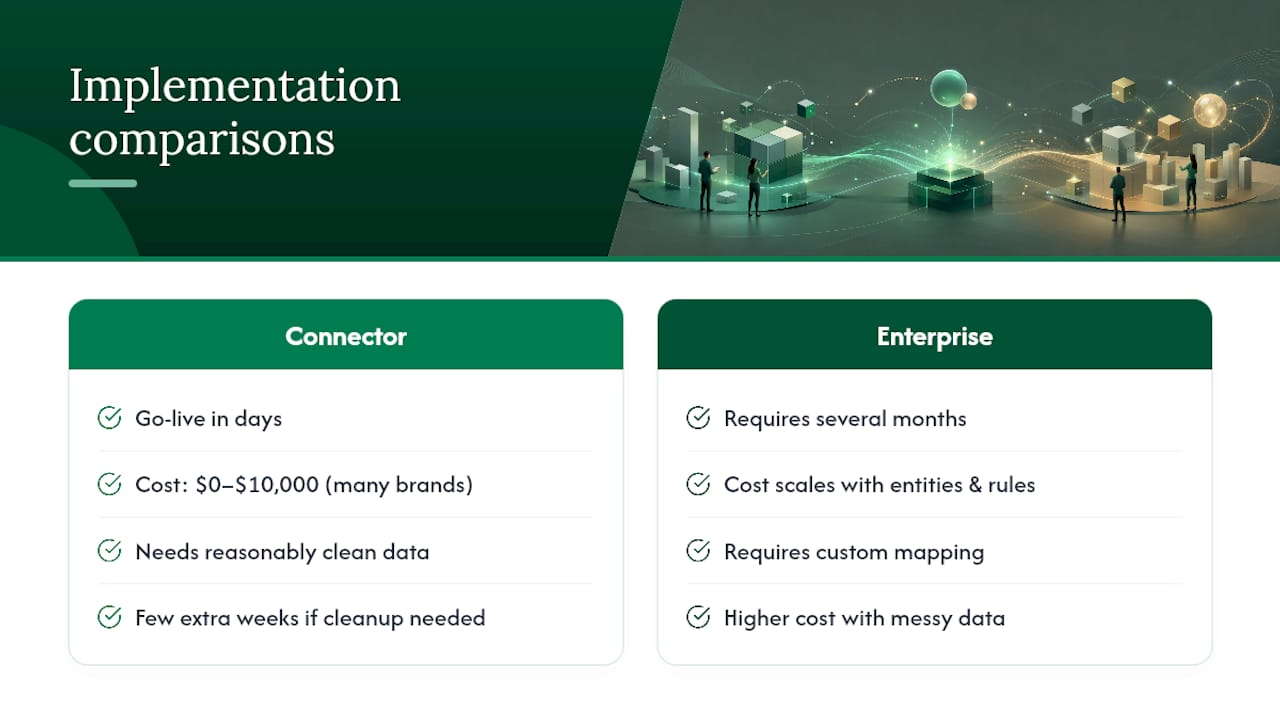
A transaction-level connector that talks directly to each channel’s API can go live in days and cost as little as $0 to $10,000 in implementation for many brands, which is a fraction of what an ERP-level rip-and-replace would run. That range assumes reasonably clean order data going in. If your product catalog has duplicate SKUs, your refund policy varies by channel, or your team has been manually patching gaps in a spreadsheet for two years, expect the higher end of that range and a few extra weeks for cleanup before the tool can run on autopilot.
Enterprise close suites typically require several months for full implementation due to custom mapping and complexity, and the cost scales with the number of entities and custom rule sets involved, not just the number of sales channels.
The reconciliation software market was valued at $2.30 billion in 2025 and is projected to reach $2.65 billion in 2026, a signal that finance leaders are treating this as infrastructure, not a nice-to-have month-end chore.
The ROI case is where the category earns its budget line. Automated reconciliation can significantly reduce manual effort and accelerate month-end close, with some vendors reporting very high auto-match accuracy, with some vendors reporting auto-match rates near 99% once rules are tuned. For a finance manager currently spending two full days a month reconciling Amazon settlements by hand, that’s the difference between a recurring headache and a task that runs quietly in the background. Add reimbursement recovery on top of straight reconciliation, and the ROI conversation shifts from hours saved to actual revenue recovered, money Amazon already owes you that a summary connector would never surface in the first place.
Why BeanHawk Fits Amazon and Multi-Channel Sellers
BeanHawk was built around a specific gap that generic reconciliation tools consistently miss: the money Amazon owes sellers for lost, damaged, or under-reimbursed FBA inventory almost never shows up as a clean line item. It gets buried inside settlement reports, split across multiple ledger events, or simply never triggers a claim because nobody’s watching the inbound shipment data closely enough to catch it.
BeanHawk runs continuous monitoring on inbound shipments and FBA ledger events, catching discrepancies as they happen rather than during a manual quarterly review. When it identifies a reimbursement opportunity, whether that’s inventory Amazon lost in a warehouse or damaged units that were never credited, it handles the recovery process directly. Once funds are recovered, some platforms automate settlement posting into QuickBooks or Xero, so the reconciliation and the recovery live in the same system instead of two disconnected spreadsheets.
Who this fits best:
- Amazon FBA sellers running multiple SKUs where manual reimbursement tracking has become unmanageable.
- Multi-channel sellers who need one centralized view of settlements across Amazon, and other sales channels, feeding into a single accounting platform.
- Finance managers who want reconciliation posted directly into QuickBooks Online without a manual export-import step every month.
- Operators who’ve never audited their FBA reimbursement history and suspect they’re owed more than they realize.
The typical path starts with a free audit of your existing FBA ledger data, which surfaces whether you have reimbursement gaps worth pursuing before you commit to anything. From there, BeanHawk connects to your existing sales channels and accounting software, and settlement postings start flowing automatically, giving your books the same transaction-level detail an enterprise suite would provide, without the enterprise timeline or price tag.
What I’ve Learned Watching Reconciliation Break Down
The single biggest driver of reconciliation failure isn’t the software. It’s what happens upstream of it. Order edits made after a sale, refunds processed outside the normal workflow, and manual price overrides at checkout all create data that no matching engine, however good, can cleanly reconcile. Fixing that upstream discipline often reduces exceptions more than switching tools does, because every reconciliation platform inherits whatever mess your order data hands it.
The second lesson is about ownership, not technology. A matching engine is only as good as the rule set behind it, and rule sets rot fast if nobody owns them. The businesses that stay reconciled long-term treat the rule set like a living document: someone named is responsible for exceptions, and every post-sale edit gets logged somewhere a human can find it later. Governance, not feature parity, is usually what separates a smooth implementation from a stalled one.
As for build versus buy: if your actual bottleneck is chasing Amazon for money it already owes you, that’s not a software problem you solve with better matching logic. That’s a recovery problem, and it calls for a service built specifically to find and file those claims, not a general ledger tool asked to do something outside its job.
, Tim
Get a Free Audit of Your Amazon Reimbursements
There’s a real gap between what most sellers assume they’re owed by Amazon and what they’ve actually recovered, and the only way to close it is to look at your own ledger data directly. BeanHawk’s free audit does exactly that: it reviews your inbound shipment and FBA ledger history and shows you where reimbursements were missed, without asking you to commit to anything first.

If the audit turns up recoverable funds, a short demo walks through what automated posting actually looks like in your accounting platform, including sample settlement entries and real examples of the kind of reimbursements BeanHawk catches that manual reviews typically miss. You’ll see exactly how lost or damaged inventory claims get filed and how the resulting funds land in QuickBooks or Xero without a manual export step. If you’re not sure whether your setup even qualifies for FBA reimbursements, the plain-English breakdown of what Amazon FBA covers is a good place to start. Request your free audit and see what Amazon owes you before you decide on anything else.
FAQ
What Is the Best Reconciliation Software for Ecommerce?
For Amazon and multi-channel sellers, BeanHawk stands out because it combines transaction-level settlement posting with automated FBA reimbursement recovery, a combination most standalone reconciliation tools don’t offer.
What Is the Best Software for Payment Reconciliation?
The right answer depends on transaction complexity: summary connectors work for simple, single-channel setups, while transaction-level platforms handle the refunds, chargebacks, and fee adjustments that come with multi-channel or Amazon FBA selling.
Is There an AI Tool for Reconciliation?
Most modern reconciliation platforms use automated matching logic, often described as AI-powered, to reconcile transactions and flag exceptions, with some vendors reporting auto-match rates near 99% once rules are properly configured.
What Is Reconciliation in Ecommerce?
Ecommerce reconciliation is the process of matching sales orders, fees, refunds, and payout deposits from each sales channel against your accounting records to confirm every dollar is accounted for accurately.
How Long Does It Take to Implement Reconciliation Software?
Transaction-level connectors can go live in days to a few weeks depending on data cleanliness, while enterprise close suites tied to a full ERP typically take two to six months to fully implement.