
Automate Amazon Business Accounting Settlements to QuickBooks and Xero

The correct Amazon business accounting setup starts with settlement-based posting, not order-based posting: create an Amazon Clearing account, connect Seller Central through SP-API to QuickBooks or Xero, and post each settlement as a single categorized journal entry. Do this first and everything else, from FBA reimbursements to sales tax, falls into a repeatable monthly rhythm instead of a scramble.
TL;DR:
- Using settlement-based posting requires creating a dedicated Amazon Clearing account to accurately match each settlement line to its corresponding accounts; order-based posting causes booking errors.
- Connectors must pull detailed settlement lines, including refunds, fees, reimbursements, and reserve changes, to automate categorization and avoid manual reclassification.
- Reimbursements should always go to a separate reimbursement account or contra-COGS, not sales, ensuring recoveries are not mistaken for income.
- Regular monthly reconciliation should include matching each settlement to its period, splitting straddling months by transaction date, and tying the general ledger to the Amazon inventory subledger.
- Automation tools like Beanhawk can streamline ongoing reconciliation, flag owed reimbursements, and reduce manual effort in reconciling settlement data.
Table of Contents
- What Chart of Accounts Do You Need for Amazon Settlements?
- How Do You Connect Seller Central to QuickBooks or Xero?
- How Should You Monitor and Record FBA Reimbursements?
- What Does a Monthly Amazon FBA Close Checklist Look Like?
- How Do You Implement This Step by Step?
- What I’ve Seen Go Wrong (and Right) With This Setup
- Automated Reimbursement Recovery Without the Manual Chase
- Sources
- FAQ
What Chart of Accounts Do You Need for Amazon Settlements?
Most sellers wreck their books in the first ten minutes by booking a settlement deposit straight to revenue. It looks like income when it hits the bank, but a single settlement bundles gross sales, refunds, fees, reimbursements, and reserve changes into one net number. Post that number as sales and your margin reporting is fiction from day one.
The fix is a small, deliberate chart of accounts built specifically around how Amazon actually pays you, not around how a generic retail business gets paid. At minimum, you need:
- Amazon Clearing (a holding/liability account that absorbs each settlement before cash lands)
- Amazon Reserves/Withheld (funds Amazon holds back, not yet payable)
- Sales - Amazon (gross product revenue, before deductions)
- Returns & Allowances (customer refunds, kept separate from fees)
- Amazon Referral Fees and FBA Fulfillment Fees (split, not lumped together)
- FBA Storage Fees (its own line since it swings seasonally)
- Inventory - FBA, Inventory in Transit, and Inventory Shrinkage/Write-Down
This structure comes directly from how settlement reports are actually organized, and it matters because reimbursements need somewhere specific to land. Reimbursements should never post as sales; they belong in a dedicated reimbursement account or as contra-COGS, since they’re really recoveries against inventory you already wrote off, not new revenue.
A quick example: a settlement line showing “$340 reimbursement, damaged inventory” gets debited to Amazon Clearing and credited to your reimbursement/contra-COGS account, not to Sales - Amazon. Get this one mapping rule right and half your reconciliation headaches disappear.
How Do You Connect Seller Central to QuickBooks or Xero?
Seller Central exposes settlement data, order data, reimbursement events, and reserve activity through the Selling Partner API (SP-API). A proper accounting setup for Amazon sellers uses a connector that authenticates against SP-API and pulls settlement reports on a schedule, not a bookkeeper manually downloading CSVs every few weeks.
Here’s what actually matters once that connection exists:
- The connector must ingest full settlement transactions, not just the net deposit amount. That means every sales line, refund line, fee line, and reimbursement line inside the settlement, individually.
- It has to track reserve changes separately from cash movements, since reserves aren’t yours yet.
- It needs to categorize each line automatically against the chart of accounts you built, mapping “FBA Inventory Reimbursement” to your reimbursement account and “Referral Fee” to referral fees, every time, without manual reclassification.
This is where the settlement-based versus order-based debate gets settled fast. Order-based posting means booking a journal entry per transaction, which sounds precise but breaks down completely at volume, since fees and reimbursements don’t map cleanly to individual orders. Connectors that decompose settlements into revenue, refunds, fees, reimbursements, and tax and post one categorized journal per settlement scale far better and leave a cleaner audit trail. A raw bank feed alone won’t do this work for you.
Pro Tip: If your connector only shows the net deposit in your bank register, you don’t have Amazon business accounting software, you have a bank feed with extra steps. Push for line-item detail.
How Should You Monitor and Record FBA Reimbursements?
Amazon loses, damages, and mis-processes inventory constantly, and the reimbursement system that’s supposed to make you whole only works if someone is watching for it. Continuous monitoring of inbound shipments and FBA ledger events catches discrepancies before they age out of Amazon’s claim window, which is where most sellers leave money on the table without realizing it.
The evidence trail matters as much as the monitoring itself. Keep:
- Inbound shipment reports showing units sent versus units received
- Check-in exceptions flagged during receiving
- The specific settlement line where a reimbursement actually posts
On the bookkeeping side, the rule is consistent: reconcile every reimbursement against an existing inventory write-off whenever one exists, treating the reimbursement as a recovery rather than income. If no matching write-off exists, the reimbursement still goes to your dedicated reimbursement account, but it should trigger an investigation into why inventory disappeared without a corresponding entry. That gap is often where sellers discover Amazon under-reimbursed them in the first place, and it’s a solid argument for pairing your books with documented check-in practices on the warehouse side.
For a deeper walkthrough of the claim documentation itself, see what FBA sellers must do when inventory goes missing.
What Does a Monthly Amazon FBA Close Checklist Look Like?
A defensible close isn’t complicated, it’s just sequential. Skip a step and reconciliation drifts a little more every month until nothing ties out.
- Pull every settlement that touches the period, including ones that started in one month and paid out in the next.
- Split straddling settlements by transaction date, not deposit date, so revenue and COGS land in the right month.
- Post the summarized journal per settlement, offsetting the net to Amazon Clearing rather than touching bank directly.
- Match each deposit to its settlement ID, one to one, closing out Amazon Clearing as the cash lands.
- Age your reserves to confirm what’s genuinely withheld versus what should have released.
- Tie the general ledger to the Amazon inventory subledger, then record any shrink or damage with its matching reimbursement attached.
The straddling-settlement problem is the one accountants underestimate most. Splitting settlements by transaction date rather than lumping everything into the month the deposit hit prevents misleading swings where one month looks unusually strong and the next looks weak for no operational reason.
When timing differences are material at period-end, record an Amazon receivable or accrued settlement so revenue and COGS land in the correct GAAP period, clearing automatically once the deposit arrives.
Skip this and your P&L tells a story your bank account doesn’t back up.
How Do You Implement This Step by Step?
Turning this into practice means assigning clear ownership, not just writing policy. Here’s the rollout in order:
- Seller or ops team: Enable SP-API access in Seller Central and grant connector permissions.
- Bookkeeper or accountant: Update the chart of accounts, configure posting rules, and confirm the connector maps reimbursement lines to contra-COGS, not sales.
- Both: Run one full month in parallel, old method alongside new, and reconcile the difference line by line before cutting over.
Test these specific scenarios before trusting the system fully: a reimbursement credit, a customer refund, a storage fee spike, and a settlement that pays out as two split deposits. If all four post cleanly and tie to Amazon Clearing, you’re in good shape.
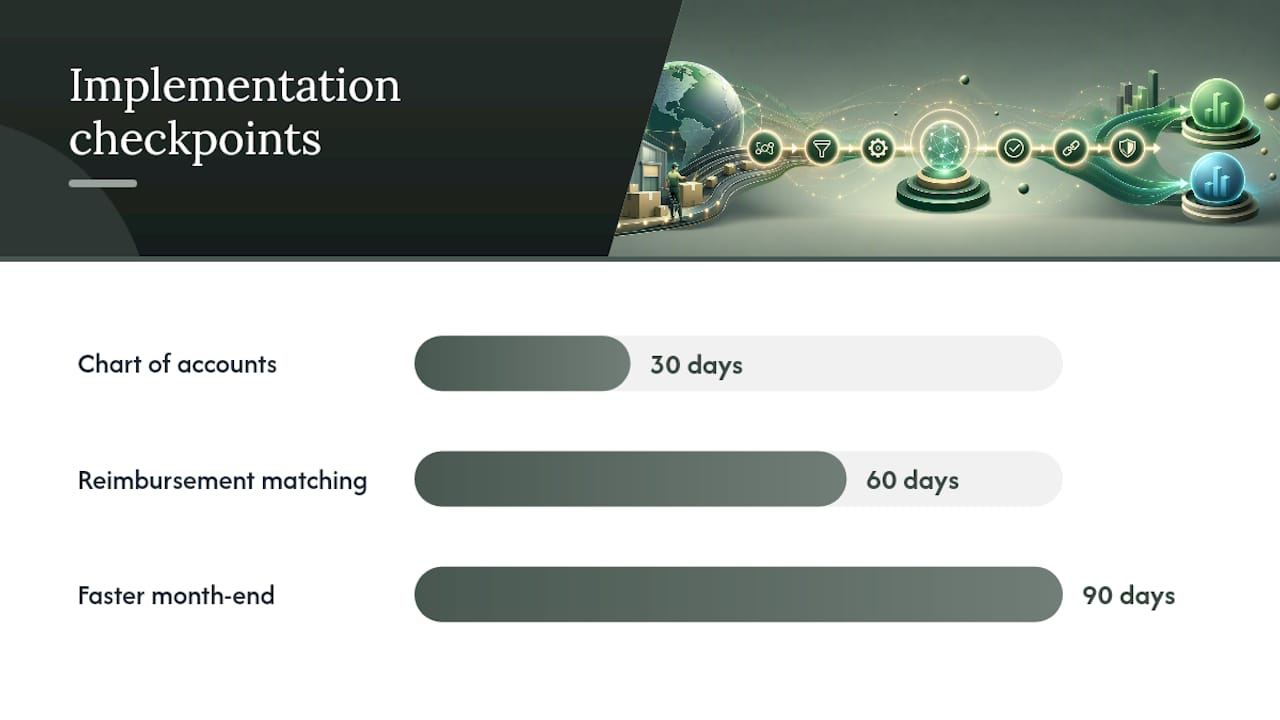
Then hold yourself to a 30/60/90 day checkpoint. At 30 days, confirm every settlement line has a home in the chart of accounts. At 60, confirm reimbursements are matching write-offs consistently. At 90, confirm your month-end close takes hours, not days.
Pro Tip: Don’t cut over on the first of a new fiscal quarter. Start mid-month so your parallel test doesn’t collide with quarterly reporting deadlines.
What I’ve Seen Go Wrong (and Right) With This Setup
The most common failure isn’t technical, it’s structural: sellers connect a tool but never tie the general ledger back to the Amazon inventory subledger. The numbers drift apart quietly for months until a tax preparer asks why COGS doesn’t match units sold, and by then nobody remembers which discrepancy came from where.
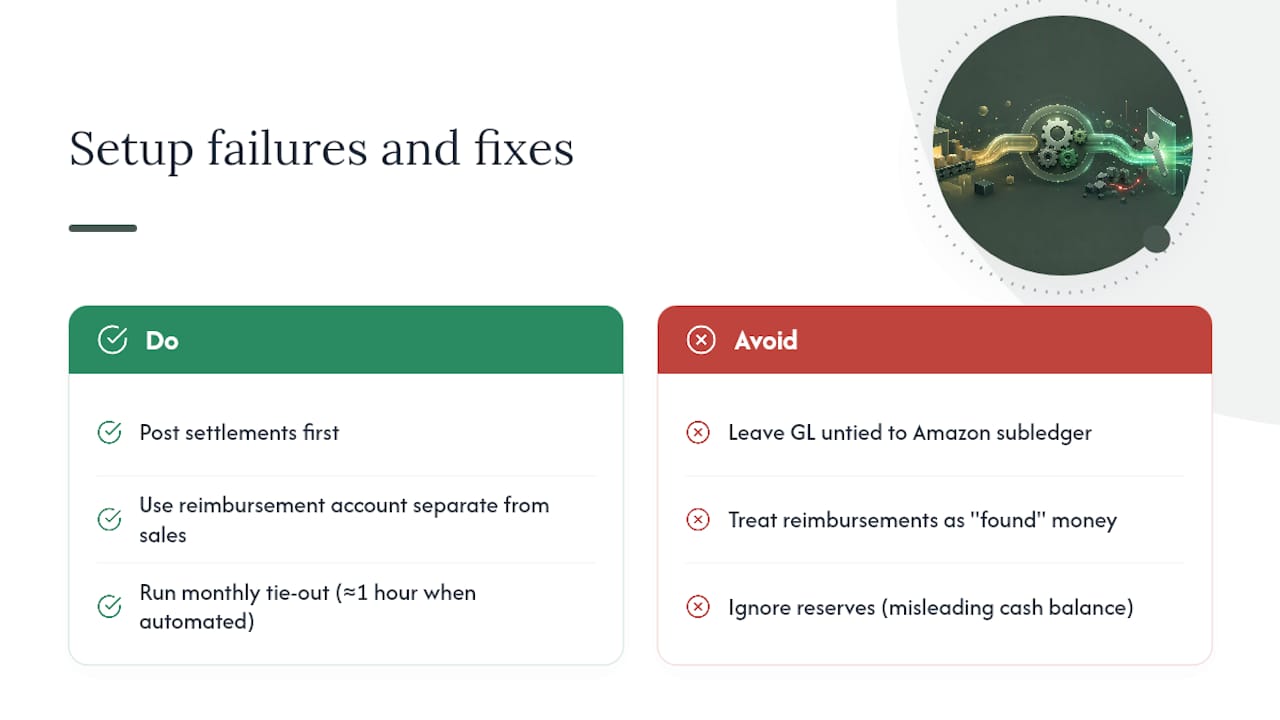
The second failure is treating reimbursements as found money instead of recoveries, which inflates margin and eventually gets flagged in due diligence or an audit. Ignoring reserves is the quiet third one, since money that isn’t yours yet still shows up as a nice, misleading cash balance.
The fix is genuinely boring: settlement-first posting, a reimbursement account that isn’t sales, and a monthly tie-out that takes an hour instead of a day once it’s automated. Run your own books against the checklist above and see where they actually stand.
, Tim
Automated Reimbursement Recovery Without the Manual Chase
Beanhawk gives you back the hours you’d otherwise spend hunting for reimbursement lines buried inside settlement reports and reconciling them by hand. Instead of checking Seller Central manually or waiting for a bookkeeper to catch a missed claim, Beanhawk runs continuous monitoring on your inbound shipments and FBA ledger events, flags what Amazon owes you, and automatically posts settlement-backed journals to QuickBooks and Xero.

That means the settlement-first model described above, Amazon Clearing, contra-COGS reimbursements, per-settlement journals, isn’t something you build manually every month. It’s the default. Beanhawk also handles multi-channel reconciliation, so sellers running Amazon alongside Shopify or other channels get one centralized view instead of stitching together spreadsheets. There’s no commission taken on recovered funds and no hidden fees layered on top of your subscription.
If your QuickBooks reconciliation currently takes a full day at month-end, start with Beanhawk’s QuickBooks reconciliation guide and run a free audit to see what’s actually sitting unclaimed in your account right now.
Sources
- Amazon FBA Accounting: Settlements, Fees & FBA Inventory
- How to Record Amazon FBA Reimbursements in QuickBooks
- Amazon FBA Software for QuickBooks and Xero Sync
FAQ
Should Amazon Reimbursements Be Booked as Income?
No. Reimbursements should post to a dedicated reimbursement account or contra-COGS since they’re recoveries against inventory loss, not new sales revenue.
How Often Should You Reconcile Amazon Settlements?
Monthly, at minimum, pulling every settlement that touches the period and matching each deposit to its settlement ID before closing the books.
Is Settlement-Based Posting Better Than Order-Based Posting?
Yes, for most sellers past a handful of orders per day. Settlement-based posting scales better and keeps a cleaner audit trail since fees and reimbursements rarely map neatly to individual orders.
What’s the First Account You Should Set Up?
An Amazon Clearing account. It absorbs the full settlement before cash lands in your bank, which is what makes settlement-based posting work without double-counting revenue.
Can Automation Actually Recover Reimbursements Amazon Owes You?
Yes. Tools built for continuous FBA ledger monitoring, like Beanhawk, catch discrepancies in inbound shipments and check-ins that manual review typically misses until the claim window closes.