
BeanHawk First: Multichannel Inventory Accounting for Amazon Sellers

For most Amazon-heavy multichannel sellers, one strong pick for multichannel inventory accounting is a tool that automates settlement posting to QuickBooks and Xero while continuously monitoring FBA reimbursements. Runner-up categories worth knowing: accounting-first reconcilers like BeanHawk itself, retail-focused platforms like Brightpearl, and enterprise ERPs like NetSuite for sellers who’ve outgrown standalone tools. Which one fits depends on whether your bottleneck is reimbursement recovery, order routing, or full financial consolidation.
TL;DR:
- Software that automates settlement posting and continuously monitors FBA reimbursements is essential for accurate inventory and financial management.
- Direct integration with QuickBooks, Xero, or NetSuite and support for FBA reserved inventory states are critical capabilities to prevent misclassified stock and phantom COGS.
- Implementation should focus on a 60 to 90-day pilot, starting with one channel, while ensuring data cleanup, correct settlement postings, and reconciliation accuracy.
- Vendors must provide clear, specific answers about settlement exports, FBA support, and landed-cost calculation to avoid costly missteps.
- Choosing an accounting-first reconciler like BeanHawk is often preferable for Amazon-heavy sellers managing limited channels, as it offers focused reimbursement recovery and seamless journal posting without high upfront costs.
Table of Contents
- What Is the Best Multichannel Inventory Accounting Software?
- How Do You Choose Multichannel Inventory Accounting Software?
- How BeanHawk Solves the Multichannel Accounting Problem
- How Purchase Orders Update Your Inventory Cost Layers
- What Does Multichannel Inventory Accounting Software Actually Cost?
- How Should You Evaluate a Vendor Before Buying?
- What Are the Biggest Pitfalls When Choosing a Vendor?
- When Should You Choose an Accounting-First Tool Instead of an ERP?
- Why Beanhawk Is Worth Testing Before You Commit to a Bigger System
- Primary Sources and Further Reading
- Sources
- FAQ
What Is the Best Multichannel Inventory Accounting Software?
“Multichannel inventory accounting” isn’t quite the industry’s own term for this problem, though it describes exactly what sellers are searching for. The formal discipline is usually called inventory accounting or cost of goods sold (COGS) management across multiple sales channels, and it covers three linked jobs: tracking stock across every channel and fulfillment method, converting marketplace settlements into correct journal entries, and keeping your cost layers accurate enough that your balance sheet doesn’t lie to you.
That distinction matters because a lot of software calls itself “inventory management” while doing almost nothing for the accounting side. A tool can sync stock counts across Amazon, Shopify, and eBay all day long and still leave you guessing what your actual COGS was last month, because it never touches your general ledger.
The vendors covered below split roughly into three camps. Accounting-first reconcilers, including BeanHawk, focus on turning settlement data and reimbursement events into clean journal entries. Multichannel operations platforms, like Linnworks and Cin7, focus on order routing and stock visibility, with accounting as a secondary export. And ERPs, like NetSuite and Acumatica, fold inventory into a much bigger financial system built for companies with more complex org structures.
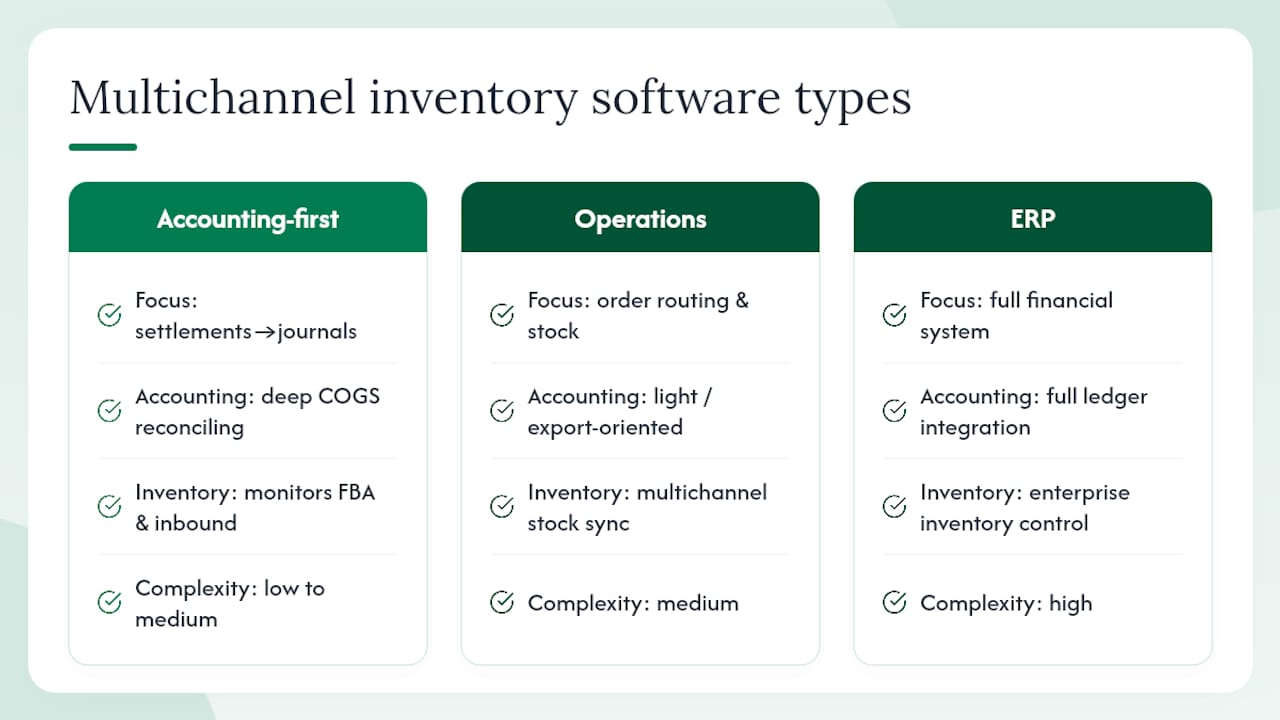
Selection for this shortlist followed the same signals search results and vendor documentation consistently surface: whether the platform actually integrates with QuickBooks, Xero, or NetSuite, whether it handles the messy multi-state reality of FBA and third-party logistics (reserved, sellable, in-transit, unfulfillable), and how it approaches costing. Vendor explainers and comparison pages consistently name Brightpearl, Linnworks, Cin7, NetSuite, and Zoho Inventory as the core set sellers evaluate, so every one of them earns a spot here alongside the accounting-specific tools that rarely make those lists but solve a more specific problem.
BeanHawk is an accounting-first reconciler built for Amazon-heavy multichannel sellers. It runs continuous monitoring on inbound shipments and FBA ledger events, flags lost or under-reimbursed inventory, and posts summarized settlement journals directly into QuickBooks or Xero. The standout capability is the pairing of automated reimbursement detection with settlement-level accounting output. Most tools do one or the other. Pricing runs Free at $0 per month, Starter at $19 per month, Growth at $49 per month, and Scale at $99 per month, with no commission taken on recovered funds.
Brightpearl positions itself as a retail operating system rather than a bolt-on inventory tool. It centralizes inventory across POS, wholesale, and online channels and ships with built-in accounting workflows, which makes it a natural fit for retailers who want fewer systems talking to each other. The tradeoff is that Brightpearl is built for retail operations broadly, not for the specific mechanics of Amazon reimbursement or FBA reserved-unit tracking, so sellers whose main pain point is Amazon-specific reconciliation will find it does less there than a specialized tool.
Veeqo covers multichannel order and shipping management with inventory sync built in, and it leans heavily into the shipping and fulfillment side of the equation. It suits sellers whose main headache is getting orders out the door correctly across channels, though its accounting depth is thinner than dedicated reconciliation tools, so most sellers still pair it with a separate accounting workflow for month-end close.
Ecomdash targets small sellers who need to keep stock levels consistent across several marketplaces without paying enterprise prices. It consolidates orders and syncs stock counts, and it’s a reasonable starting point for a seller running two or three channels who isn’t yet worried about landed-cost precision. It’s not built to solve settlement-level accounting on its own.
Sellbrite is marketplace-first: its job is listing and inventory sync across channels like Amazon, eBay, and Walmart, keeping stock counts from drifting out of sync when the same SKU sells in five places at once. It’s a strong fit for sellers whose biggest fear is overselling, less so for sellers trying to fix their books.
NetSuite is the enterprise answer. It bundles deep financial modules with inventory management, supports complex multi-entity and multi-currency operations, and integrates with a wide range of connectors for marketplace and 3PL data. The cost and implementation complexity put it out of reach for most small and mid-size sellers, but for a company running multiple legal entities or expanding internationally, the financial control NetSuite provides is hard to replicate with a lighter tool.
Acumatica sits a notch below NetSuite in scale but still delivers ERP-grade financial controls paired with inventory modules, aimed at mid-market businesses that have outgrown SMB tools but don’t need the full enterprise footprint. It’s a sensible stop for a seller who has hit the ceiling of a lighter platform but isn’t ready for NetSuite’s cost or complexity.
Cin7 connects retail, wholesale, and ecommerce inventory in one cloud system, with POS built in. It’s a strong option for brands selling through multiple business models at once, wholesale accounts alongside direct-to-consumer, rather than pure marketplace sellers.
Linnworks is built around order orchestration. If you’re selling across a dozen marketplaces and need a system that routes orders to the right warehouse or 3PL automatically, Linnworks earns its reputation there. Its accounting integrations exist, but they function more as data export than as a reconciliation engine.
Extensiv (formerly Skubana) targets scaling ecommerce brands with fulfillment routing and operational analytics layered on top of inventory data. It’s a good fit for a brand that’s outgrown a simple sync tool and needs smarter routing logic across warehouses and 3PLs, though like Linnworks, its accounting output leans toward export rather than posting.
Fishbowl is built for manufacturers and distributors, not marketplace sellers per se. Its costing features are strong for businesses that build or assemble products, tracking raw materials into finished goods, which makes it a poor match for a pure reseller but a solid one for a hybrid manufacturer/seller.
Microsoft Dynamics 365 Business Central brings ERP-level financial controls into the Microsoft ecosystem. Companies already running on Microsoft’s stack, using Excel and Power BI heavily, tend to gravitate here because the integration with tools they already use is tighter than with a standalone platform.
Zoho Inventory is the budget-conscious entry point. It handles basic multichannel syncing and connects to accounting exports at a price small sellers can actually justify. It won’t handle FBA reserved-state nuance or landed-cost layering with any sophistication, but for a seller just starting to sell on more than one channel, it removes the worst of the spreadsheet chaos cheaply.
Sellware and Expandly both occupy a similar niche to Sellbrite and Ecomdash: multichannel listing and inventory sync aimed at sellers who need channels to stop overselling each other, with accounting handled as a downstream export rather than a core feature.
Xorosoft rounds out the enterprise-leaning multichannel inventory software category, combining inventory, order management, and financial modules aimed at businesses that need more operational depth than an SMB tool but don’t want the full NetSuite implementation curve.
How Do You Choose Multichannel Inventory Accounting Software?
The checklist that actually matters has almost nothing to do with how pretty the dashboard is. It comes down to whether the software can answer, precisely, what happened to every dollar and every unit across every channel, every month, without you rebuilding the answer by hand in a spreadsheet.
Here’s the order to evaluate in, from most to least important:
- Accounting integrations. Does it post directly into QuickBooks, Xero, or NetSuite, or does it just export a CSV you have to massage yourself? Direct posting is the difference between a five-minute month-end and a five-hour one.
- Settlement-level journal export. Can it break a marketplace payout into its real components, gross sales, refunds, advertising fees, storage fees, and reimbursements, as separate journal lines rather than one lump deposit? Practitioner guidance is consistent on this point: treating a payout as a single revenue line instead of a multi-line journal is one of the most common bookkeeping errors multichannel sellers make.
- FBA and 3PL reserved-state support. Can the software distinguish sellable, reserved, in-transit, and unfulfillable units? If it can’t, your inventory value on the books will be wrong every time Amazon reclassifies stock.
- Continuous COGS and landed-cost support. Does the system update cost layers automatically as new purchase orders land, or does it wait for a manual recalculation?
- Audit trail and data exportability. Can you pull a transaction-level export that ties back to source documents, or are you stuck trusting a black box?
- Pricing transparency. Are the tiers and their limits published, or do you have to talk to sales to find out what volume triggers a price jump?
Ask vendors these questions directly, and watch how specific the answer is: “Can you export multi-line settlement journals that map to my chart of accounts?” and “How do you represent FBA reserved inventory and unfulfillable units in the system?” A vendor that answers with a confident, specific walkthrough is worth a second look. A vendor that pivots to talking about their dashboard is telling you something.
Red flags worth walking away from: no settlement import or export at all, costing logic the vendor can’t explain in plain language, no way to pull an audit-ready transaction export, and a sales team that can’t answer how the platform handles FBA or 3PL reconciliation without escalating to an engineer.
A realistic implementation timeline runs in four phases. Start with data cleanup, getting your SKU catalog and historical cost data into one clean source of truth. Then build a landed-cost catalog so every purchase order carries freight and duty allocations correctly. Run a trial reconciliation cycle against one or two channels before going all-in. Then automate the monthly close once you trust the numbers matching your bank deposits.
For a 60 to 90 day pilot, keep the scope narrow:
- Pick one channel and 20 to 50 SKUs to pilot the integration.
- Connect the accounting integration and confirm settlement journals post correctly for one full pay cycle.
- Reconcile the pilot channel’s bank deposits against the settlement report line by line.
- Run a physical count on the pilot SKUs and compare against system-reported quantities.
- Expand to remaining channels only after the pilot reconciles cleanly for two consecutive cycles.
Pro Tip: Phantom COGS almost always shows up first in reserved or in-transit inventory that never got assigned a cost layer. If your gross margin looks unusually high right after a big inbound shipment, check whether that stock is sitting in a “received but uncosted” limbo before you celebrate.
NetSuite’s own guidance backs the monthly cadence here: sellers who run reconciliations and cycle counts monthly, rather than quarterly or annually, catch cost layer errors while they’re still cheap to fix.
How BeanHawk Solves the Multichannel Accounting Problem
Most inventory tools treat accounting as an afterthought, a CSV export you’re supposed to figure out yourself. BeanHawk starts from the opposite direction: the accounting output is the product, and the inventory monitoring exists to feed it accurate numbers.
The core mechanics work like this. BeanHawk runs continuous monitoring on inbound shipments and FBA ledger events, watching for the specific patterns that indicate Amazon owes you money: units lost in transit, damaged in a fulfillment center, or under-reimbursed relative to what the ledger shows. When it flags a discrepancy, it surfaces the claim so you can recover funds you’d otherwise never notice were missing.
The second half of the mechanism is what sets it apart from a pure reimbursement-recovery tool. Instead of stopping at “here’s money you’re owed,” BeanHawk posts the settlement activity, sales, fees, refunds, and reimbursements alike, as summarized journal entries directly into QuickBooks or Xero. That closes the loop between operational reality (what happened to your inventory) and financial reality (what your books say happened), which is precisely the gap that causes phantom COGS in the first place.
The single most common year-end surprise for multichannel sellers isn’t a big loss. It’s discovering that reserved or in-transit units never got assigned a proper cost layer, so the COGS figure the books have been running on all year was quietly wrong. Continuous reconciliation is the fix, not a bigger year-end cleanup project.
That’s the exact failure mode BeanHawk’s approach targets: catch the ledger discrepancy while it’s fresh, post the correction to the accounting platform automatically, and never let it accumulate into a January surprise.
None of this requires a hidden fee structure or a commission cut on what gets recovered. The pricing is published, and no percentage is taken from reimbursement claims. For a seller trying to decide whether a tool like this is worth adding to an already crowded software stack, that’s a meaningfully different economic model than the commission-based recovery services common in this space.
Sellers who want a deeper walkthrough of how settlement postings map into a chart of accounts can check the step-by-step reconciliation guide or the more Amazon-specific breakdown of FBA reserved and sellable unit reconciliation.

How Purchase Orders Update Your Inventory Cost Layers
Every purchase order you place should update more than a quantity field. It should update a cost layer, the actual landed cost of that batch of inventory, including freight, duties, and any per-unit fees that got added on top of the unit price.
Continuous COGS tracking means the system recalculates your average or FIFO cost the moment new inventory lands, rather than waiting for a quarterly true-up. That matters most when landed costs swing between purchase orders. A shipment that arrives during a freight rate spike carries a different true cost than the one before it, and if your system averages that in immediately, your margin reporting stays honest in near real time.
The failure mode without this is familiar to anyone who’s done a year-end cleanup: inventory sitting on the books at a stale cost that no longer reflects reality, because nobody updated the layer when the new PO landed. Multiply that across dozens of SKUs and several fulfillment centers, and the gap between “what the books say” and “what’s actually true” gets wide fast.
The fix isn’t complicated in principle, it’s a landed-cost catalog that ties every PO to its full cost, freight and duties included, and a system that applies that catalog automatically rather than leaving it to a manual journal entry someone might forget to make. Whether you get there with a dedicated costing module or an accounting-first reconciler depends on how many SKUs and suppliers you’re juggling, but the underlying principle doesn’t change.
What Does Multichannel Inventory Accounting Software Actually Cost?
The subscription price on a pricing page is rarely the whole story. Total cost of ownership includes licensing, implementation time, training, and ongoing support, and the gap between the cheapest and most expensive parts of that list can be larger than the subscription fee itself.
Licensing for accounting-first reconcilers and SMB-focused tools tends to scale with order volume or SKU count, which means the monthly number grows as your business does. ERP platforms like NetSuite and Acumatica typically involve a much larger upfront implementation cost, sometimes running into the tens of thousands of dollars, plus ongoing consultant fees for configuration changes.
Implementation time is where sellers most often underestimate cost. A lightweight tool that connects via API can be live in days. An ERP implementation, by contrast, often takes months and usually involves a third-party consultant, because the system needs to be configured around your specific chart of accounts, tax jurisdictions, and channel mix before it produces trustworthy numbers.
Training costs get overlooked, too. If your bookkeeper or controller needs to learn a new interface and new reconciliation workflow, that’s real time off other work, and if the tool’s logic isn’t intuitive, that ramp period drags out.
Ongoing support matters most in month twelve, not month one. A platform with responsive support during a settlement discrepancy or a failed sync is worth more than one with a lower sticker price and a support ticket queue that takes a week to answer.
How Should You Evaluate a Vendor Before Buying?
A demo tells you what a vendor wants you to see. A trial tells you what actually happens with your data. Insist on running a real reconciliation cycle with your own settlement reports before committing, not just a guided tour of sample data that’s been curated to look clean.
Customer support quality is easiest to test before you buy, not after. Send a specific technical question, “how do you handle a partially refunded order that spans two settlement periods,” and see how precise the answer is. A vague response is a preview of what you’ll get when something breaks during a live month-end close.
Scalability questions matter even if you’re small today. Ask what happens to pricing and performance at 10 times your current order volume, because switching platforms mid-growth is expensive and disruptive, and a tool that quietly degrades under load will surface that flaw at the worst possible time.
Security deserves a direct question, not an assumption. Ask what certifications the vendor holds, how they handle API credentials for connected accounts like Amazon and your accounting platform, and whether data is encrypted at rest and in transit. A vendor that can’t answer clearly hasn’t thought about it enough.
What Are the Biggest Pitfalls When Choosing a Vendor?
The most expensive mistake is picking a tool built for inventory operations and assuming the accounting output will take care of itself. It won’t. If a platform’s only accounting feature is “export to CSV,” you’re signing up to build your own reconciliation layer by hand every month, indefinitely.
The second pitfall is underestimating how much reserved, in-transit, and unfulfillable inventory can distort your numbers if the software can’t represent those states distinctly. A tool that shows one flat “in stock” number for FBA inventory is hiding information you need.
The third is choosing based on price alone and discovering the implementation and training costs dwarf the subscription fee. And the fourth, more subtle, is choosing a platform with no clear audit trail. If you can’t produce a transaction-level export that ties back to source settlement reports, you’re building on a foundation your accountant, or an auditor, won’t be able to verify later.
When Should You Choose an Accounting-First Tool Instead of an ERP?
The right answer depends less on company size and more on where the actual pain lives.
Early-stage Amazon-heavy sellers, especially those running one or two channels with the bulk of volume through FBA, are almost always better served starting with an accounting-first reconciler. The month-end close is faster, implementation takes days rather than months, and the specific pain point, reimbursement recovery and settlement accuracy, gets solved directly rather than as a side effect of a bigger system.
Mid-market sellers running multiple 3PLs alongside marketplace channels usually need more operational routing than a pure reconciler offers, but a full ERP is often overkill. The practical move here is pairing an inventory platform like Linnworks or Extensiv with a dedicated accounting integration, accepting a bit more setup complexity in exchange for stronger order orchestration.
Enterprise sellers operating across multiple countries or legal entities are the one segment where ERP genuinely earns its cost and implementation time. NetSuite or Acumatica’s financial controls handle multi-currency and multi-entity consolidation in ways a lighter tool simply isn’t built for, and the tradeoff of a longer implementation and higher upfront cost is worth it at that scale.
If you’re not sure which camp you’re in, the lowest-risk next step is starting with a free FBA reimbursement audit to see what your current reconciliation gaps actually look like before committing to a bigger platform decision.
Why Beanhawk Is Worth Testing Before You Commit to a Bigger System
There are other routes to solving this. You could stand up a full ERP implementation, or hand your books to a bookkeeper who manually reconciles settlement reports every month, or keep patching together spreadsheets and hope nothing slips through. All three work, at a cost.
BeanHawk’s free FBA reimbursement audit shows you, before you pay anything, what’s actually broken: missed reimbursements sitting unclaimed, reserved inventory that never got a clean cost layer, and reconciliation gaps between what Amazon’s ledger says and what your books show.

Once you move past the audit, the same system that found those gaps starts posting settlements directly into QuickBooks or Xero, turning what used to be hours of manual settlement matching into a month-end close that mostly runs itself. No commission comes out of whatever gets recovered.
Run the free audit to see what’s currently slipping through, or go straight to the pricing page to compare the Starter, Growth, and Scale tiers against your order volume.
Primary Sources and Further Reading
The claims in this article draw on a mix of market research and vendor documentation. Forrester’s marketplace tracker documents growing marketplace complexity and makes the case for event-driven data architectures, which backs the argument that real-time settlement data beats batch exports for accounting accuracy.
NetSuite’s explainer on multichannel inventory management outlines the automation and monthly reconciliation practices referenced in the buying guide, along with the case for tracking reserved, in-transit, and unfulfillable inventory states separately.
Brightpearl’s operational guide covers centralized inventory views and cycle-count practices that helped validate the checklist items in this piece.
The Beancount.io practitioner guide provided the clearest technical breakdown of phantom COGS and multi-line settlement posting, concepts that shaped both the buying guide and the explanation of how BeanHawk’s reconciliation approach works.
Sources
- Forrester , 2025 online marketplace tracker (global)
- NetSuite , Multichannel inventory management: Benefits and challenges
- Brightpearl , Multichannel Inventory Management
- Beancount
FAQ
What Is the 80/20 Rule in Inventory Management?
It’s the observation that roughly 80% of a business’s inventory value or sales volume typically comes from around 20% of its SKUs, which is why most multichannel accounting checklists recommend prioritizing tight cost-layer accuracy on your top-selling SKUs first, rather than treating every item with equal urgency.
What Are the Top Inventory Management Systems for Multichannel Sellers?
There’s no single universal answer, since the right system depends on whether your priority is accounting accuracy, order routing, or full ERP consolidation. For Amazon-heavy sellers needing settlement-level reconciliation, BeanHawk fits that specific job; for broader multichannel operations, Brightpearl, Linnworks, and NetSuite are the names that come up most consistently across vendor and market comparisons.
Does Amazon Use Vendor-Managed Inventory?
Amazon does use a vendor-managed inventory model for its Amazon Vendor Central program, where suppliers sell wholesale directly to Amazon and Amazon manages replenishment ordering. That’s distinct from FBA seller inventory, which is managed by the third-party seller and only stored and fulfilled by Amazon.
What Is the Most Popular Warehouse Management System?
There isn’t one dominant warehouse management system across all business sizes. Larger operations tend toward ERP-integrated systems like NetSuite or Microsoft Dynamics 365 Business Central, while sellers focused specifically on marketplace fulfillment often use lighter, order-routing-focused platforms like Linnworks instead.
Does BeanHawk Charge a Commission on Recovered Reimbursements?
No. BeanHawk charges a flat subscription fee, Starter at $19 per month, Growth at $49 per month, or Scale at $99 per month, and takes no commission on any funds recovered through reimbursement claims.