
Reconciliation First COGS Tracking Software for Multi Channel Sellers

The best COGS tracking software runs on three connected parts: a purchase order database, a landed cost allocation engine, and an automated reconciliation process that ties settlements back to your books. For Amazon and multi-channel sellers, BeanHawk is a recommended way to get that stack without building it manually. The sections below walk through what to look for, how to test a vendor before you commit, and how to set it up correctly.
TL;DR:
- Accurate COGS tracking requires a purchase order database, landed cost allocation, and reconciliation processes that match settlements to inventory and books.
- Most sellers overlook landing cost support and rely on manual entry, which causes inaccuracies, especially with multiple SKUs and channels.
- Using software that integrates directly with marketplaces and provides automated settlement parsing minimizes manual work and reduces phantom COGS.
- Running real settlement tests and monthly SKU trace checks helps catch cost drifts and inaccurate inventory valuation before tax reporting.
- BeanHawk’s continuous inbound shipment monitoring and structured journal posting address upstream reconciliation gaps that common accounting tools often miss.
Table of Contents
- What Does Accurate COGS Tracking Software Actually Do?
- How Do You Choose the Right COGS Tracking Software?
- Which Software Category Fits Your Business Model?
- What’s the Right Way to Implement COGS Software?
- Why BeanHawk Solves the Reconciliation Problem Most Sellers Ignore
- What I’d Actually Tell a Seller Weighing Their Options
- Getting Started With BeanHawk
- Sources
- FAQ
What Does Accurate COGS Tracking Software Actually Do?
A COGS number is only as good as the system generating it. According to CentSight’s research on e-commerce finance, the pattern that reliably produces audit-ready cost of goods sold rests on three components: a purchase order database that records what you paid, a cost allocation engine that spreads landed costs across units, and a reconciliation process that matches settlements to inventory movement and journal entries.
The purchase order database sounds basic, but most sellers skip it and eyeball costs from an invoice folder instead. Every PO needs a timestamp, a unit cost, and a link to the specific inventory batch it created.
Landed cost allocation is where things get harder. Freight, duties, and prep fees rarely map cleanly to a single SKU, so the software has to spread those costs proportionally, usually by unit count, weight, or value. Beancount.io’s guide on multi-channel fulfillment and landed cost notes that spreadsheets tend to break down once a seller crosses a certain threshold of SKUs and channels, because each new PO has to recalculate landed cost for every affected item by hand.
Inventory syncing closes the loop between what you own and what you’ve sold. Reserved FBA inventory, damaged units, and stranded stock all create what’s known as phantom COGS: cost recorded against inventory that technically still exists but isn’t sellable or trackable in your feed.
A capable system handles this through:
- Automatic settlement parsing that breaks a single deposit into fee, refund, and revenue lines
- Fee-level posting into the correct journal accounts instead of one lump “Amazon fees” entry
- Per-SKU cost updates every time a new PO lands
- Reserved and damaged inventory tracking separate from sellable stock
Skip any one of these and your gross margin report becomes a guess dressed up as a number.
How Do You Choose the Right COGS Tracking Software?
Pick software the same way you’d vet a bookkeeper: ask what happens when something goes wrong, not just what the dashboard looks like when everything goes right. Here’s the order to evaluate criteria in, from most to least critical for a growing e-commerce operation.
- Integration depth. Confirm it connects directly to Amazon Seller Central, Shopify, and QuickBooks or Xero, not just a generic CSV import.
- Landed cost support. Ask specifically how freight and duty get allocated across units in a single PO. If the answer is “you enter it manually per SKU,” that’s a red flag for anyone above a couple hundred SKUs.
- Automation level. Find out whether settlement parsing and journal posting run automatically or require someone to map line items every week.
- Audit trail. You need version-controlled records, meaning every cost change is timestamped and reversible, not just overwritten.
- Channel-level reporting. CPA practitioners covering multi-channel e-commerce accounting recommend either separate revenue and COGS accounts per channel or consistent tracking categories, so you can see which channel is actually profitable without exporting three reports and building a pivot table.
- Pricing model. Check whether the pricing scales with order volume or SKU count, and whether add-ons like extra channel connections cost more.
For most SMB sellers, integrations, landed cost support, and audit trail are must-haves. Custom report builders and multi-entity consolidation are nice-to-have until you’re running several brands.
Pro Tip: Before you sign anything, run one real settlement through the trial. Import it, watch the journal entry it generates, then try to trace that journal back to the actual bank deposit. If you can’t do this in a few clicks, the vendor is likely relying on manual mapping behind the scenes, and that workload eventually becomes yours.
Which Software Category Fits Your Business Model?
Not every seller needs the same tool, and the category you pick should follow your SKU count and channel mix, not the other way around.
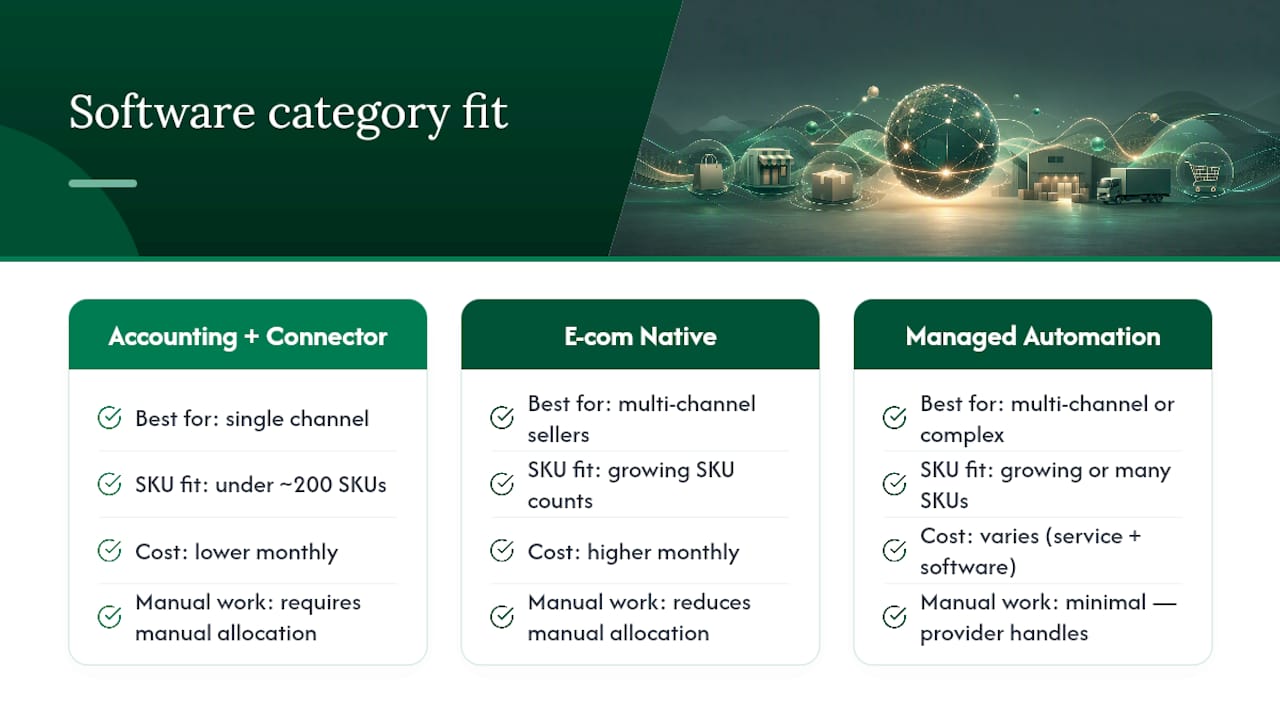
Accounting hub plus connectors. This is a general ledger platform like QuickBooks or Xero paired with a marketplace connector app. It’s affordable and familiar to any bookkeeper, but landed cost allocation and per-SKU costing usually require manual setup or a second add-on. Beancount.io’s extended guide suggests this route works best for sellers under roughly 200 SKUs on a single channel.
E-commerce native inventory and COGS platforms. These are built around purchase orders and landed cost from the start, with inventory sync as a core feature rather than a bolt-on. They cost more monthly but save hours of manual allocation once you’re juggling multiple channels or suppliers.
Managed automation services. These combine software with a service layer that handles settlement monitoring, reimbursement claims, and reconciliation on your behalf. This category fits sellers who’d rather not staff an in-house bookkeeper for marketplace-specific reconciliation work, and it’s where BeanHawk operates.
Match the category to your reality: single channel and low SKU count leans toward connectors; multiple channels and growing SKU counts push toward native platforms or managed automation.
What’s the Right Way to Implement COGS Software?
Getting the software right on paper means nothing if the rollout is sloppy. Follow this sequence, and don’t skip steps to save a week.
- Export your current inventory and cost data, and clean up SKU naming inconsistencies before importing anything.
- Import historical purchase orders with real unit costs, not averages.
- Set landed cost allocation rules (by unit, weight, or value) for freight and duty.
- Configure channel connectors for each marketplace, mapping fee types to the right accounts.
- Run a test reconciliation on one recent settlement before going live on all channels.
The pitfalls that wreck COGS accuracy are almost always the same three: SKU mismatches between the marketplace feed and the accounting system, landed costs left out entirely so COGS reflects only unit price, and reserved or in-transit inventory that never gets reconciled against what actually sold.
Pro Tip: Run a monthly spot-check where you trace five random SKUs from PO to sale to journal entry. Pair that with a quarterly physical count reconciliation, and most cost drift gets caught before it compounds into a bad tax filing. BeanHawk’s monthly reconciliation guide walks through a sample trace if you want a template to copy.
Why BeanHawk Solves the Reconciliation Problem Most Sellers Ignore
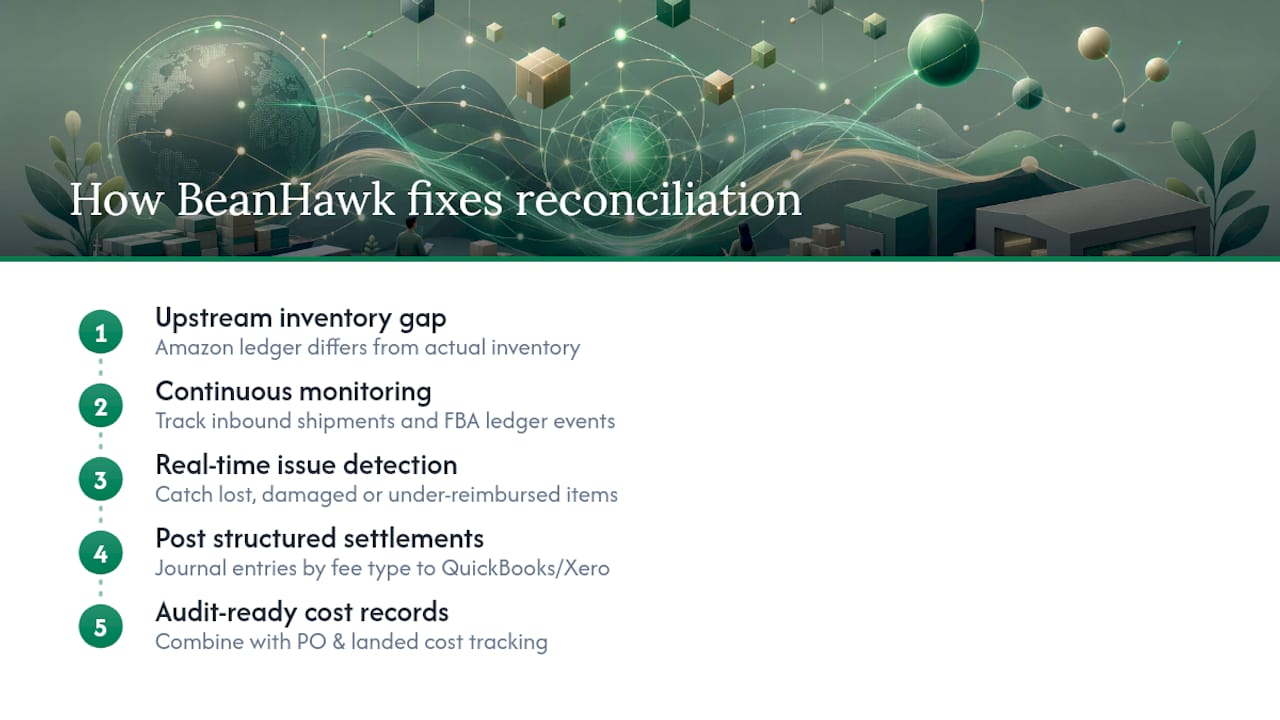
Most COGS problems don’t start in the accounting software. They start upstream, in the gap between what Amazon’s ledger says happened to your inventory and what actually landed in your warehouse or FBA account. BeanHawk was built around that specific gap.
The core mechanism is continuous monitoring of inbound shipments and FBA ledger events, which catches lost, damaged, or under-reimbursed inventory as it happens rather than months later during a manual audit. BeanHawk’s own data shows that reconciling settlements against inventory and journals this way reduces phantom COGS, the cost tied to inventory that’s technically on the books but not actually sellable.
From there, BeanHawk posts settlements directly into QuickBooks or Xero as structured journal entries, broken out by fee type, so a seller’s channel-level P&L reflects reality instead of a single lumped “marketplace fees” line. Combined with PO and landed cost tracking, this gives sellers the audit-ready, version-controlled cost records that CPAs and tax preparers actually want to see.
What I’d Actually Tell a Seller Weighing Their Options
If you’re deciding between building a spreadsheet system or paying for automated reconciliation, run the numbers on your own time first. Every hour spent manually matching settlements to inventory is an hour not spent sourcing or marketing, and that tradeoff gets worse as SKU count grows, not better.
My one recommendation before signing with any vendor: import a real settlement, watch it generate a journal entry, then trace that entry back to the bank deposit. If a vendor can’t demonstrate that in a trial, assume the manual work lands on you later.
, Tim
Getting Started With BeanHawk
BeanHawk gives you something a spreadsheet or a generic accounting connector can’t: continuous monitoring of every inbound shipment and FBA ledger event, paired with automated settlement posting straight into QuickBooks or Xero. No manual line mapping, no hidden commission on what it finds.

Here’s what that actually covers: ongoing inbound shipment and ledger monitoring to catch lost or damaged units before they quietly inflate your COGS, automated journal entries broken out by fee type, direct QuickBooks and Xero sync, and PO plus landed cost tracking so your per-unit costs stay current with every new shipment.
Getting started begins with a free audit. BeanHawk reviews your recent settlement and ledger history and shows you exactly what’s been missed or misreported, no subscription required to see the results. If the numbers show real recovery potential or reconciliation gaps, moving to the full platform is the next step. Start by checking whether Amazon owes you reimbursement for lost or damaged inventory, and see what a real audit of your account turns up.
Sources
The recommendations above draw on a few core resources worth bookmarking. CentSight’s COGS tracking guide covers the three-component system architecture in more depth. Ledger Logic’s CPA guide explains channel-level account structures. For bookkeeping fundamentals tied to margin analysis, see True Measure Accounting’s piece on bookkeeping and profitability, and for avoiding channel blind spots in inventory, Zivvy’s retail inventory playbook is a solid companion read.
- COGS Tracking & Management for E-Commerce | CentSight
- Beancount
- Multi-Channel E-commerce Accounting, CPA Guide (2026)
FAQ
How Do You Track COGS Accurately?
Track COGS with a purchase order database for real unit costs, a landed cost allocation engine for freight and duties, and a reconciliation process that matches settlements to inventory and journal entries. Skipping any one of these three usually produces a COGS number that looks fine but doesn’t hold up under an audit.
What Are the Top Inventory Management Tools for E-Commerce Sellers?
The right tool depends on SKU count and channel mix rather than a fixed list: accounting hubs with connectors work for single-channel sellers under roughly 200 SKUs, while native e-commerce inventory platforms and managed automation services like BeanHawk fit sellers running multiple channels with growing SKU counts.
Is Free Inventory Software Really Free for Growing Sellers?
Free tiers on inventory software typically cap out at a low SKU or order count and often lack landed cost allocation, which means most growing multi-channel sellers outgrow the free plan within months. Check the SKU and order limits before relying on any free tier for tax-ready books.
Which Accounting Software Do Amazon Sellers Use Most?
Most Amazon sellers run QuickBooks Online or Xero as their general ledger, paired with a marketplace connector or automation layer like BeanHawk that handles settlement parsing and landed cost allocation. The ledger platform choice matters less than whether settlements post as structured, fee-level journal entries.
Why Does My COGS Number Look Wrong Even With Software?
The most common cause is missing landed cost allocation or unreconciled reserved inventory, both of which create phantom COGS that inflates or understates your real margin. Running a trace on a handful of SKUs from PO to sale to journal entry usually reveals exactly where the gap is.