
Audit Ready COGS: Best Landed Cost Software for Ecommerce Importers

For most ecommerce importers, the best landed cost software is an automated workflow that integrates directly with your accounting system and locks shipment actuals at closeout. It needs three things to earn a spot on your stack: flexible allocation methods, clean posting into QuickBooks or your ERP, and an audit trail you can hand to an accountant without apology. BeanHawk builds toward that same standard, pairing automated reconciliation with landed-cost tracking for sellers who need the numbers to hold up.
TL;DR:
- Landed cost software should support multiple allocation methods and lock actual costs at shipment closeout, especially for high-volume, multi-SKU shipments with complex freight lanes.
- Features like variance reporting, source invoice linking, and real-time recalculation are critical for accurate reconciliation and should be verified during demos.
- The chosen architecture,ERP-native, standalone, or accounting plus add-ons,depends on shipment complexity, integration risk, and budget; flexibility and scalability are key.
- Automated ledger monitoring and settlement postings prevent delayed invoice effects from distorting inventory valuation and profit analysis.
- Effective implementation requires starting with a single pilot lane, ensuring data hygiene, and establishing clear ownership and SLAs to avoid book errors and reconciliation gaps.
Table of Contents
- Which Landed Cost Architecture Fits Your Business?
- What Does Landed Cost Software Actually Calculate?
- Which Features Actually Matter in a Demo?
- How Does Landed Cost Change Your Accounting and Inventory Numbers?
- Buyer Scorecard: What to Test and What Should Make You Walk Away
- How Do You Roll Out Landed Cost Software Without Breaking Your Books?
- Does Landed Cost Software Scale as Your Business Grows?
- What Security and Compliance Standards Should You Expect?
- How User-Friendly Should Landed Cost Software Be?
- What Reporting Do You Actually Need from Landed Cost Data?
- What We See Go Wrong With Landed Cost Tracking
- How BeanHawk Fits Into Your Landed Cost Stack
- Sources
- FAQ
Which Landed Cost Architecture Fits Your Business?
Before you book a single demo, figure out which category you’re actually shopping in. The three architectures solve the same problem differently, and picking the wrong one wastes months.
ERP-native landed cost makes sense when you’re running multi-leg global trade with dozens of integrations and you want one system of record for the long haul. Adding landed cost as a module inside an ERP like Microsoft Dynamics 365 Business Central means fewer handoffs between systems, since item charges get assigned and posted inside the same platform that already runs your purchasing and inventory.
Standalone landed-cost platforms earn their keep when you need allocation flexibility an ERP doesn’t offer out of the box. These tools tend to support more allocation methods and HTS lookups natively, connecting to your accounting or ERP through an API rather than living inside it, according to import-focused vendor guidance.
Accounting automation plus add-ons works for sellers with limited SKU counts and simpler freight lanes. If QuickBooks or Xero already anchors your books, layering automated invoice capture and fee allocation on top, the way Webgility’s landed-cost automation does, often beats standing up a separate system.
The tradeoffs come down to a few practical questions:
- How many integration points will break if a vendor changes its API?
- Can your team tolerate manual reconciliation while you scale, or does that risk compound too fast?
- Is your upfront budget better spent on flexibility now or architecture that won’t need replacing in three years?
What Does Landed Cost Software Actually Calculate?
Landed cost is the total cost to get a unit of inventory sitting on your shelf or in an FBA warehouse, ready to sell. The standard buckets are:
- Product cost , what you pay the supplier, per unit or per order.
- Freight , ocean, air, or trucking charges for the shipment.
- Duties and tariffs , calculated against the HTS classification for each SKU.
- Insurance , coverage for the shipment while in transit.
- Customs brokerage and handling fees , clearance costs at the port or border.
- Other allocated charges , inspection fees, storage, or accessorial charges tied to the shipment.
Good software treats a shipment like a running ledger rather than a single line item. Charges accrue across milestones: booking, customs clearance, final delivery. The best tools lock actual figures at closeout and show you the gap between what you estimated and what you actually paid, a workflow buyer guides increasingly treat as the baseline test for any serious landed-cost tool.
Here’s a simplified example. Say a container costs $2,000 in freight and carries 4,000 units across two SKUs: 2,500 units of SKU A (heavier, bulkier) and 1,500 units of SKU B. SKU B absorbs the remaining $600, or $0.40 per unit. Change the allocation method to unit count instead of weight, and those numbers shift, sometimes by a lot.
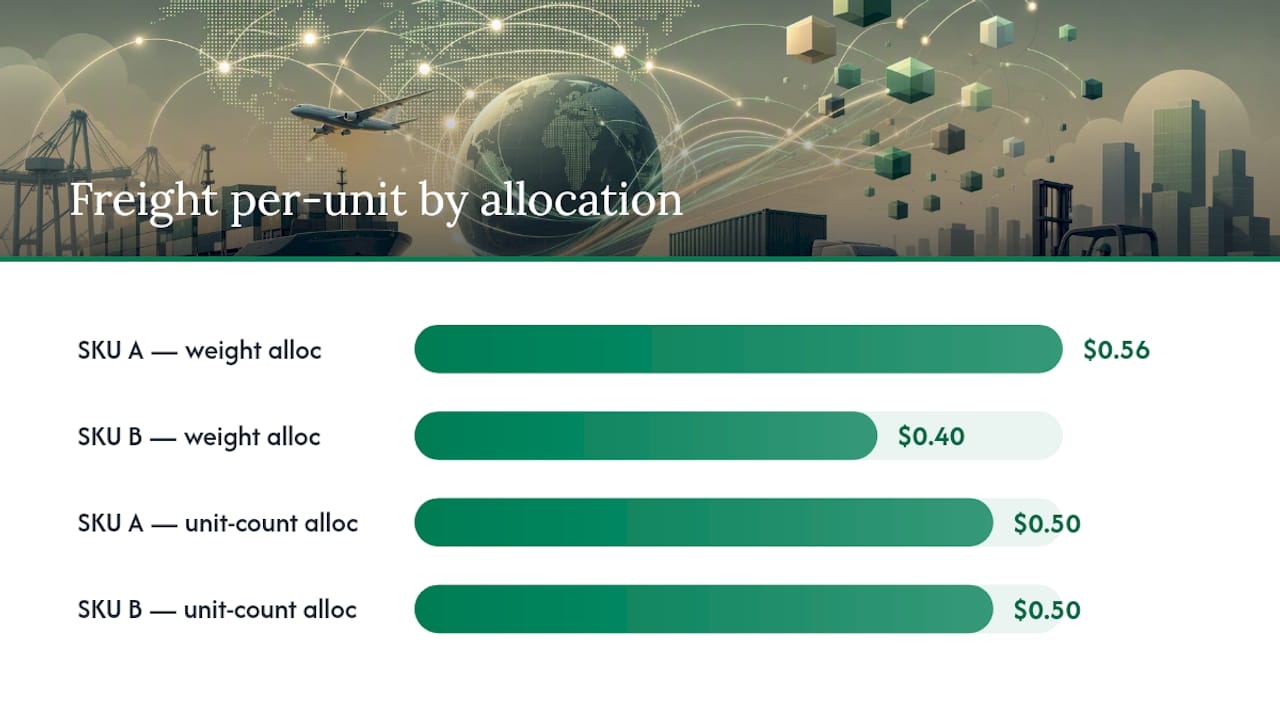
That’s why estimated landed cost and actual landed cost are two different numbers you should expect to see side by side. The estimate books at PO creation using planned rates; the actual updates once the freight invoice, customs entry, and brokerage bill land. Software that only shows you one number is hiding the adjustment you’ll need to make later. Our guide on landed cost calculation for importers walks through this in more detail.
Which Features Actually Matter in a Demo?
Every vendor demo looks polished. The features below separate the ones that hold up under real freight invoices from the ones that fall apart the first time a bill arrives three weeks late.
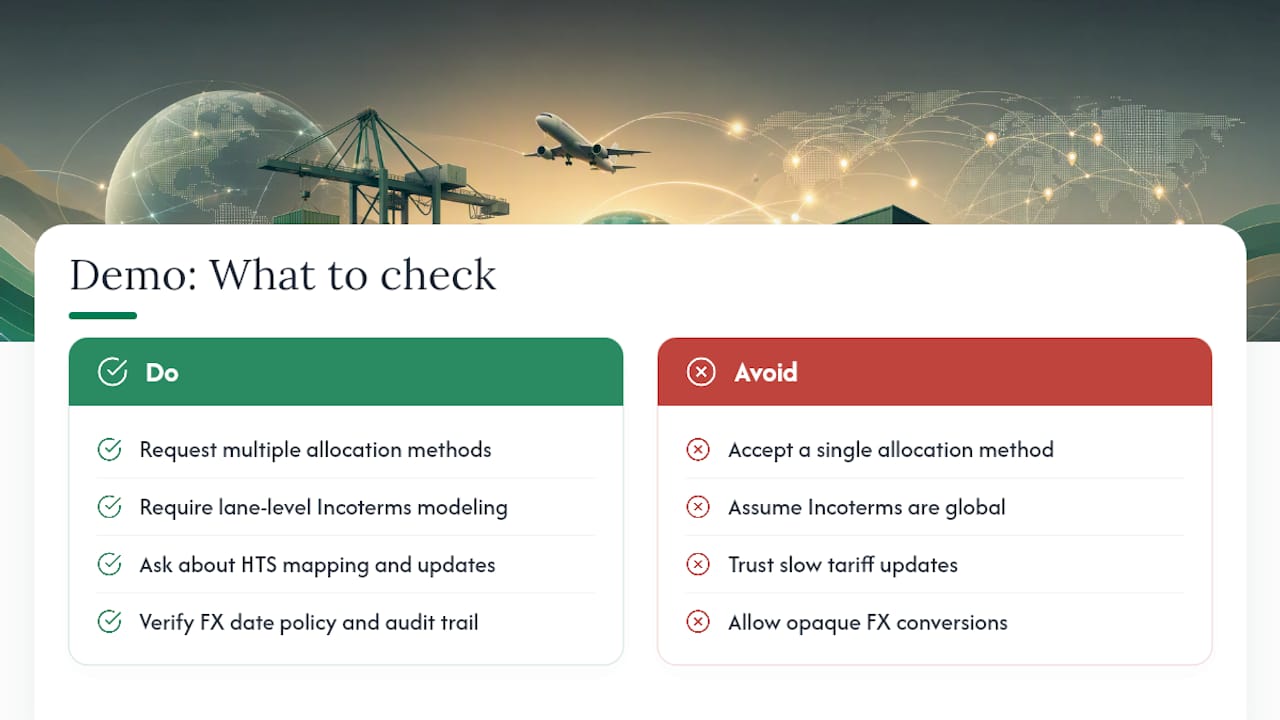
Allocation methods. You need more than one option, because different cost types allocate differently. Look for value-based (proportional to product cost), weight-based, unit-count, chargeable weight (a common ocean and air freight standard), and custom rule support for edge cases like oversized SKUs.
Incoterms support. Whether you’re shipping FOB, CIF, or DDP changes who’s responsible for which cost bucket, and software that doesn’t model this at the lane level will misallocate charges the moment your supplier terms change. Incoterms determine where financial responsibility shifts between buyer and seller, and your software needs to reflect that boundary accurately for every shipment.
HTS and duty management. Tariff codes drive duty rates, and duty rates change. Ask whether the vendor maintains HTS mapping for you or expects you to own it, and how fast rate updates propagate when tariffs shift.
Multi-currency and FX controls. If you pay suppliers in one currency and book in another, you need a defined FX date policy (booking date, invoice date, or payment date) and an auditable conversion record, not a black box.
Shipment closeout and variance reporting. This is the single most-skipped feature in cheaper tools. Closeout locks the shipment’s actual costs and produces a variance report comparing estimate to actual, which is what your accountant will ask for during reconciliation.
Accounting posting behavior. Ask exactly how landed cost posts through accounting software. Does it use a journal template with memo fields tied to invoice numbers? Does it post automatically or require manual review? Clear item-charge assignment rules matter here because vague posting logic is where reconciliation breaks down months later.
Document linking. Every landed-cost figure should trace back to a source invoice. If a vendor can’t show you that link in the demo, assume it doesn’t exist in production either.
Pro Tip: During a demo, ask the vendor to change the allocation method on an already-closed shipment and show you the recalculation. If they can’t do it live, that’s a sign the “flexibility” in their sales deck is theoretical.
How Does Landed Cost Change Your Accounting and Inventory Numbers?
Landed cost isn’t a side calculation. It changes what your inventory is worth on the balance sheet and what hits your cost of goods sold when you make a sale.
Under IAS 2, the accounting standard for inventories, acquisition costs like freight, duty, and handling get capitalized into inventory value rather than expensed immediately. That means your landed cost figure isn’t just for margin analysis. It’s the number that should sit on your books as the true cost of each unit until it sells.
The tricky part is timing. Most sellers book an estimated landed cost when inventory arrives, then get the actual freight and brokerage invoices weeks later. Good software handles this with a defined adjustment process rather than a silent overwrite.
When the actual invoice lands after you’ve already sold part of a batch, the adjustment sometimes needs to touch prior-period COGS, not just current inventory value. Software that can’t show you which units were affected, and why, is asking your accountant to take it on faith.
That’s precisely the reconciliation gap where automated tools like Webgility’s QuickBooks integration earn their value: syncing bills and fees automatically cuts down the manual journal entries that otherwise pile up every month. But automation has limits worth checking before you buy. Some QuickBooks-native tools handle simple freight allocation well but struggle with multi-SKU containers or split shipments, so ask specifically how the tool handles a container with six SKUs and three separate charge types. Our piece on inventory cost capitalization for ecommerce covers the accounting side of this in more depth.
Buyer Scorecard: What to Test and What Should Make You Walk Away
Every landed-cost demo should survive the same ten checks, run in sequence, on data that resembles your actual shipments.
- Create a shipment and attach a PO to it.
- Add charges at three points: booking, customs clearance, and final delivery.
- Allocate a shared freight charge across multiple SKUs.
- Close the shipment and lock actuals.
- Post the landed cost to your accounting system.
- Pull a variance report comparing estimate to actual.
- Link a specific charge back to its source invoice.
- Change the allocation method after closeout and confirm the recalculation.
- Export the audit trail for that shipment.
- Look up HTS duty rates for one of your actual SKUs.
Statistic Callout: A recommended buyer scorecard framework treats the ability to allocate shared costs, lock actuals at closeout, and produce variance reports without manual spreadsheets as the non-negotiable baseline, not a premium feature.
How you weight these checks depends on your size. A small seller running a handful of SKUs cares most about checks 1, 2, and 5. A scaling importer juggling multiple lanes should weight 3, 6, and 8 heavily, since allocation flexibility is where growing businesses get burned. A high-volume trader needs every check to pass, plus a real answer on check 10’s update cadence.
Ask every vendor two direct questions: who owns keeping HTS codes current, and what’s the SLA when a tariff rate changes mid-quarter? Vague answers here tend to predict vague answers everywhere else.
Walk away if a tool can’t allocate by more than one method, has no formal closeout step, or expects you to finish the real allocation work in a spreadsheet after export. That last one defeats the purpose of buying software at all.
How Do You Roll Out Landed Cost Software Without Breaking Your Books?
Start smaller than you think you need to. The minimum viable scope is a single pilot lane running the full chain: purchase order, shipment creation, invoice capture, and accounting posting. Prove that chain works end to end before adding a second lane.
Data hygiene decides whether the rollout succeeds. Canonicalize your SKUs before you connect anything, pick one currency and FX-date policy and stick to it, and map HS codes consistently rather than letting each shipment get classified ad hoc.
A rollout that tends to hold up looks like this:
- Days 1 to 30: Pilot one lane, one supplier, full workflow from PO to posting.
- Days 31 to 60: Reconcile actuals against estimates for that pilot lane and fix allocation rules that produced surprising variances.
- Days 61 to 90: Lock policies (allocation method, FX date, HS mapping) and scale to additional lanes.
Define ownership before day one, not after something breaks. Operations should own shipment data entry and milestone updates, finance should own the accounting posting rules and variance review, and your freight forwarder or customs broker needs a defined turnaround time for sending final invoices.
Pro Tip: Ask your freight forwarder for a written invoice-delivery SLA before you pilot anything. A landed-cost system is only as accurate as the slowest invoice feeding it, and “we’ll get it to you eventually” will wreck your closeout timeline every single month.
Does Landed Cost Software Scale as Your Business Grows?
The architecture you pick early tends to determine how painful growth feels later. A tool built for ten SKUs and one supplier country often can’t handle fifty SKUs across four countries without a rebuild, not because the vendor is incompetent, but because allocation logic that was hardcoded for simplicity doesn’t flex.
Look for software with configurable allocation rules rather than fixed logic, since trade regulations shift often enough that a rigid rule set becomes a liability within a year or two. Tariff schedules get revised, new Incoterms guidance gets published, and duty rates on specific HTS codes move with trade policy changes that have nothing to do with your business.
The practical test is whether adding a new supplier country, currency, or shipping lane requires a configuration change or a support ticket to the vendor’s engineering team. If it’s the latter, you’ve bought a tool that doesn’t actually scale with you, whatever the sales deck claimed.
Multi-entity support matters too, if you’re likely to add a second brand, a second Amazon marketplace, or a wholesale channel alongside your ecommerce store. Systems that assume one legal entity and one sales channel from the start tend to bolt on multi-entity support badly later, creating exactly the kind of duplicate data entry landed-cost software is supposed to eliminate.
What Security and Compliance Standards Should You Expect?
Landed-cost software touches sensitive financial data: supplier pricing, freight contracts, customs entries, and bank-linked accounting connections. That data needs the same baseline protections you’d expect from any financial SaaS tool: encryption in transit and at rest, role-based access controls, and a clear data-retention policy you can actually read.
Compliance runs two directions here. There’s data privacy, meaning how the vendor handles and stores your business information, and there’s trade compliance, meaning whether the software’s duty and HTS logic actually reflects current customs law. A vendor might be excellent on one and weak on the other.
Ask specifically who is liable if the software’s HTS classification is wrong and it triggers a customs penalty. Most vendors will tell you the classification is advisory and the importer of record bears final responsibility, which is standard, but you want that answer in writing before you rely on the tool for duty calculations.
For sellers connecting accounting platforms like QuickBooks or Xero, check whether the landed-cost tool uses official API integrations with proper authentication rather than screen-scraping or shared credentials. That distinction affects both your data security and whether the connection survives platform updates without breaking.
How User-Friendly Should Landed Cost Software Be?
A landed-cost tool that requires a finance degree to operate will get bypassed the first busy week you have, and everyone will go back to spreadsheets. Usability isn’t a nice-to-have here; it’s what determines whether the system actually gets used consistently.
Dashboard customization matters more than it sounds. Your operations team needs a view centered on shipment status and milestones, while finance needs a view centered on variance and posting status. A tool that forces everyone into the same generic dashboard usually gets used by nobody consistently.
If you work with overseas suppliers, freight forwarders, or team members who aren’t native English speakers, multi-language support in the interface reduces data-entry errors at the source, which is often where landed-cost mistakes actually originate rather than in the calculation itself.
Mobile or lightweight access matters for the operations side too. Someone confirming a shipment milestone from a warehouse floor or a port office shouldn’t need a full desktop session to log an update.
What Reporting Do You Actually Need from Landed Cost Data?
Raw landed-cost numbers matter less than the decisions they inform. The reporting layer is where SKU-level cost data turns into actual margin decisions, so this is worth testing as carefully as the allocation engine itself.
At minimum, look for per-SKU landed cost trends over time, so you can see whether a supplier’s pricing or a freight lane’s cost is drifting before it erodes your margin. Variance reporting between estimated and actual costs by lane or supplier helps you spot which freight forwarders or suppliers are consistently underquoting.
Cross-referencing landed cost against sales velocity is where the real supply chain decisions happen. A SKU with rising landed cost and flat sales velocity is a candidate for a price increase or a supplier renegotiation, and you want that surfaced automatically rather than discovered three months later during a margin review. Our SKU profitability analysis guide covers how to build that view for Amazon-specific sellers.
Export flexibility matters for anyone working with an outside accountant or a fractional CFO. If the reporting layer locks your data into one dashboard with no clean export, you’re building a dependency you’ll regret the first time you need a custom cut of the numbers for a lender or an audit.
What We See Go Wrong With Landed Cost Tracking
The mismatch we see most often traces back to a broker or freight invoice arriving weeks after the shipment already posted at an estimated cost. Books close, margins look fine, then the actual bill lands and nobody adjusts the prior entry. Automated ledger monitoring catches that gap before it compounds across a quarter.
Integrated settlement posting to QuickBooks or Xero also cuts down the manual journal cleanup that eats a bookkeeper’s week every close. During onboarding, we look closely at how a seller’s current spreadsheets handle split shipments and multi-SKU containers, since that’s usually where the real allocation errors are hiding.
, Tim
How BeanHawk Fits Into Your Landed Cost Stack
If your books are getting tangled between freight invoices, FBA reimbursements, and delayed broker bills, BeanHawk handles the reconciliation work that landed-cost tracking alone doesn’t cover.

The software continuously monitors inbound shipments and ledger events, then posts settlements automatically to accounting systems, helping land landed-cost figures and reimbursement recoveries in the same set of books instead of two disconnected systems. Combined with PO and landed-cost tracking, it gives sellers a centralized view of product cost without hand-keying journal entries every month.
This fits sellers who already have landed cost roughly figured out but keep losing hours reconciling settlements against inventory records, particularly those dealing with inventory claims that add layers of manual tracking. If you want to see what automated reconciliation actually catches, start by reviewing how reconciling QuickBooks Online works for Amazon sellers and check it against your current close process.
Sources
- Trade
- Assign item charges in Business Central , Microsoft Learn
- Best landed cost tracking software (Tijara) , Usetijara
- QuickBooks landed cost automation: R11 update explained , Webgility blog
FAQ
What software do wholesalers use for landed cost?
Wholesalers typically use either ERP-native landed-cost modules built into platforms like Microsoft Dynamics 365 Business Central, or standalone landed-cost tools that connect to their accounting system through an API, depending on shipment volume and lane complexity.
How do you calculate total landed cost?
Add your product cost, freight, duties and tariffs, insurance, customs brokerage fees, and any other allocated charges like inspection or storage fees, then divide the total by the number of units in the shipment using your chosen allocation method.
What is the difference between COGS and landed cost?
Landed cost is the total cost to get inventory into your possession and ready to sell, including freight and duty; COGS is the accounting expense recognized when that inventory actually sells, and it’s built directly from the landed cost figure under standards like IAS 2.
What is FOB versus landed cost?
FOB (Free on Board) is an Incoterm that defines the point where the seller’s responsibility ends and the buyer’s begins, typically once goods are loaded onto the vessel; landed cost is the full cost to the buyer after that point, including everything FOB doesn’t cover, like freight, duty, and clearance fees.
Does BeanHawk calculate landed cost for Amazon sellers?
BeanHawk offers PO and landed-cost tracking alongside its core reimbursement recovery and reconciliation features, giving Amazon and multi-channel sellers a way to tie true product cost to automated accounting postings in QuickBooks or Xero.