
Audit First Marketplace Accounting for Amazon Sellers With BeanHawk

The best marketplace accounting software combines three things: continuous FBA reimbursement recovery, automated settlement reconciliation, and penny-accurate posting into QuickBooks or Xero. Most tools do one of those well. BeanHawk is built around all three, monitoring your inbound shipments and ledger events directly so recoverable dollars get flagged and filed instead of quietly disappearing, then posting the resulting settlements into your books without manual cleanup.
TL;DR:
- Automated reconciliation tools cross-reference multiple Seller Central reports daily to detect and flag discrepancies in inventory, reimbursements, and settlements.
- Evidence storage must be non-editable and well-organized, supporting detailed claims and appeals with shipment IDs, invoices, and proofs attached.
- Funding claims require structured workflows filed through Seller Central, with automation reducing avoidable denials but not preventing rejections entirely.
- Penny-accurate settlement posting into QuickBooks or Xero, with clear mapping of fees and use of clearing accounts, simplifies month-end closes and prevents errors.
- Regular audit checks on reports like Inventory Adjustments, Reimbursements, Returns, and Settlements are essential, especially for high-volume sellers aiming for consistent recoveries.
Table of Contents
- What Makes Marketplace Accounting Software Different From Bookkeeping Tools?
- How Does Automated Reimbursement Recovery Actually Work?
- What Should Accurate Settlement Posting Look Like?
- Evaluation Checklist: Questions to Ask Before You Buy
- Which Seller Central Reports Actually Matter Here?
- Why Marketplace-Specific Automation Beats a Generic Accounting Package
- BeanHawk Matches This Checklist, Here’s Where to Start
- Sources
- FAQ
What Makes Marketplace Accounting Software Different From Bookkeeping Tools?
General bookkeeping software tracks money in and money out. It was never built to notice that Amazon shorted you 14 units on a shipment that closed six weeks ago, or that a customer return got marked “disposed” instead of restocked. That’s a structural gap, not a bug, and it’s why marketplace-specific tools exist as a separate category.
A tool built for Amazon and multi-channel sellers needs to do a specific job: catch discrepancies in the FBA ledger, build a case for each one, file it, and then make sure the money that eventually lands in your bank account matches what your books say you earned. Here’s what that actually requires under the hood.
- Continuous monitoring of inbound shipments, ledger events, and settlement reports, with automatic discrepancy detection instead of a monthly manual pull.
- Non-editable evidence storage for invoices, packing slips, and carrier proofs, because Amazon requires more detailed documentation for claims than it used to and edited files get flagged.
- Structured claim workflows with reference fields like shipment ID, ASIN, and FNSKU already attached, plus support for appeals when a claim gets denied the first time.
- Flexible posting options that let you choose summary or detailed journal entries, mapped to clearing accounts so bank reconciliation stays clean.
- Cadence controls and alerts that flag new discrepancies as they appear rather than batching everything into a quarterly scramble, across every channel you sell on.
Miss any one of these and you end up with either unclaimed money sitting in Amazon’s ledger, or claimed money that never reconciles cleanly against your bank feed. Both cost you hours you don’t have.
How Does Automated Reimbursement Recovery Actually Work?
The mechanics are less mysterious than most sellers assume. Automation cross-references multiple Seller Central reports against each other, and most recoverable claims surface from exactly this kind of cross-reference rather than from any single report reviewed in isolation.
- Detection: the system compares Inventory Adjustments, Reimbursements, Returns, and Settlement reports to find units that vanished, got damaged, or were returned but never refunded correctly.
- Evidence assembly: matching invoices, tracking numbers, and shipment records get pulled and stored in non-editable formats, since PDFs, JPGs, PNGs, and TIFFs hold up better in review than an editable spreadsheet.
- Claim filing: the case gets submitted through Seller Central with the required reference data attached, because integrated tools can identify discrepancies and organize evidence, but the claim itself still has to go through Seller Central.
- Appeal, if needed: denied claims get resubmitted with additional evidence tied to the original case ID.
Automation doesn’t eliminate denials. Common rejection reasons include filing outside the eligible window, thin documentation, and duplicate claims, and no software can override Amazon’s own review process. What automation does is shrink the number of avoidable denials by making sure evidence exists before the claim window closes.
One wrinkle worth knowing: since March 31, 2025, Amazon has reimbursed based on estimated sourcing or manufacturing cost rather than sale price. If your product’s sourcing cost per SKU isn’t entered anywhere, your payouts run lower than they should be, regardless of how good your recovery process is.
Pro Tip: Track approval rate, recovered dollars per period, and average resolution time in one place. Those three numbers tell you faster than anything else whether your recovery process is actually working or just generating paperwork.
What Should Accurate Settlement Posting Look Like?
Penny-accurate posting isn’t a nice extra. It’s the difference between your COGS numbers meaning something and your accountant spending three hours every month chasing a $4.17 discrepancy that turns out to be a rounding error in how fees got mapped.
- Summary posting rolls each settlement into one journal entry, faster to reconcile but harder to drill into when a customer disputes a specific fee.
- Detailed posting breaks out every fee line, better for tax reporting but heavier to maintain if you’re running multiple channels.
- Clearing accounts hold settlement activity until the actual deposit lands, then the sync zeros the clearing account out against the bank deposit, which is what makes bank matching painless instead of a monthly guessing game.
- Vendor-bill mapping for negative fee lines (storage, referral, FBA fees) preserves their tax-deductible treatment instead of burying them inside gross revenue.
Get this wrong and your inventory economics drift. Get it right and month-end closes in an afternoon instead of a week.
Evaluation Checklist: Questions to Ask Before You Buy
Most vendor pitches sound identical on a landing page. The differences show up in the demo, if you know what to ask.
- Detection cadence: does it scan daily, weekly, or only when you manually trigger a pull?
- Evidence handling: can you export evidence in a non-editable format tied to a specific shipment ID?
- Claim workflow: does it file automatically, or just flag issues for you to file by hand?
- Posting modes: does it offer both summary and detailed journal entries to QuickBooks or Xero?
- Integration depth: does it connect to your accounting platform directly, or require a CSV export step?
- Appeal support: does it help resubmit denied claims with the original case ID attached?
- Pricing model: flat subscription, or a commission cut of whatever gets recovered?
Ask for a sample recovery report and a sample QuickBooks posting during the demo. If a vendor can’t show you either one, that’s your answer. Watch for red flags too: commission-only pricing that takes a cut of your own recovered money, no non-editable evidence storage, or a tool that stops at “here’s a discrepancy” without ever touching your books.
For a rough ROI estimate, automatic Amazon credits typically cover only 30 to 50 percent of what you’re actually owed. If your monthly FBA revenue runs in the mid five figures, the gap between that automatic credit and a full audit can be the difference between a few hundred dollars a month and a few thousand.
Which Seller Central Reports Actually Matter Here?
Four reports do almost all the work. The Inventory Adjustments report shows units that got written off, lost, or found. The Reimbursements report shows what Amazon already paid you, which matters because you need to know what’s already been covered before filing a new claim on the same unit. The Returns report shows customer returns, including the ones marked as disposed or damaged that never generated a refund to you. The Settlement report shows what actually hit your bank account, which is your reconciliation anchor against everything else.
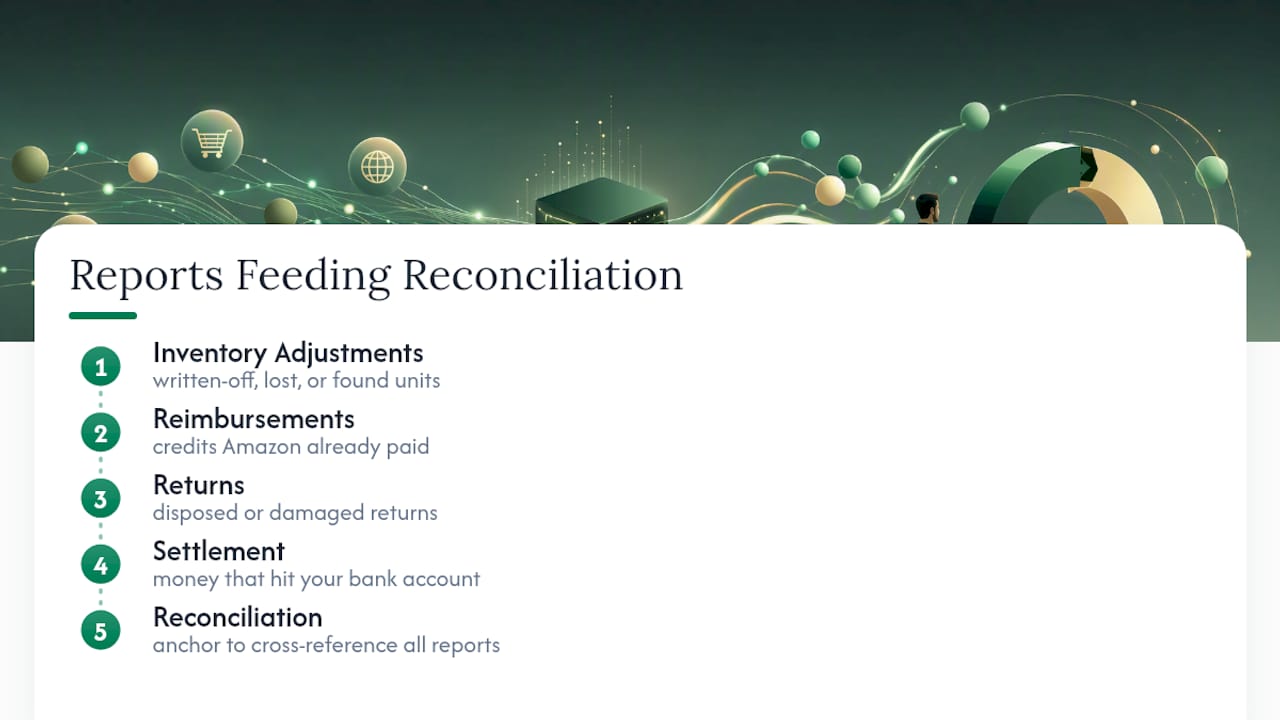
Audit checklists recommend exporting all four reports and cross-referencing them regularly, with more frequent checks for high-volume sellers. The reason weekly beats monthly for bigger accounts isn’t paranoia. Published claim windows vary depending on the source you read, and the safest practice given that inconsistency is simply to check more often rather than trust a single stated deadline.
If you’re doing this by hand, build a tracking sheet with case ID, ASIN/FNSKU, claimed amount, amount received, denial reason if any, and resolution date. That sheet is what turns “I think we’re getting reimbursed fairly” into an actual measured approval rate over time.
Why Marketplace-Specific Automation Beats a Generic Accounting Package
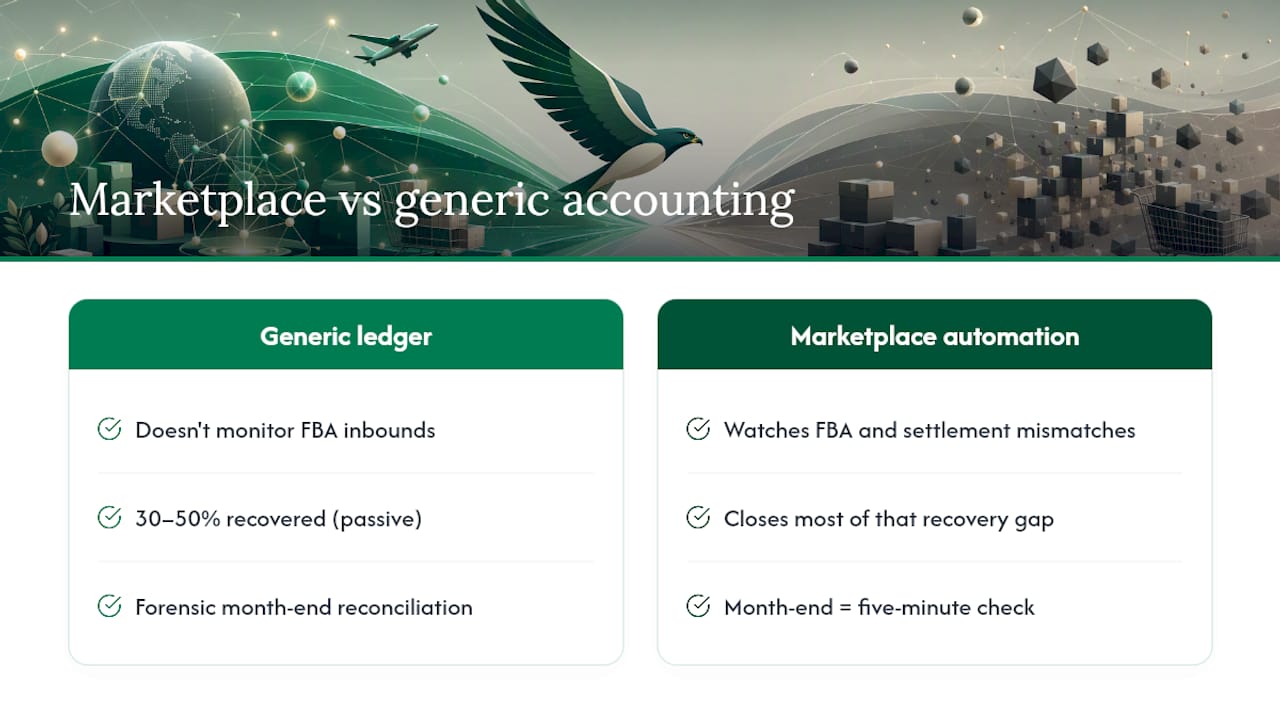
QuickBooks and Xero are excellent at being ledgers. Neither one watches your FBA inbound shipments or notices a settlement report that doesn’t match your inventory count, because that’s not the job they were built for. That gap is exactly where money quietly leaks out of a seller’s account.
The financial impact is bigger than most sellers assume. Automatic Amazon credits alone typically recover only 30 to 50 percent of what a seller is actually owed, which means passive reliance on Amazon’s own system leaves real money on the table every single month. Active, automated auditing closes most of that gap. There’s also a quieter benefit: when settlements post accurately the first time, month-end stops being a forensic exercise and becomes a five-minute check.
, Tim
BeanHawk Matches This Checklist, Here’s Where to Start
Everything in that evaluation checklist maps directly to how the software works. Continuous monitoring of inbound shipments and FBA ledger events catches discrepancies as they happen rather than months later. Evidence gets captured and stored automatically by the system. Claims move through a structured workflow instead of a spreadsheet updated manually. And settlements post penny-accurate into QuickBooks or Xero, across every sales channel, without a commission taken out of recovered funds.

If you want to see what’s actually recoverable in your own account before committing to anything, start with the free FBA reimbursement audit. It shows you real numbers from your own ledger, not a hypothetical. From there, pricing runs from a free plan up through Starter at $19 per month, Growth at $49 per month, and Scale at $99 per month, scaled to your order volume rather than a cut of your recovered funds. If you’re also trying to get your Amazon settlements clean in QuickBooks right now, the QuickBooks Online reconciliation guide walks through exactly how that posting should look.
Sources
These are the guides referenced throughout this article for documentation rules, audit checklists, and posting patterns.
- Amazon Reimbursement Rules 2026: What Changed and How to Claim
- Amazon FBA Reimbursement Audit Checklist: Recover Every Dollar
- How to Audit and Recover Amazon Lost Inventory Reimbursements
- Amazon FBA Reconciliation in NetSuite: Fees & Orders | Houseblend
FAQ
What Is Marketplace Accounting Software?
It’s software built specifically to monitor marketplace ledger events like FBA shipments and settlements, catch discrepancies, file reimbursement claims, and post accurate settlement data into your accounting platform, rather than general bookkeeping software that only records transactions.
How Often Should I Audit My Amazon Reimbursements?
Monthly is the minimum for most sellers, but high-volume accounts should audit weekly since claim windows vary and checking more often avoids missing eligibility deadlines.
Does BeanHawk Take a Commission on Recovered Funds?
No. BeanHawk uses flat monthly pricing based on order volume, starting free and running through $19, $49, and $99 per month tiers, with no cut taken from whatever gets recovered.
What Documentation Does Amazon Require for a Reimbursement Claim?
Invoices, purchase receipts, shipment tracking, and proof of quantity are commonly required, and claims with incomplete documentation get denied at noticeably higher rates.
Can Marketplace Accounting Software Replace QuickBooks or Xero?
No. It’s built to work alongside them, feeding accurate, reconciled settlement data into your existing QuickBooks or Xero setup rather than replacing your core accounting system.