
Amazon Sellers: Why BeanHawk Is the Best Xero Ecommerce Integration

For Amazon and multi-channel sellers who need settlements posted accurately into Xero, BeanHawk is the strongest pick because it pairs automated reimbursement recovery with penny-accurate settlement posting. If your volume is mostly one clean marketplace payout, A2X handles summarized posting well. If you need real-time, inventory-aware sync across many channels, Webgility fits better. The right answer depends on how many channels you run and how much reconciliation detail your accountant actually wants.
TL;DR:
- BeanHawk uniquely recovers funds owed by Amazon for lost or damaged inventory, posting these reimbursements directly into Xero, unlike other connectors that only post sales data.
- For high-volume multi-channel sellers, tools like Webgility or Cin7 provide real-time inventory updates, essential for managing multiple warehouses and complex stock movements.
- Connecting multiple channels requires more setup time, with inventory-heavy platforms often needing several days to weeks to configure properly before safe posting.
- Support quality and error handling vary: larger vendors offer dedicated help, but reliable error logs and notification systems are critical to prevent reconciliation delays.
- Conduct a free FBA reimbursement audit before committing to a connector to identify unrecovered funds and choose scalable plans as order volume grows.
Table of Contents
- What Is the Best Xero Ecommerce Integration for Your Store?
- How Do You Choose the Right Xero Integration for Your Store?
- Where Does BeanHawk Fit Into Your Xero Bookkeeping Workflow?
- How Long Does Xero Ecommerce Integration Setup Actually Take?
- How Reliable Are These Integrations, and What Happens When Something Breaks?
- How Good Is Customer Support Across These Xero Connectors?
- What Security and Data Privacy Protections Should You Expect?
- Do These Integrations Work With Every Xero Subscription Plan?
- How Often Do These Tools Update for Platform Changes?
- When Does a Simple Connector Stop Being Enough?
- Get a Free FBA Reimbursement Audit Before You Commit to a Connector
- Sources
- FAQ
What Is the Best Xero Ecommerce Integration for Your Store?
Picking the right connector comes down to matching how your business actually moves money to what a tool posts into your ledger. A single-channel Shopify store with 15 orders a day has a completely different set of needs than a seller running Amazon FBA, eBay, and a WooCommerce site with 300 orders a day and inventory spread across three warehouses.
The table below lines up the major players on the dimensions that matter most for ecommerce bookkeeping: how they sync, whether they touch inventory, how they break down fees, and what they cost to start.
| Integration | Best For | Sync Method | Multi-Channel | Inventory/COGS | Fee & Payout Detail | Starting Price | Typical Onboarding |
|---|---|---|---|---|---|---|---|
| BeanHawk | Amazon/multi-channel sellers needing reimbursement recovery plus settlement posting | Summary, automated | Yes | Basic COGS via journal mapping | High, includes recovered-fund tracking | Free tier; Starter $19/month | Same day to a few hours |
| A2X | High-volume marketplace sellers wanting clean summarized posting | Summary | Yes (Amazon, Shopify, eBay, Walmart) | Limited | High, detailed fee breakdown per payout | Paid plans, tiered by order volume | A few hours |
| Link My Books | Sellers wanting payout breakdowns matched to bank deposits | Summary | Yes | Limited | High, built around payout reconciliation | Paid plans, tiered by order volume | A few hours |
| Webgility | Multi-channel sellers needing order-level sync and inventory updates | Per-order, real-time | Yes (broad) | Full inventory and COGS sync | Detailed, order-level | Paid plans, higher tier for full sync | 1 to 2 days |
| Unleashed Software | Businesses needing advanced inventory tied to Xero | Batch/scheduled | Limited, inventory-focused | Full, advanced inventory logic | Not payout-focused | Paid plans | Several days |
| Cin7 Core (DEAR Inventory) | Retailers with complex inventory and multiple locations | Batch/scheduled | Yes, multi-location | Full, multi-warehouse | Not payout-focused | Paid plans | Several days to a week |
| Dext Commerce | Sellers wanting better receipt/invoice capture feeding Xero | Per-document capture | Limited | None | Not fee-allocation focused | Paid plans | A few hours |
| Shopify Xero integration | Shopify-only stores wanting native or app-based posting | Varies by app used | Shopify-centric | Varies by app | Varies, often needs a connector app | Depends on connector chosen | A few hours to a day |
| BigCommerce Xero integration | BigCommerce stores syncing orders to Xero | Varies by app used | BigCommerce-centric | Varies by app | Varies by connector | Depends on connector chosen | A few hours to a day |
| WooCommerce Xero integration | WooCommerce stores needing order/invoice sync | Varies by plugin | WooCommerce-centric | Varies by plugin | Varies by plugin | Depends on plugin chosen | A few hours |
| Hubdoc | Capturing receipts and bills, not payout reconciliation | Document capture only | No | None | None, this is a capture tool | Included with some Xero plans | Under an hour |
| Stripe Xero integration | Businesses processing card payments through Stripe | Per-transaction or summary | No | None | Moderate, fee-level detail on payouts | Depends on connector used | A few hours |
| PayPal Xero integration | Sellers accepting PayPal who need payout matching | Per-transaction or summary | No | None | Moderate | Depends on connector used | A few hours |
A few things jump out once you line these up side by side. BeanHawk stands apart because it does not just move numbers into Xero. It actively hunts for money Amazon owes you from lost or damaged inventory, then posts the recovered settlement alongside your regular payout data, so your ledger reflects money you actually collected rather than money you assumed was lost.
- A2X built its reputation on accountant-friendly summary journals that match bank deposits line for line, which is exactly what a bookkeeper wants during month-end close.
- Link My Books takes a similar summary approach but leans harder into visual fee breakdowns, useful if you want to see exactly what Amazon or Shopify skimmed off each payout.
- Webgility and Cin7 Core (DEAR Inventory) both go further than payout posting. They track inventory quantities and cost of goods sold, which matters once you are managing stock across more than one warehouse or fulfillment center.
- Unleashed Software is built for inventory-heavy operations first and treats the Xero connection as a secondary feature, not the core product.
- Dext Commerce and Hubdoc solve a different problem entirely: they capture receipts and bills, not marketplace payouts, so pairing one of them with a payout connector is common rather than redundant.
- Shopify, BigCommerce, and WooCommerce integrations with Xero typically depend on which third-party app you layer on top, since none of these platforms post cleanly to Xero without one.
If you sell mainly on Amazon and want reimbursements chased down automatically while your books stay current, BeanHawk covers both jobs at once. If you run a single clean Shopify store with no marketplace complexity, a lighter summary tool like A2X might be all you need.
How Do You Choose the Right Xero Integration for Your Store?
Start with your order volume. A store doing fewer than 20 orders a day can often get away with a bank feed and manual coding in Xero, though even at that volume a connector saves hours weekly. Between 20 and 200 orders a day, a dedicated connector stops being a convenience and starts being a requirement, because manually reconciling that many transactions invites errors. Above 200 orders a day, you need automated, near real-time posting or your books will always lag a week behind reality.
- Count your channels. One platform is simple. Three or more (Amazon, Shopify, eBay) means you need multi-channel support built in, not stitched together with spreadsheets.
- Decide if you need inventory and COGS tracking. If you hold physical stock across multiple warehouses, prioritize tools like Webgility or Cin7 Core over simpler payout summarizers.
- Ask your accountant what they prefer. Some bookkeepers want order-level detail for audit trails; others prefer clean summary journals that don’t clutter the general ledger. Xero’s own guidance on scaling ecommerce accounting recommends automation specifically to preserve real-time visibility as order volume grows.
- Weigh summary versus per-order posting. Summary posting keeps your ledger tidy and matches bank deposits directly, which most accountants prefer. Per-order posting gives more granular detail but can bloat your chart of accounts if you are not prepared to manage it.
Before you commit, ask any vendor how refunds get mapped back to the original sale, how payout timing lines up with your bank statement, whether audit logs exist for every posted transaction, and whether you can stage postings before they hit your live ledger. Xero’s bank feeds pull in net deposit amounts but strip out the order-level detail behind them, which is exactly the gap a good connector is supposed to close.
Pro Tip: Ask for a sandbox or trial period before committing to annual billing. A connector that looks clean in a demo can behave very differently once it hits your real, messy transaction history with partial refunds and split shipments.
Watch for red flags: vendors who can’t explain fee mapping in plain language, pricing based on transaction count with no example invoice, or platforms that lock your accountant out of visibility into what’s posting. Any of those should push you toward a different option.
Where Does BeanHawk Fit Into Your Xero Bookkeeping Workflow?
BeanHawk was built around a specific gap that most ecommerce accounting tools ignore: the money Amazon owes sellers for lost, damaged, or under-reimbursed inventory. Continuous monitoring of inbound shipments and FBA ledger events means claims get filed before they age out, and the recovered funds get posted straight into your accounting platform instead of sitting in a spreadsheet somewhere.
BeanHawk’s documented capabilities include:
- Automated settlement posting into Xero and QuickBooks
- Continuous monitoring of FBA ledger events and inbound shipments to catch reimbursement opportunities
- Multi-channel settlement reconciliation so different sales channels land in one consistent set of books
- Purchase order and landed cost tracking to keep inventory economics accurate
It fits into a Xero workflow the same way a payout connector does, sitting between your sales channels and your general ledger, but it adds the reimbursement recovery layer that a standard connector never touches. If your accounting problem is purely “get Shopify payouts into Xero cleanly,” a summarizer like A2X may be sufficient on its own. If part of your problem is “Amazon owes me money I’m not collecting,” that’s a different job entirely, and it’s the one BeanHawk was built to solve.
How Long Does Xero Ecommerce Integration Setup Actually Take?
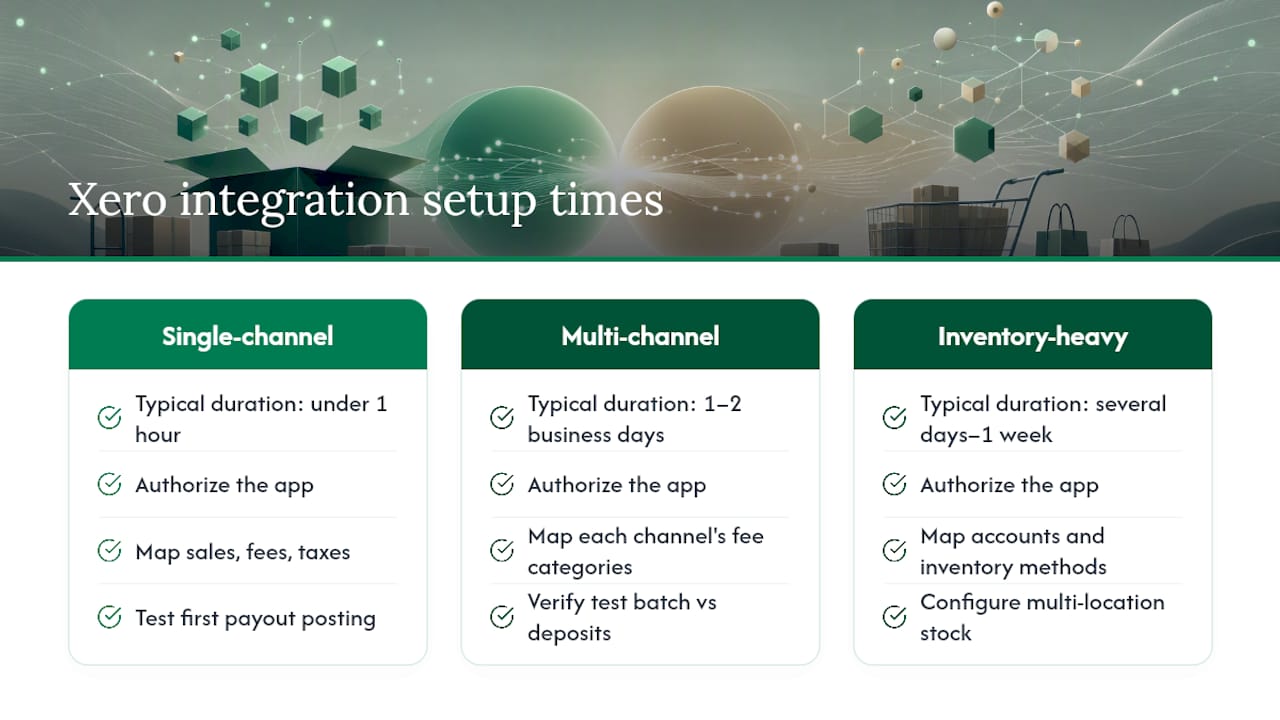
Most connectors advertise “set up in minutes,” and for a single-channel store with a straightforward chart of accounts, that’s often true. Connecting a Shopify store to a summary-posting tool typically takes under an hour: authorize the app, map a handful of accounts for sales, fees, and taxes, and let the first payout post as a test.
Reality gets more complicated once you add channels. A seller running Amazon, Shopify, and eBay through one connector should expect one to two full business days, mostly spent mapping each channel’s fee categories to the right ledger accounts and verifying a test batch matches actual bank deposits. Inventory-heavy platforms like Cin7 Core or Unleashed Software run longer still, often stretching into several days to a week, because inventory valuation methods and multi-location stock need configuring before any posting happens safely.
BeanHawk’s onboarding tends to be faster on average because much settlement posting logic is pre-built rather than fully custom configured. Most sellers see their first automated postings within hours of connecting an account, though full reimbursement monitoring takes a short ramp-up period as historical shipment data gets analyzed.
Whatever tool you choose, budget extra time for the first month-end close after switching. That first reconciliation always surfaces small mapping issues that a quick demo won’t reveal.
How Reliable Are These Integrations, and What Happens When Something Breaks?
Reliability comes down to two things: how the connector handles API changes on the platform side, and what happens when a sync fails partway through. Every connector on this list depends on APIs maintained by Amazon, Shopify, eBay, PayPal, and Xero itself, and any of those platforms can push an update that breaks a mapping overnight.
The better tools build in error handling that flags failed syncs immediately rather than silently skipping a transaction. Look for a connector that shows a clear log of what posted, what failed, and why, so a bookkeeper can catch a stuck payout before it throws off a month-end close. Xero’s developer documentation outlines how third-party apps authenticate and post journals, and that authentication layer is usually where sync failures originate when a token expires or a permission gets revoked.
BeanHawk’s continuous monitoring approach works in its favor here, since it’s built to catch discrepancies in FBA ledger events rather than assuming every transaction posts cleanly the first time. That same monitoring mindset extends to settlement posting: a failed post gets flagged rather than quietly dropped.

Ask any vendor directly what their error rate looks like at scale and how they notify you when something fails. A connector with no answer to that question, or one that shrugs it off as “rare,” hasn’t been tested against real transaction volume.
How Good Is Customer Support Across These Xero Connectors?
Support quality varies more than most sellers expect going in. Larger platforms like Webgility and Cin7 Core typically offer dedicated onboarding specialists and phone or ticket support, which makes sense given their more complex setup process. Smaller, more focused tools tend to rely on email support and help documentation, which works fine for straightforward questions but can leave you waiting during a reconciliation emergency.
Response time matters most during month-end close, exactly when things are most likely to go wrong. A connector that takes three days to answer a support ticket is a real problem if your books are due to your accountant on the first of the month.
BeanHawk offers direct support built around the specific mechanics of Amazon settlements and reimbursement claims, which matters because generic accounting support teams often don’t understand FBA ledger nuances well enough to troubleshoot a stuck claim. When you’re evaluating any connector, ask what channels support comes through, what hours it’s available, and whether you’ll be talking to someone who actually understands ecommerce accounting or a generalist reading from a script.
What Security and Data Privacy Protections Should You Expect?
Every legitimate Xero connector authenticates through Xero’s official API rather than asking for your login credentials directly, which limits exposure if the connector itself ever gets compromised. Xero’s partner documentation requires apps to follow specific authentication standards before they’re allowed into the Xero App Store at all, which is one reason checking a tool’s presence there matters before connecting your books to it.
Beyond authentication, look for connectors that encrypt data in transit and at rest, and that give you visibility into exactly what permissions they’re requesting. A tool that asks for broader account access than its function requires, for instance a receipt-capture app requesting full payroll access, should raise questions.
BeanHawk’s approach centers on precise financial reconciliation without taking a commission on recovered funds, which also means it isn’t incentivized to inflate claim amounts or hold data hostage behind a revenue-share model. That pricing structure itself functions as a kind of transparency signal: a tool paid through flat subscription fees has different incentives than one paid as a percentage of what it recovers or processes.
Do These Integrations Work With Every Xero Subscription Plan?
Most third-party connectors work across Xero’s standard plan tiers, but a few features depend on which plan you’re on. Multi-currency handling, for instance, is only available on Xero plans that support it, so a connector managing international marketplace payouts needs your Xero subscription to match.
Xero’s own documentation through Xero Central is the most reliable place to confirm which features are tied to which plan before assuming a connector will work exactly as advertised. Some capture tools like Hubdoc come bundled with certain Xero plans at no extra cost, while others always require a separate subscription regardless of your Xero tier.
If you’re running a growing multi-channel operation, it’s worth checking with both your connector vendor and Xero support before assuming your current plan supports everything a new integration needs.
How Often Do These Tools Update for Platform Changes?
Ecommerce platforms change constantly. Amazon adjusts fee structures, Shopify updates its API, and PayPal periodically restructures how it reports transaction fees. A connector that isn’t actively maintained will eventually break, quietly, and often without warning.
The most reliable vendors publish changelogs or release notes when they update mappings to match a platform change, and they typically push those updates automatically rather than requiring you to reinstall anything. Checking a connector’s Xero App Store listing for recent reviews is a decent way to spot whether a tool has kept pace with recent Amazon or Shopify changes, since sellers tend to complain loudly when a sync suddenly stops matching reality.
BeanHawk’s model depends on staying current with Amazon’s ledger structure specifically, since reimbursement rules and fee categories shift periodically. A tool built around one platform’s mechanics in depth, rather than trying to generically support dozens of platforms at once, tends to catch those shifts faster simply because there’s less surface area to monitor.
When Does a Simple Connector Stop Being Enough?
A basic payout connector works fine until your business outgrows it. The tell is usually reconciliation time: if closing your books each month takes longer than it did six months ago despite similar order volume, that’s a signal you’ve outgrown summary posting and need something with order-level or inventory-aware detail.
A workable adoption path looks like this: first, configure your chart of accounts properly before connecting anything, since fixing a bad mapping after a hundred transactions have posted is far harder than fixing it before. Second, run a pilot period where you compare automated postings against manual bank statements for at least one full payout cycle. Third, build a month-end reconciliation checklist that includes verifying recovered reimbursements, not just regular sales.
Bring your accountant in early rather than after something breaks, following brand founder bookkeeping best practices that work. A good bookkeeper can spot a bad chart-of-accounts mapping in minutes that would take you weeks to notice on your own, and that conversation is worth the cost long before your books get messy enough to need an emergency cleanup.
, Tim
Get a Free FBA Reimbursement Audit Before You Commit to a Connector
Most Xero connectors on this list solve one problem: getting sales data into your books cleanly. BeanHawk solves that problem too, but it also goes hunting for money Amazon already owes you from lost or damaged inventory, something A2X, Link My Books, and the platform-native Shopify or WooCommerce connectors were never built to do.

Start with the free FBA reimbursement audit to see what claims might already be sitting unfiled in your account before you decide on a bookkeeping setup. From there, BeanHawk’s plans scale with your business: the Free plan costs $0 per month, Starter runs $19 per month, Growth is $49 per month, and Scale is $99 per month, all listed on the pricing page. Sellers running Amazon FBA alongside other channels typically start with the audit, see what’s recoverable, then pick the plan that matches their order volume. Accountants and bookkeepers managing multiple client accounts can also check the partner program for a more direct working relationship. Run the audit first. It costs nothing and tells you exactly what you’re leaving on the table.
Sources
For readers who want to dig deeper before choosing a connector, Xero’s App Store ecommerce category lists current integrations and lets you cross-check vendor claims against real user reviews. Xero’s developer partner documentation explains how third-party apps authenticate and post data, useful background before granting any connector access to your books. Webgility publishes practical explainers on reconciling Shopify payments in Xero, and this Shopify-to-Xero setup guide walks through the practical steps of connecting a store for the first time.
- Webgility , Xero bank feeds & ecommerce reconciliation
- Ecommerce software that integrates with Xero (Xero App Store)
- How to simplify ecommerce accounting as you scale (Xero blog)
FAQ
Who Is Xero’s Biggest Competitor?
QuickBooks Online is generally considered Xero’s biggest competitor in the small business accounting space, with both platforms offering broad app ecosystems and ecommerce integrations. The right choice usually comes down to which accounting platform your bookkeeper prefers and which app ecosystem better supports your specific sales channels.
What Is the Best Accounting Software for Ecommerce?
Xero and QuickBooks Online are the two most widely supported platforms for ecommerce accounting, both offering extensive connector ecosystems. The better question is which Xero ecommerce integration fits your channel mix. Amazon-heavy sellers benefit most from tools like BeanHawk that combine reimbursement recovery with settlement posting.
What Platforms Integrate With Xero?
Dozens of ecommerce and payment platforms integrate with Xero, including Shopify, BigCommerce, WooCommerce, Amazon, eBay, Stripe, and PayPal, either through native connections or third-party apps. The Xero App Store’s ecommerce category lists the full current set of supported integrations.
Is Xero Overpriced?
Xero’s pricing is generally viewed as competitive within its market segment, and most of the cost complaints from ecommerce sellers actually stem from add-on connector fees, not Xero’s base subscription. Choosing a connector with transparent, flat pricing, rather than one that takes a cut of transaction volume, tends to matter more for total cost than the Xero plan itself.
Does BeanHawk Replace My Xero Subscription?
No, BeanHawk works alongside Xero rather than replacing it, posting automated settlements and recovered reimbursements directly into your existing Xero account. It’s built to sit between your sales channels and your ledger, handling the reconciliation work a bank feed alone can’t manage.