
Speed Your Close: Order Level vs Settlement Summary for Sellers

The real choice isn’t A2X versus Webgility. It’s order-level posting versus settlement-summary posting, two different ways of getting sales data into your ledger. Settlement-summary posting fits sellers and accountants who want fast bank reconciliation and a clean general ledger. Order-level posting fits operators who need SKU-level cost of goods sold and inventory detail inside the accounting file itself. If you run high order volume on QuickBooks Online with an outside bookkeeper, lean settlement-summary. If you’re stuck on QuickBooks Desktop or need per-order margin data in the ledger, lean order-level.
TL;DR:
- Settlement-summary posting is ideal for fast bank reconciliation and small general ledger size, especially for QuickBooks Online users working with outside accountants.
- Order-level posting provides SKU-level profit and margin detail, supporting QuickBooks Desktop and high transaction volume environments, but it can significantly bloat the general ledger.
- Marketplace complexity and volume influence the choice: Amazon’s payout structure favors settlement-summary, while multiple payment gateways and multi-entity setups benefit from order-level detail.
- Pricing models vary: flat per-channel fees suit low-volume sellers, while tiered transaction-based plans better serve mid-volume multichannel operations, with potential hidden costs.
- Both models fail to detect unclaimed reimbursements, which can be tracked by specialized software that monitors inbound shipments and automates recovery, ensuring complete financial accuracy.
Table of Contents
- A2X vs Webgility at a Glance: Pros, Cons, and Quick Signals
- Order-Level Posting vs Settlement-Summary Posting: What’s Actually Different
- Which Ledgers and Marketplaces Favor Each Approach
- What A2X and Webgility-Style Pricing Actually Costs You
- How to Choose the Right Posting Model for Your Books
- Why the Posting Model Choice Affects More Than Bookkeeping
- A Complementary Layer: Catching What Neither Posting Model Sees
- Sources
- FAQ
A2X vs Webgility at a Glance: Pros, Cons, and Quick Signals
Settlement-summary tools post one journal entry per marketplace payout. Order-level tools post every individual sale as its own line. Each has real trade-offs.
Settlement-summary posting:
- Reconciles fast because each journal ties directly to a bank deposit.
- Keeps the general ledger small, which speeds up month-end close.
- Trades away order-by-order SKU detail inside the accounting platform itself.
Order-level posting:
- Gives you SKU-level cost of goods sold and margin data right inside the ledger.
- Supports QuickBooks Desktop, which settlement-summary tools generally don’t.
- Bloats the GL with thousands of rows, which can slow QuickBooks performance and complicate reconciliation.
Three quick rules of thumb: if an outside accountant closes your books, choose settlement-summary. If you’re staying on QuickBooks Desktop for the foreseeable future, order-level is close to mandatory. If you’re running many payment gateways instead of a handful of marketplaces, order-level’s transaction-matching muscle tends to serve you better.
Order-Level Posting vs Settlement-Summary Posting: What’s Actually Different
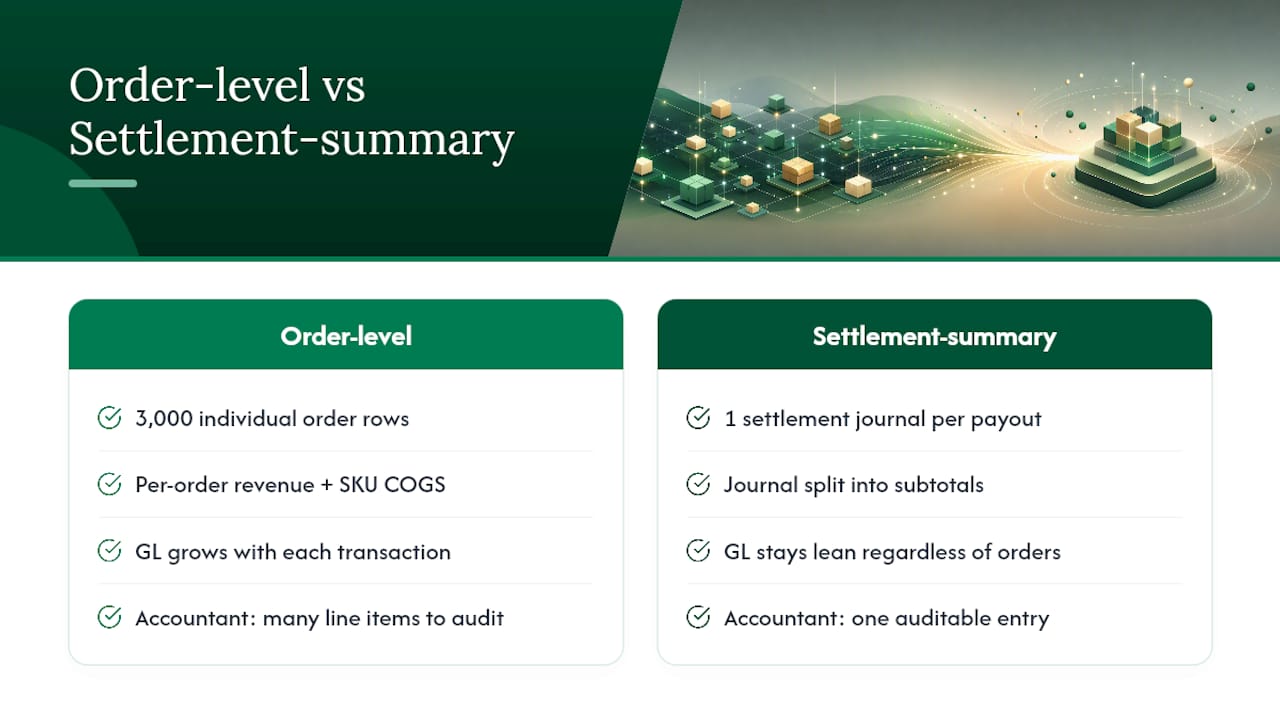
Order-level systems post each sales order as an individual transaction, complete with its own SKU-level cost of goods sold entry. Settlement-summary systems wait for the marketplace payout, then post one journal that splits it into revenue, fees, refunds, taxes, and shipping. That’s the entire architectural split, and it drives almost every practical difference between the two approaches, according to a detailed breakdown of both posting models.
The downstream effects show up fast. Order-level posting means your general ledger grows by one entry per transaction, which is fine at 50 orders a month and unwieldy at 5,000. Settlement-summary posting means your GL grows by one entry per payout period, typically every 14 days for Amazon, which keeps the ledger lean regardless of order count.
Here’s a concrete comparison. A seller doing 3,000 Amazon orders in a two-week settlement period generates one deposit from Amazon covering all of it. An order-level tool posts roughly 3,000 individual order rows into QuickBooks or Xero to represent that period, each carrying its own revenue and cost lines. A settlement-summary tool posts a single journal entry that nets out to the same deposit amount, broken into subtotals for gross sales, referral fees, FBA fees, refunds, and reserve holds. Both get you to the same bank balance. One does it with thousands of line items your accountant has to wade through at tax time; the other does it with one entry an accountant can audit in minutes.
That reconciliation-speed gap is why G2’s reviewer data shows settlement-summary tools scoring higher on ease-of-use and support, while order-level tools score higher on import flexibility and multichannel order handling. Neither wins outright. They’re built for different jobs.
Practitioner guidance backs up the split along the same lines. Accounting firms generally steer most Amazon sellers on QuickBooks Online toward settlement-summary connectors specifically because the deposit-matching cuts close time, while they reserve order-level tools for sellers locked into QuickBooks Desktop or those who genuinely need per-SKU profitability sitting inside the ledger, per LedgerGurus’ integration comparison. Accountants who close the books value the small, auditable GL. Operators running inventory want the granular detail. That tension is the whole decision.
Which Ledgers and Marketplaces Favor Each Approach
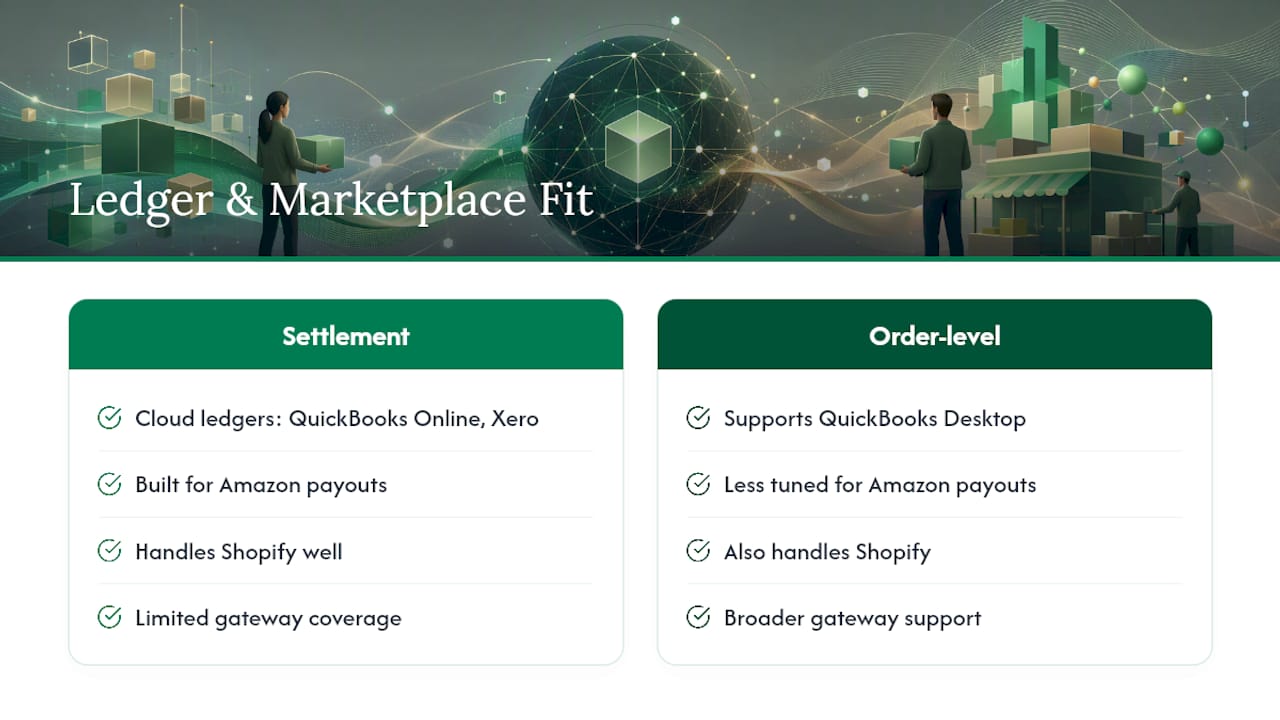
Your accounting platform narrows the field before you even get to marketplace considerations. Settlement-summary connectors are built almost exclusively for cloud ledgers: QuickBooks Online, Xero, and in some cases Sage Intacct or NetSuite for larger operations. Order-level tools, by contrast, tend to support QuickBooks Desktop directly, which matters if you’re not ready or able to migrate to a cloud platform. If your books live in QuickBooks Desktop today, that single fact often decides the whole question before pricing or features enter the conversation.
Marketplace coverage adds another layer. Amazon settlements are notoriously messy, with reserve holds, cross-border fee structures, and refund timing that lag the original sale by weeks. Settlement-summary tools were built around exactly that complexity, mapping each Amazon payout cleanly to what actually lands in your bank account. Shopify payouts follow a simpler, more predictable rhythm, so either model handles Shopify reasonably well. Where order-level tools pull ahead is breadth of payment gateway support. If you’re running a dozen different processors alongside a handful of marketplaces, an order-level tool’s transaction-matching tends to cover more ground than a settlement-first tool tuned mainly for marketplace payouts.
Edge cases push the decision further. Multi-entity sellers running separate legal entities per region often need order-level detail to keep intercompany allocations straight. Multi-currency Amazon accounts, especially sellers running UK, EU, and North American marketplaces simultaneously, add currency-conversion complexity that both models handle, but settlement-summary tools generally do it with fewer manual adjustments since the conversion happens at the payout level. Emerging channels like TikTok Shop are still catching up on both sides, so if that’s a growing share of your revenue, check current channel support directly before committing to either architecture.
What A2X and Webgility-Style Pricing Actually Costs You
Pricing shape matters more than the sticker price. Entry tiers for both approaches land in a similar range, roughly $29 to $49 a month according to G2’s pricing data, but how those tiers scale is where the real cost difference shows up.
Flat per-channel pricing charges a set fee per sales channel connected, which works out cheapest for a single-channel seller doing low volume. Tiered order-cap pricing charges based on transaction count, with overage fees once you exceed the plan’s cap, a shape that tends to favor mid-volume multichannel sellers as long as they watch their order counts. Enterprise tiers add dedicated support, custom reporting, or reconciliation guarantees, and only pay for themselves once your operation is large enough to actually use those extras, per PulseSignal’s pricing comparison.
Three quick profiles show how this plays out. A solo seller on one marketplace doing under 200 orders a month usually comes out ahead on flat per-channel pricing, since there’s no order-cap overage risk to manage. A small multichannel seller running two or three marketplaces at 1,000 to 3,000 orders a month typically lands best on a mid-tier order-cap plan, provided they’re disciplined about tracking where they sit against the cap. A high-volume brand doing 10,000-plus orders across multiple entities usually needs an enterprise tier, where the added reconciliation support and custom exports justify the premium.
Watch for hidden costs beyond the monthly fee. Migration fees for moving historical data, overage charges that kick in mid-cycle without warning, and add-on fees for dedicated accountant support can quietly double your effective monthly cost. Below roughly $500,000 in annual sales, the math sometimes favors a lighter connector or even manual reconciliation over a full subscription, according to one CFO’s assessment of A2X’s return on investment.
How to Choose the Right Posting Model for Your Books
Run through this checklist before you commit to either architecture:
- Confirm ledger support: QuickBooks Online, QuickBooks Desktop, Xero, Sage, or NetSuite.
- Identify your posting model preference: settlement-summary for fast close, order-level for SKU detail.
- Count your active channels and gateways, not just marketplaces.
- Check whether pricing is transparent at your actual order volume, including overage terms.
- Ask about migration support for historical data before you sign up.
- Confirm reporting exports match what your accountant or bookkeeper actually uses.
- Test support responsiveness before, not after, you’re locked into a plan.
Once you’ve narrowed to a candidate, run this trial sequence:
- Import one recent settlement or a representative batch of orders.
- Inspect the posted journal entry or order rows line by line against the original settlement report.
- Run a full bank reconciliation and time how long it takes.
- If SKU-level margin reporting matters to you, test that report specifically before deciding.
- Contact support with a real question and clock the response time.
Pro Tip: Don’t judge a connector by its dashboard. Judge it by the journal entry it posts. Pull one up in a trial account and hand it to whoever actually closes your books each month, they’ll spot problems in minutes that a sales demo will never surface.
Red flags worth walking away from: pricing that hides multichannel overage fees until you’re already a customer, no sample journal export available before signup, missing QuickBooks Desktop support if you need it, and onboarding documentation that reads like it was written for a different product. Practitioner testing steps like these come directly from LedgerGurus’ integration guidance, and they hold up regardless of which architecture you’re evaluating.
Why the Posting Model Choice Affects More Than Bookkeeping
Settlement accuracy isn’t just an accounting nicety, it’s the foundation of catching what Amazon actually owes you. Every reimbursement claim for lost or damaged inventory depends on the ledger correctly reflecting what happened during that settlement period. When the posting model buries or misrepresents fee and refund detail, discrepancies slip through unnoticed, and that’s exactly where sellers lose money without realizing it.
Accountants prize small, auditable GLs because errors are visible fast, a key consideration if you plan to sell your e-commerce business with Captyx. Operators prize order-level detail because SKU margins live and die on it. Both are right, and both miss half the picture without continuous monitoring of inbound shipments and ledger events sitting behind whichever posting model you choose. Automation handles the posting. Someone, or something, still has to watch for what Amazon shorted you.
, Tim
A Complementary Layer: Catching What Neither Posting Model Sees
Neither order-level nor settlement-summary posting was built to flag a missing reimbursement. Both tools tell you what happened in your ledger; neither one tells you what Amazon still owes you for inventory that was lost, damaged, or under-reimbursed in the warehouse. That gap is where sellers leave real money on the table month after month.

This software fills that specific gap. It continuously monitors inbound shipments and FBA ledger events, flags discrepancies as they happen, and automates settlement posting straight into QuickBooks or Xero so your reconciliation stays accurate without you manually cross-checking every claim. Instead of choosing between order-level detail and settlement-summary simplicity, you get accurate financial data plus active recovery of funds Amazon owes you, without commissions eating into what you recover. If you want to see what’s currently sitting unclaimed in your account, start with a free audit, then check how a settlement reconciliation in QuickBooks Online should actually look once the numbers are right.
Sources
For a deeper technical breakdown of how order-level and settlement-summary posting differ mechanically, the Eightx comparison of both architectures is the most thorough available. For side-by-side feature scores and reviewer sentiment, G2’s comparison page pulls direct ratings on ease-of-use and support. Practitioners weighing QuickBooks Online integrations specifically should check LedgerGurus’ integration guide for scenario-based recommendations. For pricing shapes and hidden costs across order volumes, PulseSignal’s pricing breakdown covers the tier structures in detail. Readers exploring alternative connectors beyond these two architectures can also review Beanhawk’s list of A2X alternatives or its roundup of Webgility alternatives.
- Webgility vs A2X in 2026: the order-level vs settlement-summary decision that determines who owns your books | Eightx
- A2X vs. Webgility Comparison 2026 | G2
- Best Amazon QuickBooks integrations in 2026 | LedgerGurus
- A2X vs Webgility: Pricing Comparison (2026) | PulseSignal
FAQ
What Are Good Alternatives to A2X?
Alternatives generally split into the same two camps: other settlement-summary connectors for QuickBooks Online or Xero users, and order-level tools for sellers who need SKU-level detail or QuickBooks Desktop support. Beanhawk complements either choice by adding continuous reimbursement monitoring on top of whichever posting model you use.
Why Do Accountants Sometimes Dislike QuickBooks Online for Ecommerce?
QuickBooks Online can struggle with high order volume when transactions post individually rather than as settlement summaries, since thousands of small entries slow performance and complicate reconciliation. That’s precisely why many accountants push multichannel sellers toward settlement-summary posting instead of raw order-level feeds.
What’s the Best Software to Replace QuickBooks?
Most ecommerce sellers aren’t looking to replace QuickBooks itself, they’re looking for a connector that feeds it more cleanly. Xero is the most common full alternative for sellers who want a different core ledger, paired with either posting approach depending on whether an accountant or an operator owns the books.
What Accounting Software Do Most Bookkeepers Use?
QuickBooks Online and Xero dominate among bookkeepers serving ecommerce clients, largely because both support the automated connectors that make settlement reconciliation fast. QuickBooks Desktop still shows up among sellers who haven’t migrated to the cloud, which is usually the deciding factor for choosing an order-level connector over a settlement-summary one.
Which Is Better, A2X or Webgility?
Neither wins universally. Settlement-summary posting suits accountant-led closes on QuickBooks Online or Xero, while order-level posting suits operators needing SKU-level margin data or QuickBooks Desktop compatibility, and the right pick depends entirely on who owns your books.