
Settlement First Amazon Seller Cash Reconciliation in 1,2 Cycles

The best Amazon cash reconciliation method is automated, settlement-first reconciliation run through an Amazon-specialist tool. It converts every settlement and FBA ledger event into audit-ready journal entries tied directly to your bank deposits, closing the gap between what Amazon paid you and what your books say you earned. If you haven’t reconciled recently, start now: pull your latest settlement report from Seller Central or run a free reconciliation audit to see where your numbers actually stand.
TL;DR:
- Reconcile using the settlement report, not the Business or Payments Report, because it directly links disbursements to specific transactions with details on fees and refunds.
- Conduct reconciliation weekly or biweekly to prevent small timing mismatches from accumulating into major variances that are difficult to resolve later.
- Use a dedicated Amazon clearing account and avoid forcing journal entries; instead, track open exceptions like reserves or deferred transactions to keep books honest.
- Choose reconciliation tools that parse fee types, trace orders to the bank deposit, and generate audit-ready journal entries, rather than simple sales syncing.
- For larger operations, consider a hybrid approach with automated matching and regular manual review, especially if account balances or reimbursements become hard to trace.
Table of Contents
- Why the Settlement Report Should Anchor Your Amazon Cash Reconciliation
- Practical Reconciliation Workflow: From Sale to Bank Deposit
- What to Look For in a Reconciliation Solution or Service
- How to Recover FBA Reimbursements Without Breaking Your Books
- Integrations and Posting Patterns: QuickBooks, Xero, and Beyond
- Pricing, Implementation Scope, and Realistic Timelines
- Publisher Proof and Practitioner Tips
- When to DIY Reconciliation vs. When to Outsource
- How Beanhawk Solves Amazon Cash Reconciliation
- Primary Sources and Further Reading
- Sources
- FAQ
Why the Settlement Report Should Anchor Your Amazon Cash Reconciliation
Most sellers try to reconcile against the wrong document. The Business Report shows order volume. The Payments Report shows a rolling balance. Neither one ties cleanly to what actually landed in your bank account. The settlement report does, because it lists every product charge, fee, refund, and adjustment tied to a specific disbursement, line by line.
That specificity is the entire point of settlement-first reconciliation. Instead of asking “does my revenue look right,” you ask “does this exact deposit match this exact settlement,” which is a question you can actually answer with a yes or no.
Two fields make that matching possible. The Settlement ID groups every transaction in a single payout period, and the Transaction ID lets you trace an individual order, refund, or fee down to the cent. Amazon’s own developer documentation defines both, along with a distinction that trips up a lot of finance teams: posted date versus release date. A charge can post to your account on one date and release into a settlement days later, which is exactly why reconciling by eyeballing dashboard totals fails.
A few things worth pulling from the settlement report every cycle:
- Product sales and refunds, itemized per order
- Referral fees, FBA fulfillment fees, and storage fees
- Reimbursements and adjustments issued that period
- Reserve holds and their scheduled release
On cadence: reconcile each settlement as it closes, and if your volume supports it, do it one to two times per week. Monthly reconciliation is the floor, not a best practice. Wait 30 days and small timing mismatches compound into a pile of unexplained variance that takes hours to unwind.
Practical Reconciliation Workflow: From Sale to Bank Deposit
A settlement-first framework only works if you run it on a schedule. Here’s a workflow that holds up whether you’re doing it by hand in a spreadsheet or watching software do it for you.
- Daily: Log into Seller Central and note new settlement periods as they close. Nothing to reconcile yet, just awareness of what’s coming.
- Weekly: Import each closed settlement report and match every line to the corresponding bank deposit using the Settlement ID.
- Weekly: Map fee categories (referral, FBA, storage, advertising) to their own ledger accounts rather than dumping everything into one generic “Amazon fees” bucket.
- Weekly: Flag any line that doesn’t have an obvious match. Deferred transactions, reserve holds, and refunds issued near the settlement cutoff are the usual suspects.
- Monthly: Review your open exception list and clear anything that’s aged past two settlement cycles.
The cleanest way to run this is through a dedicated Amazon clearing account sitting between Amazon and your bank feed in your chart of accounts. Every settlement posts into the clearing account first; only the net deposit hits your actual bank account. When the clearing account balance is zero, you know your books match Amazon’s records. When it isn’t zero, you know exactly where to look.
Exception handling is where most reconciliations quietly fall apart. Timing differences between posted and release dates, reserve amounts that won’t release for 14 days, and transactions Amazon defers to a future settlement all need to sit in an open exception queue rather than get forced into a journal entry that doesn’t actually match reality.
Pro Tip: Never force a journal entry to make your clearing account hit zero. An open exception that stays open for a week is honest bookkeeping. A forced entry that “balances” the books is a lie you’ll have to unwind later, usually during tax season.
What to Look For in a Reconciliation Solution or Service
Not every tool that claims to “automate Amazon accounting” actually reconciles anything. Some just sync sales totals into your books, which tells you nothing about whether those totals are correct. A real reconciliation solution needs to do more.
Look for these core capabilities before you commit to anything:
- Settlement parsing that breaks every report into its component fee types, not just a lump revenue number
- Order-level tracing so you can drill from a bank deposit down to a single SKU and back
- Continuous FBA ledger monitoring that flags lost, damaged, or missing inventory as it happens, not months later
- Bank matching that ties settlements to actual deposits automatically instead of leaving that step to you
- Reimbursement surfacing that separates recoverable cash from your normal sales flow
On the accounting output side, you want audit-ready journal entries with account mapping you can adjust, not a rigid template that forces your chart of accounts to match someone else’s assumptions. Direct posting to QuickBooks or Xero beats a CSV export you have to import by hand every week; manual imports are where errors creep in.
Finally, ask about service expectations before signing anything: How often does the tool reconcile? What’s the response time on flagged exceptions? Can it generate a clean reconciliation workpaper for 1099-K season, when your gross payment volume from Amazon almost never matches your actual revenue once you back out sales tax and returns?
How to Recover FBA Reimbursements Without Breaking Your Books
Lost and damaged inventory is where Amazon cash reconciliation quietly bleeds money. A unit gets crushed in a fulfillment center, misplaced during a warehouse transfer, or destroyed without notice, and unless someone is actively watching the FBA ledger, that loss just sits there unclaimed.

The mistake most sellers make isn’t missing the reimbursement. It’s how they record it once it arrives. Amazon’s own guidance is explicit: confirmed lost or damaged inventory should be recorded as a loss in your ledger the moment it’s identified. When the reimbursement eventually lands, it posts as a recovery against that loss, never as new sales revenue. Mix the two up and your P&L looks fine while your inventory valuation quietly drifts out of sync with reality.
A workable claim process looks like this:
- Identify the discrepancy through continuous ledger monitoring, not a manual quarterly check
- Collect the supporting evidence: shipment IDs, ledger event codes, expected versus received unit counts
- Submit the claim within Amazon’s eligibility window before it expires
- Post the eventual reimbursement as a recovery, tied back to the original loss entry
Claims windows close faster than most sellers expect, and manual tracking means someone has to remember to check dozens of ledger events across every SKU, every week.
Integrations and Posting Patterns: QuickBooks, Xero, and Beyond
How you post Amazon settlements into your accounting platform matters almost as much as reconciling them correctly in the first place. You’ve got two real options: summary posting, where each settlement becomes one consolidated journal entry, or order-level posting, where every transaction gets its own line. Summary posting is faster and fine for smaller catalogs; order-level posting earns its complexity once you’re tracking COGS by SKU or running multi-channel operations where granularity actually changes decisions.
Either way, your chart of accounts needs dedicated lines for:
- Gross sales and returns
- Referral fees and FBA fulfillment fees, kept separate
- Reserve holds, tracked as a distinct asset until released
- Reimbursements, posted as recoveries rather than revenue
- Inventory and COGS, updated to reflect actual unit movement
Connector tools that post structured, dated journal entries directly through an API cut down on the manual reentry that causes most reconciliation errors. A step-by-step QuickBooks posting guide is worth bookmarking if you’re setting this mapping up for the first time. API-based posting also shortens month-end close, since you’re not waiting on someone to manually export and reimport CSVs before the books can be finalized.
Pricing, Implementation Scope, and Realistic Timelines
Reconciliation tools generally price on a subscription tied to order volume, and you’ll find both software-only platforms and managed services that combine automation with a human reviewing exceptions. Managed services cost more but shift exception handling off your plate entirely.
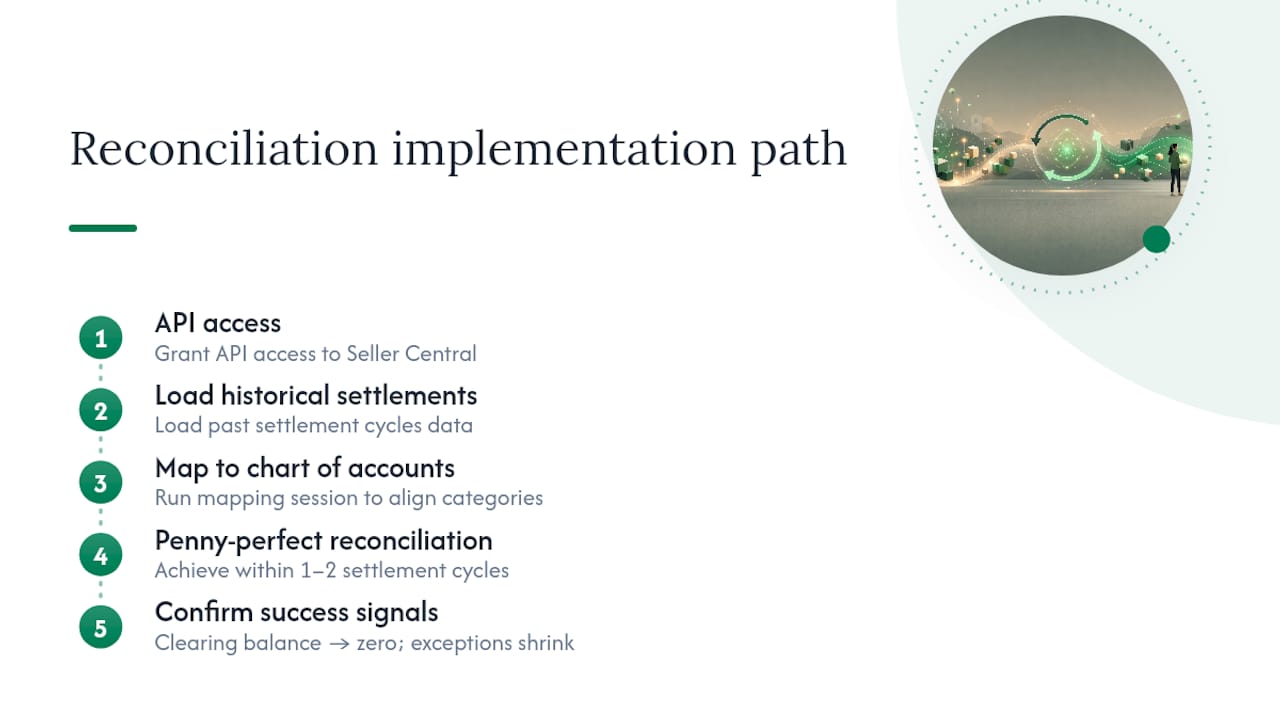
Onboarding usually asks for API access to Seller Central, historical settlement data going back at least a few cycles, and a mapping session to align transaction categories with your existing chart of accounts. None of that should take more than a few hours of your time upfront.
Most sellers reach penny-perfect reconciliation within one to two settlement cycles once historical data is loaded and mappings are confirmed. Watch two signals to know it’s working: your Amazon clearing account balance should trend toward zero after each settlement, and your exception queue should shrink week over week instead of growing.
Publisher Proof and Practitioner Tips
Beanhawk was built around the exact checklist covered above: continuous FBA ledger monitoring, automated settlement parsing, and audit-ready journal entries posted directly to QuickBooks and Xero. The core capability that matters most for cash reconciliation is the reimbursement layer, since it separates recovered cash from ordinary sales rather than letting the two blur together on the P&L.
Track every unit Amazon flags as lost or damaged the day it happens, not the day you notice the reimbursement in your settlement report. By the time the deposit arrives, the paper trail connecting it to a specific loss has usually gone cold.
Pro Tip: Keep a running log of ledger events, separate from your settlement reconciliation, specifically for lost and damaged inventory. It’s the single fastest way to catch a missed reimbursement before Amazon’s claim window closes.
When to DIY Reconciliation vs. When to Outsource
Handling reconciliation yourself works fine under roughly $1 million in annual Amazon sales with a limited SKU count and a single marketplace. Past that, the volume of settlement lines and fee categories outpaces what one person can track accurately in a spreadsheet.
A hybrid model, automated matching with a finance lead reviewing exceptions weekly, fits most growing sellers well. It’s the middle ground between full DIY and handing everything to a managed service.
Certain signals mean you should stop waiting: an Amazon clearing account balance that hasn’t hit zero in three consecutive settlements, reimbursement claims you can’t trace back to a specific loss, or a CPA asking for a 1099-K reconciliation workpaper you don’t have. Any one of those is a sign the manual approach has already broken down.
How Beanhawk Solves Amazon Cash Reconciliation
Reconciling settlements by hand or duct-taping together a spreadsheet formula works until your catalog grows past a few hundred SKUs, and then it doesn’t. Beanhawk runs continuous monitoring of your inbound shipments and FBA ledger events, catching lost and damaged inventory as it happens instead of months later when the claim window has already closed.

What sets it apart from a basic accounting sync is what happens after a reimbursement is identified: it gets surfaced as a recoverable claim, then posted to QuickBooks or Xero as a recovery, not as revenue, so your P&L and inventory valuation stay accurate. Settlement data flows automatically into audit-ready journal entries, with no manual CSV imports and no hidden fees or commissions taken from what you recover. Learn more about what qualifies as an FBA reimbursement and how the recovery process works, or run a free audit to see how much unclaimed cash is sitting in your existing settlement history.
Primary Sources and Further Reading
For hands-on reference, start with Amazon’s own settlement report guidance and its developer documentation on transaction fields. For a broader look at which Seller Central reports to pull for accounting purposes, see this rundown of essential Amazon reports. For general reconciliation concepts outside the Amazon context, Zenith’s plain-English reconciliation guide is a useful primer.
Sources
- Reconciling your transaction records with the Amazon Pay settlement report
- Amazon Pay developer documentation
- Amazon Seller Central Accounting 2026: Settlements, Fees, Reconciliation | Eightx
- Amazon Seller Central guidance on reimbursements and inventory events
FAQ
How Do You Reconcile Amazon Payments?
Match each settlement report to its corresponding bank deposit using the Settlement ID, break out fees and refunds by category, and post the result as journal entries in your accounting platform, ideally one to two times per week.
Is There an App That Gives Cash Back for Amazon Purchases?
That’s a separate consumer feature (cash-back or rewards apps for personal Amazon purchases) and isn’t part of seller-side cash reconciliation, which deals with settlement payouts, fees, and reimbursements rather than personal shopping rewards.
Does Synchrony Still Work With Amazon?
Synchrony’s involvement with Amazon has historically centered on Amazon-branded consumer credit cards, not seller payment processing, so it has no bearing on how sellers reconcile their settlement deposits.
Is Amazon Cash Flow Positive?
Amazon’s own corporate cash flow isn’t something individual sellers need to track. What matters to your business is whether your own Amazon-driven cash flow reconciles cleanly against your settlement reports and bank deposits, which is exactly what settlement-first reconciliation is designed to confirm.
How Often Should I Reconcile My Amazon Seller Account?
Reconcile every settlement as it closes, and aim for weekly reconciliation rather than monthly, since discrepancies compound quickly the longer they go unaddressed.