
Sellers & Accountants: 60 Day Amazon Returns Reimbursement Workflow

Amazon returns reimbursement means one thing for FBA sellers: getting paid back for your own inventory that Amazon lost, damaged, or mishandled, not a customer’s refund. Most claim types close within roughly 60 days of the event, so the immediate move is a 60-day reconciliation check against your settlement files and inventory reports this week. Sellers who wait for a monthly close routinely forfeit money that automation never caught.
TL;DR:
- Filing reimbursement claims promptly within 60 days is critical, as most categories close quickly, and automation only covers certain types.
- Amazon values warehouse and pre-order losses at sourcing costs, so accurately recording and updating unit costs avoids underpayment issues.
- Using reports like Inventory Adjustments and the IDR portal weekly helps identify unreimbursed losses before claim windows close.
- Record reimbursements as recoveries against inventory costs, not as sales revenue, with proper documentation to ensure accurate accounting and audit trail.
- Automated tools like BeanHawk can continuously monitor and post reimbursements, saving time and preventing missed claims for sellers and accountants.
Table of Contents
- What Counts as an Amazon Reimbursement, and How Long Do You Have?
- How Amazon Prices Your Claim, and Why Cost Data Matters
- Which Reports and Codes Reveal a Missed Reimbursement
- Posting Reimbursements Correctly Without Inflating Revenue
- The Weekly Routine That Keeps You Inside the Claim Window
- Why Settlement-Line Reads Beat Guesswork
- Let BeanHawk Catch What Manual Reviews Miss
- Where to Verify the Current Rules
- Sources
- FAQ
What Counts as an Amazon Reimbursement, and How Long Do You Have?
A reimbursement is Amazon paying you back for seller-owned units it lost, crushed, mispicked, or failed to restock after a customer return. That is distinct from the refund Amazon issues to a shopper. Once you separate those two ideas, the claim categories get much easier to track.
The categories that recur most often in a typical FBA account:
- Lost or damaged in a fulfillment center: units that vanish from warehouse inventory or show up broken in a condition report.
- Inbound shipment shortfalls: cartons that never get checked in, or arrive short of the manifest count.
- Returns not restocked: a customer sends an item back, Amazon marks it unsellable, and it never reappears in your sellable inventory or gets reimbursed.
- Removal order losses: units you asked Amazon to ship back or dispose of that go missing in transit.
- Fee overcharges: incorrect FBA fees tied to wrong dimensions or weight tiers.
Most of these carry a roughly 60-day filing window from the date of the event, though some inbound shipment disputes stretch to 120 days. Amazon auto-reimburses a growing share of lost-in-warehouse cases, but returns-not-restocked and removal losses still usually require you to file manually through the IDR portal.
How Amazon Prices Your Claim, and Why Cost Data Matters
Amazon reimburses most warehouse and pre-order losses at your manufacturing or sourcing cost, not at retail price. That single rule change, effective in 2025, is why so many sellers saw payouts drop even as unit counts stayed flat.
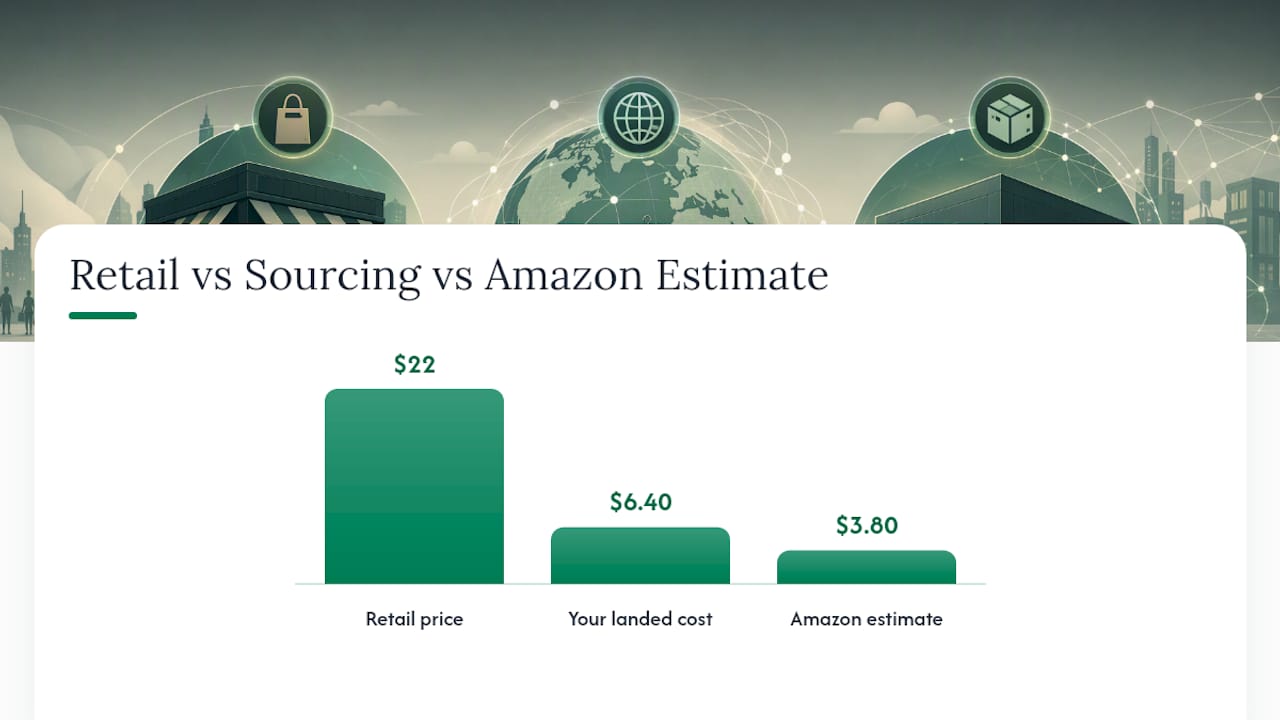
If you never entered a per-unit cost in Seller Central, Amazon substitutes its own internal estimate, and that number tends to run low. A $22 retail item that costs you $6.40 to source might get valued by Amazon’s algorithm at $3.80 if the cost field sits blank.
To fix this before it costs you money:
- Upload accurate per-unit landed cost for every active ASIN in Seller Central’s manage inventory tools.
- Keep supplier invoices that show unit price, freight allocation, and any duty paid.
- Recalculate landed cost whenever a supplier changes pricing or you switch freight forwarders.
Pro Tip: Store your supplier invoice alongside each ASIN’s cost record, not just in your accounting file. When you dispute a valuation, you will need to attach that invoice directly to the case, and digging through old email threads under a deadline wastes days you don’t have.
Which Reports and Codes Reveal a Missed Reimbursement
Finding a reimbursement opportunity is mostly a matter of reading the right report before the window closes. Four reports do almost all the work: the Inventory Adjustments report, the Reimbursements report, the Returns report, and the IDR (Inventory Defect and Reimbursement) portal for open cases and manual filing.
A practical sequence for a weekly pull:
- Export the Inventory Adjustments report for the trailing 60 days and flag negative quantity rows, particularly those coded with adjustment reasons tied to damage or loss.
- Cross-reference against the Reimbursements report to see what Amazon already paid, then subtract that from what the adjustment report shows is missing.
- Pull the Returns report and isolate units marked as customer-returned but never restocked to sellable inventory within a reasonable window.
- Check the IDR portal for auto-flagged defects still sitting open, since some require you to click “file” even after Amazon identifies them.
- Match remaining gaps to shipment IDs and open a manual case for anything not already covered.
Watch for negative rows tied to codes like warehouse damage, customer damage on return, and general adjustment codes that don’t map to a sale. Each one is a candidate reimbursement if it never shows up as a paid line later.
Industry audits estimate recoverable reimbursements often run 1 to 3% of annual FBA revenue, and automated payouts have made sellers complacent about checking for the categories automation skips.
Every claim needs its own evidence bundle: the shipment ID or removal order number, the FNSKU and report row showing the discrepancy, a dated screenshot of the report at the time you pulled it, and, for inbound disputes, carrier proof of delivery, as detailed in this merchant’s practical playbook on chargebacks and disputes. The BeanHawk guide on lost FBA inventory walks through building that evidence packet before a case gets auto-closed for insufficient documentation.
Posting Reimbursements Correctly Without Inflating Revenue
A reimbursement is a recovery, not a sale. Treat it as revenue and you inflate your top line while hiding the inventory loss that caused it in the first place, which throws off margin analysis and can misstate taxable income.
Amazon’s settlement flat-file bundles sales, fees, refunds, reimbursements, and reserves into one deposit. Posting that net deposit as a single “Amazon sales” line is the single most common bookkeeping mistake sellers make. Seller Central’s own accounting guidance recommends mapping the settlement file line by line to your general ledger instead.
The reconciliation workflow that actually holds up under review:
- Pull the settlement flat-file for the period and separate it into sales, FBA fees, refunds, reimbursements, and reserve movements.
- Classify each reimbursement row against the original inventory event it corresponds to (a specific shipment ID, removal order, or FNSKU).
- Post the reimbursement to a recovery or contra-COGS account, not to sales revenue.
- Keep the original loss documentation attached to the journal entry so an auditor can trace both sides.
A generic journal entry for a lost-inventory reimbursement looks like this: debit cash or Amazon receivable, credit “Inventory Loss Recovery” (a contra-COGS account), with a memo referencing the shipment ID and settlement ID. This offsets the expense you already recorded when the inventory first went missing, rather than creating phantom revenue. The Ledgify CPA reconciliation checklist walks through the same five-step logic: tie the general ledger to the inventory subledger, validate Amazon-held units, record shrink and damage, map reimbursements to the underlying issue, and review slow-moving stock for write-downs before it becomes a bigger reconciliation headache. BeanHawk’s guide to setting up Amazon accounting for automated settlements covers the same mapping if you’re building this in QuickBooks or Xero from scratch.
The Weekly Routine That Keeps You Inside the Claim Window
A monthly close is too slow for a 60-day clock. Weekly reconciliation has become the practical minimum since Amazon compressed several claim windows and shifted more valuations to sourcing cost.
A minimum operating cadence looks like this:
- Every Sunday or Monday, pull the last 60 days of settlement and inventory-adjustment data, not just the current week, so nothing slips past the deadline unnoticed.
- Audit inbound cartons at the case level when a shipment arrives short, photographing pallets and cross-checking carton counts against the shipping plan before the receiving team closes the shipment.
- Rank open discrepancies by dollar value and work the highest-value ASINs first, since a single mispriced electronics SKU can outweigh a dozen small accessory losses.
- Escalate stubborn valuation disputes to your Amazon account manager or Seller Support case log when the automated response undervalues a claim despite documentation.
- File manually for any category, like removal losses or return-not-restocked cases, that Amazon’s automation historically skips, rather than waiting for a payout that may never come.
BeanHawk’s audit checklist for FBA reimbursements breaks this cadence down further by claim type if you’re building the SOP from scratch.
Why Settlement-Line Reads Beat Guesswork
Sellers treat reimbursements as a bonus that shows up when Amazon feels generous. That framing costs money. Reimbursements are contractual recoveries tied to specific inventory events, and the accounting trail should be just as specific.
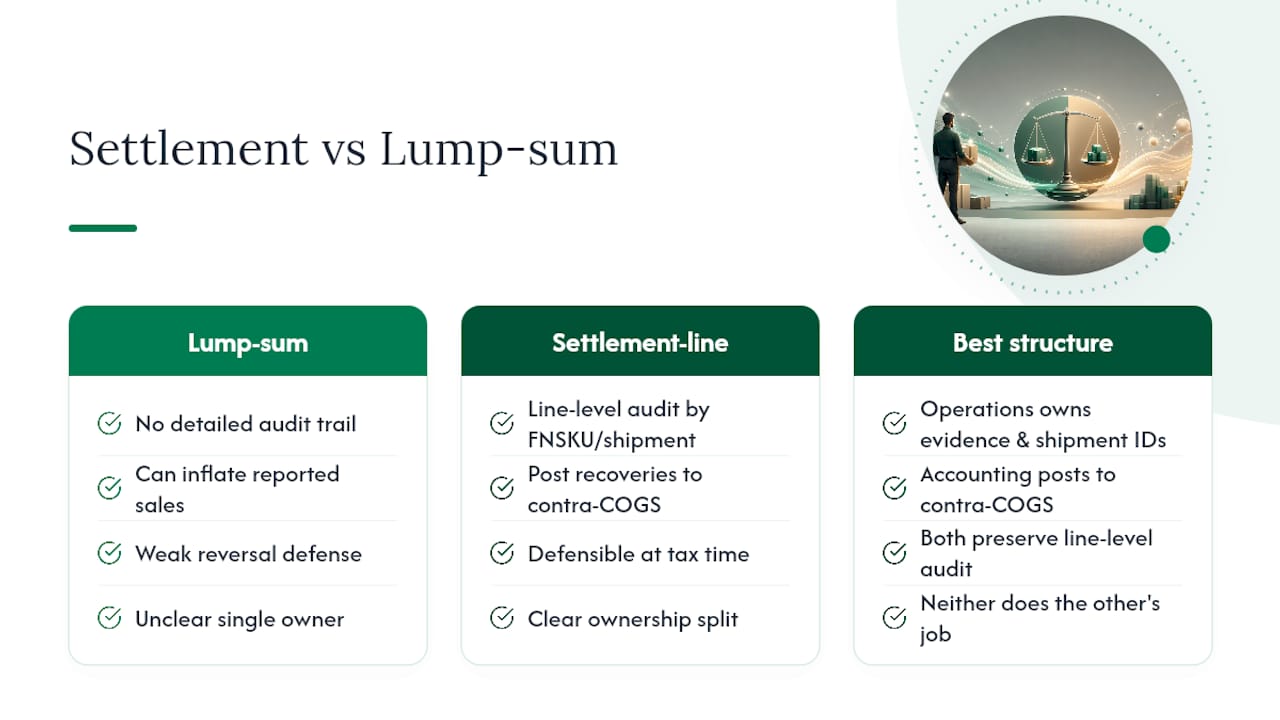
A line-by-line settlement read gives you something a lump-sum deposit never will: a defensible audit trail that ties every dollar back to a shipment ID or FNSKU. That matters at tax time and it matters if Amazon ever reverses a reimbursement and you need to show exactly what it was for.
The best structure I’ve seen splits the work cleanly. Operations owns the evidence, shipment IDs, carton photos, supplier invoices, and dated report exports. Accounting owns the posting, making sure every recovery lands in a contra-COGS account instead of inflating sales. Neither side should try to do the other’s job, but both sides need to talk weekly, not quarterly, or the 60-day window closes before anyone notices the gap.
, Tim
Let BeanHawk Catch What Manual Reviews Miss
There are software tools designed to address the gap this article just walked through: reimbursements that Amazon’s automation never flags and a monthly spreadsheet review catches too late. Such tools can continuously monitor inbound shipments and FBA ledger events, surfacing discrepancies while you’re still inside the 60-day claim window instead of after it closes.

The bigger time savings shows up on the accounting side. Instead of manually mapping settlement flat-files and typing journal entries by hand, BeanHawk posts reconciled settlements directly to QuickBooks or Xero, keeping reimbursements coded as recoveries rather than sales revenue automatically. That means the workflow described above, the report pulls, the code matching, the contra-COGS posting, runs continuously in the background instead of eating a Sunday afternoon. If you’re an accountant managing this for multiple seller clients, the accountant partner program is worth a look. For sellers ready to see what’s currently sitting unclaimed, start with a look at how FBA bookkeeping should actually work and run a free audit against your own account this week.
Where to Verify the Current Rules
Policy details shift, so confirm specifics directly with Amazon before filing. Start with Seller Central’s settlement and accounting help pages for the current reporting structure, and use the IDR portal inside Seller Central to check the status of any auto-flagged defect.
For background on the valuation shift and the compressed claim windows, the SPS Commerce community write-up and the Ecommerce Times coverage of the 2026 rule changes are worth a read. Rules change quietly and often; a five-minute check before filing beats losing a claim to a stale process.
Sources
- Seller Central help: settlement and accounting guidance
- Amazon reimbursement policy (SPS Commerce community article)
- Amazon FBA Reimbursement in 2026: How the Sourcing-Cost Policy Works and How to File | AMZBase
- Amazon’s FBA reimbursement rule changes are hitting sellers hard in Q3 2026 - Ecommerce Times
FAQ
What Is an Amazon Returns Reimbursement?
It’s the payment Amazon owes a seller for inventory it lost, damaged, or failed to restock, separate from any refund issued to the customer who returned the item.
How Long Do I Have to File an Amazon Reimbursement Claim?
Most claim types require filing within roughly 60 days of the event, though some inbound shipment disputes allow up to 120 days.
Does Amazon Automatically Reimburse Lost Inventory?
Amazon has automated many lost-in-fulfillment-center reimbursements since November 2024, but categories like removal losses and returns not restocked usually still require a manual claim through the IDR portal.
How Does Amazon Calculate Reimbursement Value?
Amazon values most warehouse and pre-order losses at your manufacturing or sourcing cost rather than retail price, and it substitutes its own lower internal estimate if you haven’t uploaded your per-unit cost.
How Should I Record a Reimbursement in My Books?
Post it as a recovery against COGS or an inventory-loss account, never as sales revenue, and keep it tied to the original loss documentation for audit purposes.
Can Software Like BeanHawk Help With Reimbursement Tracking?
Yes. BeanHawk monitors FBA ledger events continuously and posts reconciled settlements to QuickBooks or Xero, which reduces the manual detection and posting work described throughout this process.