
Protect 60 Day FBA Reimbursements with Ecommerce Journal Automation

The best approach to ecommerce journal automation is line-level settlement parsing paired with accrual-dated journal entries posted directly to QuickBooks or Xero, with reimbursements mapped separately from sales. This keeps buried FBA reimbursements and fee categories from distorting your COGS and margins. BeanHawk builds its recovery and posting service around exactly this model, monitoring inbound shipments and ledger events so nothing slips past Amazon’s claim window.
TL;DR:
- Line-level settlement parsing ensures reimbursements are correctly mapped to inventory losses and posted on the actual accrual date.
- Automating reimbursement detection prevents cash from being buried in settlement noise past the 60-day claim window.
- Reimbursements should offset inventory write-offs in a dedicated account, not be recorded as new revenue, to maintain accurate margins.
- Review-first implementation is crucial, involving detailed reconciliation of past periods before enabling full auto-posting.
- Consolidated monitoring across multiple sales channels helps identify missed reimbursements and avoids manual reconciliation errors.
Table of Contents
- Why Journal-Level Automation Matters for Amazon and Multi-Channel Sellers
- What Should You Require From Ecommerce Journal Automation Software?
- How Do You Roll Out Journal Automation Without Breaking Your Books?
- How Should FBA Reimbursements Be Recorded in Your Books?
- Practical Perspective: Where Automation Rollouts Actually Go Wrong
- Recover What Amazon Owes You, Automatically
- Sources
- FAQ
Why Journal-Level Automation Matters for Amazon and Multi-Channel Sellers
Every Amazon settlement is a single deposit hiding a dozen different transaction types. Sales, referral fees, storage fees, refunds, advertising spend, and reimbursements all land in one lump sum, and unless someone reads the settlement file at the line-item level, reimbursements simply disappear into “deposit received.” Your bookkeeper sees a number. Amazon sees forty transactions.
That distinction changes what your books actually say. Accrual accounting records activity on the transaction date, not the day cash lands in your bank. Posting by deposit date instead, which is what happens when businesses just book the net settlement, distorts your margins and skews the decisions built on them. A loss in November can show up as revenue in December just because that’s when the payout cleared.
The stakes get sharper once you factor in timing. Amazon’s FBA reimbursement claim window is 60 days from the inventory event, a policy tightened from 18 months back in November 2024. Miss that window and the money is gone for good.
Three consequences follow when journal automation is missing or shallow:
- Revenue gets inflated because reimbursements post as generic income instead of inventory recovery.
- Inventory losses go unnoticed because the offsetting reimbursement masks the write-off.
- Recoverable cash sits buried in settlement noise until the 60-day window closes.
60 days. That’s the entire runway Amazon gives you to catch and claim a lost or damaged unit before the reimbursement opportunity expires for good.
What Should You Require From Ecommerce Journal Automation Software?
Not every tool that claims to “automate accounting” actually produces correct journal entries. Before you commit to a platform, hold it to a specific technical bar.
- Settlement flat-file ingestion with line-level parsing. The software needs to read every transaction type and event date inside the raw settlement file, not just the summary total.
- Reimbursement detection tied to the inventory event. A reimbursement line should map automatically to a reimbursement account (or contra-COGS) and link back to the specific lost or damaged unit that triggered it.
- Accrual-dated posting with configurable GL mappings. You should be able to route fee categories, refunds, advertising, and shipping income to separate accounts, not one big “Amazon expense” bucket.
- Review-first mode with an exception queue. Nothing should auto-post to your books until you’ve verified the mapping logic on real settlements.
- A real audit trail. Every posted entry needs change history and exportable evidence, which matters enormously if a reimbursement claim gets challenged or a tax reviewer asks questions.
- Multi-channel consolidation. If you sell on Amazon, Shopify, and Walmart, the tool needs to handle mixed deposits without collapsing them into an unreadable mess.
Tools that disaggregate settlement reports into gross sales, referral fees, FBA fees, storage fees, refunds, and advertising consistently produce cleaner reconciliations than tools that merely summarize the deposit. That single design choice, disaggregation versus summarization, is the difference between books you can trust and books you have to double-check every month.
Pro Tip: Ask any vendor to show you a sample journal entry from a real, messy settlement, not a demo account. If they can’t produce one, the parsing probably isn’t as granular as the sales page suggests.
How Do You Roll Out Journal Automation Without Breaking Your Books?
Moving from manual bookkeeping to automated posting works best as a staged rollout, not a weekend switch.
- Run a foundation diagnosis first. Pull several past periods of settlement detail and read them line by line before you touch any live automation. This step alone often exposes buried reimbursement lines and misattributed settlement IDs that have been sitting unclaimed for months.
- Build your chart of accounts. Map separate GL accounts for sales, each major fee category, reimbursements or contra-COGS, inventory, and an Amazon clearing account.
- Start in review-first mode. Run several settlement cycles with every journal entry held for approval before it posts. Compare each one against the raw settlement detail and the actual bank deposit.
- Reconcile at month-end. Match posted journals to bank deposits and confirm inventory and COGS adjustments tie back to your Seller Central reports.
- Set a monitoring cadence. Daily or weekly reimbursement scans, with a documented SLA for resolving exceptions, keep you inside that 60-day claim window.
- Put governance in writing. Assign an approver, log every exception, and keep a running recovery log tying each reimbursement to its original claim.
Skipping the review-first stage is the most common shortcut sellers regret. Mapping errors compound fast once auto-posting is live, and untangling six months of misclassified journal entries costs far more time than the two or three cycles it takes to verify the mappings up front.
How Should FBA Reimbursements Be Recorded in Your Books?
Reimbursements compensate you for inventory Amazon lost or damaged. They are not new sales, and booking them as generic income overstates revenue while hiding the inventory loss that caused them in the first place.

The stronger practice is recording reimbursements to a dedicated reimbursement account or a contra-COGS account, so the recovered cash offsets the original write-off instead of inflating your top line. This keeps gross margin accurate. A $40 reimbursement for a damaged unit should reduce your cost of goods sold, not appear as $40 of new revenue.
Automation should do the linking work for you:
- Detect the reimbursement line inside the settlement file.
- Trace it back to the specific inventory event, lost, damaged, or destroyed, that generated it.
- Post the offsetting COGS correction on the same accrual date as the original write-off.
- Route the cash through your Amazon clearing account, not straight to a revenue line.
Run two checks every month to confirm the treatment is holding up. First, verify reimbursements clear the clearing account rather than landing in undeposited funds. Second, confirm your month-end inventory balance matches what Seller Central reports after adjustments. If those two numbers drift apart, a mapping rule somewhere is misfiring, usually the fee category split, and it’s worth catching before it compounds across another quarter.
Practical Perspective: Where Automation Rollouts Actually Go Wrong
The single most common failure isn’t a software bug. It’s a seller who books the net settlement deposit as “sales” and calls it done. That one habit erases every reimbursement, buries every fee category, and makes your P&L functionally useless for decisions.
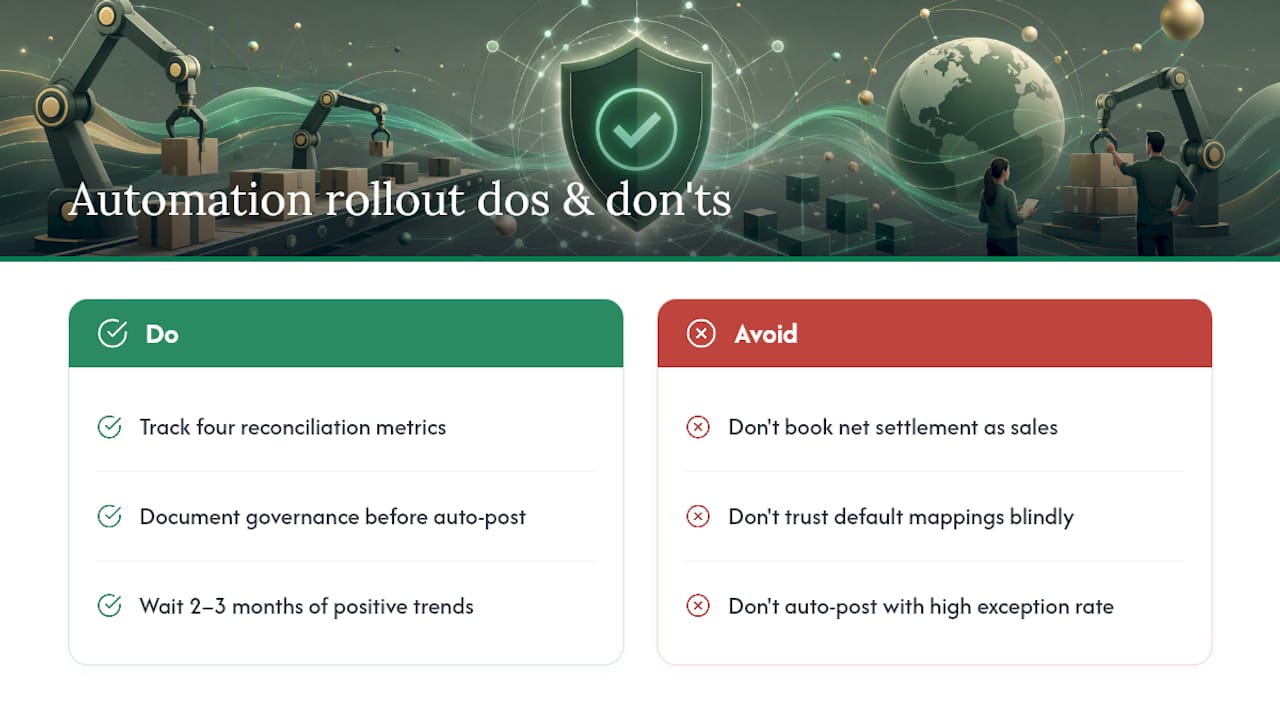
The second failure is trusting default mappings without ever checking them against a real settlement. Software that disaggregates fee categories is only as good as the account rules behind it, and generic defaults rarely fit your specific chart of accounts on the first try.
Switching from review-first to full auto-posting should happen only after your exception rate drops low and stays there across several consecutive cycles, with governance already documented. Track four numbers as you scale: time-to-reconcile, exception rate, reimbursement recovery rate, and month-end close time. When all four trend the right direction for two or three months running, auto-post is safe. Before that, it’s a guess.
, Tim
Recover What Amazon Owes You, Automatically
This platform is built around the model described here: continuous monitoring of inbound shipments and FBA ledger events, automated detection of reimbursement-eligible losses, and settlement parsing that posts accrual-dated journal entries into accounting software.

Instead of hiring someone to manually dig through settlement files before the 60-day window closes, sellers get ongoing recovery running in the background, with consolidated handling across every sales channel and no hidden commissions cutting into what gets recovered. That matters most for sellers juggling Amazon alongside Shopify or Walmart, where mixed deposits make manual reconciliation genuinely painful. If you’re unsure whether reimbursements are slipping through your own settlements right now, start with a look at what Amazon actually owes you for lost or damaged inventory and see where your recovery gap sits before another claim window closes.
Sources
FAQ
What Is Ecommerce Journal Automation?
It’s software that reads settlement and ledger data line by line, then posts accurate, accrual-dated journal entries to accounting platforms like QuickBooks or Xero, instead of recording one lump deposit as generic revenue.
Why Do FBA Reimbursements Get Missed So Often?
Amazon bundles reimbursements into the same settlement deposit as sales, fees, and refunds, so unless someone reads the settlement file at the line-item level, the reimbursement never shows up as a separate transaction.
How Long Do I Have To Claim an FBA Reimbursement?
Amazon’s claim window is 60 days from the inventory event, which is why continuous monitoring matters more than periodic manual reviews.
Should Reimbursements Be Recorded as Revenue?
No. Reimbursements should offset the original inventory loss through a reimbursement or contra-COGS account rather than post as new sales revenue, which keeps gross margin accurate.
Does BeanHawk Post Directly to QuickBooks and Xero?
Yes. The service automates settlement posting to accounting platforms, mapping fee categories, reimbursements, and inventory adjustments so books stay reconciled without manual entry.