
Busy Sellers: BeanHawk Reimbursement, Free Audit & QuickBooks Posting

For most Amazon FBA sellers, BeanHawk is the best FBA reimbursement service because it pairs continuous, automated detection of lost and damaged inventory with direct posting into QuickBooks and Xero, so recovered funds show up correctly in your books instead of sitting as a mystery deposit. Check the criteria and timeline breakdown below before you commit to any provider.
TL;DR:
- Most sellers leave thousands of dollars unclaimed annually from fee overcharges, inbound shipment mismatches, and customer return discrepancies that Amazon often misses automatically.
- Continuous, automated monitoring like BeanHawk detects claims in real-time, especially for inbound discrepancies, which have shorter filing windows of usually 60 to 90 days.
- Subscription-based reimbursement services typically deliver better value over time for larger sellers recovering tens of thousands annually, compared to percentage-based fees.
- Starting with a free audit helps identify recoverable funds in your reports within minutes, without any commitment, before choosing a service or software solution.
- Manual audits may suffice for small inventories under 50 SKUs, but larger or more complex accounts benefit from automated tools to save time and increase recovery accuracy.
Table of Contents
- What Does an FBA Reimbursement Service Actually Recover?
- What to Look for in an FBA Refund Expert (Priority Checklist)
- Commission vs Subscription: What’s the Real Cost of Recovery?
- How Fast Do You Need to Move on FBA Claims?
- How BeanHawk’s Reimbursement Recovery Actually Works
- Your First 30 Days: A Quick-Start Recovery Checklist
- DIY Auditing or a Managed Service: How to Decide
- Start With a Free Audit Before You Commit to Anything
- Sources
- FAQ
What Does an FBA Reimbursement Service Actually Recover?
An FBA reimbursement service audits your seller account for money Amazon owes you and either files the claims itself or hands you claim-ready packets to submit. The best amazon reimbursement service providers cover six recurring categories, and knowing which ones Amazon tends to catch on its own versus which ones require a human (or software) to notice is the difference between a modest refund and a real recovery.
Amazon’s systems usually self-correct a portion of lost-inventory and destroyed-inventory events within a few weeks. But Amazon does not proactively reconcile every discrepancy, and several claim types almost always require a seller-initiated audit:
- Lost inventory in fulfillment centers, often flagged in Inventory Adjustment reports but rarely reimbursed without a claim.
- Damaged inventory, including warehouse damage that Amazon logs but frequently under-credits.
- Customer-return discrepancies, where a buyer is refunded but the item never comes back to inventory, or comes back damaged and isn’t logged as such.
- Fee overcharges, such as incorrect weight or dimension categorization on fulfillment fees.
- Inbound shipment discrepancies, where units shipped to Amazon never get checked in and simply vanish from the ledger.
- Removal and disposal claims, where Amazon destroys or removes inventory without adequate reimbursement.
Fee overcharges and inbound-shipment mismatches are the categories Amazon’s automated systems typically miss entirely, because they require cross-referencing shipment confirmations against ledger events rather than flagging a single anomalous transaction. Building a claim means pulling Inventory Adjustment reports, FBA ledger event details, and inbound shipment confirmations, then matching them by ASIN, shipment ID, and date range. Miss one report and you miss the pattern.
What to Look for in an FBA Refund Expert (Priority Checklist)
Not every fba reimbursement software tool or service is built the same way, and the differences show up fast once real money is on the line. Work through this list in order, because the earlier items disqualify more vendors than the later ones.
- Coverage breadth. Ask exactly which of the six claim types above the service audits. Some tools only catch lost and damaged inventory and quietly skip fee overcharges and inbound discrepancies, which is where a lot of money hides.
- Pricing clarity. You need to know upfront whether it’s commission-based, subscription-based, or hybrid, and you need to be able to calculate your net recovery, not just the headline number.
- Documentation quality. A provider should hand you (or keep on file) an audit trail for every claim, not just a total dollar figure. If Amazon disputes a claim, you need the underlying report.
- Accounting integration. Manual reconciliation of reimbursement deposits against your books eats hours every month. Automated posting to QuickBooks or Xero removes that entirely.
- Case management and SLAs. Ask how disputes get escalated and how long a typical case takes from filing to payout.
- Data security. Reimbursement tools need read access to sensitive Seller Central data, so confirm how credentials are stored and whether access is scoped or full-account.
Pro Tip: Ask any provider for a sample claim packet before you sign up. If they hesitate to show you documentation for a claim they’ve already won, that’s a signal their audit trail isn’t as strong as their sales page claims.
Fulfillment fee audits run on the same logic: the audit is only as good as the reconciliation process behind it, whether it’s reviewing freight costs or FBA fees.
Commission vs Subscription: What’s the Real Cost of Recovery?
Pricing shapes fall into three buckets, and the math changes considerably depending on how much you recover annually.
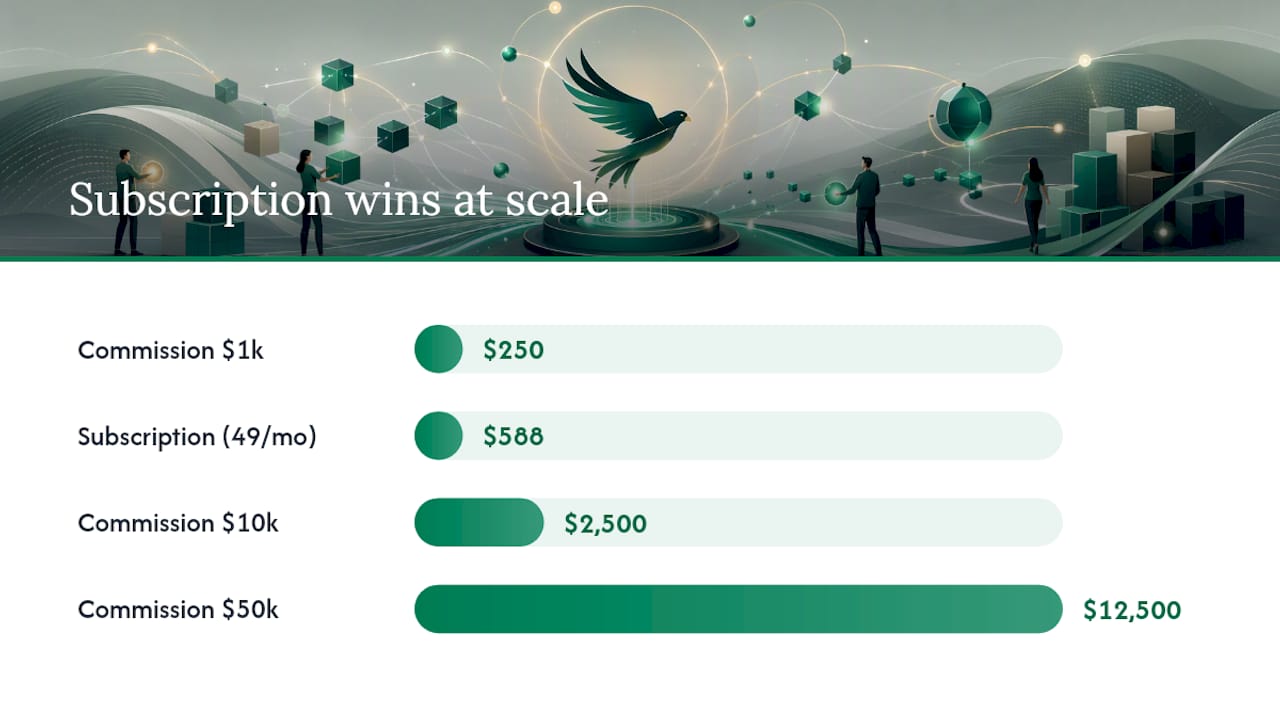
Commission-based services take a cut, typically 20% to 30% or more, of whatever they recover, and you pay nothing if they find nothing. Subscription-based services, including fba reimbursement software like BeanHawk, charge a flat monthly fee tied to your order volume regardless of recovery amount. Hybrid models charge a smaller base fee plus a reduced commission.
Run the numbers on $1,000, $10,000, and $50,000 recovered in a year:
- At $1,000 recovered, a 25% commission costs you $250. A $49/month subscription costs $588 annually, which is worse at this volume.
- At $10,000 recovered, that same 25% commission costs $2,500. The subscription still costs $588, a clear win.
- At $50,000 recovered, commission costs $12,500. The subscription, even scaled to a higher tier for order volume, typically stays well under $2,000 annually.
Sellers recovering meaningful revenue every year come out far ahead on a flat subscription. Estimates commonly cited across the industry put unclaimed FBA errors at 1% to 3% of annual revenue, so a seller doing $500,000 a year could be leaving $5,000 to $15,000 on the table. Watch for hidden costs too: minimum monthly fees on commission plans, re-open fees if Amazon reverses a paid claim, and data-access fees some providers tack on separately from the advertised rate.
How Fast Do You Need to Move on FBA Claims?
Amazon runs on windows, not open-ended grace periods, and those windows have gotten shorter in recent reporting cycles. Miss the deadline and the claim is gone, regardless of how strong your documentation is.
Inbound shipment discrepancies and lost-inventory claims tend to carry the tightest deadlines, often measured in months rather than the year-plus window sellers used to count on. Damaged inventory and return-related claims usually give you a bit more runway, but not enough to justify waiting until year-end to check.
Amazon’s automated reimbursements handle a slice of this, but they run silently in the background. If you’re not auditing separately, you have no way to confirm what Amazon caught versus what it skipped. A simple cadence closes that gap:
- Monthly quick scan. Pull your Inventory Adjustment and reimbursement reports and skim for anomalies. Fifteen minutes.
- Quarterly deep audit. Cross-reference inbound shipment confirmations against FBA inventory reconciliation reports to catch units that never got checked in.
- Immediate flag on inbound receiving discrepancies. These have some of the shortest windows, so treat any inbound mismatch as urgent the moment you spot it.
If your reports show inventory adjustments with no matching reimbursement within 60 to 90 days, that’s your signal to file a manual claim before the window closes.
How BeanHawk’s Reimbursement Recovery Actually Works
BeanHawk runs continuous monitoring on inbound shipments and FBA ledger events rather than a one-time scan, which means claim opportunities surface as they happen instead of getting buried in a quarterly export. That distinction matters most for the inbound-discrepancy category, since matching shipment IDs against reconciliation reports over time is exactly how missing units get caught before the claim window closes.
Once a claim is identified and recovered, BeanHawk posts the settlement directly into QuickBooks or Xero, so the reimbursement lands in the right ledger line automatically instead of showing up as an unexplained deposit your accountant has to chase down later.
BeanHawk publishes its methodology and examples rather than keeping the audit process opaque:
- The 2026 Seller Audit walks through real report types and claim examples.
- Blog guides cover specific claim categories, like damaged inventory reimbursements, in detail.
- A free FBA fee and profit calculator helps sellers model where fee overcharges are likely hiding.
Pro Tip: If your business already reconciles well in QuickBooks or Xero, automated settlement posting is where you’ll feel the biggest time savings, not just in the dollars recovered but in the hours your bookkeeper stops spending on unexplained deposits.
BeanHawk works best for sellers with enough order volume and SKU complexity that manual auditing has become a real time cost. A seller moving a handful of SKUs a month may not see the same return on a subscription tool as someone running hundreds of SKUs across multiple channels.
Your First 30 Days: A Quick-Start Recovery Checklist
You don’t need a provider to start. You need the right reports and forty-five focused minutes.
- Pull your core reports. Inventory Adjustment, FBA reimbursements, and inbound shipment confirmation reports from Seller Central, or run a free audit through a monitoring tool.
- Rank by dollar value and deadline. Sort discrepancies by recovery amount first, then flag anything nearing its claim window.
- Build the claim packet. Match each discrepancy to its supporting report, then file the manual claim yourself or submit it through your provider.
- Reconcile and set prevention controls. Once funds land, post them to the correct ledger account and flag the SKU or shipment pattern so you catch repeats faster next time.
DIY Auditing or a Managed Service: How to Decide
The honest trigger point isn’t revenue alone, it’s SKU count and how much time your bookkeeping already takes. A seller under roughly 50 SKUs with simple accounting can often run a quarterly audit manually and come out ahead. Past that, the hours spent cross-referencing reports start costing more than a subscription would.
The real trade-off is time and accuracy against cost and control. Manual audits are free but easy to get wrong or skip entirely during a busy quarter. Managed, automated monitoring costs a flat fee but catches ledger events the day they happen instead of the day you remember to check. Once your accounting runs through QuickBooks or Xero and your SKU count climbs into the hundreds, automation usually pays for itself within the first recovered claim.
, Tim
Start With a Free Audit Before You Commit to Anything
BeanHawk is the practical next step for sellers who’ve read this far and realized their reports probably have money hiding in them right now. The free audit scans your Inventory Adjustment, ledger, and inbound shipment data to show you what’s likely recoverable, with no commitment required to see the results.

After the audit, some providers run on a flat subscription tied to order volume rather than taking a cut of recovered funds, offering predictable cost and automated posting features, without commission-based fees cutting into reimbursements. Run the free audit and see what your reports have been sitting on.
Sources
- Marketplace Pulse: 100,000+ million-dollar Amazon sellers
- SPS Commerce: Amazon Reimbursement Services guide
- eFulfillmentService: Amazon 2026 FBA fee changes
FAQ
Is FBA still profitable in 2026?
FBA remains profitable for most active sellers, though rising fulfillment fees make recovering unclaimed reimbursements a bigger factor in net margin than it used to be.
How many Amazon sellers make over $100,000 a year?
Exact figures vary by year, but Marketplace Pulse research shows a growing concentration of sellers exceeding $1 million in annual sales, which means the six-figure seller tier has become common rather than exceptional.
What is an Amazon seller reimbursement service?
It’s a tool or service that audits your Seller Central account for lost, damaged, or overcharged inventory and fee errors, then files claims or automates the recovery process. BeanHawk does this through continuous ledger monitoring paired with automated posting into your accounting software.
What are the biggest FBA mistakes sellers make with reimbursements?
The most common mistakes are treating Amazon’s automated reimbursements as complete, never cross-checking inbound shipment confirmations, and missing short claim windows because audits only happen once a year instead of monthly.
How do I know if a reimbursement service is worth the cost?
Compare the provider’s fee structure against your actual annual recovery using the commission-versus-subscription math above, and confirm it covers fee overcharges and inbound discrepancies, not just lost and damaged inventory.